
What is the Integrations Screen? #
Integrations lists the plugins Pointics can earn from or be extended by, and lets you install, activate, or deactivate them without leaving Pointics.
About Us shares the same catalogue. It introduces Arraytics, links to the plugin list, and promotes the affiliate program and the Timetics SaaS product.
Why Do You Need It? #
- Pointics is only as useful as the events it can hear: Activating WooCommerce or WPCafe unlocks new earning triggers.
- One-click installs: No need to search the plugin directory in another tab.
- A curated list: Only plugins that work with Pointics appear.
Prerequisites #
- An Administrator account to view either screen.
- Permission to install plugins if you want to install a plugin.
- Permission to activate plugins if you want to activate or deactivate a plugin.
- An internet connection.
No setup is required. The catalogue ships with Pointics.
Where to Find It #
| Screen | Menu | Direct URL |
|---|---|---|
| Integrations | Pointics → Integrations | #/integrations |
| About Us | Pointics → About Us | #/about-us |
Step-by-Step Instructions #
Step 1: Open the Integrations Screen #
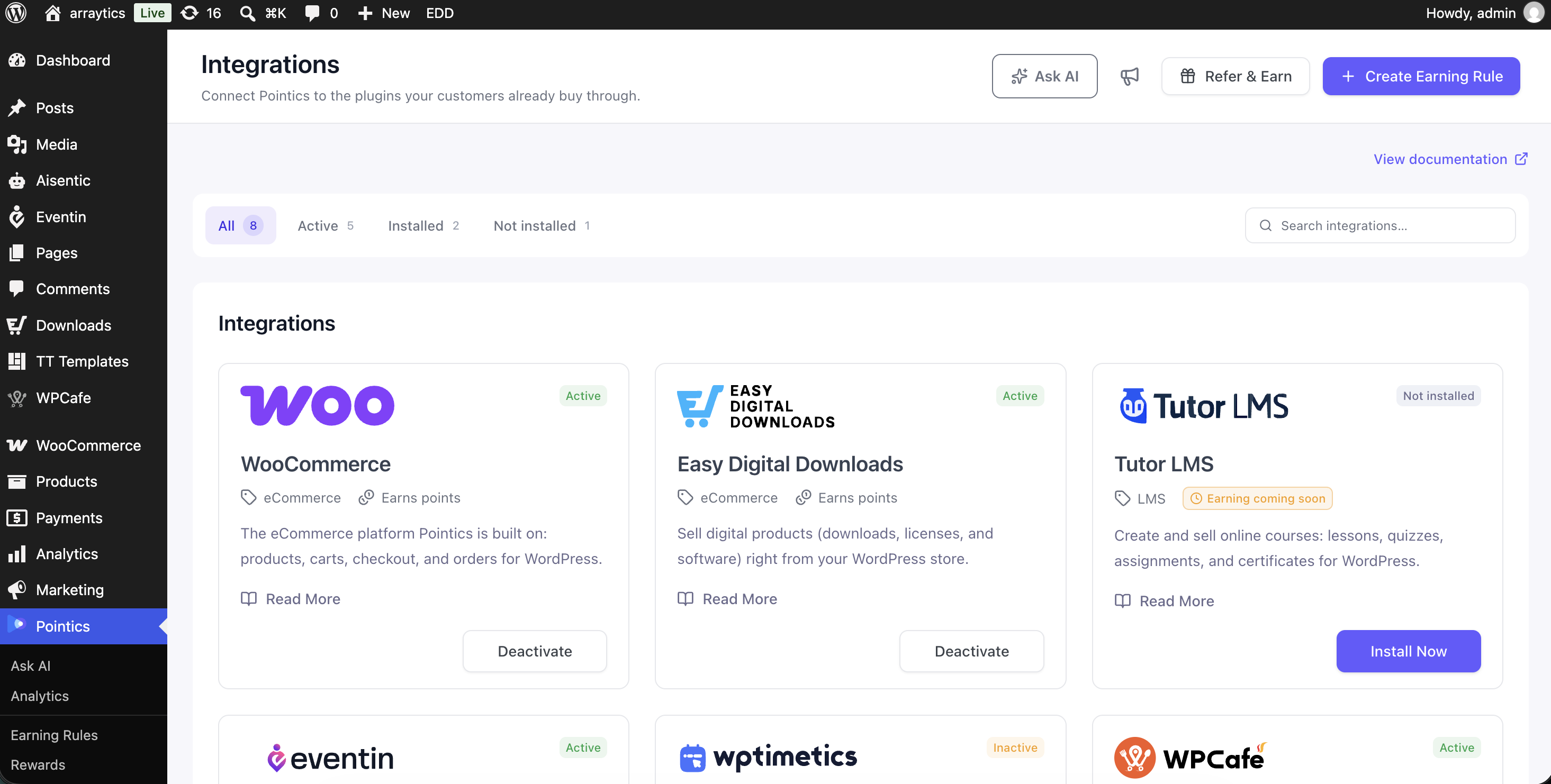
Go to Pointics → Integrations. The grid is split across two shelves:
| Shelf | Contains |
|---|---|
| Integrations | Plugins Pointics earns from |
| Addons | Plugins that extend Pointics itself |
A shelf with nothing on it is hidden, so Addons only appears once you have something in it.
Step 2: Narrow the List #
A chip row lets you filter the catalogue by plugin status.
| Chip | Meaning |
|---|---|
| All | Everything in the catalogue |
| Active | Installed and running |
| Installed | Installed but deactivated |
| Not installed | Available to install |
The search box matches the plugin title, description, and category.
Step 3: Act on a Card #
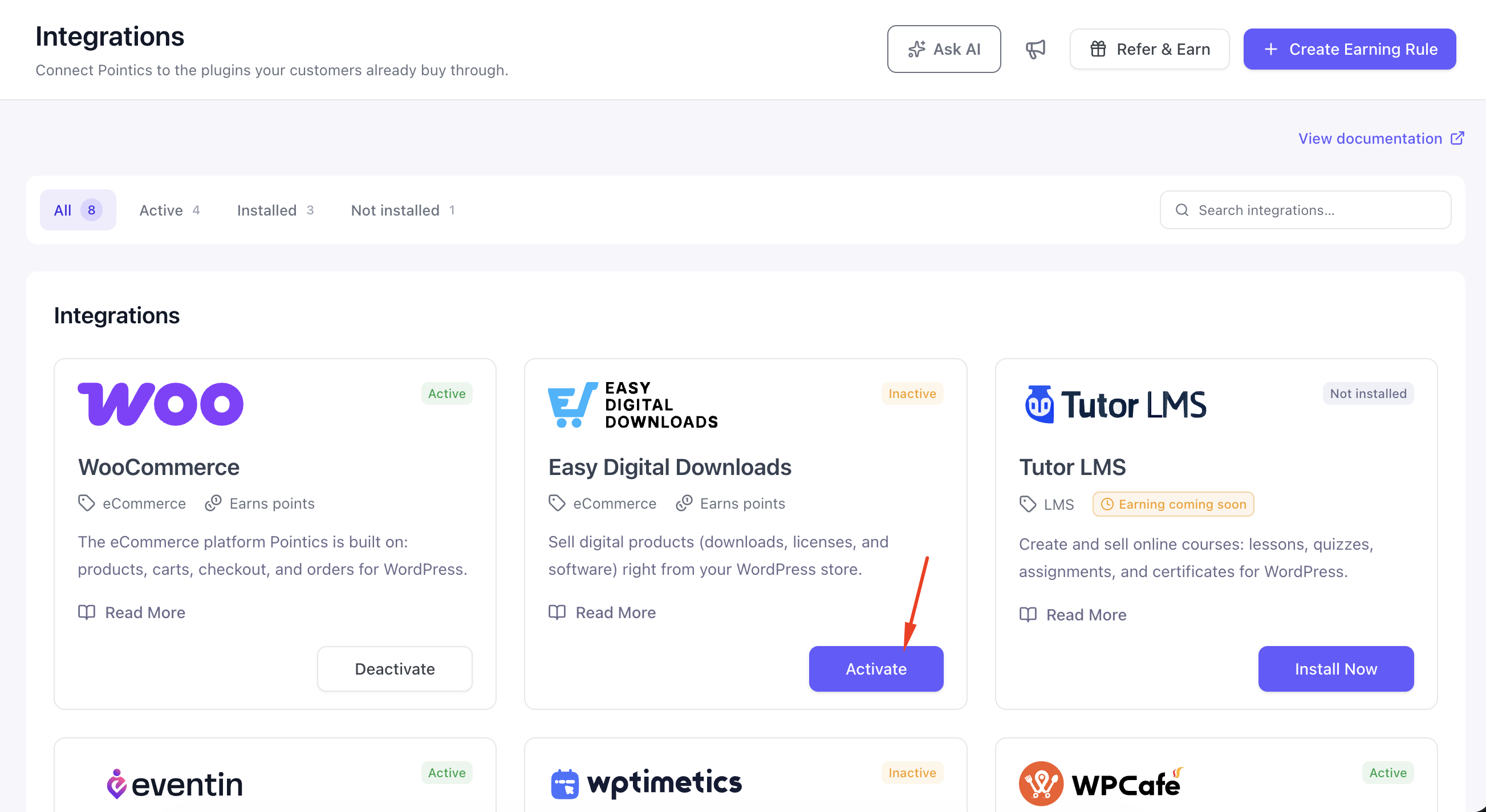
Each plugin card provides one action based on its current status.
| Card Shows | Button Does | Permission Needed |
|---|---|---|
| Not installed | Downloads and installs | Install plugins |
| Installed | Activates | Activate plugins |
| Active | Deactivates | Activate plugins |
While one plugin action is running, every other card is disabled. Pointics allows only one plugin operation at a time.
Step 4: Add Earning Rules #
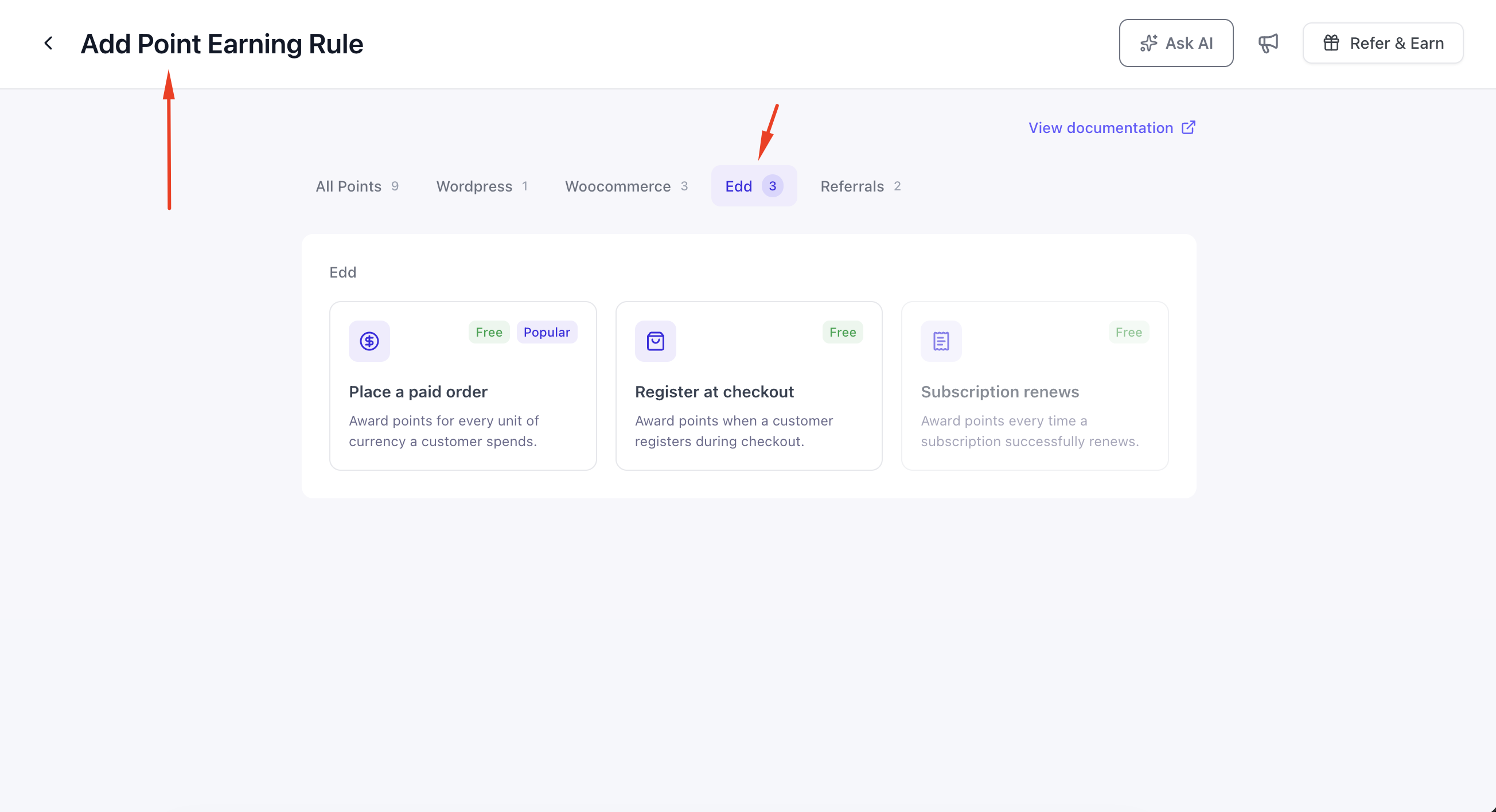
Activating a plugin does not automatically create earning rules. Once its triggers become available, go to Points Program and create the earning rules you want.
For example: If EDD plugin is activated you will find the relevant EDD earning rules enabled
Step 5: Explore About Us #

| Section | Content |
|---|---|
| About Our Company | Arraytics — founded 2013; around 70,000 customers across 120+ countries; 30+ experts; 12+ years; Level 12 Envato author |
| Our Plugins | The same catalogue, with install and activate actions |
| Our SaaS | Timetics AI — AI-Powered Scheduling, with Get Started Free and Learn more |
| Refer & Earn | 30% Commission affiliate program, with Join Affiliate Program |
Key Functionality #
The Catalogue #
| Plugin | Category | Ours? | Earns Points Today |
|---|---|---|---|
| WooCommerce | eCommerce | No | Yes |
| WPCafe | Restaurants & Food | Yes | Yes |
| Eventin | Events & Ticketing | Yes | Not yet |
| Timetics | Booking & Scheduling | Yes | Not yet |
| Booktics | Booking & Scheduling | Yes | Not yet |
| Aisentic | AI & Automation | Yes | Not yet — powers the AI assistant |
| Optiontics | WooCommerce | Yes | Not yet |
Earns Points Today means the plugin currently supplies earning triggers to Pointics. The other plugins are listed as forthcoming integrations.
Most entries install from WordPress.org. Optiontics installs from the Arraytics release server instead.
What an Integration Adds #
An integration can supply Pointics with earning triggers, which are events that award points, and redemption methods, which determine how points turn into value.
WooCommerce supplies the most functionality: order, review and registration triggers, coupon redemption, order-count data on the Customers screen, and every customer-facing badge on your storefront.
How an Install Works #
When you install, activate, or deactivate an integration, Pointics follows this process:
- Open Integrations and load the catalogue with the current plugin statuses.
- If Pointics cannot determine the statuses, it shows “Could not determine plugin statuses.”
- Filter the catalogue using a status chip or search.
- Press the action button on a plugin card.
- Pointics checks whether your account has permission to perform the action.
- If permission is missing, it shows “You are not allowed to manage plugins on this site.”
- If permission is available, Pointics installs, activates, or deactivates the plugin.
- An unknown catalogue entry is rejected with “Unknown plugin.”
- If the operation fails, Pointics shows “The plugin action could not be completed.”
- When the operation succeeds, the card updates to its new status.
- If the integration provides earning triggers, they become available in the Points Program trigger picker.
Validation Rules #
- Only three plugin actions are accepted: install, activate, and deactivate.
- Your permissions are checked at the moment you perform an action, so hosting restrictions on plugin installation are respected.
- Pointics never advertises itself in its own integration catalogue.
Limitations #
- Only one plugin action can run at a time. All other cards are disabled while an operation is running.
- Installing plugins requires file write access. Some hosts disable plugin installation entirely, and on multisite only network administrators can install plugins.
- The catalogue is curated. It is not the complete WordPress plugin directory, so arbitrary plugins cannot be installed from this screen.
- Most catalogue entries do not provide earning triggers yet.
- There is no uninstall or delete action. Pointics only provides install, activate, and deactivate actions.
- Activating a plugin does not automatically create earning rules.
- The About Us statistics are marketing copy rather than live figures from your WordPress site.
- The affiliate and SaaS links take you outside WordPress.
Troubleshooting #
| Problem | Solution |
|---|---|
| “Could not determine plugin statuses.” | Your Pointics installation may be incomplete. Reinstall the plugin. |
| “You are not allowed to manage plugins on this site.” | Your account does not have permission to install or activate plugins. |
| “Unknown plugin.” | The plugin is not included in the Pointics catalogue. |
| “The plugin action could not be completed.” | Check file permissions, whether your host blocks plugin installations, and whether WordPress.org is reachable. |
| A card’s button does nothing | Another plugin action may still be running. Wait for it to finish. |
| Plugin activated but no new earning triggers | Not every catalogue entry supplies earning triggers yet. Check the catalogue table above. |
| Addons shelf missing | You have no add-ons installed. |
| Optiontics install fails | Optiontics installs from the Arraytics release server instead of WordPress.org. Check your site’s outbound connection. |
Notes #
- The same installation system is used by the AI assistant when it offers to install Aisentic for you.
- Deactivating an integration does not delete points customers have already earned through it. Its earning rules simply stop firing.


