
What are Rewards? #
Rewards are what customers spend their points on. Each reward combines a point cost, a reward value, and a redemption method. The redemption method turns points into something practical, such as a checkout discount, a coupon, or a free product.
Rewards are the opposite side of earning rules. Earning rules give customers points, while rewards remove points when customers redeem them.
Why Do You Need It? #
- Points with nowhere to go are worthless: The reward catalogue is what makes the loyalty program feel valuable.
- It controls the cost of the program: The relationship between point cost and currency value is defined here.
- It encourages return visits: A reward that a customer is saving toward gives them a reason to come back.
Prerequisites #
- An Administrator account to manage rewards.
- The Rewards feature must be enabled.
- WooCommerce, because every built-in redemption method works at WooCommerce checkout.
- Pointics Pro to use the three Pro-only redemption methods.
Customers only need to be logged in to redeem rewards. Anyone, including logged-out visitors, can browse the reward catalogue.
Where to Find It #
Go to Pointics → Rewards.
/wp-admin/admin.php?page=pointics#/rewardsStep-by-Step Instructions #
Step 1: Open the Rewards Screen #
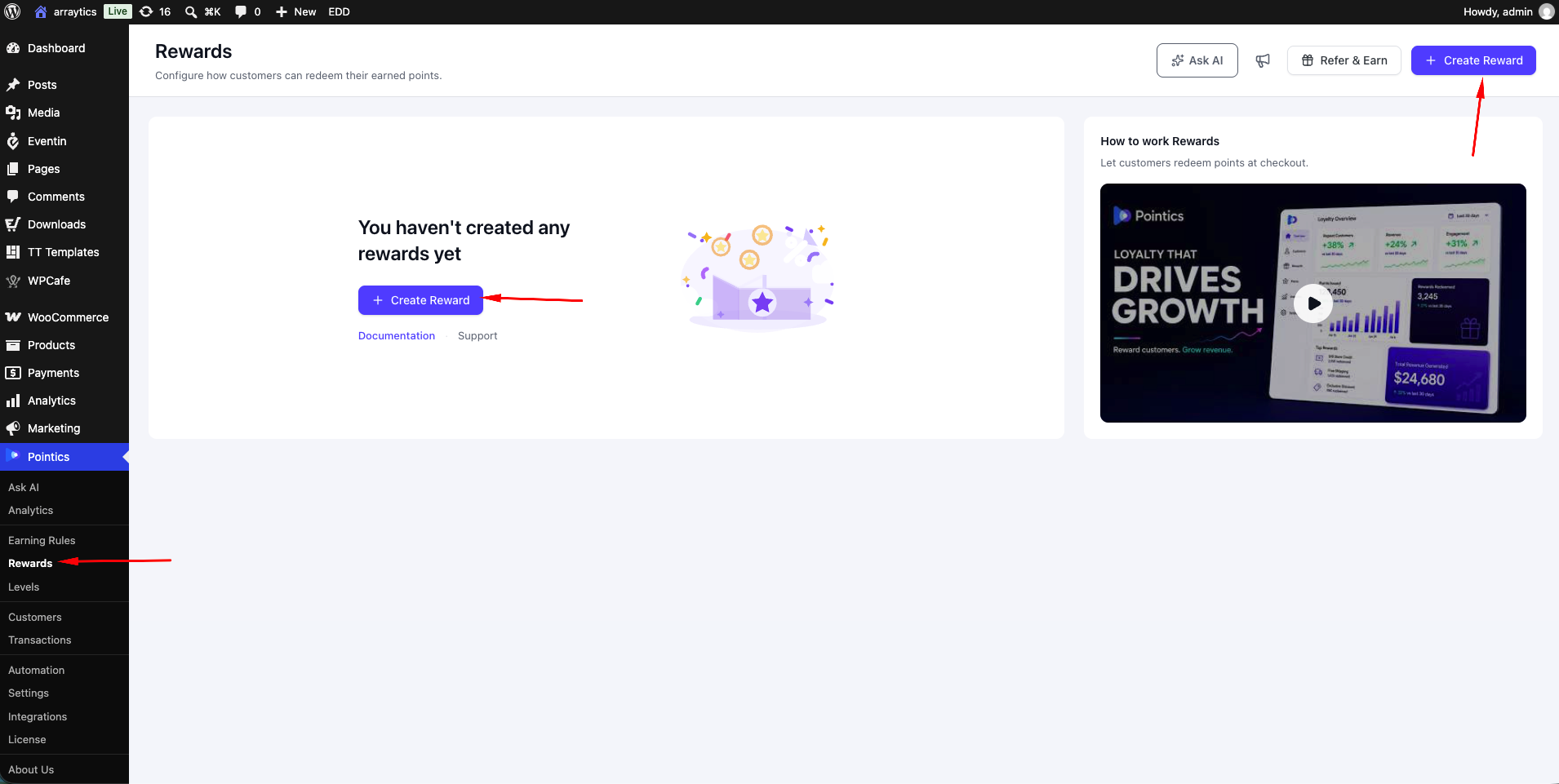
Go to Pointics → Rewards and click Create Reward. The Add Rewards Rule picker will open.
Step 2: Pick a Redemption Method #
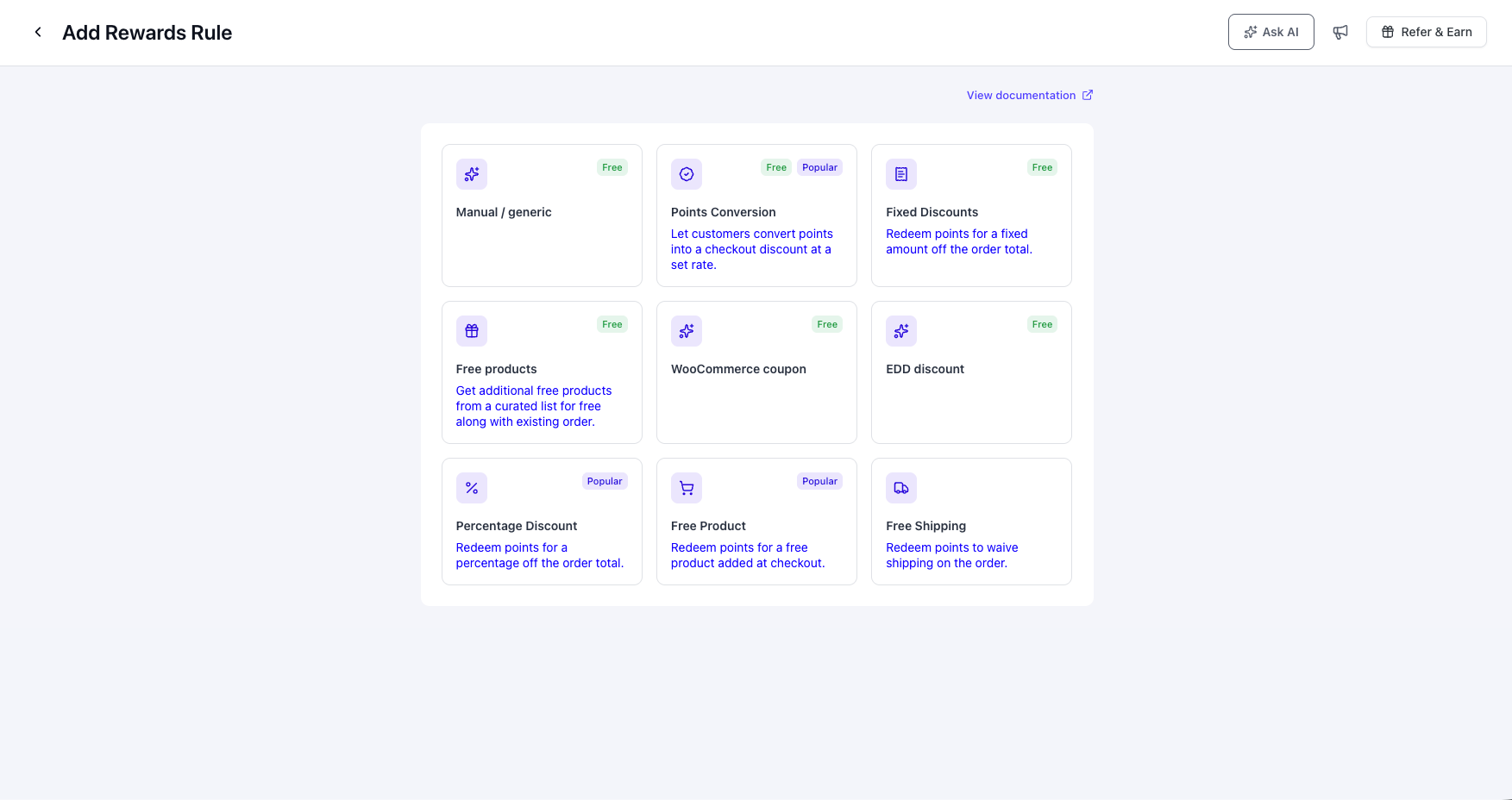
| Method | What It Does | Suggested Cost | Suggested Value | Pro? | Popular? |
|---|---|---|---|---|---|
| Points Conversion | Converts points into a checkout discount at a configured rate. | 1500 | 30 | No | Yes |
| Fixed Discounts | Applies a fixed amount discount to the order total. | 1500 | 30 | No | No |
| Percentage Discount | Applies a percentage discount to the order total. | 1500 | 10 | Yes | Yes |
| Bundle Reward | Provides a curated bundle of products. | 1500 | 30 | No | No |
| Free Product | Adds a free product during checkout. | 1500 | 30 | Yes | Yes |
| Free Shipping | Removes the shipping charge from the order. | 1500 | 10 | Yes | No |
| Manual / Generic | Provides no automatic fulfilment. You complete the reward manually. | 0 | 0 | No | No |
| WooCommerce Coupon | Creates a real WooCommerce coupon. | Not set | Not set | No | No |
The WooCommerce coupon method is available only when WooCommerce is active. Pro-only methods display a Pro badge, while popular methods are marked separately.
Step 3: Fill In the Reward Details #
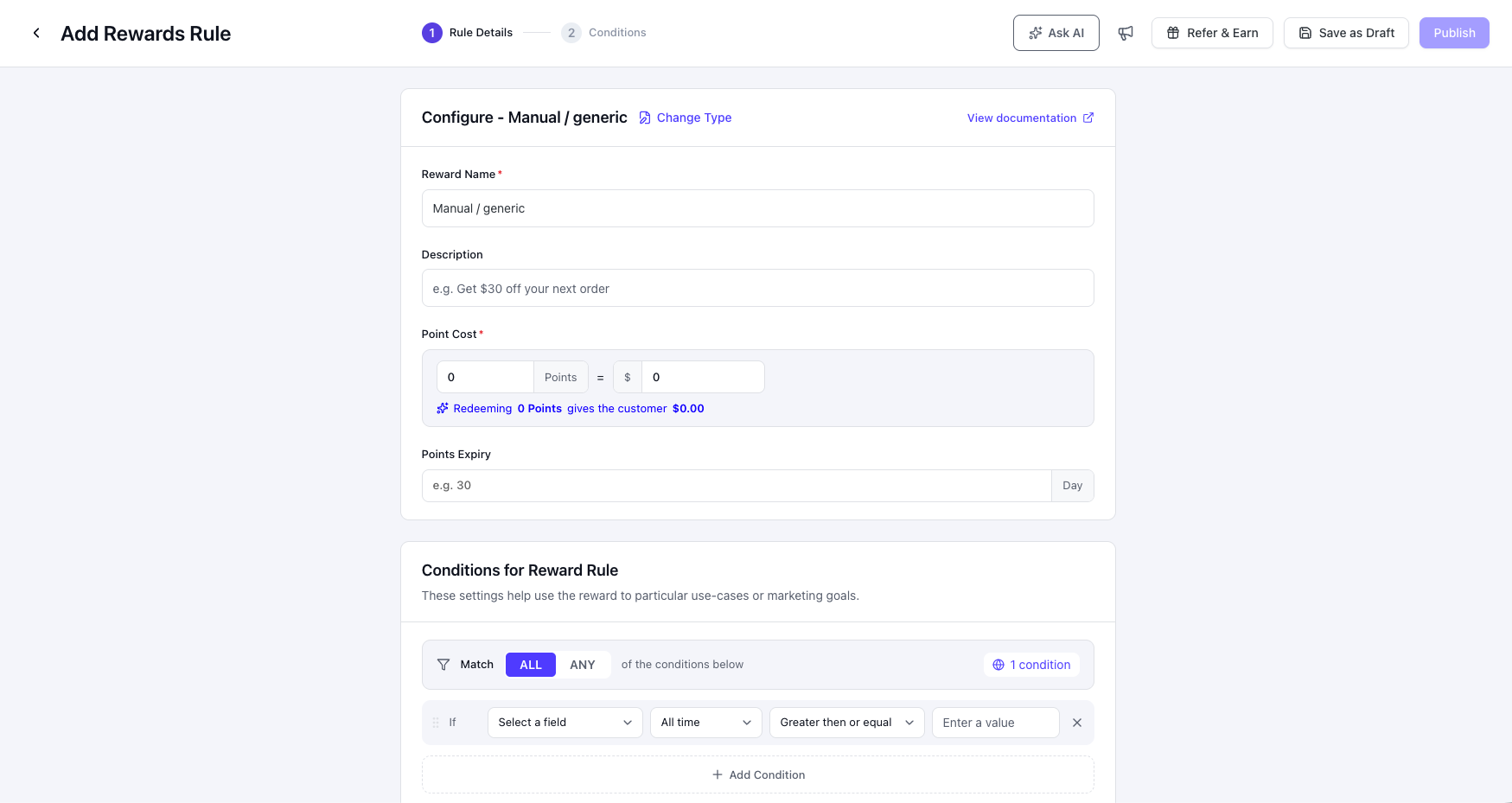
The reward editor opens with two sections in the left rail: Rule Details and Conditions.
| Field | Notes |
|---|---|
| Reward Name | Required. |
| Description | Optional supporting text. |
| Allow Sharing | Controls whether the reward can be shared. |
| Points Expiry | The number of days the issued reward remains valid. |
| Point Cost | Required. Defines how many points the customer must spend. |
| Reward Value | The currency value provided by the reward. |
Step 4: Configure the Coupon Options #
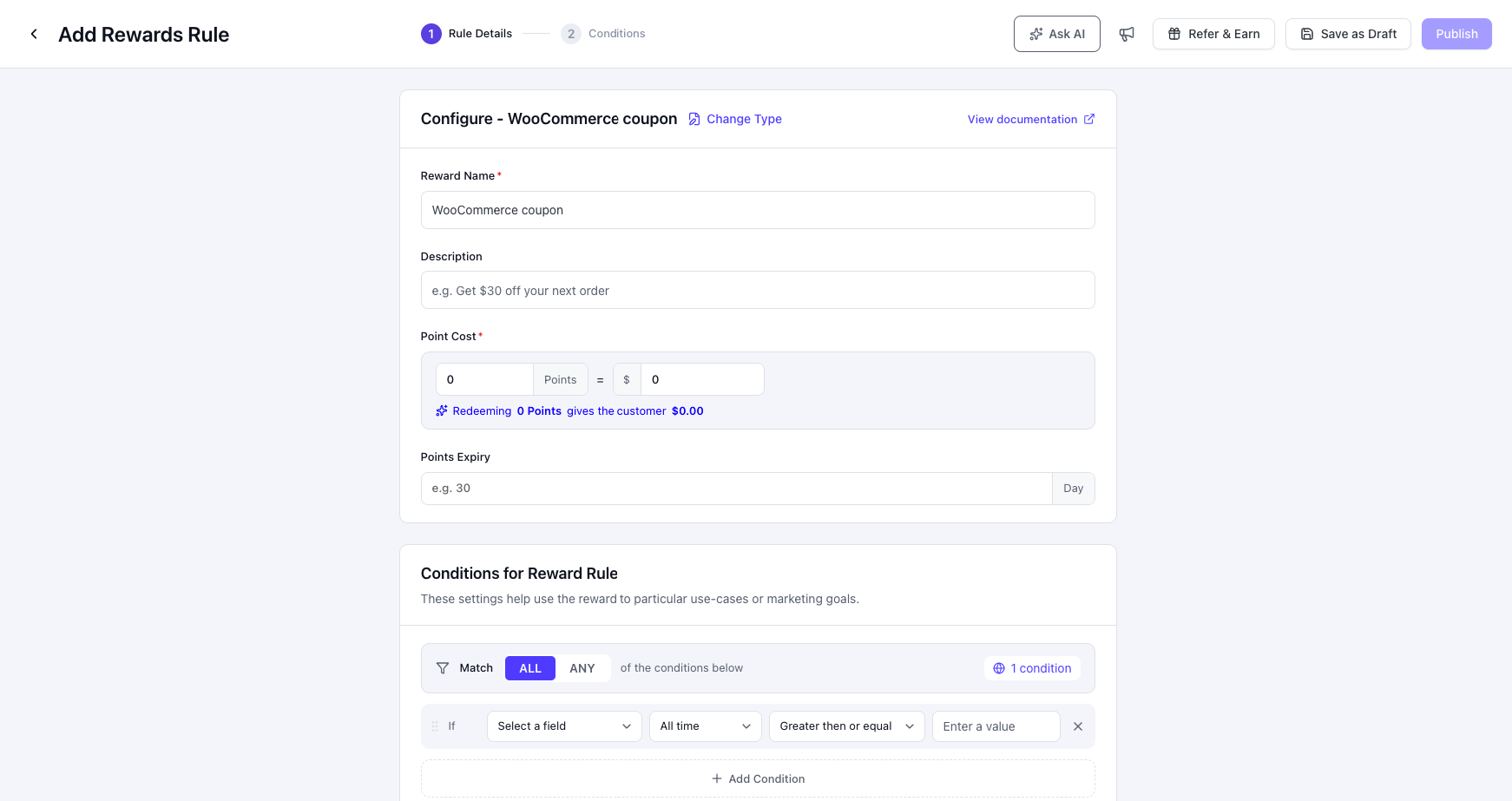
These settings are available when you select the WooCommerce coupon redemption method.
| Option | Description | Default |
|---|---|---|
| Discount Type | Choose a fixed cart discount or a percentage discount. | Fixed cart amount |
| Expiry Days | The number of days until the coupon expires and the held points are returned. Zero means the coupon never expires. | Plugin default |
| Code Prefix | The prefix used for generated coupon codes. | pts |
| Minimum Spend | An optional minimum cart subtotal. | Not set |
| Individual Use | Prevents the coupon from being combined with other coupons. | On |
Step 5: Save the Reward #
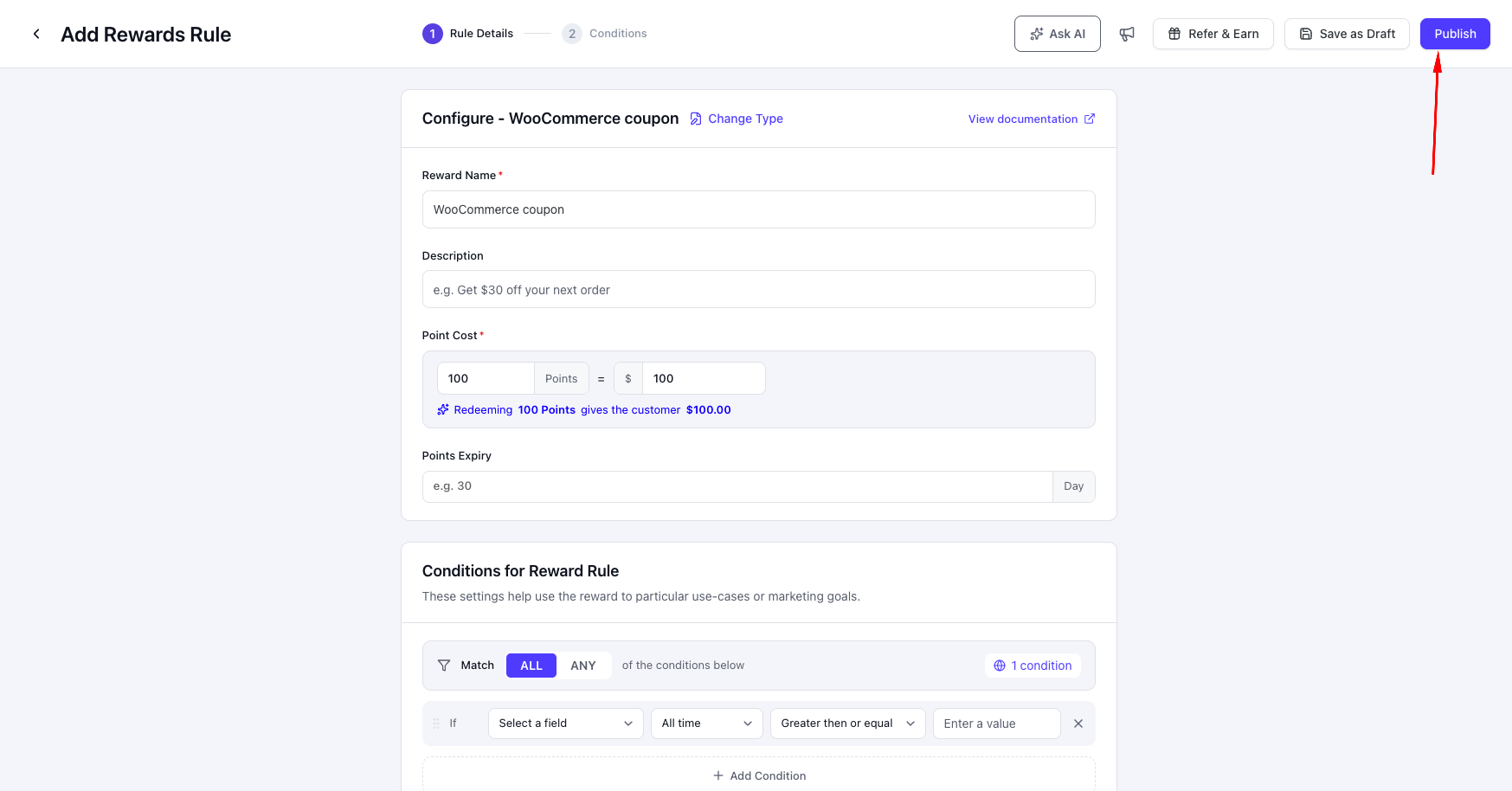
- Save Draft: Saves the reward as inactive.
- Publish: Saves and activates the reward.
Step 6: Manage Your Rewards #
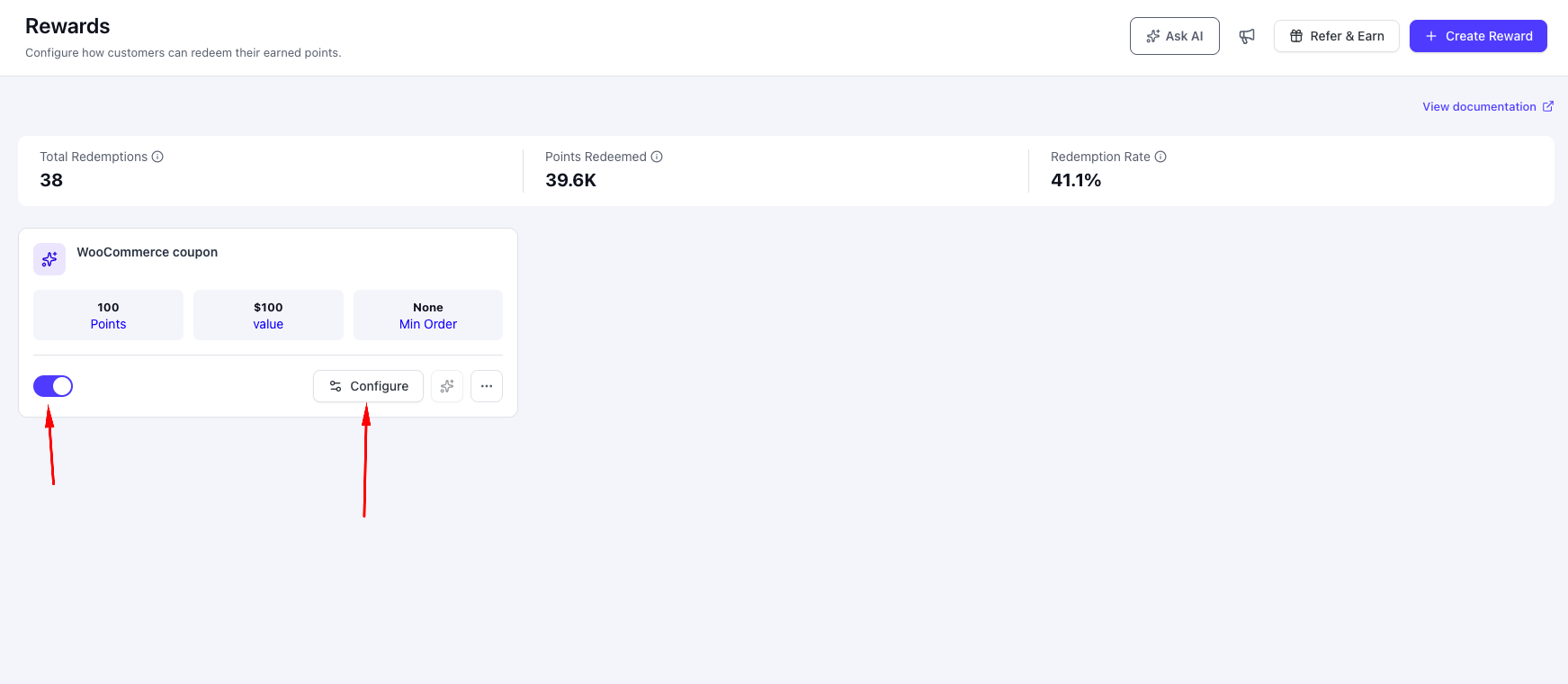
- Edit: Click Configure on a reward card.
- Delete: Open the card menu and choose the delete option. Deleting deactivates the reward instead of permanently removing it.
Delete this reward? {name} will stop being redeemable. Points customers already spent on it are kept.
Step 7: Watch a Redemption Happen #
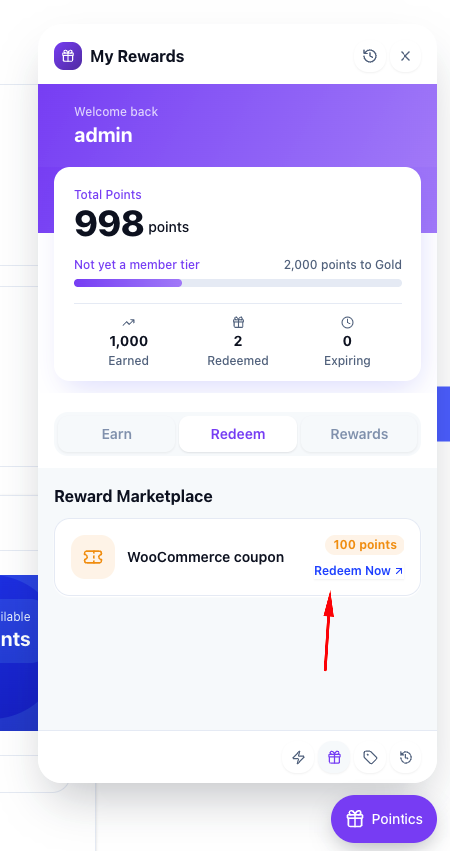
A customer can redeem a reward from the customer panel or floating widget. The redemption process works as follows:
- The customer clicks Redeem.
- The required points are held instead of being spent immediately.
- The selected redemption method creates the reward value, such as a WooCommerce coupon or checkout discount.
- When the related order is paid, the hold is settled and the points are permanently spent.
- If the customer cancels the redemption, the hold is released and the points return to the balance.
- If the coupon expires unused, the hold is automatically released and the points return.
Key Functionality #
How a Reward’s Cost Is Calculated #
| Model | Options |
|---|---|
| Fixed Value | A set number of points for a set reward value. |
| Points-to-Currency Ratio | A value for each point, with optional minimum and maximum points per redemption. |
Reward Fields #
| Field | Required | Default |
|---|---|---|
| Name | Yes | Not set |
| Redemption Method | No | None selected |
| Point Cost | No | Not set |
| Value | No | 0 |
| Currency | No | Site default |
| Conditions | No | None |
| User Roles | No | All roles |
| Description | No | Empty |
| Active | No | On |
| Sort Order | No | 0 |
How a Redemption Settles #
A reward moves through the following process from creation to final settlement:
- Open the Rewards screen.
- Click Create Reward.
- Select a redemption method.
- Configure the reward in the editor.
- Choose Save Draft to keep the reward inactive, or choose Publish to activate it.
- The active reward appears in the customer reward catalogue.
- The customer clicks Redeem.
- Pointics checks whether the customer has enough points.
- If the customer does not have enough points, the redemption is refused.
- If the customer has enough points, the required points are placed on hold.
- Pointics creates the coupon, discount, free product, or other reward value.
- If the related order is paid, the hold is settled and the points are permanently spent.
- If the customer cancels, the hold is released and the points are returned.
- If the coupon expires unused, the hold is automatically released and the points are returned.
Validation Rules #
Creating a Reward #
- Name and a Redemption Method are required.
- The selected redemption method must be supported by your site. Pro-only methods cannot be used on the free version.
- The reward’s integration is assigned automatically based on the selected redemption method.
- The reward slug is generated automatically from the reward name. If another reward already uses the same slug, Pointics appends a unique number. Deleted rewards keep their original slugs, so reusing the same name results in a new unique slug.
Editing a Reward #
- Only the fields you modify are updated.
- You cannot change the redemption method while customers still have active redemption holds.
- Each reward slug must remain unique.
This reward has open redemptions; finalize or cancel them before changing its redeem method.
That slug is already in use by another reward.
When a Customer Redeems a Reward #
- Only one redemption can be processed at a time for each customer.
- The customer must have enough available points to redeem the reward.
Another redemption is already in progress.
Not enough points for this reward.
Editor Validation #
- Save Draft requires only a reward name.
- Publish requires a reward name and a complete redemption configuration.
- A reward is considered configured only when both the point cost and reward value are greater than zero.
- Empty condition rows are ignored. If no conditions are configured, the reward is available without restrictions.
Limitations #
- The Reward editor currently supports only fixed-value rewards. A points-to-currency ratio cannot be configured from the interface.
- Minimum Order currently displays None and is not yet supported.
- Restricting rewards to a specific loyalty level is not currently available.
- The Uses count shown on reward cards always displays 0. Use the Analytics or Transactions screen for actual redemption data.
- Percentage Discount, Free Product, and Free Shipping require Pointics Pro.
- Inactive rewards serve as drafts. There is no separate draft status.
- Coupons generated by Pointics are hidden from the WooCommerce coupon list, and their labels are masked in the shopping cart.
Troubleshooting #
| Problem | Solution |
|---|---|
| “Reward not found.” | The reward has been deleted or the link is outdated. |
| “Field ‘name’ is required.” | Enter a reward name before saving. |
| “Unknown redeem_type…” | The selected redemption type is unavailable on your installation, usually because it requires Pointics Pro or a third-party integration. |
| “Unknown redeem_method…” | The required integration is inactive. Activate WooCommerce or the appropriate integration. |
| “This reward has open redemptions; finalize or cancel them before changing its redeem method.” | Wait until all pending redemption holds have been completed or cancelled before changing the redemption method. |
| “That slug is already in use by another reward.” | Choose a different slug. Deleted rewards retain their original slugs. |
| “The reward could not be saved.” | Check for database or hosting issues and contact your hosting provider or support team if necessary. |
| “Not enough points for this reward.” | The customer’s available balance is lower than the required point cost. |
| “Another redemption is already in progress.” | Wait until the current redemption finishes, then try again. |
| “This redemption has already been finalized.” | The redemption has already been completed or cancelled and cannot be processed again. |
| “This reward is not available for your account.” | The customer’s role or configured conditions prevent redemption. |
| “The reward could not be applied to the cart.” | WooCommerce coupon restrictions such as minimum spend or individual-use rules prevented the reward from being applied. |
| Points did not return after a coupon expired. | Automatic point releases rely on WordPress scheduled tasks. Verify that WP-Cron is running correctly. |
| Reward card shows “Not configured”. | The reward’s point cost or reward value is still zero. |
| Rewards menu is missing. | The Rewards feature has been disabled. |
Notes #
- A redemption hold is settled as soon as the related order is paid, regardless of the payment method, including Cash on Delivery and Bank Transfer.
- Points placed on hold cannot be used for another redemption, preventing customers from spending the same points more than once.


