
What are Levels? #
Levels are membership bands that customers progress through by earning points. Each level includes a name, badge, point threshold, and, with Pointics Pro, benefits such as a points multiplier.
A customer’s level is determined by their qualifying points: all points earned within a rolling period, which is 12 months by default. This is intentionally separate from the customer’s current point balance, so spending points on rewards does not reduce their VIP status.
Why Do You Need It? #
- Turns transactions into status: Levels give your most valuable customers something to maintain and give other customers something to work toward.
- Concentrates generosity: Benefits allow you to reward the customers who already engage and spend the most.
- Spending never causes demotion: Levels are based on qualifying points earned, not the customer’s current balance, so redeeming a reward does not reduce their status.
Prerequisites #
- An Administrator account to manage levels.
- The Levels feature must be enabled.
- Pointics Pro to create additional levels and configure benefits.
- WordPress scheduled tasks must be running because level demotions are processed during a daily check.
Any logged-in customer can view their own level.
Where to Find It #
Go to Pointics → Levels.
/wp-admin/admin.php?page=pointics#/levelsFree vs Pro #
The free version of Pointics supports exactly one level. A disabled Starter level is created automatically, and the Setup Wizard can configure and activate it.
| Capability | Free | Pro |
|---|---|---|
| Edit the existing level | Yes | Yes |
| Create additional levels | No | Yes |
| Delete a level | Only when it is not the final remaining level | Yes |
| Configure benefits | Visible but locked | Yes |
Step-by-Step Instructions #
Step 1: Open or Create a Level #
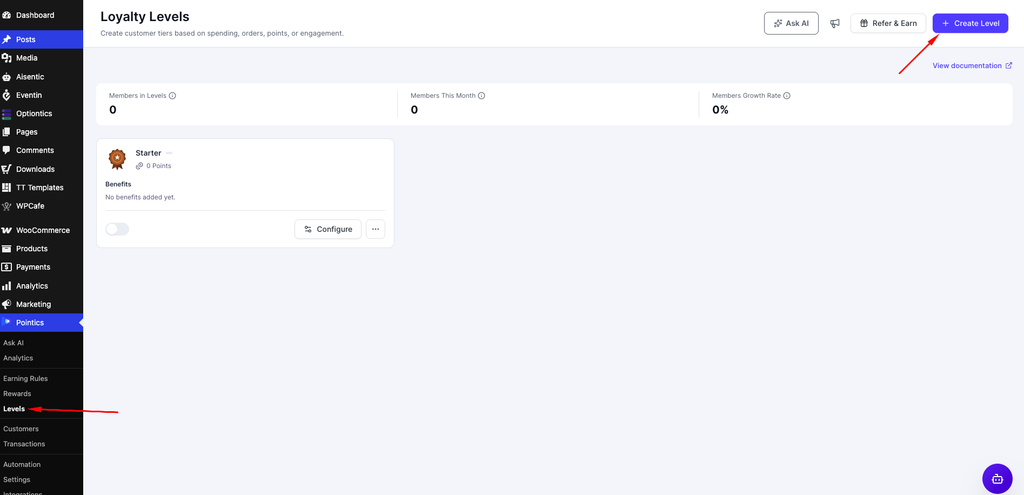
Click Create Level if Pointics Pro is active, or open the existing level to edit it.
Step 2: Configure the Level #
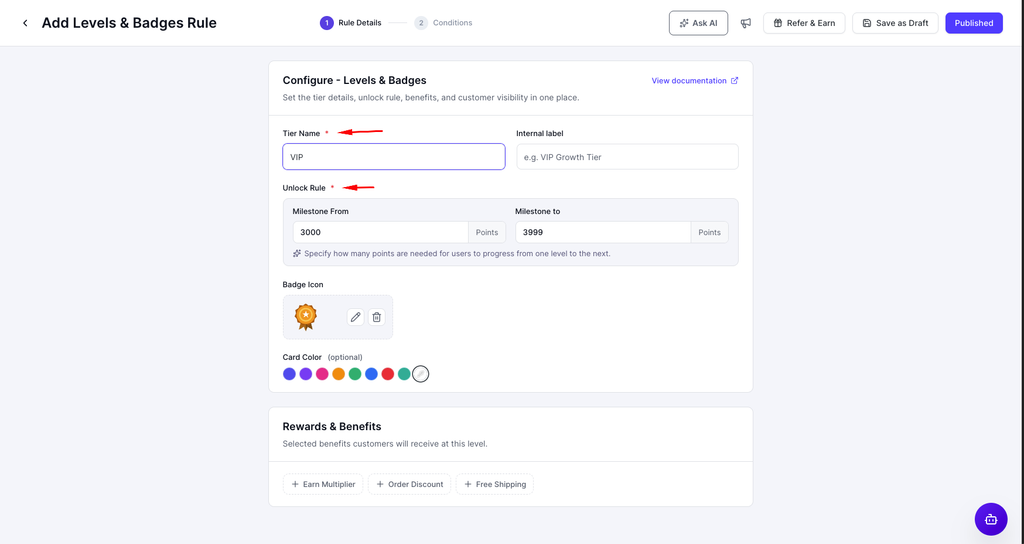
The level editor contains two sections in the left rail. Complete the fields under Configure – Levels & Badges.
| Field | Description | Default |
|---|---|---|
| Name | The customer-facing level name. | Not set |
| Badge | The address of the badge image. | Gold |
| Icon | The icon displayed with the badge. | Matches the selected badge |
| Internal Label | A private label used to identify the level internally. | Not set |
| Description | Optional supporting text for the level. | Empty |
| Milestone From | The number of qualifying points required to enter the level. | 3000 |
| Milestone To | An optional upper qualifying-point limit. | 3999 |
| Sort Order | Controls where the level appears in the membership ladder. | 0 |
Step 3: Add Benefits #
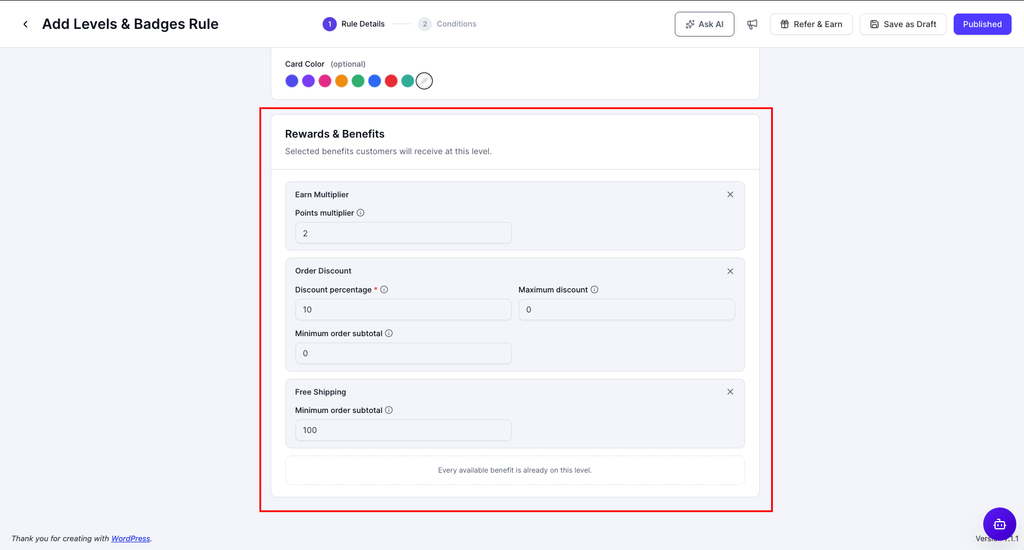
Benefits require Pointics Pro. In the Rewards & Benefits section, click Add Benefit.
| Group | Button |
|---|---|
| Points Benefits | Add Points Benefits |
| Rewards Benefits | Add Rewards Benefits |
If no benefits have been configured, the section displays “No Rewards & Benefits added.”
Step 4: Save the Level #
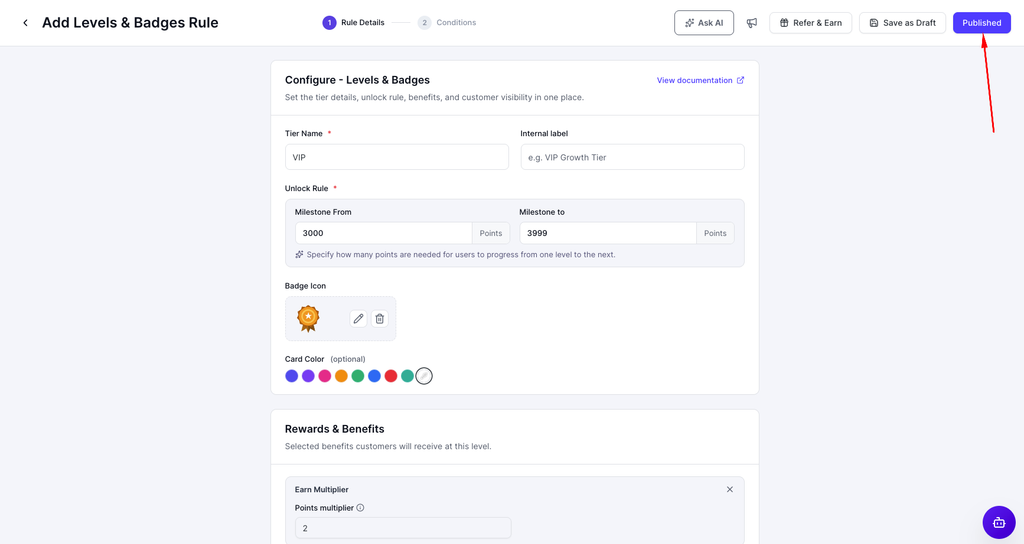
Choose Save as Draft to keep the level inactive, or choose Published to activate it.
Only active levels are assigned to customers. A draft level does not contain any members.
Step 5: Delete a Level, If Needed #
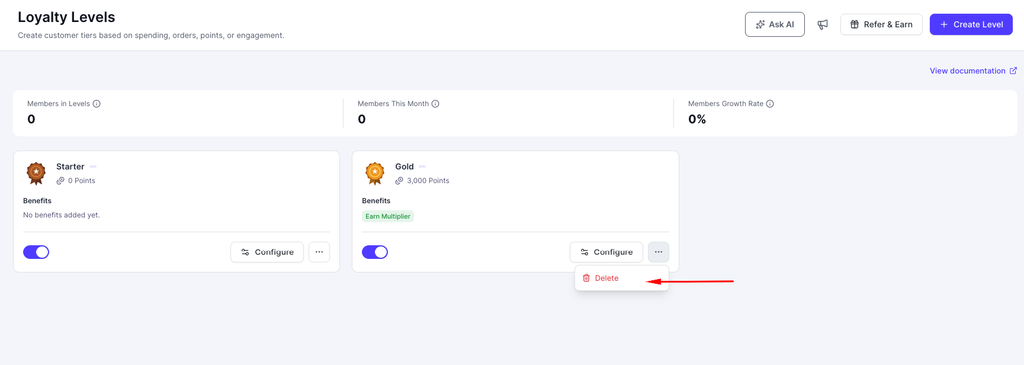
You cannot delete the only remaining level.
“This is your only level — edit it instead of deleting it.”
Key Functionality #
Promotion Versus Demotion #
| Event | When | Direction |
|---|---|---|
| Earning points | Immediately | Promotion only |
| Daily automatic check | Once a day | Promotion and demotion |
Earning points can only move a customer upward. If an older earning event falls outside the rolling qualification window, the customer is not demoted at the moment they earn again.
Why a Badge Can Briefly Lag #
The level a customer currently holds controls their multiplier, benefits, and badge. The level they qualify for is recalculated as they earn points.
These values can differ briefly between the moment a threshold is crossed and the next level recalculation.
How a Level Changes #
A customer’s level changes through the following process:
- A customer earns points.
- Pointics recalculates the customer’s qualifying level.
- If the customer qualifies for a higher level, they are promoted immediately.
- If the customer does not qualify for a higher level, no change is made. Earning points never causes a demotion.
- When a promotion happens, Pointics records the level history.
- A level-change email is sent.
- Once a day, Pointics reviews every member in batches.
- If a customer’s qualifying points have fallen below their current threshold, they are demoted.
- If the customer still meets the threshold, their level remains unchanged.
Settings #
| Setting | Description | Default | Bounds |
|---|---|---|---|
| Qualification Window | The number of months of earning history that count toward a customer’s level. | 12 | Minimum 1 month |
Validation Rules #
- Name is required when creating a level.
- If you do not enter a slug, Pointics generates one from the level name.
- A level with neither a name nor a slug is refused.
- A slug already used by another level is refused.
- Milestone From, Milestone To, and Sort Order must be whole numbers.
- Negative values are converted to zero.
- Each benefit is validated according to its own rules.
- If any benefit value is invalid, the entire level save fails.
- A benefit provided by a plugin that has since been deactivated remains unchanged rather than being removed.
- The final remaining level cannot be deleted.
- Save as Draft requires a level name.
“A tier requires a non-empty slug or name.”
“A tier with the slug ‘X’ already exists.”
Limitations #
- The free version supports only one level. Creating additional levels requires Pointics Pro.
- Benefits require Pointics Pro. The benefits section remains visible but locked in the free version.
- Demotion occurs only during the daily automatic check. If WordPress scheduled tasks are not running, customers are not demoted.
- The daily check processes members in batches and has a time limit. A large customer base may take several days to settle after a major configuration change.
- Member Since is based on the customer’s first points activity, not their WordPress registration date.
- A customer who has never earned points does not show a Member Since date.
- Restricting a reward to a specific level is not currently supported.
- The Rewards Benefits section is not repopulated when a saved level is reopened. Only Points Benefits are restored.
- The Starter level is disabled by default, so customers receive no level until onboarding is completed or the level is activated manually.
Troubleshooting #
| Problem | Solution |
|---|---|
| “Tier not found.” | The level was deleted, or the link is no longer valid. |
| “This is your only level — edit it instead of deleting it.” | Edit the existing level instead of deleting it. |
| “A tier with the slug ‘X’ already exists.” | Choose a different slug. |
| “A tier requires a non-empty slug or name.” | Enter a level name or a valid slug. |
| A benefit save is rejected without an obvious reason. | Check each benefit value and confirm that it is within the allowed range. |
| Nobody is ever demoted. | Confirm that WordPress scheduled tasks are running. The daily check may also still be processing customers in batches. |
| Everyone was demoted at once. | The qualification window may be too short, which reduces every customer’s qualifying-point total. |
| A customer’s badge does not match their points. | The held level may temporarily differ from the qualifying level. Earning again or waiting for the daily check should trigger recalculation. |
| Create Level does nothing. | The free version supports only one level. Additional levels require Pointics Pro. |
| A level exists, but no customers are assigned to it. | The level is inactive. Only published levels are assigned. |
| The Levels menu is missing. | The Levels feature is disabled. |
Notes #
- The Levels screen displays a live member count for each level.
- The Levels dashboard shows the number of customers currently in levels, the number who reached a level during the current calendar month, and the change compared with the previous month.
- Deleting a level does not remove points that customers earned while they held that level.


