
Pointics is an AI-powered Loyalty Points, Rewards, and Referral plugin for WordPress. It helps businesses turn one-time customers into repeat customers by rewarding actions such as purchases, registrations, reviews, and referrals.
Pointics works with WooCommerce, Easy Digital Downloads (EDD), Eventin, and WPCafe, allowing you to manage loyalty rewards across different business models from one place.
With Pointics, you can create earning rules, reward customers with discounts or free products, build VIP membership tiers, manage referrals, and let customers redeem their points directly during checkout—all without coding.
Key Features #
Pointics provides a complete loyalty and rewards system for WordPress websites.
- Flexible Earning Rules: Reward customers for purchases, account registrations, product reviews, referrals, and other actions.
- Multiple Reward Types: Allow customers to redeem points for discounts, percentage-based discounts, free shipping, or free products.
- WooCommerce & Block Support: Works with both the classic WooCommerce checkout and modern Cart & Checkout Blocks.
- Multi-Platform Loyalty System: Manage loyalty points across WooCommerce, EDD, WPCafe, and Eventin.
- VIP Membership Levels: Create membership tiers such as Bronze, Silver, Gold, and Platinum with different point multipliers.
- Referral System: Give customers unique referral links and coupon codes with automated referral rewards.
- Point Expiration: Set expiration periods for customer points and notify customers automatically.
- Customer Dashboard & Widgets: Display point balances, earning information, and loyalty details through storefront widgets and the customer account area.
- AI Setup Assistant: Use the built-in AI onboarding assistant to configure personalized earning and reward rules.
Why Use Pointics? #
Pointics helps you build a customer loyalty program directly inside your WordPress website.
- No Transaction Commission: Run your loyalty program without paying a percentage of your rewarded sales.
- Unified Point Balance: Manage loyalty points across eCommerce, digital products, restaurant orders, and event bookings.
- Easy to Configure: Create earning rules, rewards, referrals, and membership levels without coding.
- Lightweight & Scalable: Designed to support growing websites while maintaining a clean and efficient setup.
How to Install Pointics Free #
- Log in to your WordPress Admin Dashboard.
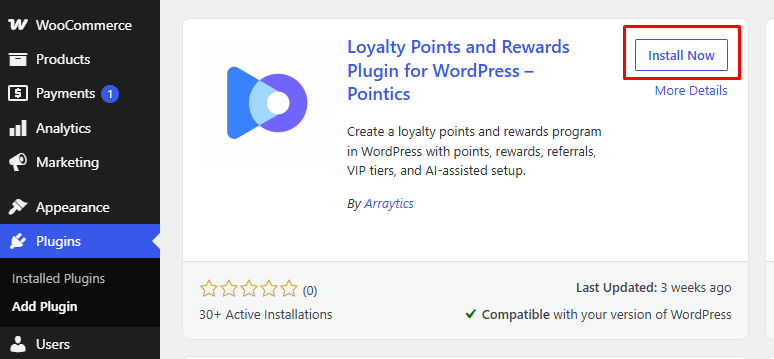
- Go to Plugins → Add New Plugin.
- Search for Pointics.
- Find Pointics – AI-Powered Loyalty and Rewards Plugin.
- Click Install Now.
- Once the installation is complete, click Activate.
How to Upgrade to Pointics Pro #
Pointics Pro adds advanced loyalty, reward, referral, membership, and customization features to the free version.
Important: Keep both Pointics Free and Pointics Pro installed and active.
- Log in to your ThemeWinter account and go to Purchase History/Downloads.
- Find Pointics Pro and download the
pointics-pro.zipfile. - In your WordPress dashboard, go to Plugins → Add New Plugin → Upload Plugin.
- Upload the
pointics-pro.zipfile and click Install Now. - Once installed, click Activate Plugin.
How to Activate Pointics Pro License #
Activating your Pointics Pro license allows you to receive product updates and premium support.
- Go to your WordPress Admin Dashboard.
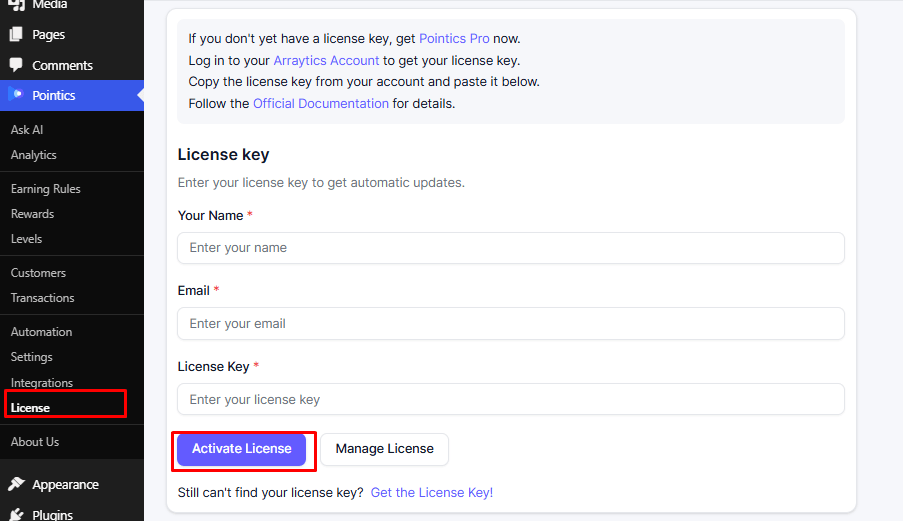
- Navigate to Pointics → License.
- Copy your license key from your ThemeWinter account.
- Paste the license key into the License Key field.
- Click Activate License.
- Once successfully activated, the license status will show as Active.
Note: Keep your license active to receive automatic updates, security improvements, new features, and premium support.
How to Deactivate or Uninstall Pointics #
Go to Plugins → Installed Plugins and deactivate Pointics Pro first, followed by Pointics Free. To uninstall them, delete Pointics Pro first and then Pointics Free.
Note: Deleting the plugins does not remove existing customer point data unless database cleanup is enabled.
Frequently Asked Questions #
Q1. Do I need coding knowledge to use Pointics?
A1. No. Pointics is a no-code solution that lets you manage rewards, referrals, and membership levels from the WordPress dashboard.
Q2. Can I use Pointics without WooCommerce?
A2. Yes. Pointics also supports EDD, Eventin, WPCafe, and WordPress user registrations.
Q3. What happens to points when an order is refunded?
A3. Points earned from a canceled or refunded order are automatically deducted from the customer’s balance.
Q4. What happens when my Pointics Pro license expires?
A4. Your existing loyalty program continues to work, but Pro updates, new features, and premium support are unavailable until renewal.
Q5. Can I test Pointics before purchasing Pro?
A5. Yes. You can use the free version and explore the Pro demo.
Q6. Do I need to keep Pointics Free active when using Pro?
A6. Yes. Both Pointics Free and Pointics Pro must remain installed and active.
Q7. Can customers redeem points at checkout?
A7. Yes. Customers can redeem points for eligible rewards such as discounts, free shipping, or free products.
Q8. Can I create different membership levels?
A8. Yes. You can create multiple VIP tiers with different point multipliers and benefits.
Q9. Does Pointics support referrals?
A9. Yes. Customers can use unique referral links and earn rewards based on your configured rules.


