How to Create Event Attendee List in WordPress Event Website


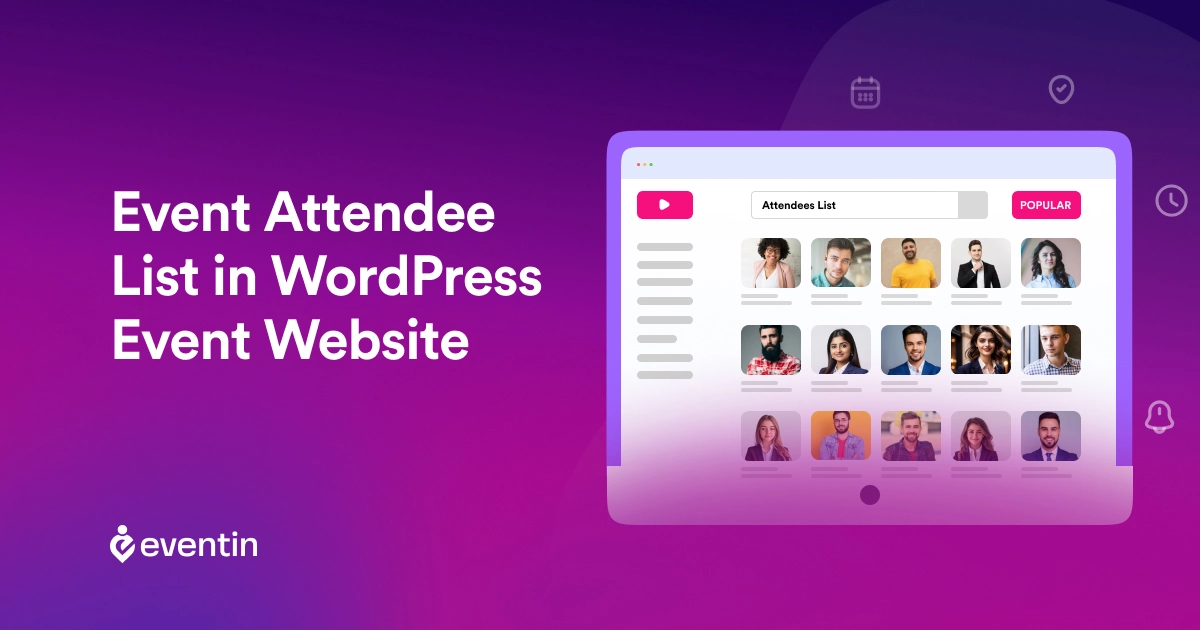
Table of Contents
Are you looking for how to create and manage an event attendee list in WordPress? Without a proper system, tracking registrations, organizing attendee data, and handling check-ins can quickly become difficult.
An event attendee list in WordPress helps you keep all participant details in one place. It allows you to track registrations, manage attendees, and plan your events more effectively, whether you’re running a conference, workshop, or meetup.
Instead of handling everything manually, you can use a WordPress event registration plugin like Eventin to collect attendee data, organize your list, and manage check-ins from one dashboard.
In this guide, you’ll learn how to create and manage event attendees in WordPress step by step, along with the best way to organize registrations, track participants, and simplify your event workflow.
Manage Events Like a Pro
Try the easiest way to create, manage, and promote events with Eventin.
- 🟣 AI event generation
- 🟣 Ticket & Certificate builder
- 🟣 Secure ticket sales
- 🟣 Event analytics & report
Quick Overview
In this guide, you’ll learn how to create and manage an attendee list step by step, why manual tracking causes problems, the benefits of using a WordPress event registration plugin, and how Eventin helps you manage registrations and attendees from one place.
- What an event attendee list is in WordPress
- Why managing attendees is difficult without a system
- Benefits of using an event registration plugin
- How to create and manage event attendees in WordPress
- Why Eventin is the best solution for attendee management

What is the Event Attendee List in WordPress?
An Event Attendee List is a comprehensive database of individuals that allows the event planner to manage and track the people who have registered for or plan to attend an event organized through a WordPress website. This list can be displayed on the event website, where attendees can see the list of other attendees. It typically includes:
- A database to store attendee information
- Integration with event registration forms on your site
- An admin interface to view and manage the list
Event Attendee Listing in WordPress provides valuable insights into your audience and helps you plan and execute your event more professionally.
- It allows you to keep track of all participants in one place
- Seeing other attendees participate, they became interested
- Display new event attendees in the website’s “attendee list” when they register
Why Managing Attendees is Difficult Without a System
Managing event attendees in WordPress without a proper system might seem simple at first. But as soon as registrations start growing, it quickly becomes hard to control everything.
Here’s where the problem starts:
- Manual data handling creates confusion: When you rely on spreadsheets or emails, attendee data gets scattered. It becomes difficult to keep track of who registered, who paid, and who actually attended.
- No clear attendee tracking system: Without a structured setup, you can’t properly manage event attendees in WordPress. You may miss updates, lose important details, or struggle to see real-time attendee status.
- Registration and attendee data don’t stay organized: Using separate tools for forms, payments, and lists often leads to mismatched or incomplete data. This makes event attendee management slow and unreliable.
- Check-in becomes chaotic during the event: Without a proper event check-in system, verifying attendees at the entrance takes longer. This leads to delays, long lines, and a poor attendee experience.
- Hard to manage event capacity and limits: You may accidentally overbook or underutilize your event because there’s no centralized way to control registrations and attendee limits.
- No automation means more manual work: Every update confirmation email, attendee tracking, and status changes need to be handled manually, which wastes time and increases the chance of errors.
Benefits of Using an Event Registration Plugin
A WordPress event registration plugin solves common problems like scattered attendee data, manual tracking, and confusing check-in processes. Instead of managing forms, emails, and spreadsheets separately, it gives you a simple way to manage event attendees in WordPress from one place.
Here are the key benefits:
- Save time with automation by collecting registrations, storing attendee data, and organizing everything automatically, with no manual entry needed for your event attendee list WordPress setup.
- Manage attendees more efficiently with a centralized event attendee management system where you can track registrations, monitor participation, and access all attendee details anytime.
- Simplify ticketing and registration by creating free or paid events, setting limits, and controlling capacity using a complete event registration plugininstead of multiple tools.
- Ensure a smooth check-in process with a built-in event check-in system, so attendees can enter quickly without delays or confusion.
- Get clear insights and data to track registrations, understand attendee behavior, and improve your event attendee management for future events.
- Reduce errors and manual mistakes by avoiding duplicate entries, missing data, or tracking issues that often happen without a proper attendee tracking system.
Want to Manage Event Attendees Without Manual Work?
Instead of handling registrations, attendee lists, and check-ins manually, you can use Eventin to manage everything from one place inside WordPress.
Explore EventinHow to Create Event Attendee List in WordPress (Step-by-Step)
Creating an event attendee list in a WordPress event Website is a very easy process if you use the right event management plugin.
To simply create and manage your event attendee list, you will need two key plugins: The first one is the WooCommerce plugin to handle the sales process, and an event management plugin to list and organize your events on your website. Here, we will use the Eventin Event Management Plugin as an example.
Step 1: Install Required Plugins
Let me show you how to install a plugin through the WordPress dashboard.
- Log in and go to the WordPress dashboard
- Go to Plugins > Add New Plugin.
- Type “Eventin” in the search bar. (Similarly, do it for WooCommerce)
- Now Click on Install Now, then Activate the plugin after installation.
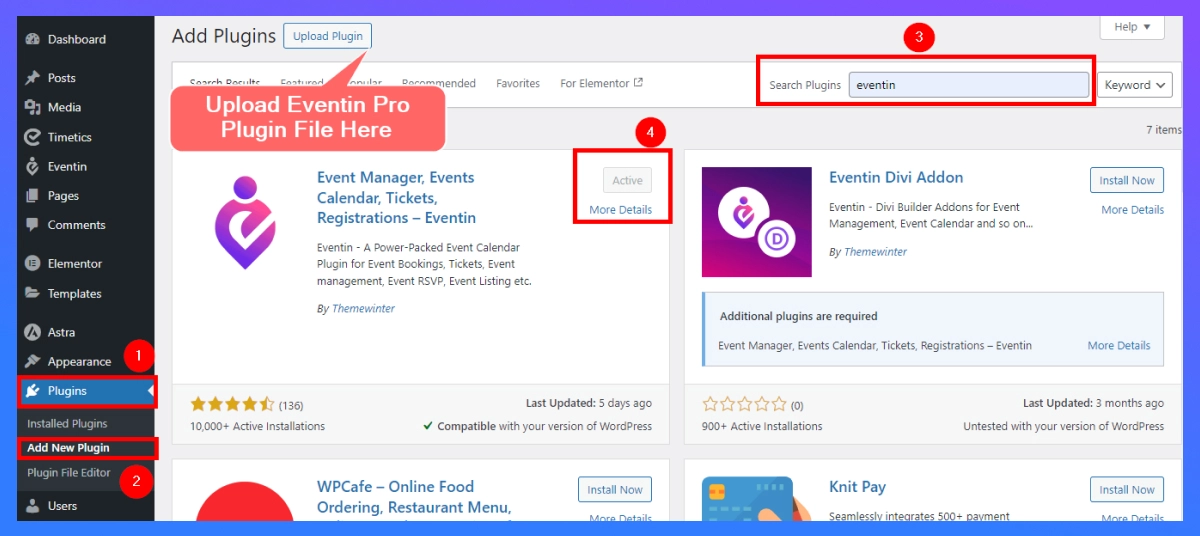
Follow these steps when installing the Eventin Event Manager PluginPro
- Download Eventin Pro from Themewinter website
- Log in and go to the WordPress dashboard
- Go to Plugins > Add New Plugin > Upload Plugin
- Now Click on Install Now, then Activate the plugin after installation.
Step 2: Create Event Attendee list
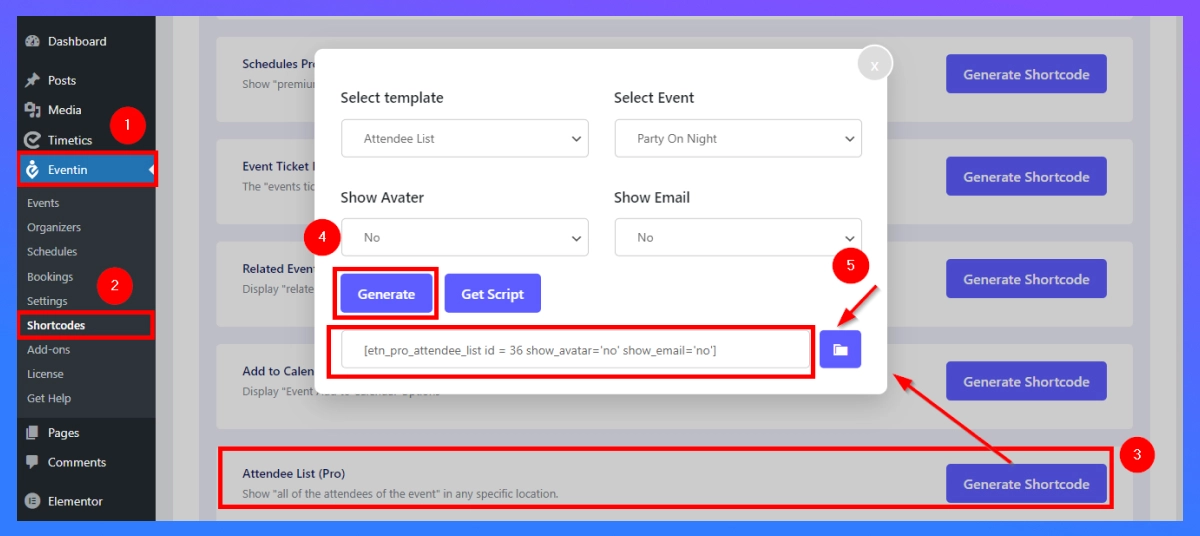
- Dashboard > Eventin > Shortcodes
- Find “Attendee List” and Click “Generate Shortcode”
- Select the Template, Event, Avatar, and Email that you would like to view.
- Click “Generate” to get the shortcode
- Copy and paste into the page (guide below).
Step 3: Create Event Attendee List Page
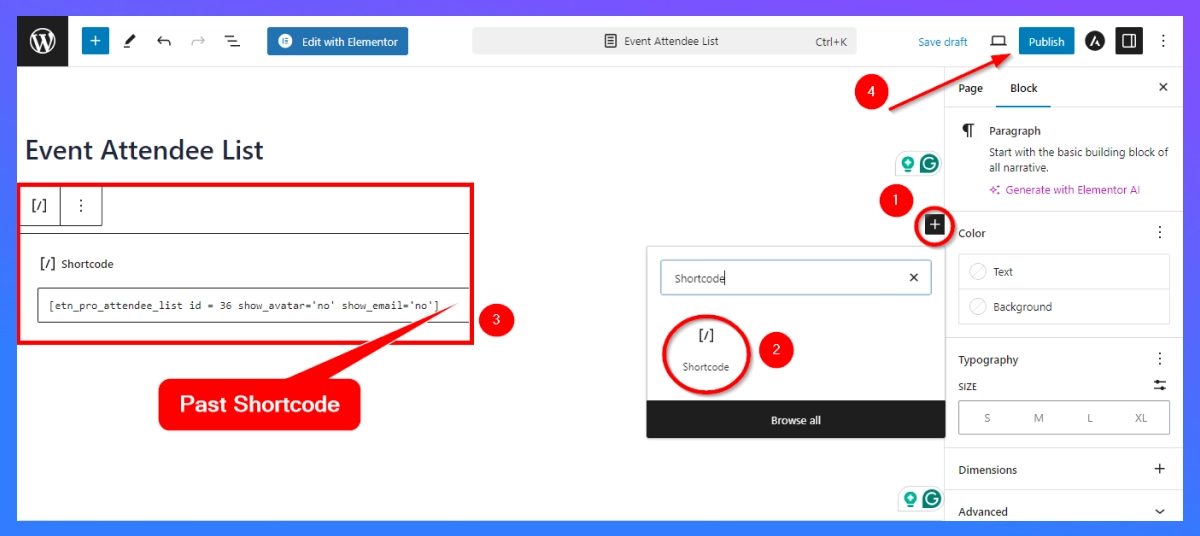
- To display your event attendees, create a dedicated page. Go to Pages > Add New.
- Now paste the shortcode into your page “Shortcode box.”
- Save Draft and Publish: Select the title for your page (like Event Attendee List) and then hit Publish. The page will automatically generate a list of all attendees.
Step 4: Configure Settings
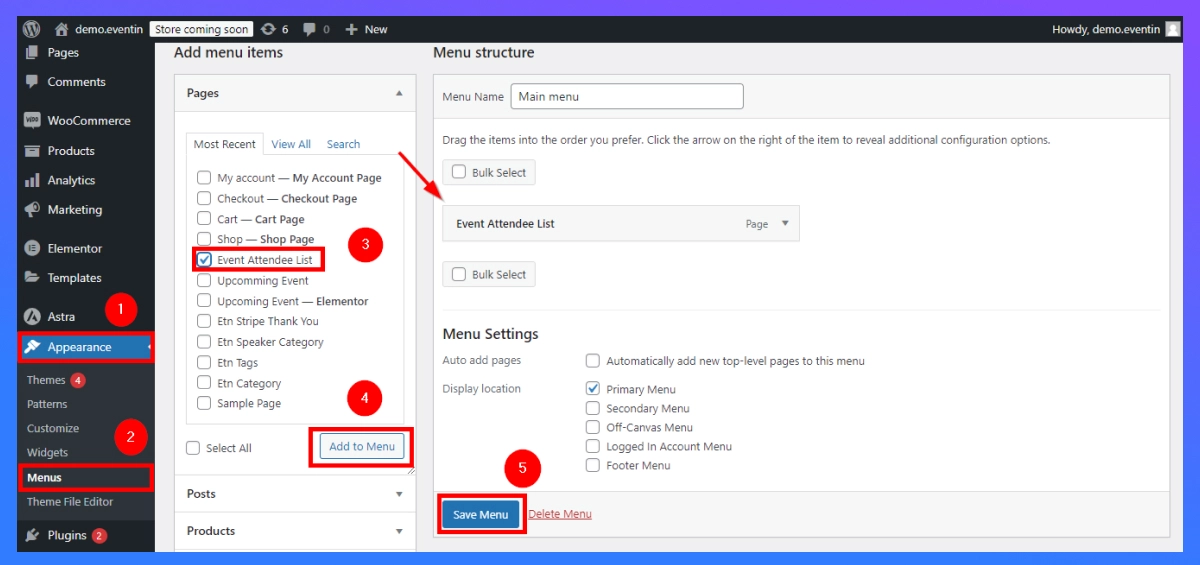
- Go to Appearance > Menus to make your event list easily accessible in Website view.
- Find the page you just created(“Event Attendee List”) and add it to your menu.
- Lastly, click “Save Menu” to complete the process.
Step 5: Manage Your Event Attendee List
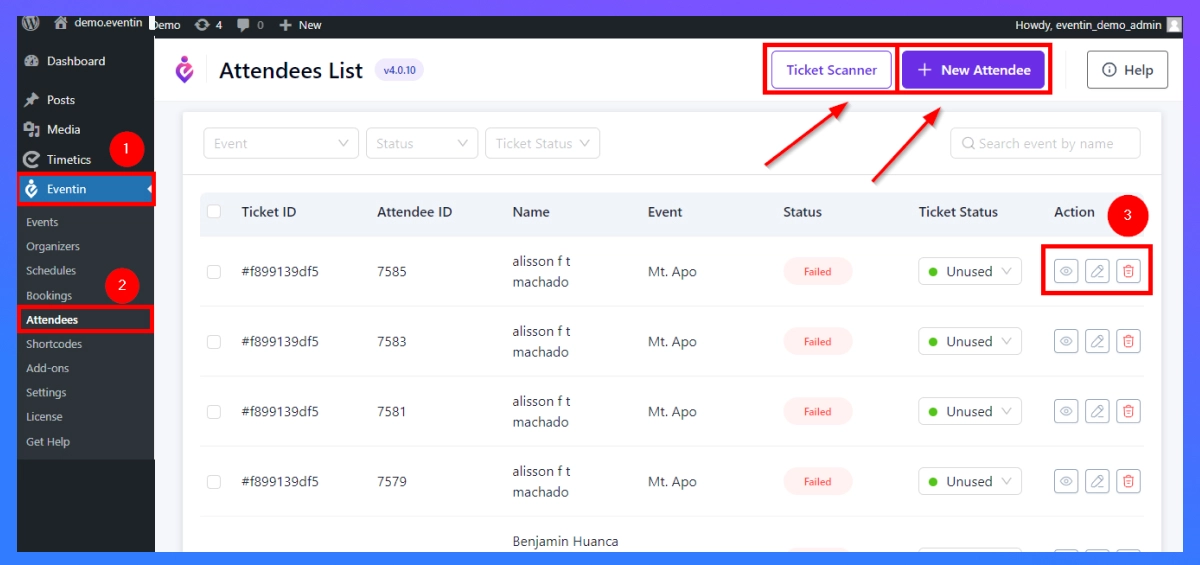
- To update or modify any event attendee, navigate to Eventin > Attendee.
- Using this section, you can edit, delete, or view the details of existing event attendees.
- You can easily add new attendees manually from “New Attendee.”
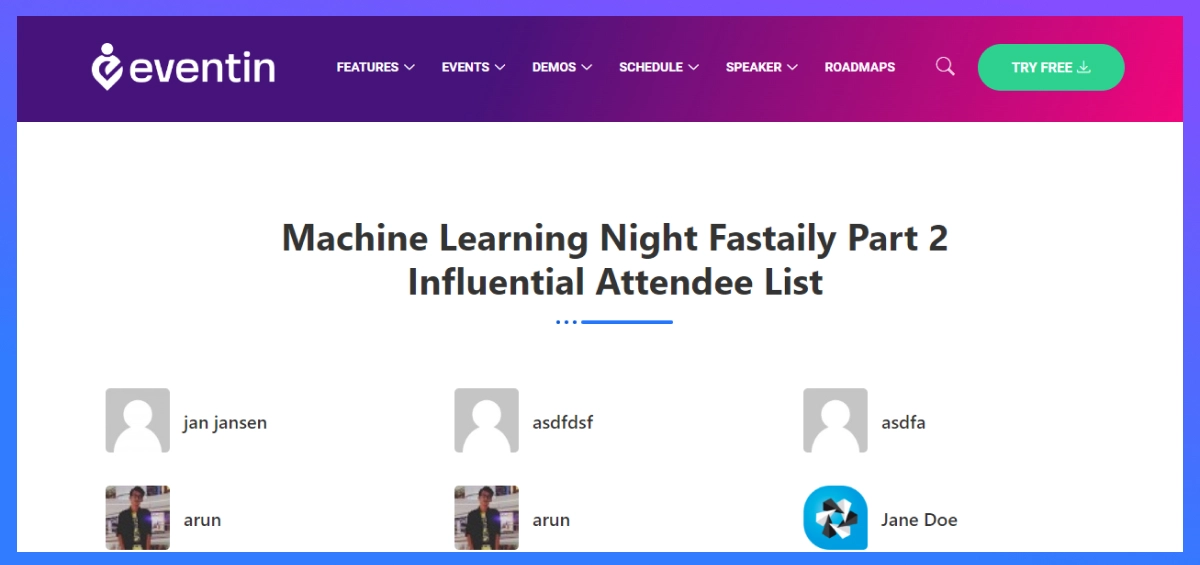
Attendee List Frontend View on WordPress Website
📌 Want to know how to add an event listing in WordPress? Read the full guide →
Why Eventin is the Best Solution for Attendee Management
Eventin works as a complete WordPress event registration plugin and attendee management system. It helps you create events, collect registrations, manage your event attendee list in WordPress, track participants, and handle check-ins all from one place. You don’t need spreadsheets, external tools, or manual tracking.
Here’s why it works better for attendee management:
What Makes Eventin Strong for Attendee Management
- Centralized attendee dashboard: Manage your full event attendee management system from one place. You can create attendee registrations with ticketing without switching tools.
- Built-in registration system: Collect attendee data directly from your event page using a complete WordPress event registration system, without relying on external forms.
- Multiple ticket & attendee control: Create different ticket types, set limits, and control how many people can join.
- Real-time attendee tracking: Instantly track registrations, payments, and attendance using a reliable attendee tracking system, without manual updates.
- QR-based check-in system: Use a fast and simple event check-in system on WordPress to check in attendees and avoid long queues during your event.
- WooCommerce integration for paid events: Sell tickets and manage payments smoothly while keeping your event attendee list fully organized in WordPress.
- Works for all event types: Whether it’s a webinar, workshop, or conference, you can manage all without changing your setup.
Make Attendee Management Easier with Eventin
If you want a faster way to create an event attendee list in WordPress, Eventin helps you collect registrations, organize attendee data, and manage check-ins without using extra tools.
See How It Works Get EventinFAQs about Event Attendee List in WordPress
How do I manage event attendees in WordPress?
You can manage event attendees in WordPress by using a WordPress event registration plugin like Eventin. It lets you collect registrations, organize your event attendee list, track participants, and handle check-ins from one dashboard instead of using spreadsheets.
What is the best way to create an event attendee list in WordPress?
The best way is to use an event booking plugin for WordPress that automatically collects and stores attendee data during registration. This avoids manual entry and keeps your attendee list accurate and organized.
What is the best WordPress event registration plugin?
Eventin is the best WordPress event registration plugin that handles registrations, attendee tracking, and check-ins in one place.
How do I track event registrations in WordPress?
You can track event registrations using an attendee tracking system inside your event plugin. It shows real-time data like total registrations, confirmed attendees, and ticket usage, so you always know your event status.
Can I manage paid event attendees in WordPress?
Yes, with a proper event booking plugin like Eventin, you can manage paid attendees by integrating payment systems like WooCommerce. This lets you track payments, ticket sales, and attendee data together.
Why should I use a plugin instead of spreadsheets for attendee management?
Spreadsheets require manual updates and can lead to errors. A plugin acts as a complete event attendee management system, automating registrations, tracking, and check-ins while keeping your data accurate and easy to manage.
Conclusion
Creating and managing an event attendee list in WordPress is not just about collecting names; it’s about keeping your entire event organized from registration to check-in. When you try to manage everything manually, it becomes time-consuming, confusing, and prone to errors.
The better approach is to use a structured system like Eventin that helps you manage event attendees in WordPress efficiently.