How to Choose Black Friday WordPress Plugin Deals (2026 Checklist)


Table of Contents
Black Friday is on Friday, November 27, 2026. Cyber Monday comes three days later, on November 30. Almost every WordPress company will say its price is the lowest of the year. But the biggest discount is not always the best deal. That’s why knowing how to choose WordPress plugin deals matters. A cheap plugin you never use is still money lost, and so is a license that doesn’t cover all your sites.
Maybe you run a blog, build sites for clients, or sell with WooCommerce. Either way, this guide shows you how to check Black Friday WordPress plugin deals before you pay. It comes down to three questions. Do you need the tool? Is the price really lower? Does the license fit your sites? We answer each one below, with real numbers from our own pricing pages.
At ThemeWinter, we’ve been building WordPress plugins since 2013. We see both kinds of buyers every sale. Some buy a tool and use it for years. Others buy on impulse and never install it. This is the checklist we’d suggest before the sale starts.
Want to browse offers first? See our list of WordPress Black Friday deals or our list of Black Friday deals on AI tools. Short on time? Jump to the 10-point checklist.
To choose a WordPress plugin deal on Black Friday, start with a problem you need solved in the next 90 days. Verify the regular price, compare lifetime and annual costs, check site limits and developer activity, test the free version, and read what the refund policy excludes before you pay.
Start With Your Problem, Not the Discount
The best Black Friday plugin deal is the one that solves a problem you already have. If you can’t name that problem, the size of the discount doesn’t matter.
This is the first rule of how to choose WordPress plugins, sale or no sale. Before you open any deal page, write down three things:
- What problem does it solve? For example, “I need to sell event tickets” or “I want customers to book appointments online.”
- What will it replace? A new plugin often takes over from a tool you already pay for, or from a manual task.
- When will I use it? Give a real date or project.
Then check what you already have. Your theme, page builder, or an existing plugin may already cover part of the job. Paying twice for the same feature is one of the easiest mistakes to make during a sale.
A simple rule helps here: if you can’t say where you’ll use it in the next 90 days, skip it.
This is also why a 70% discount doesn’t automatically make a good deal. Seventy percent off a plugin you never use is still money spent on nothing. And every plugin you add is one more thing to update, test, and keep secure.
Is the Discount Real? How to Verify Black Friday Plugin Pricing
A Black Friday plugin deal is only as good as the price of the plan you need. WordPress plugin discounts are usually advertised by their biggest number, so the banner shows the biggest saving on offer, not yours.
“Up to 70% off” means one plan gets 70% off. The other plans may get much less. Here’s an example from our own Optiontics pricing. The annual Agency plan (unlimited sites) is now $149 instead of $499. That’s about 70% off. The annual Standard plan (5 sites) is $63 instead of $79. That’s only about 20% off. It’s the same product in the same sale, but your savings depend on the plan you need.
Before you buy, run three checks:
- Find your plan. Compare the sale price with the listed regular price for your license type and site count. A listed price doesn’t prove the plan ever sold at that price, so run check 2 as well.
- Check past prices. Paste the pricing page URL into the Wayback Machine. If the plan cost the same last summer or during a Halloween sale, the offer may not be exclusive to Black Friday.
- Do your own bundle math. A bundle’s “combined value” includes tools you may never use. Add up the prices of only the tools you need and compare that with the bundle price. This applies to every bundle, ours included.
The same checks work for Cyber Monday plugin deals. To weigh several vendors at once, compare offers from other WordPress vendors.
Shopping for AI-powered plugins or SaaS tools too? See our list of Black Friday deals on AI tools and run each offer through the same checks.
Are WordPress Lifetime Deals Worth It? Lifetime vs Annual Plugin License
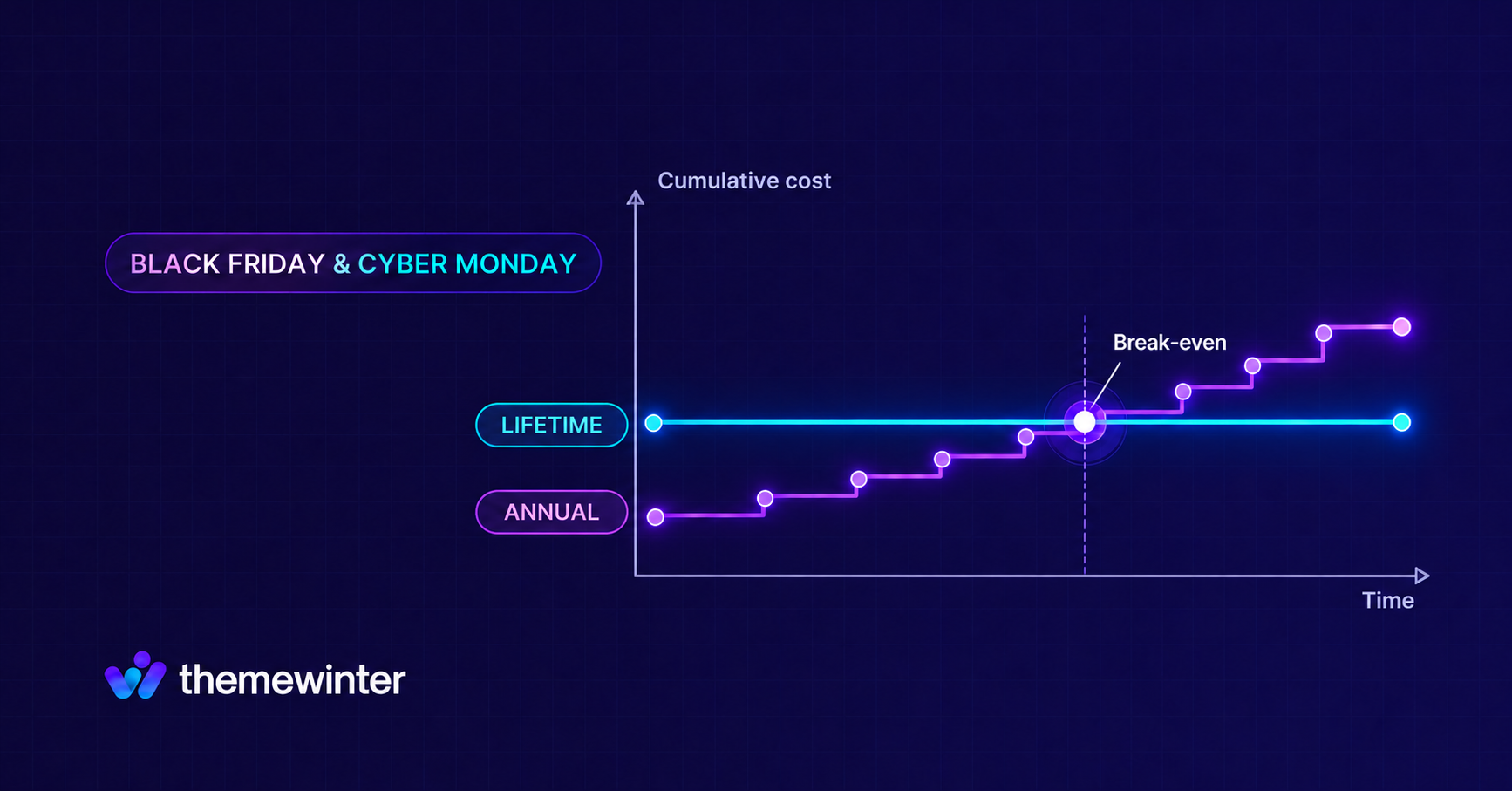
A lifetime plugin license is a one-time payment that covers updates and usually support, for as long as the vendor keeps the product going. An annual license costs less upfront but needs renewing every year to keep those updates.
The break-even point is the year your renewals add up to the lifetime price, so a lifetime deal is worth it if you’ll use the plugin past that point and the vendor keeps updating it. For a tool you’re still testing, annual is usually safer.
| Annual license | Lifetime license | |
|---|---|---|
| Cost | Lower upfront, renews every year | Higher, paid once |
| Updates and support | For each paid year | As long as the vendor provides them |
| Main risk | Paying more over the years | Paying for a tool you stop using |
To compare a lifetime vs annual plugin license, count renewals:
Renewals needed = (lifetime price − first-year price) ÷ renewal price, rounded up
Example (illustrative numbers): annual costs $49 the first year and $99 to renew. Lifetime costs $99 once. (99 − 49) ÷ 99 is about 0.5, which rounds up to 1. So if you renew even once, lifetime is cheaper: $99 versus $148.
| Year 1 | Year 2 | Total after 2 years | |
|---|---|---|---|
| Annual | $49 | $99 | $148 |
| Lifetime | $99 | $0 | $99 |
Before you pay, check three things in the license terms:
- What “lifetime” covers: updates, support, or both. “Lifetime” means the life of the product, not yours.
- What renewals cost: some vendors renew at the sale price, others at full price. Ask before you buy, because it changes the math above.
- What happens when an annual license expires: some plugins lose pro features, while others keep running without updates.
Check Site Limits and License Terms
A plugin license is the right fit only if it covers every site you plan to use it on. Some entry-level licenses cover just one or two sites, so check the limit before comparing prices.
Look for four things on the pricing page:
- Site limit: single site, a fixed number, or unlimited.
- Client use: if you build sites for clients, check whether the plan allows it. Some agency plans state this clearly. Our Optiontics and Pointics Agency plans, for example, list white-label and client licensing.
- Transfers and staging: ask whether you can move a license to a new site, and whether staging sites count toward your limit.
- Upgrades: check whether you can move to a bigger plan later. With Eventin, you can upgrade anytime by paying the price difference.
Also, don’t assume plans with the same name have the same limits. Eventin’s annual Standard plan covers 2 domains, while its lifetime Standard plan covers 1.
Vet the Developer Before You Pay
Before you buy, check whether the developer is still actively maintaining the plugin. If updates stop, the plugin may fall behind WordPress releases, and a lifetime license can’t guarantee that the developer will keep releasing updates.
Most of what you need is on the plugin’s WordPress.org page:
- Last updated: a recent date is a good sign.
- Tested up to: this should match a recent WordPress version.
- Active installations and rating: read a few recent reviews, not just the stars.
- Support threads: WordPress.org shows how many threads were resolved in the last two months.
On the vendor’s site, a public changelog shows how often updates ship, and a public roadmap shows what’s planned next. Eventin, WPCafe, and Pointics each have both. Eventin had a 4.7 out of 5 rating from 407 reviews on WordPress.org in October 2026.
One more warning: During sale season, sites selling stolen or unsafe plugin copies become more common. A premium plugin for $5 may seem like a great deal, but it could contain malware, miss important security updates, and come with no support. Buy from the plugin developer or an approved marketplace, even if it costs more.
Test Compatibility Before You Buy
The safest way to test a plugin is to try the free version or live demo before the deal ends. Don’t count on the refund window as a free trial.
Start with these steps:
- Install the free version or open the demo. Many premium plugins have a free version on WordPress.org. Eventin and WPCafe both do, and both offer live demos.
- Check the requirements. The WordPress.org page lists the minimum WordPress and PHP versions. Compare them with your hosting.
- Test it with your setup. Make sure it works with your theme, page builder and WooCommerce, if you use it.
- Use a staging site. Test on a staging site so you can catch a conflict before it affects your live site.
Next, read the refund policy for what it excludes, not just how many days it lasts. Some vendors exclude change-of-mind requests, products that don’t fit your needs, or conflicts with other plugins. Renewal payments may also be non-refundable.
Our own refund policy allows refund requests within 15 days if our support team can’t resolve a product issue after investigating it. It excludes change-of-mind requests, products that don’t suit your needs, third-party conflicts, and renewals. Our payment processor, Paddle, also keeps a 5% + $0.50 fee from refunds. That’s why we suggest testing the free version or live demo first.
| Our refund covers | Our refund excludes |
|---|---|
| Product issues our support team can’t resolve, requested within 15 days | Change-of-mind requests, products that don’t suit your needs, third-party conflicts, and renewals |
Black Friday deals end quickly, so start testing a week or two early. Then you can decide before the price goes back up.
Bundle or Single Plugin: How to Decide
A bundle is the better deal when the tools you’ll actually use cost more on their own than the whole bundle. If you only need one or two plugins, buying them separately may cost less.
Use the bundle math from earlier. Here’s how it plays out:
Say a bundle costs $300, and each plugin inside costs $110 on its own.
- You need 2 plugins: $220 separately, so buy them separately.
- You need 3 plugins: $330 separately, so the bundle wins.
Price isn’t the only factor. A bundle may also make sense when:
- You manage several sites or clients. Compare the bundle’s site limit with the licenses you would otherwise buy.
- The tools work together. For example, Pointics works with WooCommerce, WPCafe and Eventin, and Optiontics works with WooCommerce, Dokan and WPCafe. Check that each integration supports your setup before buying.
One thing to watch: every plugin you activate is one more to update and test. Install only the tools you need, even if the bundle gives you more.
For WooCommerce Store Owners: Buy Now, Install After Your Sale
If you run a WooCommerce store, you can buy a deal during Black Friday and wait to install it on your live store until your own sale is over. A new plugin added during your busiest days can cause a conflict when you can least afford one.
WP Umbrella’s Black Friday checklist for agencies recommends freezing deployments, new features, styling changes, and plugin installs one week before Black Friday. A simple plan:
- Buy during the sale so you lock in the price.
- Test on a staging site while your live store handles the traffic.
- Install on the live store after Cyber Monday, once traffic settles.
Check the vendor’s refund window. If it offers 15 days, a plugin bought on November 27 may be covered until around December 12; confirm the exact deadline in the vendor’s policy. Test on staging before then, so you can contact support while you’re still covered.
The Black Friday WordPress Plugin Deal Checklist
Before you buy any Black Friday or Cyber Monday plugin deal, run it through these 10 checks. Checks 9 and 10 apply only if they fit your situation.
| # | Check | Pass if… |
|---|---|---|
| 1 | Need | You’ll use it within 90 days |
| 2 | No duplicate | It doesn’t duplicate a tool you already own, unless you’re replacing it |
| 3 | Real price | The discount holds on your plan and against past prices |
| 4 | Total cost | The renewal count favors the license you pick |
| 5 | License | The site limit covers your sites or clients |
| 6 | Developer | Recent updates, a recent “tested up to”, and resolved support threads |
| 7 | Compatibility | The free version or demo works with your setup |
| 8 | Refund terms | You know what the refund covers and what it excludes |
| 9 | Bundle math (bundles only) | The bundle costs less than the tools you’ll use |
| 10 | Timing (WooCommerce stores only) | You can test on staging and install after your sale |
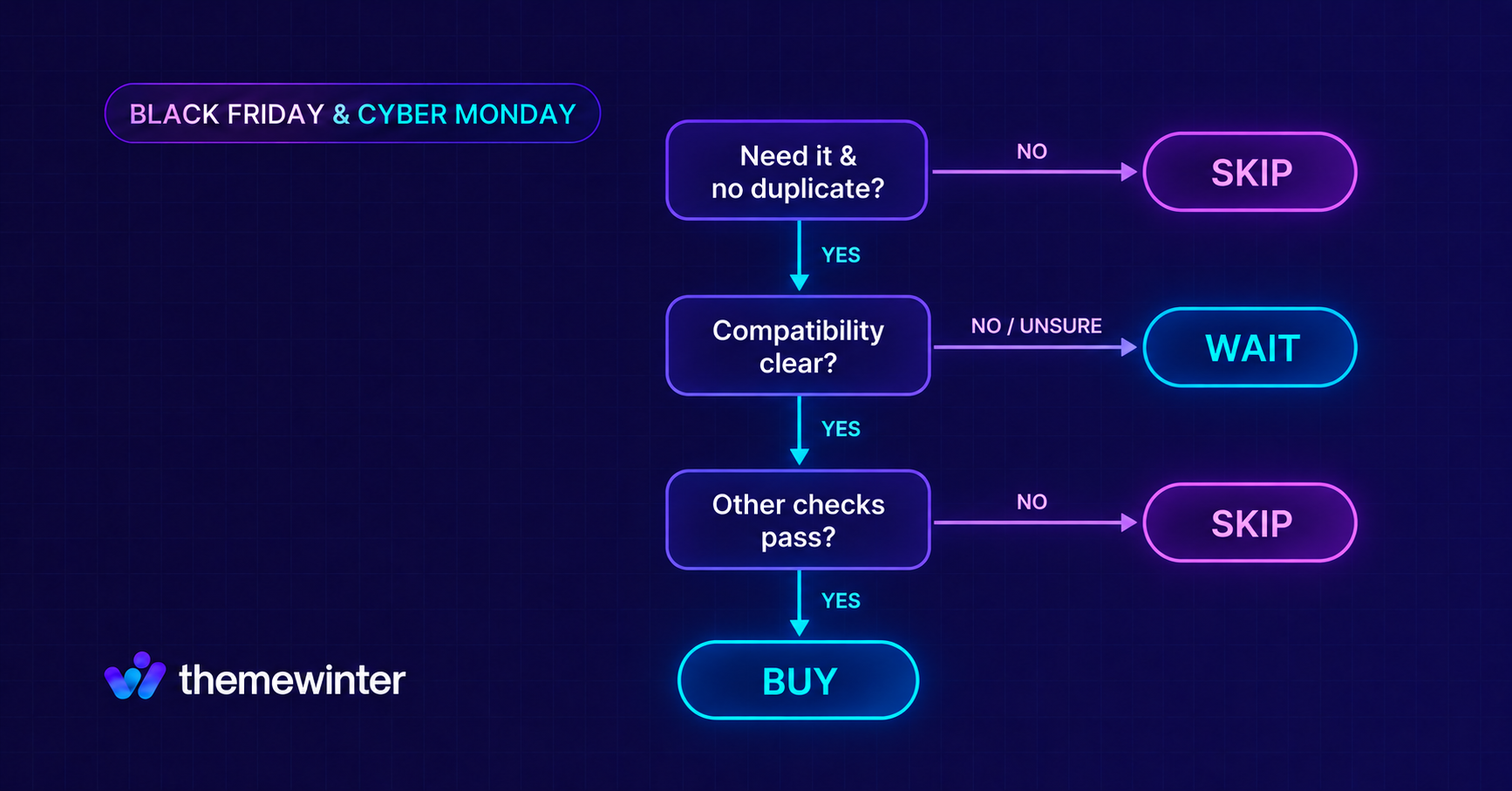
Your decision:
- Buy: it passes every check that applies to you.
- Wait: you need it, but compatibility is still unclear. Test the free version before the deal ends.
- Skip: you won’t use it within 90 days, or it duplicates a tool without a clear reason to replace it. No discount fixes a plugin you don’t need.
See how ThemeWinter’s deals measure up against this checklist ↓
Applying This Checklist to ThemeWinter’s Black Friday Deals
We said we’d hold our own deals to the same checklist, so here’s how they measure up. Where a check depends on your needs, such as checks 1 and 2, only you can answer it.
| Checklist item | What ThemeWinter offers |
|---|---|
| Developer (check 6) | Building WordPress products since 2013, with public changelogs and roadmaps for Eventin, WPCafe and Pointics |
| Total cost (check 4) | Annual and lifetime plans. An Eventin annual license keeps working after it expires; only updates and support stop |
| License (check 5) | Plans range from single-site to unlimited-site licenses. Check the terms for client use; Optiontics and Pointics Agency plans list client licensing |
| Compatibility (check 7) | Free versions of Eventin, WPCafe, Booktics, WP Timetics, Optiontics and Pointics, plus live demos for Eventin and WPCafe |
| Refund terms (check 8) | ThemeWinter’s standard refund window is 15 days, with conditions. Pointics orders have an extended 30-day guarantee |
| Bundle math (check 9) | Lifetime Mega Bundles for 5, 500 or unlimited sites, with three-month installments on the Agency and Enterprise bundles |
If you’re an existing customer, you can use the deals too, and no coupon code is needed.
Find the right tool for your site:
| If you need to… | Try |
|---|---|
| Sell event tickets and manage events | Eventin |
| Take restaurant orders and table reservations | WPCafe |
| Take bookings for a service business with staff and locations | Booktics |
| Schedule one-to-one or group meetings with calendar sync | WP Timetics |
| Add product options and dynamic pricing in WooCommerce | Optiontics |
| Run loyalty points and rewards for WooCommerce, WPCafe or Eventin | Pointics |
Explore the ThemeWinter Black Friday Deals →
FAQ on WordPress Plugin Deals
When do WordPress Black Friday deals start?
Black Friday is on November 27, 2026, and Cyber Monday is on November 30. Sale dates vary by vendor. Some offers start before Black Friday, while others continue into December. Check each vendor’s dates.
Are lifetime WordPress plugin deals worth it?
They can be, if you’ll use the plugin beyond its break-even point and the license terms fit your needs. Compare the lifetime price with the first-year cost plus the renewals you expect to pay.
Can I use a Black Friday plugin license on client sites?
It depends on the license. Check the site limit and whether the plan allows client use. Some Agency plans allow more sites or state client licensing directly. If the terms aren’t clear, ask the vendor before buying.
Should I install new plugins on my WooCommerce store before Black Friday?
Avoid installing and testing a new plugin directly on your live store during a sale. Buy the deal, test it on a staging site, and install it on your live store after Cyber Monday if it works with your setup. Many agencies freeze plugin installs a week before Black Friday, so plan your testing before then.
What if the plugin doesn’t work on my site after buying?
Contact the vendor’s support team promptly and check its refund terms. ThemeWinter’s standard refund window is 15 days, with conditions; Pointics orders have an extended 30-day guarantee. Other vendors set their own windows and exclusions, so read the policy before buying.
Do existing customers get Black Friday discounts?
It depends on the vendor. At ThemeWinter, existing customers can use the deals, and no coupon code is needed. With other vendors, check whether the offer covers renewals and upgrades or only new purchases.
Conclusion
A good Black Friday plugin deal starts with a real need, a real price, and a license that fits your sites. Test the free version, check the developer, read what the refund policy excludes, and compare renewal costs before choosing lifetime. If a deal passes every check that applies to you, buy it and move on. If it doesn’t, let it go. There will be another sale, and the money is still yours for a tool you actually need.
Want to see what’s actually on sale?
Check the current ThemeWinter Black Friday Deals and use the checklist above to decide whether an offer makes sense for your website.
→See ThemeWinter Black Friday Deals

