How to Run Events on WordPress: The Ultimate Guide



Table of Contents
Running events on WordPress is no longer a niche use case. Many organizers now prefer to manage everything on their own website instead of relying on third-party platforms or SaaS. If you want full control over your branding, ticket sales, and attendee data, WordPress gives you that control.
This guide will show you how to run events on WordPress from start to finish. From what WordPress event management means today to what tools you need, and how to set up your first event, we will discuss everything.
We will also look at how WordPress compares to SaaS platforms like Eventbrite and why many organizers choose it as an alternative to Eventbrite.
Let’s get started.
Ready to run smoother events?
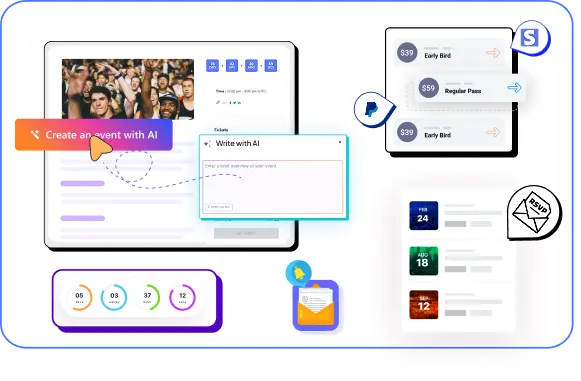
Create & manage events easily with Eventin event manager.
- ✅ Sell tickets
- ✅ Track attendees
- ✅ Automate reminders
🎯 Quick Summary
This guide explains how to run events on WordPress in 2026—from choosing the right setup to launching your first event with Eventin, and comparing WordPress with SaaS platforms like Eventbrite.
- What is WordPress event management?
- Why WordPress is a practical alternative to SaaS tools
- Event types you can run: physical, virtual, hybrid, recurring, and multi-day events
- The full setup stack: hosting, theme, payments, and the right event plugin
- Step-by-step event setup using Eventin
- Where Eventin fits best: ticketing, QR check-in, automation, analytics, and integrations
- Cost comparison vs Eventbrite + long-term savings for high-volume events

What is WordPress Event Management in 2026?
WordPress event management means using WordPress to create, promote, and manage events directly from your own website. Instead of relying on external platforms, you control everything from one place, including event listings, registration, attendees, and communication.
You can sell tickets on WordPress, accept payments, and even use QR code event check-in WordPress tools for on-site validation. With the best WordPress event management plugin, you can manage events on WordPress for physical, virtual, hybrid, or recurring events while keeping full control over branding, data, and costs.
Why Use WordPress for Event Management Instead of SaaS?
Many organizers begin with SaaS platforms because they are easy to use. You sign up, publish an event, and begin selling tickets. It works at first, but limits appear over time.
When comparing WordPress vs SaaS event platforms, the key difference lies in ownership. With SaaS, you rent the system, follow their rules, accept limited branding options, and often pay per-ticket fees while your attendee data stays on their platform.
Running events on WordPress is different. Your website becomes the main hub where you control design, content, data, and payments, without mandatory platform commissions beyond standard transaction fees.
Here’s some other reason to use WordPress over SaaS:
Cost Efficiency vs SaaS Platforms
SaaS platforms often charge per-ticket service fees that increase as sales grow. When you manage events on WordPress, your main costs are hosting and plugin licenses. There are no required platform commissions, which makes it a practical alternative to SaaS.
Flexibility and Customization
SaaS tools offer limited templates and fixed structures. With WordPress, you can create an event website WordPress users can fully customize, add integrations, and connect tools like WooCommerce event tickets for advanced features.
SEO Benefits for Event Promotion
WordPress event management supports long-term search visibility because your event pages live on your own domain. This helps you rank for local searches, event keywords, and recurring events more effectively than SaaS-hosted pages.
Scalability for Growing Events
As your events expand, you can add features like tiered tickets, speaker management, or QR code event check-in WordPress tools. A strong event management plugin allows you to scale without moving to another platform.
Types of Events You Can Run on WordPress
One of the biggest advantages of running events on WordPress is flexibility. You are not limited to one format. Even with a free event management plugin, you can organize different types of events from a single website.
- Physical events: You can manage in-person conferences, meetups, workshops, or seminars. WordPress event registration and ticketing allow you to control capacity, pricing, and on-site verification using QR code event check-in WordPress tools.
- Virtual events: Online webinars, live classes, and digital conferences can be handled directly from your site. You can share meeting links securely and restrict access to registered attendees.
- Hybrid events: Hybrid events combine physical and virtual participation. With WordPress event management, you can create separate ticket types for in-person and online attendees while managing everything from one dashboard.
- Recurring events: If you host weekly classes, monthly sessions, or seasonal programs, recurring event functionality saves time. Instead of creating events manually each time, you can automate scheduling.
- Multi-Day conferences: For large events that span multiple days, you can manage sessions, speakers, and schedules clearly. WordPress event calendar plugin layouts help attendees navigate multi-day programs easily.
- Free community events: You can also create RSVP-based events without charging attendees. Even for free events, WordPress event registration helps you track participation and control attendance.
What You Need to Run Events on WordPress (Complete Stack)
Running events on WordPress requires more than just installing a plugin. You need a stable setup that supports performance, payments, and attendee management. Below is the basic stack required for reliable WordPress event management.
Hosting & Performance
Your hosting provider is the technical foundation of your event website. A fast and stable hosting environment ensures your pages load quickly, payments process without interruption, and users can complete WordPressevent registration with ticketing without errors. If you plan to sell tickets on WordPress, performance directly impacts conversions and user trust.
Theme
Your theme controls the layout and user experience of your event pages. It should be responsive, lightweight, and compatible with modern tools. A well-structured WordPress theme helps you clearly present event details, schedules, speaker information, and ticket pricing.
WordPress Event Management Plugin
To run events on WordPress, the most professional and flexible way is to use a dedicated event management plugin, such as Eventin. Eventin is a complete event management plugin for WordPress built to handle event creation, ticketing, payments, attendee tracking, and even QR code event check-in functionality in one system. Instead of combining multiple tools, Eventin provides everything needed to run and scale events directly from your WordPress website.
Ready to Start Running Events on WordPress?
Take full control of your event management with Eventin. Create events, manage registrations, sell tickets, and handle check-ins — all from your own WordPress website.
Get Started with EventinPayment Gateway Integration
To sell tickets on WordPress, you need secure payment processing. Most setups support Stripe, PayPal, or WooCommerce event tickets for advanced checkout workflows. Payment flexibility is one of the key reasons many organizers consider WordPress vs Eventbrite comparisons or other SaaS platforms and move toward self-hosted systems for better cost control.
How to Run an Event on WordPress with Eventin (Step-by-Step)
Let’s walk through how to run events on WordPress using Eventin, a WordPress event management plugin.
The process is simple and does not require coding skills.
Step 1: Install WordPress. Set up WordPress on your hosting and configure basic settings.
Step 2: Install Eventin. Install and activate the WordPress event management plugin from your dashboard.
Step 3: Create an Event. Follow the guided process and add your event title, date, time, location, and description. It will appear in your WordPress event calendar plugin layout.
Step 4: Add Tickets. Create free or paid tickets. Configure pricing and limits. You can also use WooCommerce event tickets if needed.
Step 5: Connect Payments. Integrate Stripe or PayPal to sell tickets on WordPress securely.
Step 6: Enable Registration. Activate WordPress event registration and confirmation emails.
Step 7: Publish. Publish the event and start promoting it.
Watch the video below for a complete walkthrough of the setup process.
Watch the Full Eventin Setup Walkthrough
Watch the video below for a complete walkthrough of the setup process.
How Eventin Shines as an SaaS Alternative
Many organizers compare WordPress vs SaaS event platforms before making a decision. SaaS tools are simple at first, but they often charge per-ticket fees and limit customization.
Eventin provides a self-hosted alternative to Eventbrite SaaS platform alike that runs fully on your WordPress site. You keep control of branding, attendee data, and pricing while avoiding ongoing platform commissions.
Here’s how we can compare SaaS vs Eventin:
Event Listings & Calendar Views
Eventin allows you to display events in calendar or list format. This makes browsing simple for visitors and keeps your events organized. A structured layout improves user experience and helps manage events on WordPress efficiently.
Registration & Ticketing System
Eventin includes built-in WordPress event registration and WordPress event ticketing tools. You can create free or paid tickets, set quantity limits, and define sale periods. This allows you to sell tickets on WordPress without relying on external platforms.
Attendee Management
All attendee information is stored inside your WordPress dashboard. You can view, manage, and export participant data at any time. This simplifies event management and supports future marketing efforts.
Speaker & Schedule Management
For conferences or multi-session events, Eventin allows you to create detailed speaker profiles and structured schedules. This keeps event information clear and easy to follow.
QR Code Check-in System
For in-person events, QR code event check-in WordPress functionality enables fast and accurate entry management. Each attendee receives a scannable ticket for verification at the venue.
Email Notifications & Automation
Eventin automatically sends confirmation emails after successful registration. You can also schedule reminders before the event date. This reduces manual communication and improves attendance rates.
Analytics & Reporting
Eventin provides detailed reporting to track ticket sales, registrations, and revenue. This helps you evaluate performance and plan future events.
AI Event Creation
Eventin also includes AI event creation tools. You can generate event titles, descriptions, image and structured content based on simple inputs. This saves time and helps maintain consistency across event pages.
Payment Gateway Integration
Eventin supports secure payment gateways such as Stripe and PayPal. You can also connect WooCommerce event tickets if you need advanced checkout features. Payments are processed directly on your website.
Advanced Event Management Features (For Growing Organizers)
- Multi-Vendor Event Marketplace: You can allow multiple organizers to create and manage events on the same platform while maintaining central control.
- Speaker and Organizer Profiles: Dedicated profile pages add structure and credibility to larger conferences.
- Seat Maps and Capacity Control: You can limit ticket quantities and manage seating capacity to prevent overbooking.
- Zoom and Google Meet Integration: For virtual or hybrid events, automatic meeting integration allows registered attendees to receive secure access links.
Event Cost Comparison: Eventin vs SaaS
Cost is one of the main reasons people compare WordPress vs SaaS event platforms. SaaS tools are easy to start with, but they often charge service fees, payment processing fees, and sometimes monthly subscriptions. Most platforms take a percentage per ticket, which increases as your sales grow.
In WordPress, this difference becomes clear since SaaS charges per-ticket fees on top of payment processing costs. That’s why running events on WordPress is different.
With Eventin, running events on WordPress works differently. Your main expenses are hosting, the Eventin license (if you decide to use the pro version), and standard payment gateway fees. There are no mandatory per-ticket platform commissions. This gives you full control over pricing, ticket structure, and overall revenue.
How to Save Time & Money with Eventin’s Free WordPress Event Plugin
Watch the full feature guide to see how Eventin helps you manage events on WordPress, reduce platform costs, and control ticketing without per-ticket fees.
Example Cost Breakdown
For illustration:
- SaaS platform: 3% to 5% service fee + payment processing fee per ticket
- WordPress setup: No platform fee, only payment processing fee
For high-volume events, the difference becomes noticeable. If you sell hundreds or thousands of tickets, avoiding per-ticket platform fees can result in significant savings.
Here is a clear side-by-side view of typical costs and fees when you use Eventin on WordPress vs Eventbrite (a common SaaS event platform).
Scenario
- Ticket price: $100
- Total tickets sold: 1,000
- Total revenue: $100,000
Using Eventbrite (Typical Pricing Model)
Eventbrite usually charges around:
- 3.7% + $1.79 per ticket (US standard pricing)
- Plus payment processing fees (often included in the above structure, depending on plan)
Per ticket fee estimate:
- 3.7% of $100 = $3.70
- $1.79 fixed fee
- = $5.49 per ticket
For 1,000 tickets:
- $5.49 × 1,000 = $5,490 in platform fees
This does not include optional add-ons or advanced feature upgrades.
Using Eventin (WordPress-Based Model)
With Eventin, running events on WordPress follows a different structure:
You pay for:
- Hosting
- Standard payment gateway fees (for example, WooCommerce, Stripe 2.9% + $0.30 per transaction in the US)
Per ticket payment processing estimate:
- 2.9% of $100 = $2.90
- $0.30 fixed fee (not charged by Eventin)
- = $3.20 per ticket
For 1,000 tickets:
$3.20 × 1,000 = $3,200 in processing fees for the payment gateway
Note: There are no mandatory per-ticket platform commissions beyond the payment gateway. Estimated savings with Eventin: $2,290
Long-Term Cost Control
Another important factor is scalability. With SaaS platforms, higher sales often mean higher fees. With WordPress event ticketing, your costs remain predictable. Hosting may need upgrades if traffic increases, but you are not charged based on ticket quantity.
For organizers looking for an alternative to Eventbrite or Whova, this cost structure is often a deciding factor.
WordPress allows you to sell tickets on WordPress under your own system, keep attendee data, and reduce recurring service fees. Over time, this model offers better financial control, especially for recurring or large-scale events.
Case Study Highlights of Eventin
To understand the real impact of running events on WordPress with Eventin, it helps to look at actual results from organizers who use the system in real situations.
Menos1 Cine (Local cinema event organizer)
Menos1 Cine, a local movie event organizer, moved from manual ticket handling to a fully digital process using Eventin. After the switch, they reported a 35% increase in advance ticket sales. They sold over 10,000 tickets, which was nearly three times higher than their previous manual process.
Their 82-seat theater achieved an 85% fill rate. They also saved more than 40 hours per week on administrative work and reduced last-minute issues by 30% thanks to automated confirmations and digital tickets.
You can read the full breakdown here: Eventin User Journey: A Local Cinema Theater’s Real Struggle-to-Success Story.
Suzuki Matsuri (Suzuki bike community event)
Suzuki Matsuri, a large bike community event, used Eventin to manage registrations for a free event. In a short time, they handled over 3,700 participants in a single edition, including 13 riding groups. Even though the event was free, they used the system to organize registrations efficiently and control attendance at scale.
Real User Testimonial & Experience with the WordPress Event Plugin
Watch how real users manage events on WordPress using Eventin and see how the plugin performs in practical scenarios.
FAQs About How to Run Events on WordPress
Can I sell tickets directly on WordPress?
An event ticketing plugin like Eventin allows you to sell tickets and collect payments directly through your website. You can accept payments through gateways like Stripe or PayPal and manage transactions directly from your dashboard.
Can WordPress handle large conferences?
Yes. With reliable hosting and a well-built WordPress event management plugin, you can manage large conferences, multiple ticket tiers, and high traffic volumes. Performance depends mostly on hosting and proper configuration.
How do I create a free RSVP event?
You can enable WordPress event registration without adding payment gateways. Simply create a free ticket type and allow users to register through a form.
Can I run virtual or hybrid events?
Yes. With Eventin, you can run virtual and hybrid events directly from your WordPress website. It supports integrations like Zoom and Google Meet, allowing you to manage both online and in-person attendees from one system.
What is the best event management plugin for WordPress?
Eventin is one of the best WordPress event management plugins. It supports event creation, ticketing, payments, attendee management, calendar views, and advanced features in a single system.
How do I avoid per-ticket fees?
By running events on WordPress, you avoid platform service fees. You only pay standard payment gateway transaction fees, which makes it a cost-effective alternative to Eventbrite.
What is the best free event plugin for WordPress?
Eventin is one of the best free event plugins for WordPress. The free version allows you to create events, manage basic registrations, and display events on your website. If you need advanced WordPress event ticketing, payment integration, and automation features, you can upgrade to the premium version.
Final Thoughts: Start Running Events on WordPress with Eventin
Running events on WordPress gives you full control over your website, data, and revenue. Unlike many SaaS tools, you are not locked into per-ticket platform fees or limited branding options.
With the right WordPress event management plugin, you can manage events on WordPress, handle WordPress event registration, set up event ticketing, and even use QR code event check-in WordPress tools from one system.
If you are looking for a practical SaaS event alternative, Eventin stands out as a complete solution. It combines event creation, ticketing, payments, attendee management, and advanced features in one platform.
With Eventin, you can sell tickets on WordPress and scale your events without switching systems.
Start Running Events on WordPress Today
Create your event website, manage registrations, and sell tickets on WordPress without per-ticket platform fees. Keep full control of your event system with Eventin.