7 Best WordPress Event Ticket Plugins Compared in 2026



Table of Contents
The best WordPress event ticket plugin depends on your checkout, ticket types, attendee workflow, and check-in needs. Eventin is the strongest all-in-one option, while FooEvents suits WooCommerce stores and Tickera is designed for ticket-focused sales and check-in.
A WordPress event ticket plugin lets you create tickets, collect payments or RSVPs, manage attendee information, deliver digital tickets, and check guests in from your website. Some plugins include these features directly, while others depend on WooCommerce or premium add-ons.
In this guide, we compare seven WordPress event ticket plugins by features, pricing, flexibility, and best use cases.
Ready to run smoother events?

Create & manage events easily with Eventin event manager.
- ✅ Sell tickets
- ✅ Track attendees
- ✅ Automate reminders

Top Event Ticket Plugin for WordPress Comparison
| Event Ticketing Plugin | Best for | Ticket template Builder | Free version for ticketing |
| Eventin | Organizations seeking comprehensive ticketing solutions with AI features | ✅ | ✅ |
| The Events Calendar | Versatile event management solution with basic ticketing capabilities | ❌ | ✅ |
| Amelia | Businesses seeking an event booking system with customizable ticketing forms | ❌ | ❌ |
| EventOn | Visually rich event calendars | ❌ | ❌ |
| Events Manager | Businesses looking for flexible event registration and booking with ticketing options | ❌ | ✅ |
| Modern Events Calendar | Feature-rich events with ticketing and booking options | ❌ | ❌ |
| Foo Events | WooCommerce-based ticket sales | ❌ | ❌ |
*Prices are based on official pricing information available at the time of writing. Plans, renewals, add-ons, and promotional prices can change.
What Should You Compare Before Choosing an Event Ticket Plugin?
A WordPress event ticket plugin becomes useful when you need more than a basic registration form. It can help you create multiple ticket types, manage capacity, collect payments, deliver digital tickets, organize attendee information, and check guests in. The right choice depends on which features are included and which require paid add-ons.
Before choosing one, compare:
- Ticket types, including free, paid, VIP, early-bird, group, and limited-capacity tickets
- Payment options, such as Stripe, PayPal, WooCommerce, or built-in checkout
- Ticket delivery through email, PDF, HTML, QR codes, or barcodes
- Attendee management, custom fields, exports, confirmations, and reminders
- Support for recurring, multi-day, online, hybrid, and in-person events
- The total cost of the core plugin, add-ons, payment processing, and renewals
- Compatibility with your WordPress theme, page builder, WooCommerce store, and email tools
A low-cost plugin may become more expensive after adding payment gateways, ticketing extensions, check-in tools, or recurring-event support. Always calculate the complete cost of the workflow you need.
Want to Sell Event Tickets From Your WordPress Site?
Eventin gives you a complete WordPress event ticketing plugin to create events, sell tickets, manage attendees, and accept payments without relying on third-party platforms.
Get Started with EventinHow We Tested These WordPress Event Ticketing Plugins
We compared these plugins using their official feature documentation, pricing pages, and plugin listings.
The comparison considered:
- Ticket creation and pricing controls
- Free and paid event support
- Payment integrations
- WooCommerce compatibility
- QR code, barcode, or mobile check-in
- Attendee management and registration fields
- Recurring and multi-day event support
- Online and hybrid event features
- Ease of use and setup requirements
- Free-plan limits and paid add-ons
We also considered whether ticketing is included in the main plugin or requires a separate extension.
We also paid close attention to usability. We looked at how easy it was to set up events, adjust settings, and manage tickets without extra steps. This helped us identify which tools work as a complete WordPress event ticket system and which ones need add-ons or workarounds.
Best WordPress Event Ticket Plugins (Compared)
Let’s see how each plugin handles ticket sales, event setup, payments, and attendee management.
Eventin
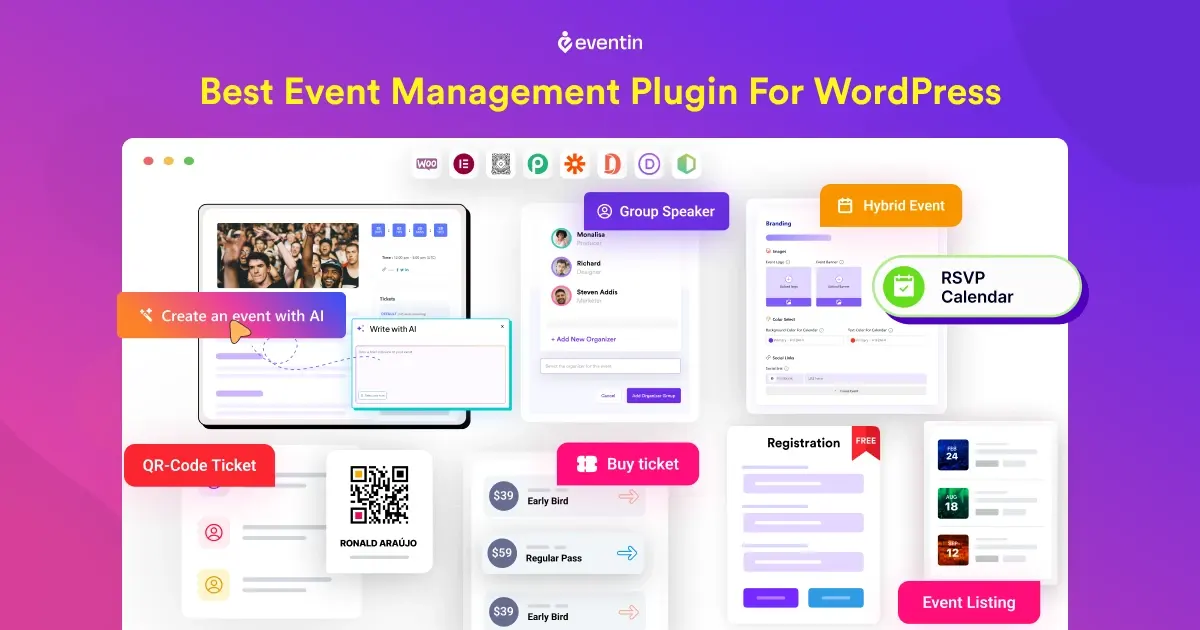
Eventin is an all-in-one WordPress event ticketing and management plugin. It lets you create events, add ticket types, collect registrations, accept payments, manage attendees, and check in guests from one WordPress dashboard.
Eventin supports free and paid events, recurring events, online events, hybrid events, conferences, workshops, webinars, and community programs.
Key Features
- Create free, paid, VIP, early-bird, and group tickets
- Add ticket limits, prices, and availability dates
- Support Stripe, PayPal, WooCommerce, SureCart, and other payment workflows depending on configuration
- Manage attendees and registration details
- Generate QR codes for attendee check-in
- Send confirmation emails and ticket information
- Add speakers, organizers, venues, and event schedules
- Support recurring and multi-session eventsAdd custom registration fields
- Connect with online meeting and calendar tools
- Use templates for event pages, tickets, and certificates
- Integrate with popular WordPress page builders
What We Liked Most
Eventin combines event creation, ticketing, payment collection, attendee management, and check-in in one plugin. This makes it suitable for organizations that want to manage the complete ticketing workflow without assembling several unrelated tools.
The plugin’s pricing model does not add a platform commission to each ticket, although payment providers may still charge their own processing fees.
What are the Cons
Some advanced features, payment integrations, templates, and automation options depend on the Eventin plan and configuration. Users who only need a basic RSVP form may find the complete event-management interface broader than necessary.
Pricing
Pro starts at $89/year for a single site incluing all the features.
Best For
Businesses, conference organizers, event agencies, training providers, webinar hosts, and organizations that need ticketing, payments, attendee management, and check-in in one WordPress plugin.
For a detailed look at its product features, explore this WordPress event ticketing solution.
Want to Sell Event Tickets From Your WordPress Site?
Watch how you can set up your event ticket system, automate registrations, and manage everything from one place:
Event Tickets by The Events Calendar
Event Tickets is a WordPress plugin for creating RSVPs and selling tickets. It can work on its own or alongside The Events Calendar.
This makes it a practical choice for websites that want to add basic registration or ticket sales without immediately adopting a complete event-management platform.
Key Features
- Monthly calendar and list views
- Support for single or recurring events
- Integration with Event Tickets add-on for selling tickets
- Works with WooCommerce and Easy Digital Downloads
- Google Maps and venue management
- Filter and search features for users
What We Liked Most
Event Tickets provides a relatively simple starting point for organizations that need event registration or basic ticket sales. The free plugin is useful for simple events, free RSVPs, and websites already using The Events Calendar ecosystem.
What are the Cons
Advanced ticketing features may require Event Tickets Plus, The Events Calendar, WooCommerce, or other paid extensions. The total setup can become more complex when you need advanced payment workflows, custom fields, recurring events, or enhanced attendee management.
Pricing
Pro version starts at $259/year
Tickera
Tickera is a ticket-focused WordPress plugin designed for selling event tickets and checking in attendees.
It focuses more directly on the ticketing workflow than general event-calendar plugins. You can create tickets, deliver them to attendees, scan QR codes or barcodes, and manage entry using the Checkinera mobile apps.
Key Features
- Sell free and paid event ticketsCreate multiple ticket types
- Send PDF tickets to attendeesGenerate QR codes and barcodes
- Check in attendees using mobile devices
- Use the Checkinera mobile check-in apps
- Connect with multiple payment gateways
- Manage ticket sales and attendee information
- Support event ticketing without a platform commission
- Extend functionality with additional add-ons
What We Liked Most
Tickera is a strong option when ticket sales and event entry are the main priorities. Its ticket delivery and check-in features make it suitable for conferences, concerts, workshops, venues, and other events where staff need to verify admission quickly.
Limitations
The free version is limited, and many payment gateways or advanced workflows may require paid add-ons. Users who need a complete event calendar, extensive speaker management, or broad event-marketing tools may need additional plugins.
Pricing
Tickera offers a free version through WordPress.org. Paid plans currently include a Standard plan from approximately $149 for the first year, with higher bundles and lifetime options available. Check the current Tickera pricing page for updated costs and included add-ons.
Best For: Conference organizers, venues, concert promoters, training providers, and businesses that need focused ticket sales and mobile attendee check-in.
EventOn
EventON is a visually focused WordPress event calendar plugin for creating customizable event listings, recurring events, virtual events, and hybrid event schedules.
Its main strength is event presentation. You can display events in tile, list, schedule, and calendar layouts, then extend the plugin with ticketing, RSVP, QR code, seating, booking, and dynamic-pricing add-ons.
Key Features
- Single-day and multi-day event support
- Custom event colors and featured images
- Event location and organizer details
- Countdown timers and event highlights
- WooCommerce integration via add-ons for ticket sales
- RSVP and booking support through extensions
- Shortcodes for embedding events anywhere
What We Liked Most
EventON is a strong choice for websites where the visual event calendar is as important as ticketing. Its customizable event cards, filtering tools, recurring-event support, and multiple display layouts make it suitable for event directories, schools, nonprofits, venues, communities, and businesses.
The add-on system also allows you to add ticket sales, RSVP registration, QR check-in, seating, and booking features as your event requirements grow.
What are the Cons
EventON Lite is primarily designed for creating and displaying events. Advanced ticketing features such as ticket inventory, ticket variations, QR codes, seating, and dynamic pricing require the full version and relevant premium add-ons.
The Event Tickets add-on uses WooCommerce for ticket sales, so the complete setup may require more configuration than an all-in-one ticketing plugin. The total cost can also increase when you add multiple extensions.
Pricing
EventON Lite is available for free. The premium EventON Full license currently starts at approximately $30 as a one-time purchase, while ticketing, RSVP, QR code, seating, and other add-ons are priced separately.
EventON add-ons are generally licensed separately and may use yearly billing. Check the current EventON Full pricing and add-on bundle options before purchasing.
Events Manager
Events Manager is a flexible WordPress event and booking plugin. It supports event creation, recurring events, venues, booking forms, attendee limits, and ticket pricing.
The plugin is useful for websites that need more control over event schedules and booking rules than a basic calendar plugin provides.
Key Features
- Single and recurring events
- Booking management with an approval system
- Custom event attributes and tags
- Integration with Google Maps
- BuddyPress support for user profiles
- Shortcodes and widgets for displaying events
What We Liked Most
Events Manager provides a flexible foundation for recurring events, community programs, classes, meetups, and organizations with more detailed booking requirements.
The free version supports a broad range of core event features, making it useful for websites that want to begin without committing to a premium ticketing platform.
What are the Cons
Advanced payment, ticketing, and commerce workflows may require Pro features or separate add-ons. The large number of settings can also take longer to configure than a simpler RSVP plugin.
Pricing
Events Manager has a free core version. Pro plans currently start at approximately $99 per year, while Pro Plus plans with additional add-ons start at approximately $129 per year. Check the current Events Manager pricing page for plan details.
Best For
Community organizations, clubs, recurring event hosts, meetup organizers, schools, and advanced WordPress users who need flexible booking controls.
Modern Events Calendar
Modern Events Calendar is a WordPress event calendar and booking plugin with multiple layouts, recurring-event support, registration features, and ticketing options.
Its main strength is event presentation. It is suitable for websites that want to display events in calendar, list, grid, agenda, or other visual formats while also supporting bookings and ticket sales.
Key Features
- Event booking and ticketing system
- Support for single, recurring, and multi-day events
- Frontend event submission forms
- WooCommerce integration for payments
- Google Calendar and iCal sync
- Zoom and virtual event support
- Customizable event layouts and skins
What We Liked Most
Modern Events Calendar gives event-focused websites a wide range of display options. It works well when the calendar itself is an important part of the user experience.
The plugin can support different event types, including workshops, classes, conferences, concerts, meetups, and webinars.
What are the Cons
Advanced booking, payment, and ticketing functions may require the Pro version or additional extensions. Websites that only need ticket sales may find the calendar features more extensive than necessary.
Pricing
Modern Events Calendar offers a free Lite version. The Pro version currently starts at approximately $99 per year, although pricing and included features may change. Review the current Modern Events Calendar comparison page before choosing a plan.
Best For
Conference organizers, schools, workshop providers, concert organizers, event directories, and businesses that want advanced calendar layouts alongside ticketing features.
Foo Events
FooEvents adds event ticketing to WooCommerce. It uses WooCommerce products, checkout, payment gateways, taxes, coupons, orders, and customer records to manage ticket sales.
Because it is built around WooCommerce, FooEvents is particularly useful for online stores that already use WooCommerce for selling products.
Key Features
- Automatic ticket generation with PDF or email delivery
- QR code–based check-in using the FooEvents mobile app
- Attendee management inside the WordPress dashboard
- Support for in-person, virtual, and hybrid events
- Custom ticket fields for collecting attendee information
- Seat selection and multi-day event support (add-ons)
- Works with most WooCommerce payment gateways
What We Liked Most
FooEvents fits naturally into an existing WooCommerce store. Store owners can use familiar order management, payment, tax, coupon, and inventory tools instead of learning a separate ticketing checkout system.
What are the Cons
WooCommerce is required, which adds another system to install and maintain. The total cost can also increase when you need bookings, seating, multi-day events, or other premium extensions.
FooEvents may be more than you need if you only want a simple RSVP form or a small free event.
Pricing
FooEvents does not offer a free core version. Current paid bundles include options such as the Basic Bundle from approximately $399, with higher-priced bundles for bookings, premium features, or point-of-sale functionality. Review the current FooEvents pricing page before purchasing.
Best For
WooCommerce store owners, online businesses, training providers, schools, and organizations that want event tickets to use their existing WooCommerce checkout.
Which WordPress Event Ticket Plugin Is Best for Each Need?
| Requirement | Best Fit | Why |
|---|---|---|
| Complete event ticketing system | Eventin | Combines tickets, payments, attendee management, and check-in |
| Simple RSVP or free ticketing | Event Tickets | Offers a straightforward free starting point |
| Ticket-first sales and check-in | Tickera | Focuses on ticket delivery, QR codes, and entry management |
| WooCommerce ticket sales | FooEvents | Uses WooCommerce products, checkout, orders, and gateways |
| Recurring events and flexible bookings | Events Manager | Provides detailed booking and schedule controls |
| Visual calendar and event layouts | Modern Events Calendar | Offers multiple calendar and event-display formats |
| Modular event listings | WP Event Manager | Adds registration and ticketing through extensions |
There is no universal winner for every event website. The right choice depends on whether your priority is ticket sales, event calendars, WooCommerce checkout, recurring bookings, attendee check-in, or a complete event-management workflow.
WordPress vs SaaS Event Ticketing Platforms
Choosing between a WordPress event ticket plugin and a SaaS ticketing platform depends on how much control you want over ticket sales, payments, branding, and attendee data.
| Comparison Point | WordPress Event Ticket Plugin | SaaS Event Ticketing Platform |
|---|---|---|
| Ticket Sales Control | You sell tickets directly from your own WordPress website. | Tickets are usually sold through the platform’s hosted system. |
| Platform Fees | You can avoid extra platform commissions and keep more revenue. | Many platforms charge service fees, ticket fees, or transaction-based costs. |
| Branding | You control the event page design, checkout flow, and customer experience. | Branding is often limited by the platform’s layout and rules. |
| Payment Options | You can use WooCommerce-supported gateways like Stripe, PayPal, and local payments. | You must use the payment options supported by the SaaS platform. |
| Attendee Data | You keep attendee and customer data inside your own website system. | Your data stays inside the platform’s system, with limited control. |
| Customization | You can customize event pages, ticket types, checkout, and integrations. | Customization depends on the platform plan and available settings. |
| Best For | Businesses that want full control over event ticketing in WordPress. | Users who want a hosted tool and do not need full website control. |
If you want more control over ticket sales, payments, branding, and attendee data, a WordPress event ticketing plugin like Eventin is a better long-term choice than relying only on a SaaS event platform.
FAQs about WordPress Ticket Plugin
What is the best event ticket plugin for WordPress?
Eventin is the best WordPress event ticket plugin if you want a complete, all-in-one solution. It lets you handle ticketing, RSVPs, event scheduling, and front-end submissions from one place, without paying any commission fees.
Can I sell tickets directly from my WordPress website?
Yes! With plugins like Eventin, Tickera, or Event Tickets by The Events Calendar, you can sell tickets directly from your WordPress site using payment gateways like PayPal or Stripe.
Is it possible to manage RSVPs and guest check-ins?
Absolutely. Many WordPress ticket plugins offer RSVP management, attendee lists, and even QR code check-ins. Eventin supports all these features right out of the box.
Can I customize the ticket layout and design?
Yes. Some plugins offer ticket layout customization. With Eventin, for example, you can personalize event pages and ticket designs using Elementor and shortcodes.
How do I track event sales and attendees?
Most premium plugins offer built-in analytics dashboards. Eventin, for instance, includes detailed reports on ticket sales, event attendance, and customer data.
Which One Is the Best Ticketing Solution for Your Business?
Choosing the right WordPress plugin for event ticketing depends on what kind of events you run and what features matter most to you.
If you want an all-in-one solution inside WordPress, Eventin is the most balanced option. It works as a complete WordPress event ticket system and covers event creation, ticket sales, registration, and attendee management without relying on many add-ons. It is also a good choice if you want to start with a free WordPress event plugin and upgrade later.
If your main focus is event content and calendar display, The Events Calendar works well. It is better suited for publishing events first, then adding ticketing through paid extensions when needed. If your events are appointment-style or time-based, Amelia is a better fit than traditional ticketing plugins. I
If visual design is your top concern, EventOn stands out. It’s best for showcasing events in a modern, engaging way, with ticketing added through WooCommerce or extensions. If you need flexible booking and registration control, Events Manager is a solid option.
If you want a feature-rich event plugin with built-in booking, Modern Events Calendar strikes a good balance between design and functionality. For WooCommerce-based businesses, FooEvents is the most direct solution.
Choosing the right plugin comes down to your event size, budget, and how much control you want inside WordPress.