10 Common Event Management Challenges in 2026 (and How to Solve Them)


PheedLoop analyzed check-in data from more than 1,070 live events. It found a median no-show rate of about 20%. That means roughly one in five expected attendees did not check in.
Rising catering costs, vendor delays, and small teams make event planning harder. Common event management challenges in 2026 include rising costs, tight deadlines, vendor coordination, low attendee engagement, disconnected tools, last-minute risks, logistics and no-shows, weak promotion, hybrid events, and proving ROI. Many of these problems get worse without a clear process and reliable data.
This guide explains why these problems happen and how to handle them. It also shows how Eventin, our WordPress event management plugin, can help you manage tickets, email attendees, and review event reports on your own website.
Ready to run smoother events?
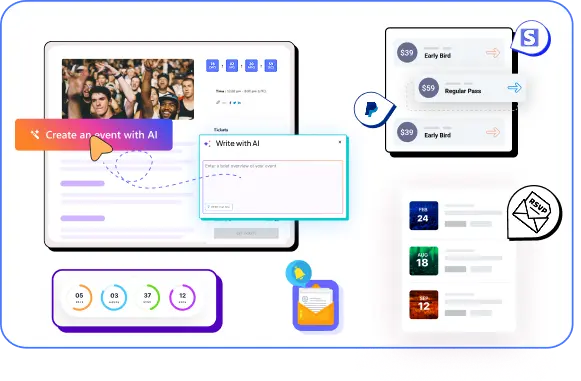
Create & manage events easily with Eventin event manager.
- ✅ Sell tickets
- ✅ Track attendees
- ✅ Automate reminders
Table of Contents
Event Management Challenges and Solutions at a Glance
Each challenge below has one main cause and a quick fix. Find your biggest problem in the table, then read its section for the supporting data, step-by-step solutions and how a WordPress event plugin helps.
| Challenge | Main cause | Quick fix |
|---|---|---|
| Budget overruns and rising costs | Travel, lodging and food and beverage prices rise faster than budgets | Line-item budget with a 10 to 15% contingency |
| Time management and tight deadlines | Small teams and underestimated task times | Plan backward from the event date with buffers |
| Vendor and stakeholder coordination | Agreements scattered across emails and calls | Written contracts and one shared run sheet |
| Low attendee engagement | Long lectures and unstructured breaks | Interactive sessions and planned networking |
| Technology integration problems | Tools bought one at a time for one problem | One central platform, connected through integrations |
| Risk management and weather | Teams react at the last minute instead of planning | Written contingency plan with clear triggers |
| Logistics, check-in and no-shows | Not knowing who will actually show up | Reminders, waitlist and QR check-in |
| Event promotion and registration drop-off | Same message everywhere and long registration forms | Two or three targeted channels and a short form |
| Hybrid and virtual event delivery | Two audiences to serve on one budget | Choose the format by event goal |
| Measuring event success and ROI | Goals and tracking set after the event | Set KPIs before launch and tag every lead source |
10 Common Event Management Challenges and How to Fix Them
Even well-planned events run into trouble. We have heard from event organizers for years, and the same problems keep coming back, from tight budgets to empty seats.
Some of them start long before event day. That is often the case when you start an event management business from home, where one person handles everything.
1. Budget overruns and rising costs
Event budgets break because costs rise faster than plans. The fix is a line-item budget with a protected reserve and earlier ticket sales.
Cost is the challenge planners name most often. In the American Express GBT 2026 Global Meetings and Events Forecast, 38% of 601 planners called it their biggest challenge, as reported by Associations Now. EventsAir’s State of Events 2026 found 61% of its 380+ respondents list budget constraints among their top challenges. In the Cvent and Northstar PULSE survey, planners pointed to rising travel and lodging (78%) and food and beverage (69%) prices.
What to do:
- Budget every line (venue, F&B, AV, staff, marketing, tech) before you sign anything
- Keep a 10 to 15% contingency that needs approval to spend
- Open an early bird tier, which can bring in revenue sooner
- If you must cut, drop low-impact extras before content or networking
🚀 Good Read: How to make your event as successful as possible with AI-powered event automation: Read more →
2. Time management and tight deadlines
Timelines slip because small teams carry the whole workload and people underestimate how long tasks take. Plan backward from the event date, with buffers and one owner per task.
Bizzabo’s 2026 benchmark data shows 45% of event teams have just one to three people. The other cause is a general human bias called the planning fallacy, which psychologist Roger Buehler has studied since the 1990s: we expect the next project to go faster, even when similar ones ran late.
What to do:
- Lock venue, speakers and ticket launch dates first, then work backward
- Add extra time to every task that depends on someone outside your team
- Name one owner per task
- Automate anything you repeat, such as confirmations and reminders
3. Vendor and stakeholder coordination
Vendor problems usually start with unclear agreements, not bad vendors. Written contracts and one shared run sheet prevent most of them.
The risk is highest with your largest suppliers. In PCMA Convene’s 32nd Meetings Market Survey, planners expected food and beverage (65%) and audiovisual (58%) to be their biggest expenses, so a mistake there costs more. Contracts are also getting stricter: half of planners in the PULSE survey reported less flexible contract terms.
What to do:
- Put scope, delivery times, payment schedule and cancellation terms in writing
- Keep one run sheet with every vendor’s contact and arrival time
- Review the run sheet with all vendors 48 to 72 hours before the event
- Name one point of contact for event day
💡 Good Read: Learn how to write a winning event proposal that secures clients and builds stronger vendor partnerships: Read more →
4. Low attendee engagement
Attendees lose interest when they only sit and listen. Engagement improves when you add interaction and plan networking instead of leaving it to chance.
EventsAir found 74% of respondents see engagement as a key success factor, yet 39% list it among their biggest challenges. Networking is the weak spot: only 15% of organizers in Bizzabo’s research rate theirs as very effective. In the AmEx GBT forecast, interactive sessions were the top engagement priority (42%).
What to do:
- Turn some talks into workshops, Q&A or small-group sessions
- Put networking on the agenda as its own slot, and match people by shared interests
- Start conversations before the event and continue them after
5. Technology integration problems
Integration breaks down when tickets, email and CRM sit in separate tools, so data gets copied by hand. One central platform with working integrations removes most of that work.
EventsAir found 25% of planners still struggle with technology integration, citing fragmented systems, budget limits and implementation complexity.
What to do:
- List every tool you use and the data that moves between them
- Pick one platform for events, tickets and attendees
- Connect the rest through native integrations instead of spreadsheets
- Before launch, test the full attendee path yourself: register, pay, receive the ticket and check in
6. Risk management and weather
You cannot remove risks like bad weather or a speaker cancellation, but you can prepare for them. A written contingency plan with clear triggers lets you decide fast.
Many of these calls happen late. A May 2026 DTN study, run with the Event Safety Alliance and crowd management groups, found more than 90% of weather-related decisions are made within 48 hours of an event, and nearly one-third while it is running. Only about one-third of respondents felt highly confident reading forecasts.
What to do:
- Agree on what triggers a change, who makes the call and how attendees will hear about it
- Check insurance and vendor cancellation clauses before signing
- Keep a backup speaker or session ready
- Draft the attendee update message in advance
7. Logistics, check-in and no-shows
Empty seats and long queues come from the same gap: not knowing who will actually arrive. Reminders, a waitlist and fast check-in close most of it.
The overall median is about 20%, as noted above, but pricing makes a clear difference. In PheedLoop’s Event Data Lab report, the median no-show rate, measured against expected attendees, was about 28% for free events and 17% for paid ones. Small events with 10 to 49 expected attendees had the highest median, at about 32%.
What to do:
- Send reminders a week, a day and a few hours before the event
- For free events, consider a small refundable deposit
- Overbook only if past attendance supports it, and never beyond venue capacity
- Use a waitlist and scan tickets at the door
8. Event promotion and registration drop-off
Promotion fails when the message is generic or registration loses people halfway. Use a few channels your audience already trusts, lead with what they get, and keep sign-up quick.
In Bizzabo’s own platform benchmarks, dynamic registration flows that adapt to each attendee converted at 24.4%, compared with 11.6% for static flows. It is one platform’s data, not a universal rate, but the gap is worth testing. Planners in PCMA’s survey named LinkedIn (88%) and newsletters (70%) as their favorite digital channels.
What to do:
- Focus on two or three channels your audience already uses
- Open with the outcome: what people will learn or who they will meet
- Ask only for the details you need to run the event
- Use real deadlines, such as an early bird end date
- Track which channel brings each registration and invest more in the ones that work
9. Hybrid and virtual event delivery
Hybrid is hard because you serve two audiences with one budget and one team. Choose the format by your goal before adding a stream.
Fully hybrid events are less common than the buzz suggests. On Bizzabo’s platform, 63% of events are in-person, 33% virtual and only 4% hybrid. A separate PCMA survey asked a different question: 44% of planners ran fully in-person events, while 34% streamed part of the program live.
What to do:
- Choose in-person when networking is the goal and virtual when reach is
- If you go hybrid, give remote attendees their own host, chat and Q&A
- Record sessions and offer them on demand afterward
10. Measuring event success and ROI
Teams struggle to prove ROI when they decide what to measure after the event. Set KPIs and tracking before registration opens.
In Outcomes Rocket’s 2026 survey of 841 B2B professionals, reported by Demand Gen Report, 68.9% had given leadership an event ROI figure they were not confident in, and only 39.2% tag every conference lead to its source. A Cvent and Censuswide survey of 901 marketers and event professionals found nine in ten face high scrutiny on event returns.
What to do:
- Choose two or three KPIs before launch, such as revenue, attendance rate, leads or satisfaction
- Tag every registration source with UTM links
- Send a short survey within 24 hours
- For B2B pipeline, agree on how leads are credited (first touch, last touch or shared) before the event, and keep pipeline separate from revenue
How to Solve These Event Management Problems with Eventin
Eventin is a WordPress event management plugin that handles the attendee side of an event: event pages, registration, tickets, reminders, check-in and attendee data. It helps most with no-shows, registration drop-off, disconnected tools and manual follow-up. It does not replace your budget sheet, vendor contracts or a full ROI system, so use it for the attendee workflow and export or sync the data your team needs elsewhere.
Step 1: Set up the event, tickets and capacity
Helps with: budget overruns, no-shows, registration drop-off
Go to Eventin → Events → Add New and add the date, time zone, venue or online details, speakers, organizers and schedule. Pick an event page template, keep the registration form to the fields you need, and add FAQs for practical questions.
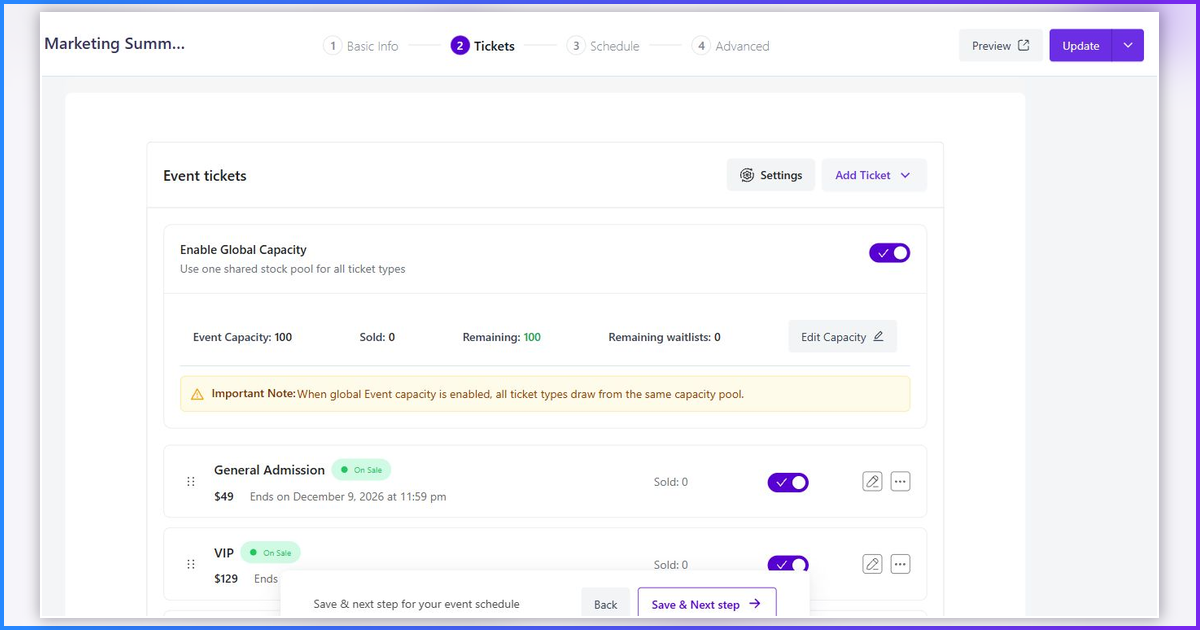
In the Tickets step, create ticket types and sale periods, set the event capacity, and turn on a waitlist to collect interest after tickets sell out. For reserved seating, use the seat map and checkout timer where your Eventin plan includes them. Payments run through WooCommerce, FluentCart, SureCart or offline payment, with Stripe, PayPal and Razorpay in Pro, which makes Eventin a complete WordPress event ticketing plugin that lets you sell event tickets online from your own site.
A 100-seat workshop, for example, can offer a limited early bird ticket followed by a standard ticket. Eventin tracks sales and remaining seats, while venue, food, AV and staffing costs stay in your budget sheet.
Step 2: Automate confirmations, reminders and updates
Helps with: time management, risk and weather, no-shows
Purchase and RSVP confirmation emails send attendees the event details right after they register. With the automation builder, you can set up a simple flow: ticket purchase → confirmation email → one-day delay → reminder email.
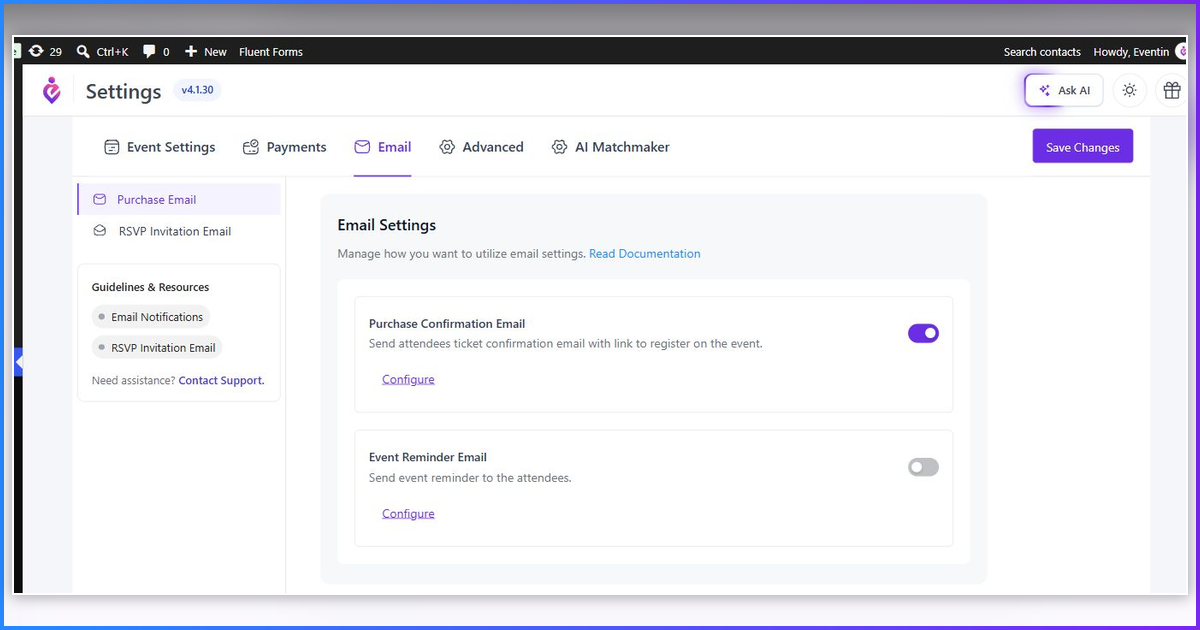
If the schedule or venue changes, use Send Email to All Attendees from the event actions. SMS and WhatsApp messages need the related integrations, and WhatsApp flows also need approved templates.
Step 3: Check in attendees and follow up with data
Helps with: check-in, engagement, disconnected tools, ROI
At the venue, use the attendee list and QR ticket scanner (Pro) to validate tickets and mark arrivals. After the event, review booking, RSVP, sales and check-in reports, export attendee data as CSV or JSON, or send registration details to a connected CRM for follow-up. Eventin gives you the attendance and sales inputs, but you still need event costs and downstream sales data to calculate ROI.
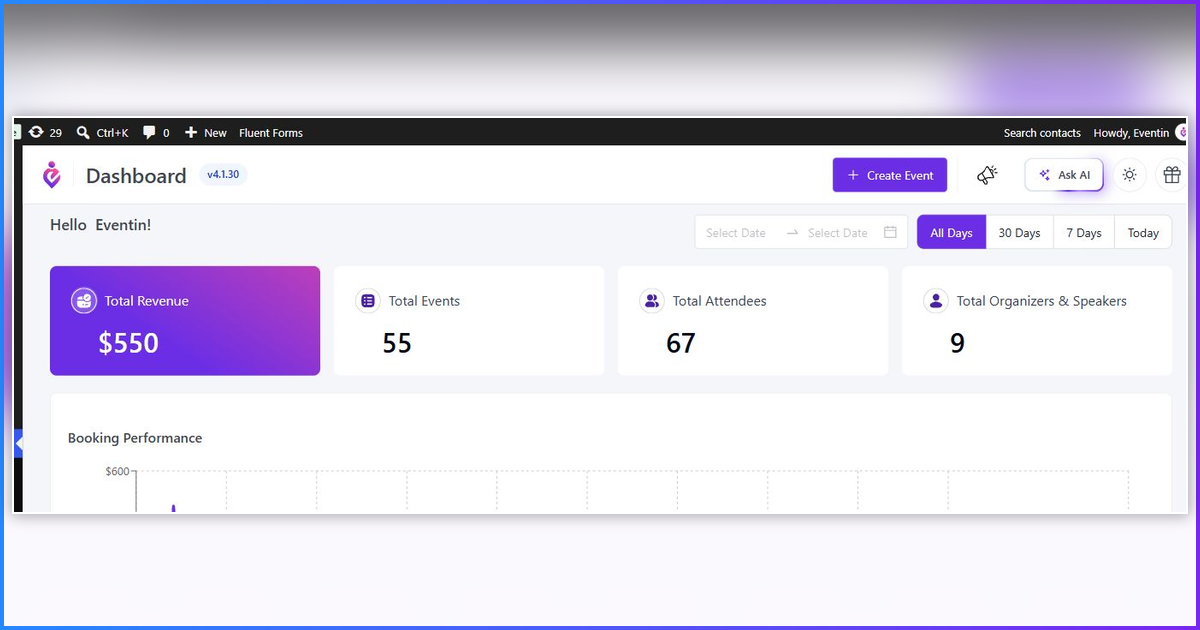
For networking, Eventin’s AI event matchmaking recommends attendee connections and shares contact details only after a request is accepted (requires Eventin Pro, the AI Matchmaker add-on and Pinecone setup). For training events, Pro certificates can go to all attendees or only those who checked in.
Real ways organizers use Eventin
- Sold-out paid workshop: Cap tickets, set an early bird end date and enable a waitlist. Send confirmations and reminders, scan tickets at the door, and send a payment link to the next waitlisted person when a seat opens.
- Hybrid product training: Create one event with venue and virtual meeting details, then send certificates only to checked-in participants (Pro).
- Weekly community session: Use a recurring schedule in the event calendar instead of rebuilding each date, reuse the page and ticket setup, and check RSVP and attendance reports after each session.
- Sponsor-focused conference: Ask for company, role and interests at registration, send attendee details to your CRM, and use matchmaker profiles for networking. Track sponsor leads and pipeline in the CRM, since Eventin does not calculate those outcomes.
Results from real users: Menos1 Cine, an 82-seat theater, sold 10,000+ tickets with Eventin, reached 85% seat fill and grew advance sales by 35% (read the full story). Suzuki Matsuri, a free bike community event, managed registrations for 3,700+ participants across 13 riding groups.
Eventin holds a 4.7 rating from 416 reviews on WordPress.org. You can start with the free version and add Pro features as your events grow.
FAQs Regarding Event Planning Challenges and Solutions
What are the 5 C’s of event management?
The 5 C’s are Concept, Coordination, Control, Culmination and Close-out. Concept defines the event’s purpose, audience, place and date. Coordination covers planning the budget, venue, vendors and timeline. Control keeps the event on plan and on budget, culmination is the event day itself, and close-out is the review afterward, according to Falmouth University.
What is the difference between event planning and event management?
Event planning is the design work before an event: setting goals, choosing the venue, building the budget and schedule. Event management covers the whole process, including running the plan, coordinating teams and vendors, handling on-site operations and following up afterward. On small teams, the same person often does both.
How far in advance should you start planning an event?
It depends on size. Cvent notes that a small event may need only a couple of months, while large conferences with thousands of attendees can take up to a year. PheedLoop’s planning timeline starts key decisions 6 to 12 months out for conferences and trade shows.
What KPIs show whether an event was successful?
The most common measures are attendance, attendee feedback and engagement. In EventsAir’s State of Events 2026 report, 83% of respondents measure success by attendance, 82% by feedback and 61% by engagement metrics. For paid or B2B events, add revenue, cost per attendee and leads tied to the event.
Can you manage events on WordPress without a separate ticketing platform?
Yes. Many WordPress event management plugins can do this. Eventin, for example, lets you create event pages, take registrations, sell tickets, send reminders and check in attendees on your own site, so attendee data stays with you. You still need separate tools for budgets, vendor contracts and full ROI reporting.
Overcoming Event Management Challenges: Final Thoughts
Event management challenges rarely arrive one at a time. Rising costs squeeze the budget, a small team runs short on time, and a weak reminder plan turns registrations into empty seats. Many of them share the same root: decisions made late and information spread across too many places.
Start with the problem that hurts your next event most. Write the budget, contingency plan and vendor run sheet before you need them, set your KPIs before registration opens, and automate the attendee tasks that repeat every time.
If your events already live on your website, you can run events on WordPress with Eventin handling tickets, reminders, check-in and attendee data. That leaves your team free for the parts no plugin can do: the content, the people and the experience.
Ready to solve your event management challenges?
Create events, manage attendees, sell tickets, and run virtual or hybrid events, all from one dashboard using Eventin. No extra tools, no confusion.