How to Create Events With AI in WordPress using Eventin


Table of Contents
With Eventin, you can instantly create an event using its AI-powered features without any coding skills. From one-click event creation to ticket sales, Eventin simplifies the entire event management process effortlessly.
Today, we’ll show you how to leverage AI with Eventin to create and manage WordPress events. Additionally, we introduce you to some advanced event features that take your event management to the next level. Let’s get started! 🙌
Why Use AI for Event Generation on WordPress?
🧠 Imagine this: You have a great idea for an event, like a webinar, workshop, or product launch. But setting it up can feel hard. You need to design landing pages, manage registrations, and promote it on different platforms. This can take up a lot of your time. What if you could skip the hassle and create a professional, fully functional event in minutes?
With the power of AI, it’s not just possible, it’s effortless. And if you’re a WordPress user, you’re in luck. Eventin event management plugin now comes with AI-powered event generation in WordPress. Now you can create, manage, and promote events faster than ever before.
With AI event generation:
- Saves time and effort.
- Reduces human error.
- Automates repetitive tasks.
- No coding skills required.
Step-by-Step Guide to Generating Event Content with AI Using Eventin

The Eventin event management plugin takes event creation to the next level by integrating with OpenAI in WordPress. This powerful eventin x OpenAI integration allows you to generate high-quality, automated text content for your events. You can create compelling event titles, engaging descriptions, and professional email copies – all powered by OpenAI’s advanced text generation capabilities.
🔐 To unlock the full potential of Eventin AI, you’ll need to ensure the following plugins are installed on your WordPress site:
- Eventin (the core plugin)
- Eventin Pro (for premium features)
- Eventin AI add-on (included with paid Eventin plans; it connects Eventin to OpenAI)
📌 If you don’t know how to get the OpenAI key read this documentation.
Once you’ve installed the necessary plugins and connected Eventin with OpenAI, it’s time to create your event with AI. Here’s a detailed walkthrough of how to set up a new event using Eventin’s AI-powered features:
Navigate to the Event Creation Page
- Log in to your WordPress dashboard.
- Go to Eventin > Event.
Now you can see a page where you can choose the AI event page generator option or the manual event creation process.

Click Create an Event with AI. In the popup, enter the event name, start and end date and time, and location, then click Generate Event Now.
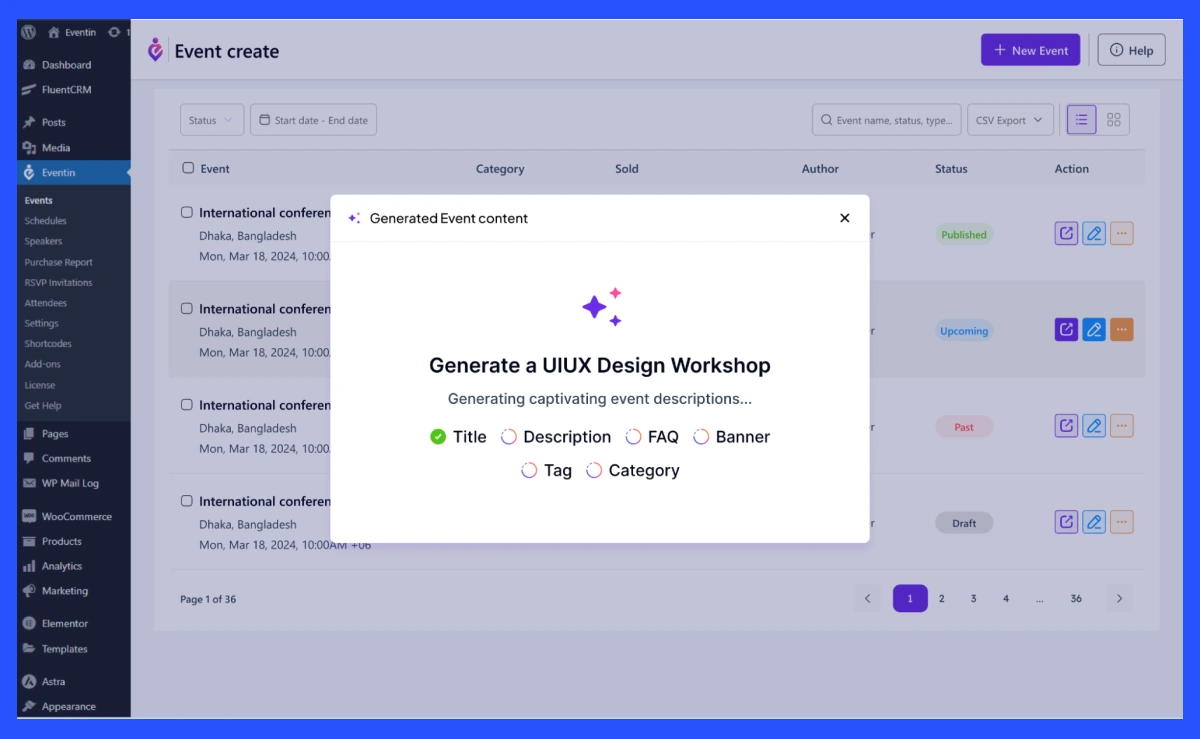
Eventin AI generates your event title, description, FAQs and banner image in seconds. The new event appears in your event list (refresh the page if you don’t see it). Open it to review and edit everything before publishing.
After generating your event content, fill in the remaining details and update the content, banner image, logo and others according to your needs. Eventin also allows you to design custom event tickets, certificates and landing pages easily. No tech skills needed- just drag, drop, and done!
💁 If you want to learn more about Event Template Builder then this blog is for you 👉 “How to Design Custom Event Tickets, Certificates and Detail Pages in WordPress (Without Coding)” | Read more

Finally, preview your page to ensure everything looks perfect, then hit Publish.
What Else Eventin AI Can Do?

When it comes to creating events with AI, the WordPress market offers very few options. Eventin changes the game with its powerful OpenAI integration. With just brief data inputs like event type, date, and location, the AI automatically generates event titles, descriptions, tags, FAQ and banners. This feature not only saves time but also ensures your event pages look polished and professional. The interesting part is that no technical skills are required.
Eventin has recently introduced some amazing new features to enhance your event management experience. Check them out! 🚀
🟣 Template Builder: Help you create custom event tickets, certificates, and detailed event pages using drag-and-drop functionality.
🟣 Dashboard Reporting: Get real-time insights into ticket sales, attendee registrations, and event performance through a user-friendly analytics dashboard.
🟣 Order Management: Easily track attendee details, ticket purchases, and payment statuses from a centralized dashboard, ensuring smooth event operations.
🟣 License Panel: Manage multiple website licenses from a single dashboard- ideal for agencies and developers handling multiple clients.
🟣 Currency Settings: Customizable currency preferred for ticket sales and transactions.
🟣 Custom Email Templates: Personalize event email templates to match your brand.
🟣 Custom RSVP Email Templates: Send automated, customized RSVP confirmations.
🟣 Role-Based Access Management: Assign different user roles and permissions to efficiently manage your team’s access to event settings.
🟣 Extra Field Capabilities: Add custom fields like dropdowns or selection options to event registration forms for better data collection.
🟣 Ticket Enable/Disable Option: Easily activate or deactivate tickets based on event .
🟣 Turn Off Email Speaker (Frontend): Disable speaker email notifications when not required for better email management.
📌 Want to know: Common Event Management Challenges and Solutions for Event Planners| Read more
Go Further: Manage Events With AI Using Eventin MCP
Eventin AI helps you create event content inside WordPress. Eventin MCP connects Claude, Codex or another MCP-compatible assistant to your site, so you can create and update events, check attendees and read reports from a chat. Learn how in our guide to managing WordPress events with AI using Eventin MCP.
Frequently Asked Questions (FAQs)

Q: Is Eventin beginner-friendly?
Definitely! Eventin’s no-code, drag-and-drop features make it easy for anyone to create custom event tickets, certificates and pages-no technical skills required.
Q: How do I connect Eventin with OpenAI?
After installing the required plugins, you’ll need an OpenAI API key. Follow the documentation provided by Eventin to set up the integration.
Q: Can I customize the AI-generated event content?
Yes! Once the AI generates your event page, you can edit the title, description, banner image, logo, and other details to match your branding and preferences.
Q: How long does it take to generate an event with Eventin AI?
After generation, you can edit the content, add missing details, and preview the event page before publishing.
Q: Does Eventin AI generate tickets and certificates too?
While the Eventin AI focuses on event pages, Eventin’s Template builder lets you easily design custom tickets and certificates separately. No coding is required!
Q: Is Eventin suitable for agencies or developers?
Yes! Eventin’s license panel makes it easy for agencies and developers to manage multiple sites from a single dashboard. It’s perfect for handling client projects efficiently.
Q: Can I enable or disable tickets as needed?
Absolutely! Eventin’s ticket enable/disable option lets you control ticket availability with just one click.
Start Creating Events With AI
Event planning doesn’t have to be stressful or time-consuming. With Eventin AI, you can eliminate manual content creation and leverage AI to create and manage WordPress events faster and better than ever before.
So, why wait? Take the first step toward smarter, AI-driven event management today.
👉 Download Eventin now and let AI handle the hard work for you!