6 Best WordPress Food Ordering Plugins for 2026


Table of Contents
Running a restaurant today means more than serving good food. Customers now expect an easy way to order online, choose pickup or delivery, and browse menus from their phones.
This is why many restaurant owners look for the best WordPress food ordering plugins to handle orders, menus, and payments without hiring a developer.
In this article, we’ll take a closer look at the best food ordering plugins for WordPress. Whether you’re looking for a full WordPress restaurant ordering system or just a simple way to let customers order food online, this list will help you find the right fit.
Let’ get started.
Start Your Restaurant Website in Minutes – Free with WPCafe
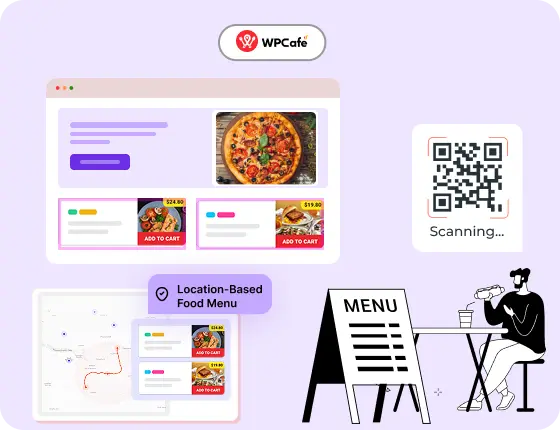
WPCafe helps you take food orders, manage reservations, and run your restaurant online, without extra tools.
- 🟣 34+ ready-to-use food menus
- 🟣 Easy table reservations
- 🟣 Accept online payments
- 🟣 Location-based menus & schedules
- 🟣 Multivendor support
Top food ordering plugins for WordPress: Comparison at a glance
| Plugin | Best For | Multi Location | WooCommerce Support | Free Version |
| WPCafe | Full restaurant management with online orders, menus, table booking | ✅ | ✅ | ✅ |
| GloriaFood | Simple order system for small restaurants | ❌ | ❌ | ✅ |
| Food Store | WooCommerce food ordering system | ❌ | ✅ | ✅ |
| Orderable | Local ordering with a clean checkout flow | ❌ | ✅ | ✅ |
| RestroPress | Delivery and pickup without WooCommerce | ❌ | ❌ | ✅ |
| Five Star Restaurant Menu | Simple menu display with basic ordering | ❌ | ❌ | ✅ |
What to look for in a WordPress food ordering plugin?
Not all food ordering plugins are built the same. Some focus on simple menu displays, while others support full ordering systems with scheduling, payments, and multi-location management.
Here are a few things to consider when picking the right food ordering plugin for WordPress:
- Easy menu setup: You should be able to create menu items without trouble. A good plugin lets you add prices, variations, add-ons, and categories in a simple way.
- Works well on mobile: Most customers order food from their phones. Your online food ordering plugin for WordPress should load fast and feel easy to use on small screens.
- Delivery and pickup options: If you offer both, your plugin must support them. Look for clear settings for delivery fees, delivery zones, pickup times, and order limits.
- WooCommerce compatibility: If you want full control over payments, coupons, taxes, and reports, you need a WooCommerce food ordering plugin. This gives you more flexibility and access to more payment gateways.
- Simple checkout process: Make sure the ordering flow is short and clear. Long forms or slow pages can lead to lost orders.
- Support for order scheduling: Some restaurants need to close orders during peak hours or allow customers to pick a time slot. Good plugins include this option.
- Multi-location support: If you run more than one branch, your WordPress restaurant ordering system should let you manage menus and orders for each location separately.
- Reliable notifications: You need instant alerts for new orders, so your team can start preparing food right away. This includes email, dashboard alerts, or SMS if needed.
- Stable updates and support: Since your restaurant depends on online orders, the plugin must receive regular updates and offer helpful support when you need it.

How we chose the best food ordering plugins for WordPress (and why you can trust us)
There are many food ordering plugins out there, but not all of them are reliable or suitable for real-world restaurant websites. We created this list based on hands-on testing, plugin documentation, user reviews, and support responsiveness.
To make this list fair and helpful, we used the same criteria for every plugin.
- Real feature testing: We installed each plugin on a clean WordPress site and checked how easy it was to set up menus, create ordering pages, and manage orders. This helped us see how they work in real situations.
- Speed and user experience: A slow or confusing ordering flow can lead to abandoned orders. We reviewed the mobile experience, page load time, and the clarity of the checkout steps.
- Pricing and value: Some plugins offer strong free versions, while others focus on paid upgrades. We compared the value you get at each price point.
- Features that matter to restaurants: We focused on features that help real restaurants: delivery and pickup scheduling, tipping, order notifications, multi-branch support, and customizable menus.
- Honest comparison: Even though we have our own online food ordering plugin (WPCafe), we kept the evaluation balanced and clear. Each tool has strengths and limitations, and we point them out so you can make an informed choice.
Best WordPress food ordering plugins for a restaurant
Let’s find a detailed review of each plugin. We cover what it does, its key features, where it performs well, and where it may fall short. This will help you match the right tool with your restaurant’s needs.
WPCafe

WPCafe is an all-in-one food ordering plugin for WordPress that helps restaurants handle online orders, menus, pickup, delivery, and table reservations in one place. It works with WooCommerce, so you get access to many payment gateways and order management tools. WPCafe is made for all types of restaurants, including small cafes, food trucks, cloud kitchens, and multi-location businesses.
Key features
- Online ordering with delivery and pickup options
- Flexible food menu builder with addons and variations
- WooCommerce integration for payments and cart management
- Multi-branch support with custom hours, menus, and locations
- Live order notification system
- QR code menus and food menu shortcodes
- Compatibility with Elementor and Gutenberg
- Responsive, mobile-friendly design
What we liked most
- Very easy to set up, even for beginners
- AI tools for menu titles, descriptions, and images
- Smooth ordering flow on mobile devices
- All restaurant features come in one plugin
What could be better
- Some advanced layouts may require the pro version
- Learning all features may take time for new users
Pricing
WPCafe has both free and premium versions. The free version offers core features like creating food menus and basic ordering. The pro version starts at $79/year, unlocking advanced tools like branch management, order notifications, and more layout options.
Ready to simplify your restaurant workflow with WPCafe?
Upgrade to WPCafe Pro!GloriaFood
GloriaFood is a simple online food ordering system for WordPress that focuses on quick setup and ease of use. It lets restaurants take orders for delivery and pickup without complex configuration. The plugin uses its own ordering system instead of WooCommerce, which makes it beginner-friendly but less flexible for payment and custom workflows.
Key Features
- Online ordering system with delivery and pickup
- Drag-and-drop menu builder
- Free order-taking app for restaurants
- Supports multiple languages and currencies
- Table reservation and tipping options
- Easy integration with WordPress via shortcode
What we liked most
- Very easy to start using
- Simple ordering interface
- Good for small restaurants with simple needs
What could be better
- Limited design control
- No WooCommerce support
- No multi-location system
Pricing
The base plugin and core features are free. Paid add-ons are available for services like credit card payments, promo codes, and advanced analytics. These are billed separately through GloriaFood’s own pricing plans.
Food Store
Food Store is a WooCommerce food ordering plugin that turns your store into a simple restaurant ordering system. It works well for users who already use WooCommerce and want to keep all payments, taxes, and reports inside the same setup. The plugin focuses on delivery and pickup orders, with a clean front-end ordering layout.
Key Features
- Built on WooCommerce, with no third-party systems
- Supports delivery, takeaway, and dine-in
- Option to disable the cart and use direct checkout
- Menu item filtering by category or tag
- Works with most WordPress themes
- Simple shortcode-based menu layout
What we liked most
- Fits restaurants already using WooCommerce
- Clean ordering layout
- Simple backend setup
What could be better
- No table reservation system
- No multi-location support
Pricing
Food Store is free to use and available on the WordPress plugin repository. Premium add-ons are available from the developer’s website for features like time slots, tipping, and kitchen status.
Orderable
Orderable is a modern ordering plugin for WordPress that focuses on local delivery and pickup. It works with WooCommerce so that you can use built-in payment gateways and reporting. The plugin is designed for small to medium restaurants that want a clean ordering flow without too many settings.
Key Features
- Full support for delivery and pickup
- Time-slot scheduling for orders
- Drag-and-drop product layout editor
- Optimized mobile interface
- Works with any WooCommerce-compatible theme
- Tip options and checkout customization
What we liked most
- Very smooth checkout flow
- Good for restaurants with specific time windows
- Nice design and mobile experience
What could be better
- Limited free version
- No built-in table booking
Pricing
Orderable offers a free version with core functionality. The pro version starts at $149/year, which includes features like holiday scheduling, order bumps, and priority support.
RestroPress
RestroPress is a standalone online food ordering plugin for WordPress that lets you take delivery and pickup orders without using WooCommerce. It comes with its own ordering system, checkout flow, and admin panel. This makes it a simple choice for restaurants that want to avoid complex setups and keep everything lightweight.
Key Features
- Built-in ordering system for delivery and pickup
- Customizable food items with add-ons and variations
- Email and push notifications for new orders
- Order management dashboard for store admins
- Simple menu layout with shortcode support
- Payment options: cash on delivery, PayPal, and more via extensions
What we liked most
- Works without WooCommerce
- Simple interface
What could be better
- Limited customizations
- No multi-location support
Pricing
The core plugin is free. Premium extensions are available for payment gateways, SMS notifications, tips, and more. Prices vary based on features, starting from $29 for individual add-ons.
Five Star Restaurant Menu and Food Ordering
Five Star Restaurant Menu is a simple restaurant menu and ordering plugin for WordPress that helps you display food items in a clean layout. While it’s not a full WordPress takeaway ordering plugin, it does include limited ordering features when paired with its add-ons. It’s best suited for restaurants that want to showcase their menu online, with optional order functionality for simple pickup or reservation-based services.
Key Features
- Visual menu layouts with categories and item descriptions
- Customizable menu sections and item images
- Responsive design for mobile users
- Gutenberg blocks and shortcodes included
- Add-ons available for ordering and WooCommerce integration
- Supports multiple menus and daily specials
What we liked most
- Looks good on most themes
- Easy to display menus
What could be better
- Not ideal for full ordering systems
- Limited delivery features
Pricing
The base plugin is free. Paid extensions are available for WooCommerce support, ordering, and additional menu layouts. Pricing starts at $67/year for the pro version.
Why WPCafe stands out as the best online food ordering plugin in 2026
WPCafe 3.0 was rebuilt from the ground up based on real feedback from restaurant owners. The goal was simple: make daily work easier. The new version brings a cleaner dashboard, smoother workflows, faster setup, and better control for both single cafés and multi-location restaurants.
- Cleaner, modern dashboard that is easy to use
- Real-time control of orders, reservations, and schedules
- Faster onboarding and setup steps
- Location-based menu for multi-branch restaurants
- Updated food menus, smart add-ons, and QR code generation
- Time-based menus and flexible discount options
- AI tools for menu titles, descriptions, and images
WPCafe 3.0 keeps everything simple while giving you full control over your restaurant workflow. Whether you run one shop or many, the new version helps you work faster and manage less.
FAQs
What’s the best free WordPress food ordering plugin?
If you need a free plugin to get started, WPCafe, Food Store, and RestroPress all offer free versions with core features. WPCafe gives you menu layouts, basic ordering, and compatibility with page builders, making it a strong starting point.
Can I use these plugins with any WordPress theme?
Most of the plugins listed here work with any modern WordPress theme, especially those that follow WordPress coding standards. If you’re using a custom or outdated theme, testing is recommended to ensure full compatibility.
Are they compatible with major payment gateways or WooCommerce?
Can I offer delivery and pickup?
Yes. Most of the plugins in this list support both delivery and pickup. WPCafe, Orderable, and RestroPress all include scheduling tools so customers can select their preferred time.
What if I have multiple branches/outlets?
Not all plugins support multi-location restaurants. WPCafe and WooFood offer the most flexible multi-location options. They let you manage menus and orders for each branch separately.
Is WPCafe compatible with Elementor?
Is it easy for non-tech users?
Most of these plugins are designed for beginners. WPCafe, GloriaFood, Food Store, and Orderable offer the simplest setup. You can create menus, enable ordering, and set up delivery or pickup without technical skills.
Conclusion
Choosing the best WordPress food ordering plugin depends on your restaurant’s needs, your preferred workflow, and how much control you want over the ordering process.
Some plugins on this list are great for small businesses that need simple ordering features. Others work best with WooCommerce and offer more customization and flexibility. A few are better suited for menu display with limited ordering support.
If you’re looking for an all-in-one solution that combines online orders, flexible menus, pickup and delivery scheduling, and support for multiple branches, WPCafe offers the most complete setup.
Take the time to review each option and test the one that best fits your business. Most plugins offer free versions or demos, so you can get a feel for how they work before making a decision.
Ready to add online food ordering to your restaurant?
Try WPCafe and set up menus, orders, delivery, pickup, and reservations in one simple system. It works with your WordPress site and is easy to use for any restaurant team.
Try WPCafe Free