How to Manage Food Orders and Table Reservations in One System (WordPress Guide)


Table of Contents
Managing food orders and table reservations separately can quickly turn into a mess. Orders get missed, bookings overlap, and your staff ends up switching between tools instead of focusing on customers.
That’s why many restaurants are moving to a single system that handles both ordering and reservations in one place.
With the right WordPress setup, you can accept online food orders, manage table bookings, update menus, and track everything from one dashboard, without using multiple plugins or complicated tools. Just one WordPress Restaurant Reservation Plugin can solve it.
In this guide, you’ll learn how to manage food orders and table reservations in one system using WordPress, step by step. By the end, you’ll have a clear setup that helps you save time, reduce errors, and run your restaurant more smoothly.
Quick Overview
A food ordering and reservation system lets you manage online orders and table bookings from one place. Instead of using separate tools, everything works together in a single WordPress dashboard.
In this guide, you’ll learn:
- what a restaurant ordering and reservation system is
- why managing them separately creates problems
- how a combined system works step by step
- how to set up food ordering and table reservations using WordPress
You’ll also see how tools like WPCafe connect menu, orders, reservations, and payments into one system, so you can reduce errors, save time, and run your restaurant more smoothly.
This guide is useful for restaurant owners who want a simple way to manage both orders and bookings without using multiple plugins.
Why Managing Orders and Reservations Separately Causes Problems
At first, using different tools/plugins for food orders and table reservations might feel manageable. But as your restaurant gets busy, it quickly turns into a problem.
When your restaurant ordering system and reservation system are not connected, it becomes hard to manage availability. A table might already be booked, but your system still allows new orders for the same time. This leads to delays, overcrowding, and unhappy customers.
Here are the most common issues restaurants face:
- Double bookings and timing conflicts: Orders and reservations don’t sync, so tables get overbooked during busy hours.
- Slow service due to tool switching: Staff have to move between different dashboards to manage orders, bookings, and menus.
- Higher chances of mistakes: Manual coordination increases errors, especially when things get busy.
- No clear view of operations: You can’t easily track peak hours, table usage, or how orders and reservations overlap.
- Extra costs and maintenance: Using multiple plugins or systems means more setup, updates, and ongoing costs.
Over time, these problems affect both your team and your customers. That’s why many restaurants are now moving to a single system where food ordering and table reservations work together. It keeps everything organized, reduces errors, and makes daily operations much easier.
How a Food Ordering and Reservation System Works
A food ordering and reservation system connects your menu, orders, and table bookings in one place. Instead of handling everything separately, it keeps your restaurant operations organized and easy to manage.
Here’s how the process usually works:
- Customers browse your menu online: They visit your website, check the menu, and choose what they want to order.
- They place an order or book a table: Customers can either order food for delivery/pickup or reserve a table for a specific time.
- System checks availability automatically: The system manages time slots and table availability, so there are no overlaps or double bookings.
- Orders go directly to your kitchen: Once an order is placed, it appears in your dashboard or kitchen display, ready to be prepared.
- Reservations are synced with orders: If a customer books a table and orders food in advance, everything is linked together.
- Payments are handled online or offline: Customers can pay during checkout or choose to pay at the restaurant.
- You manage everything from one dashboard: Orders, reservations, menus, and customer details are all controlled from a single place.
This kind of system helps you avoid confusion, speed up service, and give your customers a smooth experience from booking to dining.
If you’re using WordPress, you can set up this entire workflow using a plugin like WPCafe, where ordering and reservation features are already connected and easy to manage.
Let’s Set Up Reservations with a Food Ordering Feature Using WPCafe
Now that you understand how a food ordering and reservation system works, let’s set it up on your WordPress website using WPCafe.
WPCafe lets you manage online orders, table reservations, menus, and payments from one dashboard. You don’t need to install multiple plugins or connect separate tools.
Follow these steps to get everything running:
Create a Table Reservation Form to Manage Customers
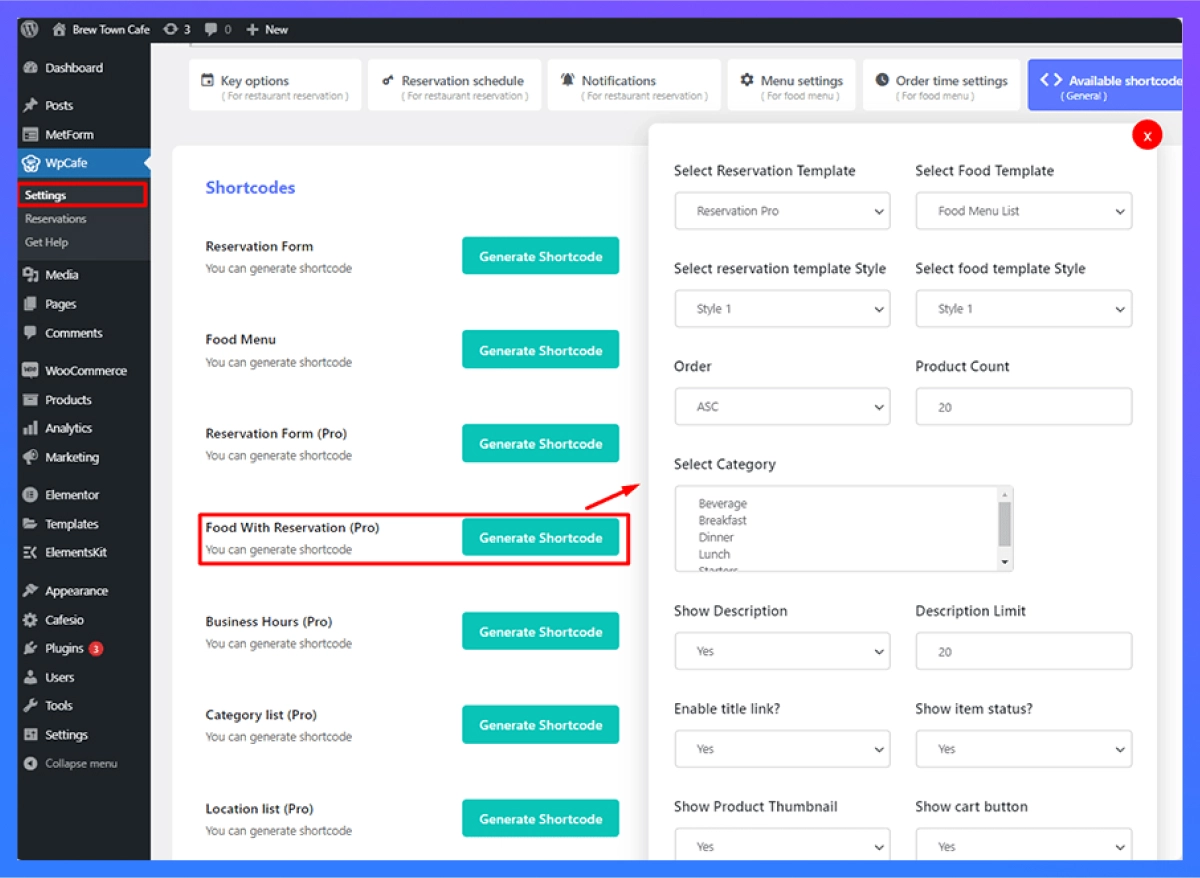
Once you have WPCafe PRO installed, go over to your dashboard to get started. The first thing you have to do is create a shortcode with a shortcode builder. Find WPCafe > Settings > Available Shortcode and you will see many shortcode-generating options. Find Food with Reservation (PRO) and click on generate shortcode.
You will see a pop-up with options to customize your reservation and food templates. Here you can select which categories you want to show in your food menu. You can also choose to set the product thumbnail and show the cart button. Once you are happy with the settings, generate the shortcode and paste it to your page. Users can visit your site and complete reservations with food ordering.
Placing a Reservation with Food Order
Your customers will see this reservation form when they visit your site. They will be prompted to select a reservation date, time, and the number of guests in the first stage. Next, you will be asked for your personal details.
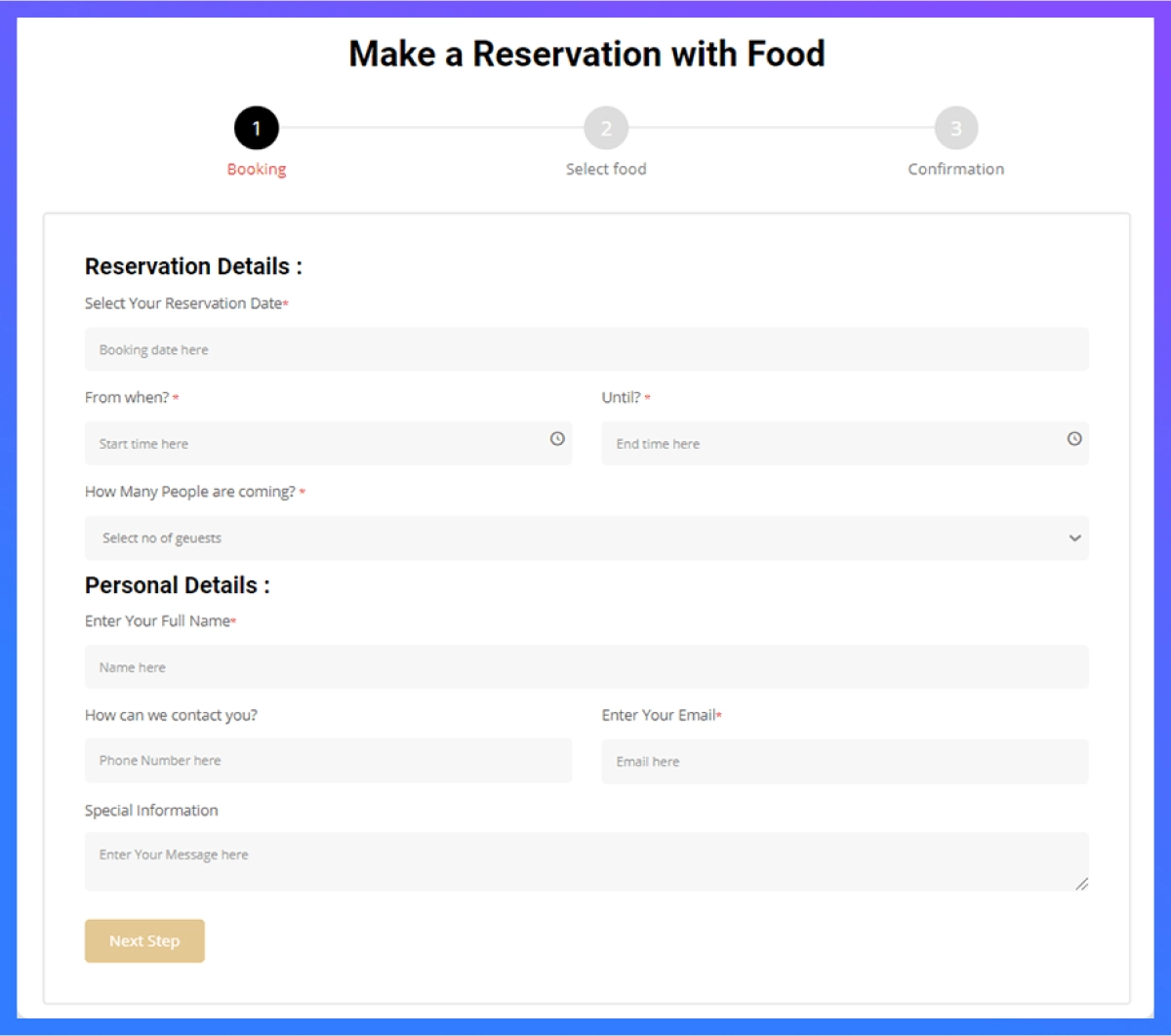
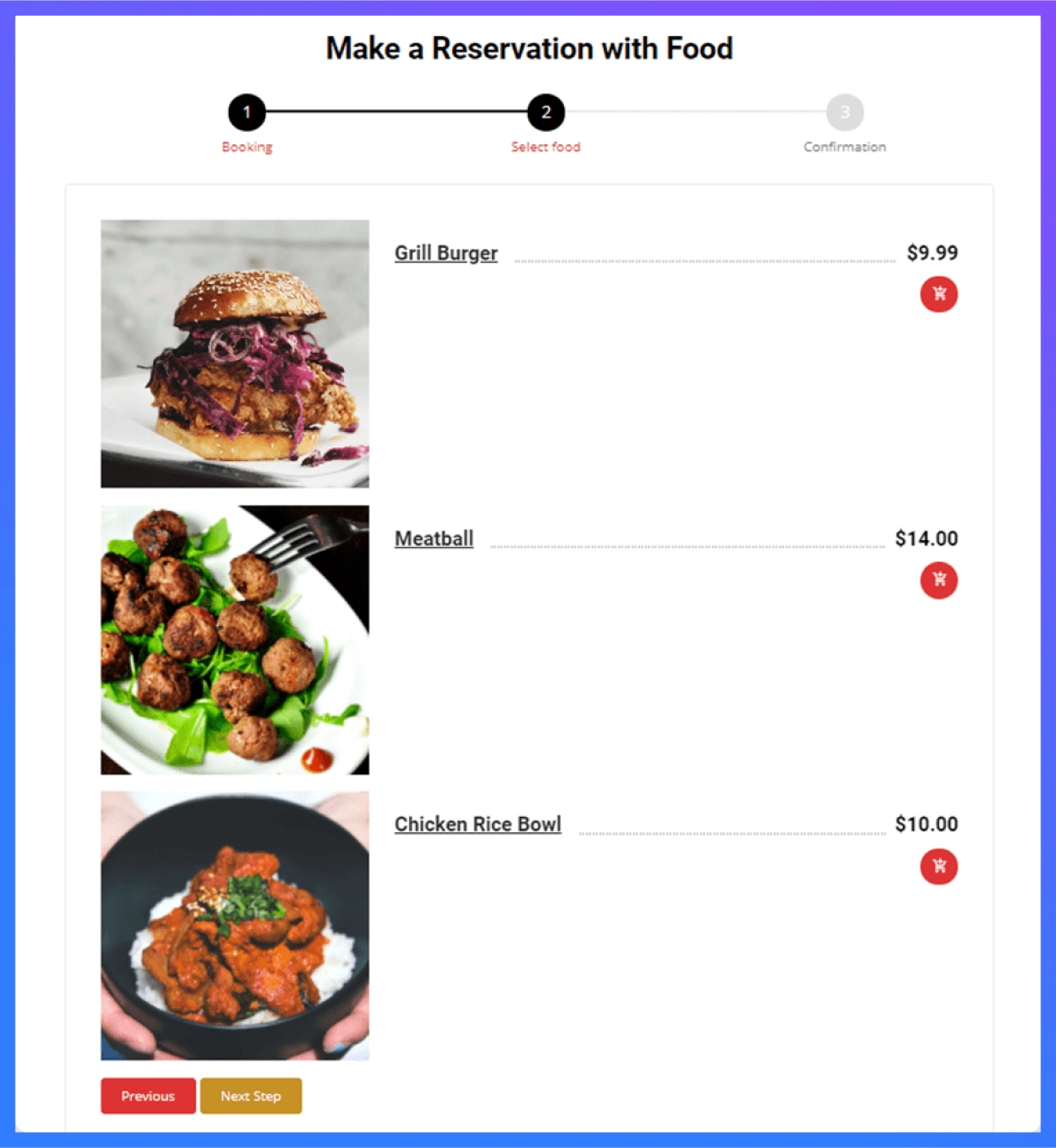
In the third stage, your customer will need to confirm your reservation details. Once they do, they will be asked to place their food order. A food menu will appear on the right side where they can select all of their favorite dishes. As an admin, you can customize this menu style from your dashboard when you generate the shortcode.
Customer Checking Reservation with Food Order Details
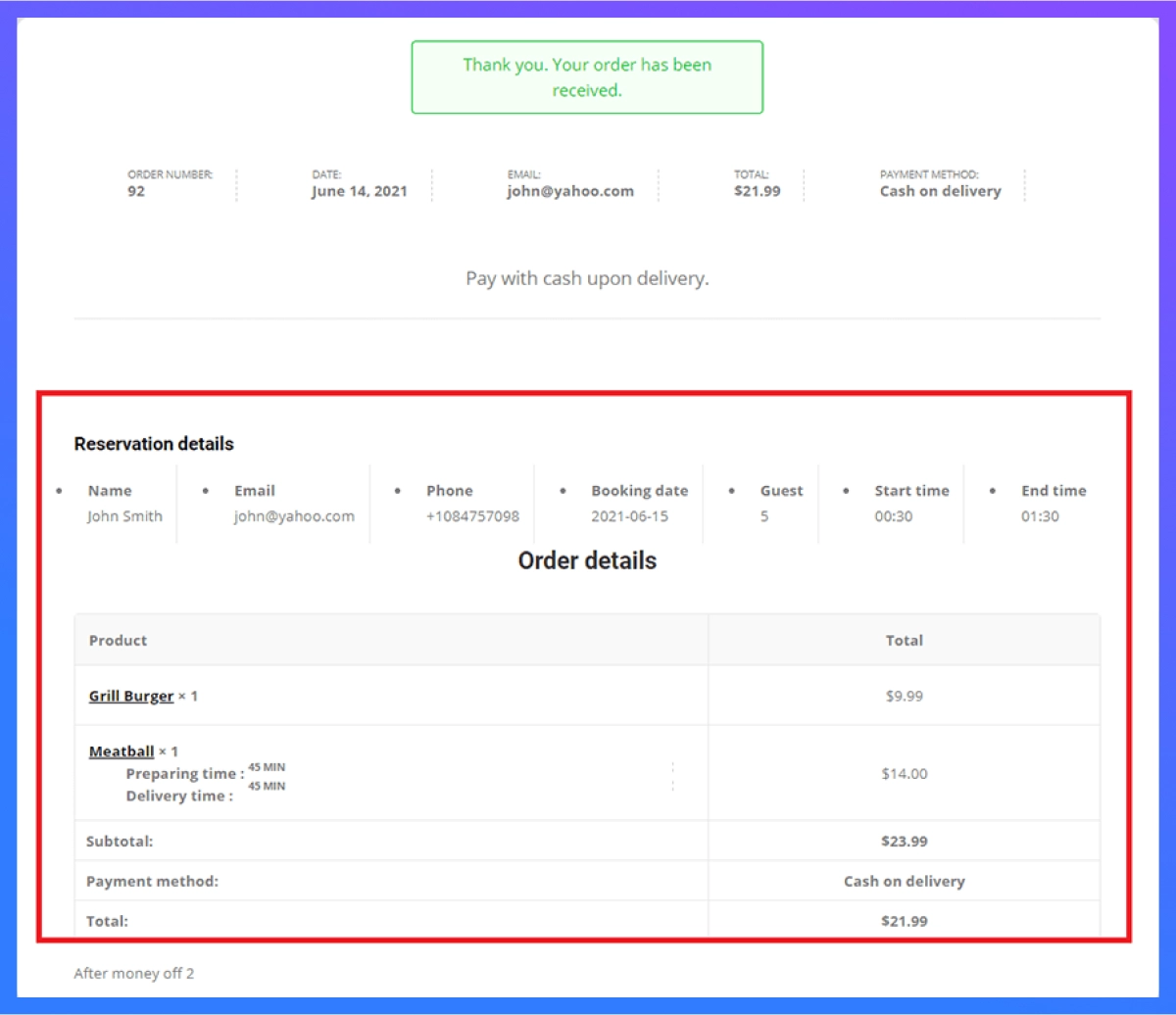
Once a customer places their reservation, they can check their order details. The order details will be shown on the checkout page, thank you page, and their cart. You can see from the image below how the order details are displayed on the thank you page.
Admin Managing Reservations and Order Details
WPCafe’s user-friendly settings make it simple to handle reservations with food orders. Admin can check the reservation and the order details from their dashboard. You need to go to WPCafe -> Reservations to see all the reservations.
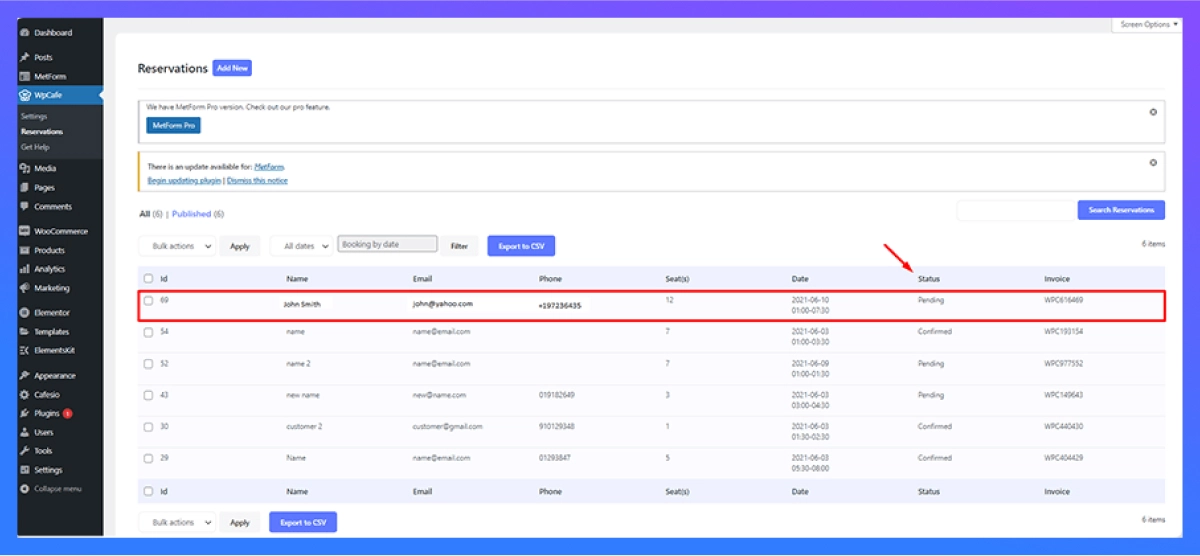
Select any of the reservations and you will see a link to check the order details. You can view the order details and manage your restaurant staff to prepare the order accordingly. Not only are you able to check the order details, but you can also edit the status of the reservation details and update it.
Note that automatically confirmed guest numbers will not apply for reservations with food ordering system. You can read the detailed documentation on this feature to learn more.
Supports WooCommerce Payment Gateways
WPCafe makes it easy for your guests to pay through WooCommerce payment gateways. All WooCommerce payment gateways are supported by WPCafe. Your guests can choose to pay through their preferred payment method.
An important factor in customer satisfaction is their experience. Making the method of payment quick and easy can set a positive impression on your restaurant. You can also add multivendor support with WPCafe and Dokan Addon and customize with popular page builders like Divi.
Why WPCafe Works Better for Food Ordering and Reservations
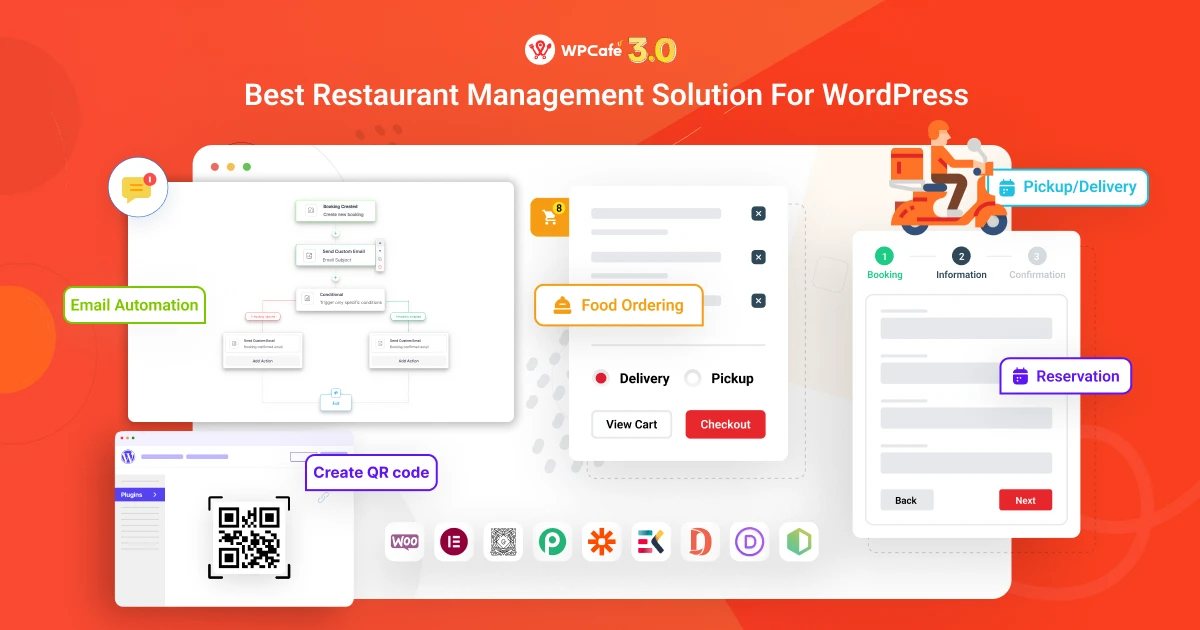
Setting up a system is one thing. Managing it smoothly every day is another.
Many restaurants start with separate tools for ordering, reservations, and menus. But over time, this setup becomes hard to manage. You have to switch between dashboards, fix syncing issues, and deal with extra costs.
WPCafe solves this by bringing everything into one place.
Instead of using multiple plugins, you can manage food orders, table reservations, menus, and payments from a single dashboard inside WordPress. This makes your workflow faster, cleaner, and easier to control.
Here’s why WPCafe works better:
- All-in-one system: Handle online food ordering, table reservations, menus, and payments without using separate tools.
- Built on WooCommerce: You get full control over orders, payments, and customer data without relying on third-party platforms.
- Visual table reservation: Let customers pick their seats, which improves booking experience and reduces confusion.
- Flexible ordering options: Support delivery, pickup, dine-in, and scheduled orders from one system.
- Centralized dashboard: Manage everything from one place instead of switching between multiple systems.
- Better customer experience: Customers can book a table and order food in one smooth flow, which saves time and improves satisfaction.
Instead of managing multiple plugins for different tasks, you can use a restaurant management plugin for WordPress like WPCafe to keep everything connected and easy to run. This not only reduces errors but also helps you serve customers faster and more efficiently.
Manage Orders and Reservations the Smart Way
Running a restaurant becomes much easier when your ordering and reservation system work together. Instead of switching between tools, fixing errors, and handling confusion during busy hours, you can manage everything from one place.
With a proper setup, you can:
- accept food orders and table bookings smoothly
- avoid double bookings and delays
- give your customers a faster and better experience
- keep full control over your restaurant operations
If you’re using WordPress, you don’t need a complicated setup to make this work.
Instead of managing separate plugins for menus, ordering, and reservations, you can use a complete solution like WPCafe. It brings everything into one system so you can focus more on serving customers and growing your business.
👉 If you’re ready to simplify your restaurant workflow, you can explore how WPCafe helps you manage food orders and table reservations from one dashboard.
Start with a simple setup, keep everything connected, and build a smoother experience for both your team and your customers.
1. What is a food ordering and reservation system?
A food ordering and reservation system lets customers order food online and book a table from the same platform. It helps restaurants manage orders, bookings, menus, and payments from one dashboard.
2. How do I manage food orders and table reservations in one system?
You can manage both by using a WordPress restaurant plugin that combines ordering and booking features. With tools like WPCafe, you can accept online food orders, handle reservations, and track everything from one dashboard.
3. What are the benefits of combining food ordering and reservations?
When both systems are connected, you can avoid double bookings, reduce manual work, and improve customer experience. It also helps you manage time slots, orders, and tables more efficiently.
4. Do I need WooCommerce for a food ordering system in WordPress?
In most cases, yes. WooCommerce helps manage payments, orders, and checkout. Many restaurant plugins, including WPCafe, use WooCommerce to handle online transactions and order processing.
5. What features should a restaurant ordering and reservation system have?
A good system should include menu management, online ordering, table reservation, time slot control, payment integration, and a dashboard to manage everything in one place.