Eventin Event Plugin Review: Best WordPress Event Management Tool Breakdown (2026)


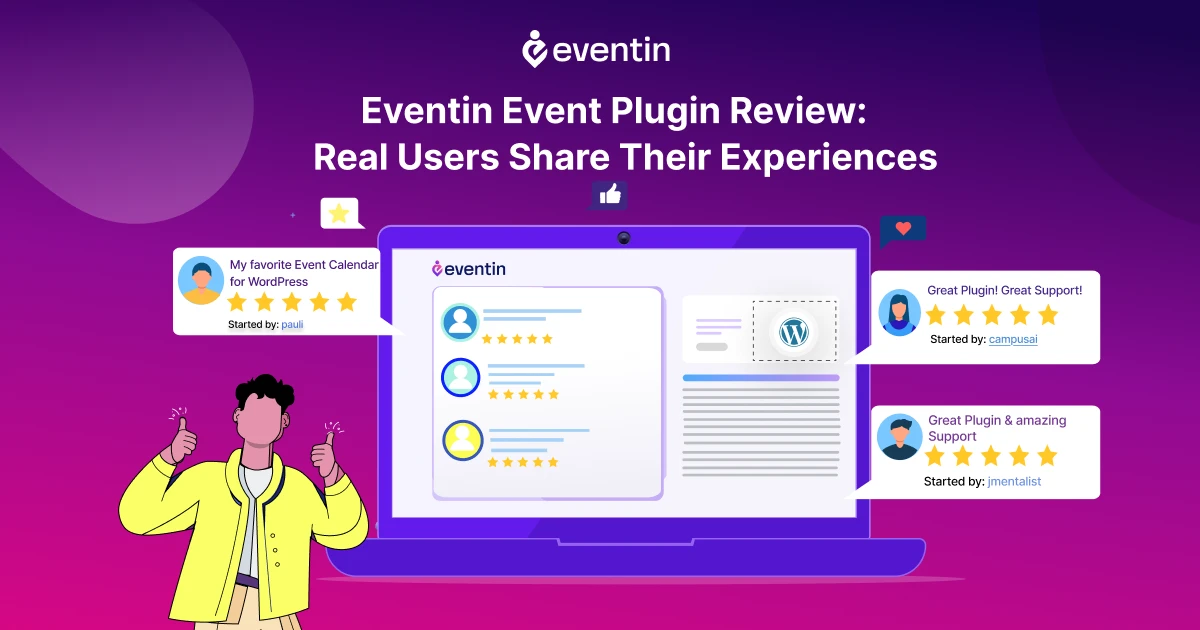
Table of Contents
If you’re trying to manage events on WordPress, you’ve probably realized one thing quickly: most tools only solve part of the problem. Some plugins handle calendars. Others focus on registration. And many require extra add-ons just to sell tickets.
That’s why many users start searching for the best WordPress event management plugin that can handle everything in one place.
Eventin is designed to do exactly that. It combines event creation, ticketing, attendee management, and automation into a single system. Instead of using multiple tools, you can run your entire event workflow from your WordPress dashboard.
In this detailed Eventin event plugin review, we’ll break down its features, pricing, use cases, and how it compares with other WordPress event plugins. By the end, you’ll know whether Eventin is the right event ticketing and event registration plugin for WordPress for your needs.
Grow Your Events Faster
Plan, manage, and grow your events with Eventin event manager.
- 🟣 Attendee registrations
- 🟣 Virtual events with Zoom
- 🟣 Smart email reminders
- 🟣 Secure ticket sales with Woo
Quick Overview
This guide gives you a complete breakdown of Eventin, a WordPress event management plugin, including its features, pricing, and real use cases. If you’re looking for a simple way to manage events, sell tickets, and handle registrations from one dashboard, this review will help you decide if Eventin is the right solution.
Inside this article, you’ll learn:
- What Eventin is and how it works as a complete event management plugin for WordPress
- Key features like ticketing, registration, and automation that make it stand out
- How Eventin compares with other WordPress event plugins and SaaS platforms
- What Real Users Say About Eventin
- What are the pros and cons of using Eventin?
- Why Eventin is better than SaaS event platforms
- How to get started with Eventin

Eventin at a glance: what it is and why it stands out
Eventin is a complete event management plugin for WordPress that helps you create, organize, and sell events without needing extra tools. It is designed for everyone, event planners, businesses, educators, or community organizers who want an easy way to manage events online.
Instead of using separate plugins for ticketing, registration, and scheduling, Eventin combines everything in one place. You can create single or multi-day events, manage speakers, sell tickets through WooCommerce, and track attendees from your dashboard.
What makes Eventin special is how simple it feels, even with powerful features inside. You do not need technical knowledge to set it up, yet it still offers advanced options like AI event creation, email automation, and calendar sync that save hours of work.
If you are looking for a tool that balances flexibility with ease of use, Eventin is one of the best WordPress event plugins you can try. Here is a quick start that you can check.
What’s new in Eventin?
Eventin has come a long way from being a simple event calendar to a complete event management system. This year, we mainly focused on the overall ease of use, implemented automation, AI, and a smoother user experience that saves time for both organizers and attendees.
Here is what stands out in the latest version:
- Event template builder: Instantly create event pages, tickets, and certificates using AI. Just add your event details, and the layout is ready within seconds.
- AI-powered event creation: It automates event creation with built-in AI support. Forget about starting from scratch; generate event details, descriptions, and content faster using AI.
- Email automation builder: Send reminders, follow-ups, and thank you messages automatically without writing code or using third-party tools.
- Two-way calendar sync: Sync your schedule with Google Calendar or Outlook so event updates stay consistent everywhere.
- Improved dashboard: A cleaner design that makes it easier to manage speakers, attendees, and sessions all from one place.
- Advanced WooCommerce ticketing: Better control over ticket types, coupon codes, and order tracking for every event.
- Visual seat map upgrade: A smarter seat selection system that prevents double bookings and improves attendee experience.
- Dokan-powered multivendor marketplace: Now you can create an event marketplace where multiple organizers host their own events on your site.
These updates make Eventin one of the best WordPress plugins for event ticketing and management. It is faster, smarter, and built for anyone who wants professional-level event tools without complexity.
Featured on Astra
Astra recognized Eventin as one of the best WordPress event calendar plugins. The article highlights how Eventin helps users organize, promote, and manage events easily with tools for ticket sales, scheduling, and automation, all designed to work seamlessly inside WordPress.
Read the full feature on AstraKey features that make Eventin the best WordPress event management solution
Eventin brings everything you need to plan and manage successful events inside WordPress. Each feature is built to save time, reduce manual work, and create a better experience for your attendees.
- Smooth event creation and management
Creating an event in WordPress has never been this simple. You can design single or multi-day events, add schedules, and display them in an interactive calendar. Eventin also supports recurring events and advanced time controls, making it perfect for workshops, training, or ongoing sessions.
- Custom event template builder
With Eventin’s template builder, you can design event pages, tickets, and certificates that match your brand style. The drag-and-drop editor lets you customize every detail without coding.
- WooCommerce ticketing and payment system
Selling tickets becomes effortless with built-in WooCommerce integration. You can create different ticket types, add coupons, and manage orders directly from your dashboard. Payments are supported through PayPal, Stripe, and other popular gateways.
- Speaker and schedule management
Add detailed speaker profiles with photos, company names, and session topics. Each event can have multiple speakers and schedules that visitors can browse easily. It’s ideal for conferences or educational events where content planning matters.
- Zoom and Google Meet integration
Eventin connects directly with Zoom and Google Meet so you can host virtual or hybrid events without leaving WordPress. Attendees receive meeting links automatically after registration, making the process smoother for everyone.
- Visual seat map and QR code check-in
Eventin lets you design a visual seat plan for venues and track entries using QR codes. It ensures accurate attendee verification and helps prevent double bookings.
- Multivendor event marketplace
Using Eventin with Dokan, you can turn your site into a complete event marketplace where multiple organizers sell their own tickets. It’s a powerful setup for agencies, venues, or communities.
- Detailed reports and attendee management
Eventin includes detailed analytics to help you track attendance, revenue, and engagement. You can export attendee lists, view ticket status, and manage users easily. If you’re new to it, see how to manage event attendees in WordPress.
These features together make Eventin one of the best WordPress event management plugins. It replaces the need for multiple tools and gives you everything to plan, promote, and manage events from one dashboard.
Eventin Free vs Pro — Which One Should You Choose?
Eventin offers both a free and pro version, designed for different stages of your event business. If you’re just getting started, the free version gives you everything you need to create events and manage registrations. But if you want to sell tickets, automate workflows, and scale your events, the Pro version unlocks advanced features.
- Start with Free → Manage simple events and test the plugin
- Upgrade to Pro → Sell tickets, automate tasks, and scale your event system
- Use one plugin → Replace multiple tools with a complete event ticketing and registration system
👉 Want to see full features, pricing plans, and what you unlock with Pro?
View Eventin Pricing & PlansHow Eventin compares to other WordPress event plugins
There are plenty of WordPress event plugins out there, but most of them lock essential features behind paywalls. Eventin takes a different approach. It gives you fundamental, usable tools right from the start; even in the free version.
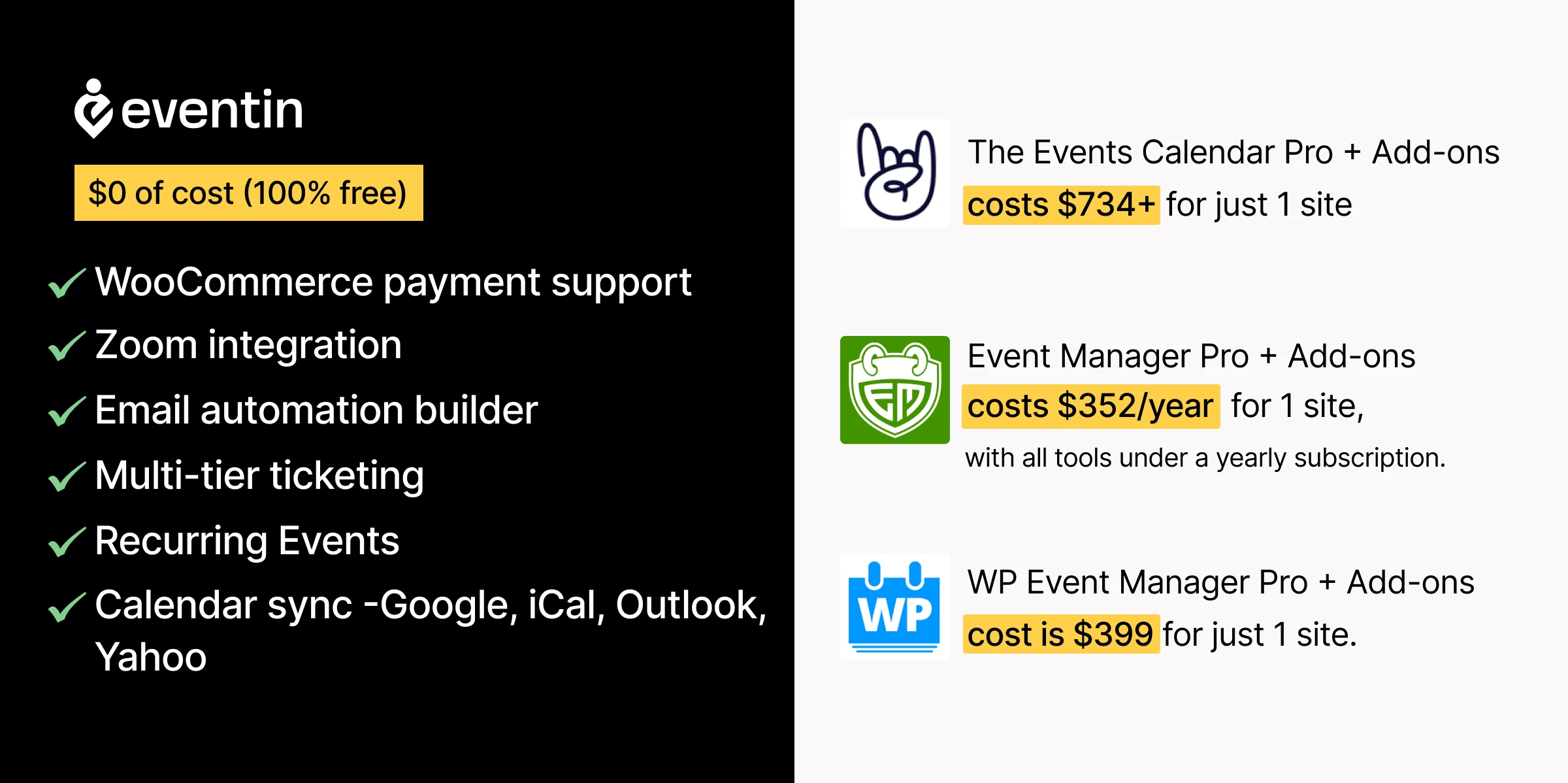
Let’s put that into perspective.
The Events Calendar offers solid scheduling tools, but if you want attendee registration, payment processing, or Zoom integration, you need multiple premium add-ons. That can easily push your cost close to a thousand dollars a year.
👉 See a full breakdown The Events Calendar vs Eventin, where the differences in features and pricing become much clearer.
Modern Events Calendar is known for its visually rich layouts and design flexibility. However, many advanced features like booking, payments, and integrations are locked behind higher-tier plans. For users looking for a complete event ticketing and event management plugin for WordPress, this can mean higher costs and a more complex setup.
👉 For a detailed feature comparison, check this Modern Events Calendar vs Eventin guide.
Amelia is a powerful booking plugin, mainly built for appointments and service-based businesses. While it works well for scheduling, it’s not designed specifically for event management at scale. Features like multi-event handling, ticketing, and attendee workflows are limited compared to a dedicated WordPress event management plugin like Eventin.
👉 Explore the differences in this Amelia vs Eventin comparison to see which one fits your needs better.
WP Event Manager has a lightweight core plugin, but almost every advanced feature — like selling tickets or managing attendees- requires extra extensions. The full bundle costs much more than most small businesses expect to spend.
Events Manager gives you a few good basics in the free version, but to unlock custom forms, speaker profiles, or ticket sales, you’ll need to upgrade to Pro at around $89 per year.
With Eventin, you get all these core features, event creation, ticketing, attendee management, Zoom integration, and automation, at no cost. Everything works right out of the box without the usual plugin stacking or hidden fees.
Still Comparing Event Plugins?
Most WordPress event plugins require multiple add-ons for ticketing, payments, and registrations. Eventin keeps everything in one place—so you can manage events, sell tickets, and track attendees without extra tools.
If you want a complete WordPress event management plugin without complexity, Eventin is built to handle your entire event workflow from a single dashboard.
What Real Users Say About Eventin
When choosing a WordPress event plugin, it’s always smart to look at what real users say. The good news is that Eventin has built a strong reputation across multiple platforms for being reliable, simple, and full of features that actually work.
On WordPress.org, Eventin holds an impressive 4.6 out of 5 rating with more than 17,000 active installations. Users often highlight its clean interface, strong event automation, and responsive support team. You can explore more real feedback on why Eventin stands out among event management systems.
Over on AppSumo, Eventin has become a favorite among entrepreneurs and educators who host webinars or online summits. Many reviews mention how the AI template builder and WooCommerce integration have saved them hours of setup time.
Even on CodeCanyon (Envato Market), where users are known for detailed feedback, Eventin maintains a 4.6+ rating. Users appreciate its quick updates, stability, and flexibility across various themes — especially when compared with other tools covered in our Eventin vs The Events Calendar breakdown.
See Eventin in Action
Want to explore how Eventin handles ticketing, scheduling, and attendee management in real time? Visit the live demo and experience how effortlessly you can create and manage events right inside WordPress.
Check the Live DemoWhat are the pros and cons of using Eventin?
Like every tool, Eventin has its strengths and a few areas where it could be improved. But what makes it stand out is how much value it offers even before you upgrade to Pro.
Pros
- All-in-one event solution: Manage everything from event creation to ticket sales and attendees in one plugin.
- AI and automation support: Use the AI Template Builder and Email Automation tools to save hours on setup and follow-up.
- WooCommerce integration: Sell tickets, create coupons, and accept payments directly on your site.
- Easy virtual event setup: Host meetings through Zoom or Google Meet with just a few clicks.
- Visual seat map and QR check-in: Make attendee management faster and more professional.
- Multi-vendor support: Create a complete event marketplace with Dokan integration.
- Excellent support team: Users often mention fast, helpful replies when troubleshooting issues.
If you want to learn how to turn your events into a steady income source, check out our guide on how to increase event revenue.
Cons
- Design customization: Deep styling changes may require basic CSS knowledge.
- Pro-only features: Some advanced modules, such as the seat plan and automation builder, are available only in the Pro version.
Overall, Eventin earns high marks for flexibility, innovation, and ease of use. It simplifies event management while keeping professional tools accessible, a balance few plugins achieve.
If you want to see how Eventin performs against other tools, check out our detailed Eventin vs Amelia comparison.
Why Eventin is better than SaaS event platforms
Many event organizers start with SaaS platforms like Eventbrite or Cvent because they seem simple at first. But as your events grow, you start noticing limits in pricing, flexibility, and control.
That’s where a WordPress event management plugin like Eventin gives you a clear advantage.
Instead of relying on a third-party system, Eventin lets you run everything directly from your own website. This changes how you manage events, especially when you want long-term control and better profit margins.
Here’s how Eventin compares to typical SaaS event platforms:
- No commission on ticket sales: SaaS tools often take a percentage from every ticket you sell. With Eventin, you keep 100% of your revenue, making it a more cost-effective event ticketing plugin WordPress users can rely on.
- Full ownership and control: SaaS platforms limit customization and store your data on their servers. Eventin runs on your WordPress site, so you control your event pages, attendee data, and overall system without restrictions.
- All-in-one event system: Most SaaS tools require integrations for email, payments, or attendee tracking. Eventin combines everything into one event management system WordPress users can manage easily without juggling multiple tools.
- Flexible event management: Whether you’re hosting online, offline, or hybrid events, Eventin supports all formats. It also handles recurring events, which many SaaS platforms either restrict or charge extra for.
- Better scalability for growing businesses: As your events grow, SaaS costs increase. Eventin grows with your business without adding platform fees, making it a stronger long-term event booking plugin solution.
How to get started with Eventin
Getting started with Eventin is straightforward, even if you’re new to WordPress. You don’t need multiple plugins or complicated setups to launch your first event.
You can set up your entire WordPress event management plugin system in just a few steps:
- Install and activate the plugin: From your WordPress dashboard, go to Plugins → Add New, search for Eventin, and activate it.
- Configure basic settings: After activation, you can set your timezone, currency, and email preferences. This step ensures your event registration system works properly from the beginning.
- Create your first event: Add your event title, description, schedule, and event type. Whether it’s an online webinar or a physical event, Eventin handles it as a complete event management plugin.
- Set up ticketing and payments: You can create free or paid tickets, define pricing, and connect WooCommerce for payments. This turns your site into a full event ticketing plugin WordPress solution.
- Publish and manage events: Once everything is set, publish your event page, share it with your audience, and track registrations and attendees from your dashboard.
- Unlock advanced features (Pro): With the Pro version, you can enable recurring events, integrate Zoom or Google Meet, automate emails, and use QR code check-ins. This makes Eventin a powerful event booking plugin WordPress users can scale with.
Need a Step-by-Step Eventin Setup Guide?
If you want to create your first event the right way, follow our complete Eventin setup tutorial. It shows how to create events, add tickets, configure settings, and manage your WordPress event system from start to finish.
Read the Eventin Setup GuideFrequently Asked Questions
Is Eventin a free WordPress event plugin?
Yes, Eventin offers a free version that lets you create and manage events with basic features like event listings and attendee tracking. For advanced features such as ticket selling, recurring events, and integrations, you need the Pro version. It works well as a scalable WordPress event management plugin.
Can I sell tickets using Eventin?
Yes, Eventin allows you to sell both free and paid tickets directly from your website. With WooCommerce integration, you can manage pricing, payment methods, and ticket types. This makes it a complete event ticketing plugin WordPress users can use without relying on external platforms.
Is Eventin better than other WordPress event plugins?
Eventin stands out because it includes event management, ticketing, and registration in one plugin. Many other tools require additional add-ons for these features. If you want an all-in-one event management system for WordPress, Eventin is often a more efficient option.
Can I host online or hybrid events with Eventin?
Yes, Eventin supports online and hybrid events through integrations like Zoom and Google Meet. You can manage both virtual and physical events from one dashboard, making it a flexible event registration plugin WordPress users can use for different event types.
How to sell event tickets on WordPress using WooCommerce?
Install Eventin + WooCommerce, create your event, and enable Ticket Sales via WooCommerce. Eventin automatically creates products for each ticket type. Visitors can purchase tickets securely through PayPal or Stripe. This makes Eventin one of the best WordPress event ticketing plugins.
Featured on Elegant Themes
Elegant Themes listed Eventin among the best WordPress event plugins for 2025. They highlighted its flexibility, ease of use, and advanced features like ticketing, scheduling, and attendee management—making it a complete WordPress event management plugin.
Read Full FeatureConclusion: Is Eventin worth it for your business?
If you are looking for a plugin that does more than just list events, Eventin is a solid choice. It combines powerful features, automation, and simplicity inside one clean dashboard, without needing extra add-ons or coding.
From ticket sales and attendee tracking to AI automation and calendar sync, Eventin handles everything an event organizer needs. Whether you run small workshops or significant multi-vendor marketplaces, it scales smoothly as your business grows.
Thousands of WordPress users trust Eventin because it saves time, reduces setup hassle, and makes event management feel effortless.
If you are ready to take your events to the next level, start with Eventin and see how much easier your next event can be.
Simplify Your Event Management with Eventin
Join thousands of organizers who trust Eventin to plan, promote, and sell tickets effortlessly. Start using the best WordPress event management plugin today and focus on what really matters, your event’s success.
Explore Eventin Upgrade to Pro