WooCommerce Product Add-On Pricing: The Complete Guide (2026)


Table of Contents
Personalized products are no longer just a nice extra; they’re what many customers expect. Research from Epsilon found that 80% of consumers are more likely to buy from brands that offer personalized experiences.
Yet many WooCommerce stores still rely on hundreds of product variations to offer customization. Over time, that leads to a cluttered catalog, more maintenance, and a shopping experience that’s harder for customers to navigate.
WooCommerce product add-on pricing solves this by letting you charge for extras like custom text, file uploads, gift wrapping, or premium materials without creating hundreds of variations.
In this guide, you’ll learn how add-on pricing works, the different pricing models available, and how to set them up to create a smoother shopping experience and grow your revenue.
📌 Key Takeaways
- Use product add-ons to charge for optional features and personalized products without creating unnecessary product variations.
- Choose the right pricing model based on how customers customize your products, whether that’s fixed, percentage, character-based, or formula pricing.
- Combine product variations and add-ons when you need both inventory tracking and product personalization.
- Native WooCommerce has limitations for advanced pricing, including formula pricing, conditional logic, and character-based pricing.
- Optiontics simplifies advanced product pricing with flexible pricing models, live price updates, file uploads, and conditional product options.
What Is WooCommerce Product Add-On Pricing?
WooCommerce product add-on pricing lets you charge customers for optional product features without creating extra product variations.
Instead of creating a separate product variation for each choice, you can assign additional charges to options such as text fields, dropdowns, checkboxes, file uploads, or measurement inputs.
How Product Add-On Pricing Works
The pricing system works in three layers. First, your product carries a base price, which is the standard cost before any customization. Second, when a customer selects an add-on option such as gift wrapping, engraving, or a specific material, an extra charge is applied on top. Third, the final price is calculated and shown on the product page in real time.
Most WooCommerce add-on pricing follows this workflow:
- Set a base price for the product
- Add custom product options such as engraving, premium materials, or file uploads
- Assign a pricing rule to each option
- WooCommerce calculates the new total as customers make their selections
- The updated price appears instantly on the product page
Example: A base product is set at $20. A customer adds Name Engraving for +$8 and Gift Wrapping for +$4, bringing the total to $32, all calculated automatically without any manual work.
Common WooCommerce Product Add-On Pricing Models
Different products need different pricing rules. A print shop doesn’t price products the same way as a flooring business or a jewelry store. That’s why WooCommerce product add-on pricing supports multiple pricing models.
There’s no single “best” pricing model. The right choice depends on your product, your pricing strategy, and how customers personalize their orders.
| Pricing Model | How It Works | Best For | Example | Ideal Use Case |
|---|---|---|---|---|
| Fixed Pricing | Adds a fixed amount to the product price | Gift wrapping, warranties, premium packaging | +$5 gift wrapping | Every customer pays the same additional fee. |
| Percentage-Based Pricing | Charges a percentage of the product’s base price | Premium materials, installation, and protection plans | +10% premium finish | The add-on price should increase with the product price. |
| Quantity-Based Pricing | Calculates the price based on quantity | Bulk orders, accessories, wholesale products | +$2 per extra item | Customers can purchase multiple units or extras. |
| Character-Based Pricing | Charges based on the number of characters entered | Engraving, personalized gifts, custom signs | $0.50 per character | Customers enter names, messages, or initials. |
| Formula-Based Pricing | Uses a custom formula to calculate the price | Flooring, wallpaper, fabric, countertops | Width × Height × Rate | The final price depends on measurements or dimensions. |
| File Upload Pricing | Adds a fee when customers upload artwork or documents | Print shops, signage, custom merchandise | +$15 artwork upload | Customers need to upload logos, photos, or design files. |
| Conditional Pricing | Applies pricing only when specific conditions are met | Product configurators and complex product builders | Premium finish after selecting wood | One option should appear or change price based on another selection. |
Many WooCommerce stores use more than one pricing model at the same time. For example, a personalized gift store might combine fixed pricing for gift wrapping, character-based pricing for engraving, and conditional pricing for premium materials.
Benefits of WooCommerce Product Add-On Pricing
Adding extra charges is only one benefit of product add-ons. A well-planned pricing strategy can increase revenue, simplify store management, and give customers more freedom to customize their purchases.
Whether you sell personalized gifts, made-to-order furniture, or printed products, these advantages become more valuable as your business grows.
Increase Average Order Value (AOV)
Product add-on pricing increases average order value (AOV) by encouraging customers to purchase relevant upgrades during the buying journey. Instead of promoting separate products, you present optional extras when customers are already committed to a purchase.
A customer ordering a custom mug, for example, may also choose engraving, gift wrapping, or express production. Because these upgrades complement the main product, they’re easier to justify and more likely to be added to the order.
Over time, these small additions can generate meaningful revenue without increasing your marketing budget or website traffic.
Offer Product Personalization
Customers increasingly expect products that reflect their personal preferences. Offering customization helps your products stand out while creating a more engaging shopping experience.
With WooCommerce product add-ons, shoppers can add custom text, upload artwork, select premium materials, or choose optional services from a single product page. Instead of browsing dozens of similar products, they build the version that fits their needs.
The result is a more personalized buying experience that often increases customer satisfaction and perceived product value.
Automate Complex Pricing
As customization options grow, so does pricing complexity. Calculating charges for measurements, text length, quantities, or optional services manually becomes difficult to maintain and easy to get wrong.
Using WooCommerce custom product pricing, you can automate these calculations with fixed prices, percentage-based pricing, formulas, or conditional pricing rules. Every price adjustment happens instantly based on the customer’s selections.
This keeps pricing accurate, reduces manual work, and makes it easier to scale your store as order volume increases.
Reduce Product Variation Clutter
Product variations work well for fixed choices like size or color, but they become difficult to manage when every customization requires a new combination.
Instead of creating hundreds of variations, WooCommerce product add-ons let customers personalize a single product using flexible pricing rules. Your catalog stays cleaner, product management becomes simpler, and updating products takes less time.
This approach is especially valuable for stores that sell customizable or made-to-order products.
Product Add-Ons vs Product Variations: What’s the Difference?
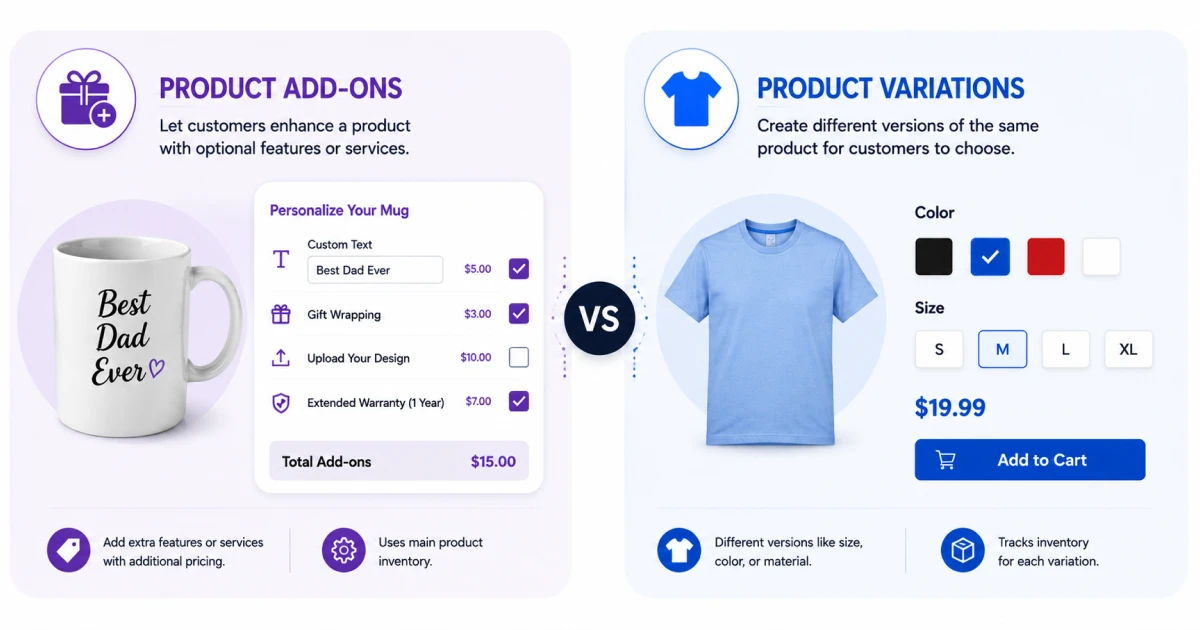
Both approaches help customers customize products, but they solve different problems. Product variations create different versions of a product, while product add-ons let customers personalize the product they’ve already selected. Understanding the difference helps you choose the right approach for each product.
What Are Product Variations?
Product variations are WooCommerce’s built-in way to sell predefined versions of the same product. Each variation has its own price, SKU, inventory, and attributes.
For example, a T-shirt available in 3 colors and 4 sizes creates 12 separate variations. This works well for fixed choices such as size, color, or storage capacity.
As more attributes are added, however, the number of combinations grows quickly, making products harder to manage.
What Are WooCommerce Product Add-Ons?
WooCommerce product add-ons let customers enhance a product with optional features or services without creating new variations. Instead of selecting another product version, customers personalize the one they’re already buying.
Popular add-ons include:
- Custom text or engraving
- Gift wrapping
- File uploads
- Premium materials
- Extended warranties
Each add-on can include its own pricing rule, allowing the product price to update automatically as customers make their selections.
Product Add-Ons vs Product Variations
Both product add-ons and product variations help customers customize products, but they’re designed for different situations. The comparison below highlights the key differences, making it easier to decide which approach fits your products and when you might use both together.
| Feature | Product Add-Ons | Product Variations |
|---|---|---|
| Purpose | Add optional features or services | Create different versions of a product |
| Pricing | Add extra charges using pricing rules | Set a price for each variation |
| Inventory | Usually shares the main product inventory | Tracks inventory for each variation |
| Best For | Engraving, gift wrapping, file uploads, and premium services | Size, color, storage, material |
| Scalability | Handles complex customization without creating new products | Best for a limited number of combinations |
| Use Case | Customers personalize a product | Customers choose between product versions |
Quick takeaway: Use product variations for fixed product choices like size or color. Use WooCommerce product add-ons when customers need to personalize a product with optional features, services, or additional pricing. Many successful WooCommerce stores combine both approaches to deliver a flexible shopping experience while keeping their product catalog easy to manage.
Common WooCommerce Product Add-On Pricing Challenges
Offering customizable products creates new opportunities, but it also introduces pricing challenges that standard WooCommerce features weren’t designed to handle.
As your product catalog grows, managing pricing manually becomes harder, increases the risk of errors, and slows down store management. Understanding these challenges makes it easier to choose the right pricing approach.
Managing Hundreds of Product Variations
Product variations work well for simple choices, but they become difficult to manage as customization options increase. Every new size, color, material, or finish multiplies the number of possible combinations.
Imagine selling a table available in 5 sizes, 4 wood types, and 6 finishes. That single product would require 120 variations before adding optional services like engraving or assembly.
Using product add-ons instead of creating every possible variation keeps your catalog organized while giving customers the same level of flexibility.
Creating WooCommerce Dynamic Pricing Rules
WooCommerce dynamic pricing updates the product price instantly as customers select different options. Different add-ons often require different pricing methods, such as fixed fees, percentages, quantities, or formulas.
For example:
- Gift wrapping: +$5
- Premium fabric: +15%
- Extra accessories: +$2 each
Automating these pricing rules saves time, reduces pricing errors, and ensures every customer sees the correct price before checkout.
Pricing Personalized Products
Personalized products rarely have a fixed price. Every customer’s order can be different depending on the options they select.
A customer may choose premium materials, upload custom artwork, request gift wrapping, and add a personalized message, all within the same product.
Without flexible product pricing, calculating these combinations manually is time-consuming and increases the risk of pricing errors.
Charging for Custom Text and Engraving
Custom text often requires pricing based on the amount of content a customer enters, not simply whether they use the field.
For example, engraving “John” should not always cost the same as engraving “Happy Anniversary, Sarah.”
Character-based pricing automatically adjusts the cost according to the number of characters entered, creating a fair pricing model for personalized products while eliminating manual calculations.
Calculating Prices Based on Measurements
Some products cannot have a fixed price because the final cost depends on their dimensions.
Businesses selling flooring, wallpaper, fabric, banners, or countertops often calculate prices using measurements such as width, height, area, or length.
Instead of creating hundreds of predefined prices, formula-based pricing calculates the total automatically using customer-provided measurements, improving both accuracy and efficiency.
Building Conditional Pricing Logic
Some pricing rules only apply when customers make specific selections. This requires conditional logic that can show, hide, or price options based on previous choices.
For example, a furniture store might only display Premium Oak Finish after the customer selects Solid Wood as the material.
Conditional pricing creates a cleaner buying experience by showing only relevant options while ensuring customers are charged correctly.
How to Set Up WooCommerce Product Add-On Pricing
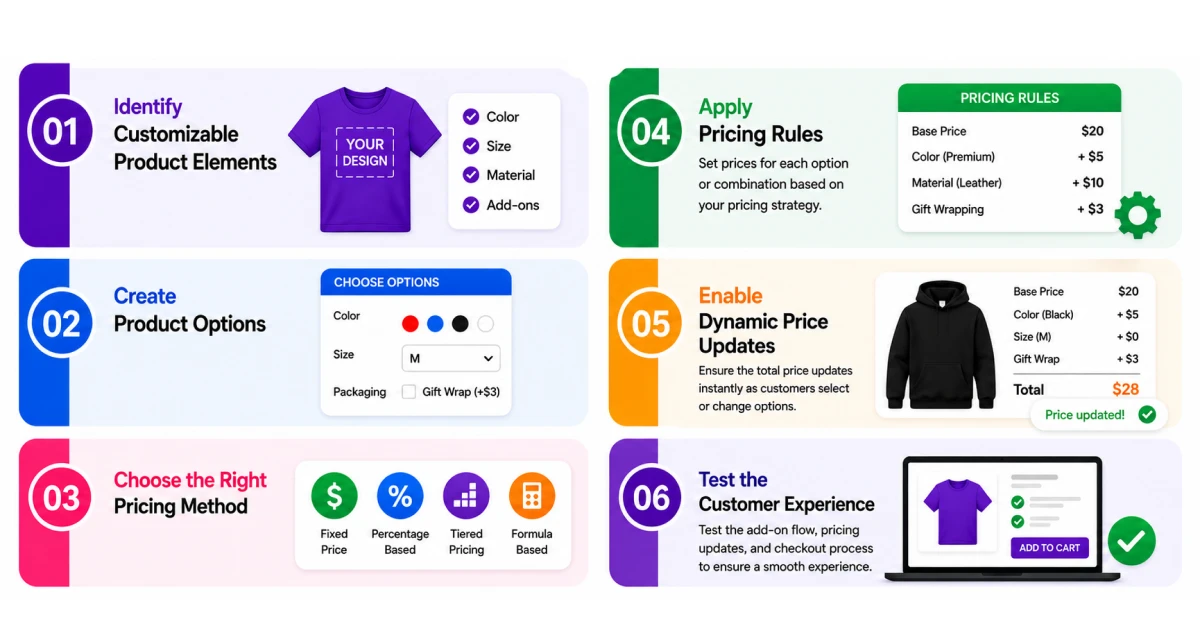
Setting up product add-on pricing isn’t just about adding extra charges. The goal is to build a pricing system that’s accurate, easy for customers to understand, and simple to manage as your store grows.
Following the right process helps you avoid unnecessary product variations while creating a smoother buying experience.
Step 1: Identify Customizable Product Elements
Start by listing every part of your product that customers can personalize or that carries an extra charge.
These may include custom text, premium materials, gift wrapping, file uploads, measurements, or optional services. Mapping these out first makes it easier to choose the right pricing approach for each one.
Step 2: Create Product Options
Once you have identified the available customizations, create the fields customers will interact with on the product page.
Choose field types that match the information you need to collect, such as text fields for names or messages, dropdowns for material choices, checkboxes for optional extras, file upload fields for artwork, and number or measurement inputs for dimensions.
Step 3: Choose the Right Pricing Method
Assign a pricing model that matches each option rather than using the same approach for everything.
Use fixed pricing for simple extras like gift wrapping, percentage pricing for value-scaled services like insurance, character-based pricing for engraving, and formula pricing for products priced by dimension.
Step 4: Apply Pricing Rules
After selecting the pricing method, configure how each option affects the product price.
Depending on the product, pricing rules may add a fixed amount, apply a percentage increase, charge per quantity, or calculate a price using a formula based on customer inputs.
Well-structured rules ensure every order is calculated consistently without manual adjustment.
Step 5: Enable Dynamic Price Updates
Configure your plugin to recalculate and display the updated total live on the product page as customers make selections.
Real-time pricing shows customers exactly how each choice affects the final cost before they add the product to the cart. This transparency reduces pricing surprises and builds confidence during checkout.
Step 6: Test the Customer Experience
Before publishing, test every customization option from a customer perspective.
Check that every field displays correctly, prices update accurately, conditional rules work as expected, and the cart total matches the product page. Testing on both desktop and mobile ensures a consistent experience across all devices.
Why Native WooCommerce Falls Short for Advanced Product Pricing
WooCommerce handles simple products well, but its built-in features become limiting when products require custom pricing or personalization. If your pricing depends on customer input, measurements, or conditional options, you’ll quickly encounter functionality gaps.
The table below highlights the most common limitations compared to an advanced WooCommerce product options plugin.
| Capability | Native WooCommerce | Advanced WooCommerce Product Options Plugin |
| Fixed add-on pricing | ✅ Supported | ✅ Supported |
| Percentage-based pricing | ❌ Not supported | ✅ Supported |
| Formula-based pricing | ❌ Not supported | ✅ Supported |
| Character-based pricing | ❌ Not supported | ✅ Supported |
| Quantity-based pricing | ❌ Not supported | ✅ Supported |
| Conditional pricing logic | ❌ Not supported | ✅ Supported |
| Live price updates | ⚠️ Limited | ✅ Supported |
| File upload pricing | ❌ Not supported | ✅ Supported |
| Custom product options | ⚠️ Basic | ✅ Advanced |
| WooCommerce product configurator | ❌ Not available | ✅ Included |
Native WooCommerce works well for standard products and simple variations. However, businesses selling personalized or configurable products often need features like formula pricing, conditional logic, character-based pricing, and live price updates, which require an advanced WooCommerce product options plugin.
How Optiontics Solves WooCommerce Product Add-On Pricing Challenges
Native WooCommerce handles basic product options, but advanced pricing often requires additional functionality.
Optiontics WooCommerce Product Add-ons Plugin extends WooCommerce with flexible product options, multiple pricing models, and automation tools, making it easier to sell personalized and configurable products without relying on hundreds of product variations.
Why Store Owners Choose Optiontics
Optiontics combines advanced product options and flexible pricing in a single solution. Its feature set is designed to help WooCommerce store owners build personalized products, automate complex pricing, and simplify product management without coding.
Key capabilities include:
- Drag-and-Drop Product Builder – Create custom product options without writing code.
- AI Field Generator – Generate complete product fields from a simple plain-text description.
- Multiple Pricing Models – Apply fixed, percentage, quantity, character-based, and formula pricing from one interface.
- Conditional Logic – Show or hide product options based on previous customer selections.
- Live Price Updates – Update product prices instantly as customers customize products.
- File Upload Pricing – Charge extra for artwork, logos, photos, and other uploaded files.
Some other capabilities are discussed below.
Build Custom Products Faster
Building complex product options manually can be slow and difficult to maintain. Optiontics includes a drag-and-drop builder with support for dropdowns, checkboxes, image swatches, text fields, file uploads, and more.
For even faster setup, the built-in AI Field Generator creates complete product option groups from a simple description, reducing setup time from hours to just a few minutes.
Automate Advanced Product Pricing
Optiontics supports all major WooCommerce pricing models, including fixed, percentage-based, quantity-based, character-based, and formula pricing. Whether you charge for engraving, calculate prices by dimensions, or apply percentage-based upgrades, every pricing rule is calculated automatically based on customer selections.
Improve the Customer Experience
Customers can personalize products while seeing live price updates before checkout. Combined with conditional logic that displays only relevant options, Optiontics creates cleaner product pages, reduces decision fatigue, and helps shoppers configure products with confidence.
Simplify Product Management
Instead of creating hundreds of product variations, Optiontics uses flexible product options and conditional rules to manage complex configurations from a single product. This keeps your catalog organized, reduces maintenance, and makes your WooCommerce store easier to scale.
Supported Pricing Models
Here are the advanced pricing models available in Optiontics, along with the business scenarios they’re designed to support.
| Pricing Model | Supported | Best For |
|---|---|---|
| Fixed Pricing | ✅ Yes | Gift wrapping, warranties, premium packaging |
| Percentage-Based Pricing | ✅ Yes | Insurance, premium materials, installation |
| Quantity-Based Pricing | ✅ Yes | Accessories, bulk orders, wholesale products |
| Character-Based Pricing | ✅ Yes | Engraving, monograms, personalized text |
| Formula-Based Pricing | ✅ Yes | Flooring, curtains, wallpaper, measurement-based products |
| File Upload Pricing | ✅ Yes | Print shops, signage, custom merchandise |
| Conditional Pricing | ✅ Yes | Product configurators, dependent product options |
| Live Dynamic Pricing | ✅ Yes | Instant price updates as customers customize products |
FAQ
Can you use multiple pricing models on one WooCommerce product?
Yes. You can combine multiple pricing models on the same product. For example, a product can use fixed pricing for gift wrapping, character-based pricing for engraving, and conditional pricing to display additional options based on customer selections.
Do WooCommerce product add-ons affect inventory?
No. Product add-ons don’t create separate inventory records. Inventory is managed through the main product or its variations, while add-ons simply apply additional customization and pricing.
What’s the difference between dynamic pricing and product add-on pricing?
Product add-on pricing charges for optional features like engraving or gift wrapping. Dynamic pricing changes product prices based on rules such as quantity discounts, user roles, or promotions.
Can product add-ons replace WooCommerce product variations?
Not completely. Use product variations for fixed attributes like size or color with inventory tracking. Use product add-ons for personalization, optional services, and extra charges. Many stores use both together.
Conclusion
WooCommerce product add-on pricing helps you offer personalized products without making your store harder to manage.
By using the right pricing model, you can automate calculations, simplify product customization, and create a smoother buying experience for your customers.
Whether you need fixed, formula-based, conditional, or dynamic pricing, the right tools make every step easier. If you’re ready to build advanced product options without coding, Optiontics gives you everything you need to create flexible pricing and grow your WooCommerce store with confidence.
If you’re ready to implement advanced WooCommerce product add-on pricing, compare the available plans and choose the license that best fits your store.

