Optiontics: Best WooCommerce Product Add-Ons Plugin for Custom Options & Upgrades


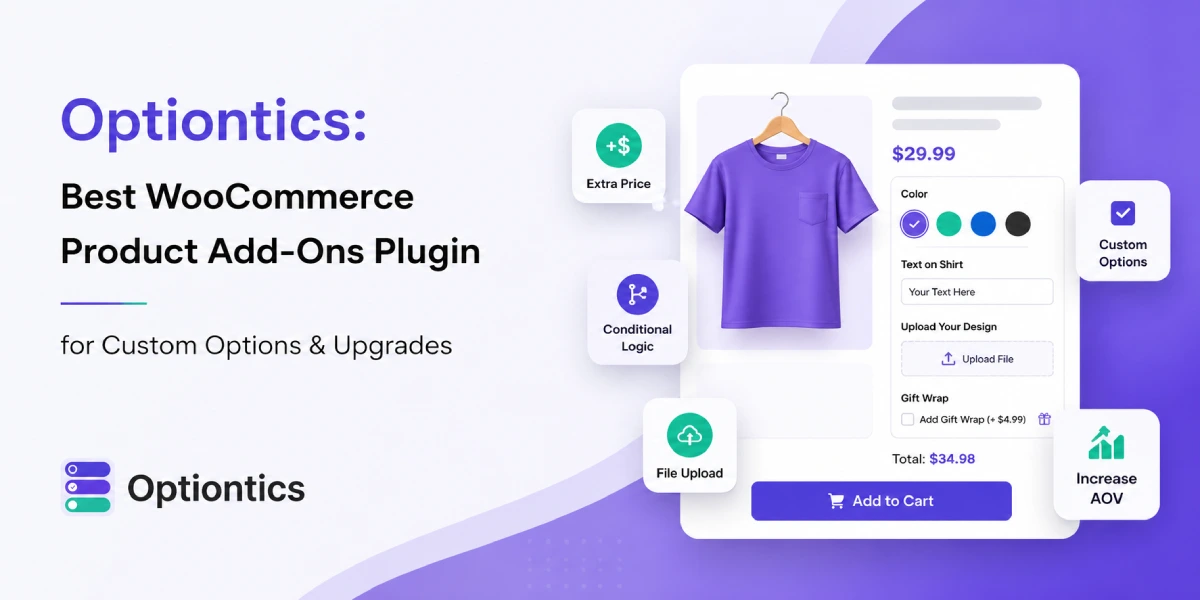
Table of Contents
Most WooCommerce product pages are designed to sell a single item. But real customers often want more-extra features, add-ons, or the ability to customize what they’re buying.
WooCommerce gives you a strong foundation to build an online store. However, when it comes to increasing order value from a single product page, the default setup has limits.
This is not a weakness of WooCommerce. No single plugin can cover every business need perfectly.
If your goal is to offer extras, upgrades, personalization, or custom choices, you need a dedicated WooCommerce product add-ons plugin.
That’s where Optiontics comes in.
Optiontics helps you add custom options, extras, and upgrades to your WooCommerce products. It turns a basic product page into a more interactive buying experience, where customers can tailor their orders, and you can earn more from each sale.
In this guide, you’ll learn what Optiontics does, how it differs from default WooCommerce variations, and how it can be used in real scenarios like restaurants and events. You’ll also see why it’s a practical solution for store owners who want to offer better product customization.
What is Optiontics?
Optiontics is a WooCommerce product add-ons plugin that helps you add custom product options, paid extras, conditional fields, and personalized choices to your WooCommerce product pages without coding.
In simple words, Optiontics helps you offer more than the default product price and quantity field.
You can add extra choices like checkboxes, dropdowns, radio buttons, text fields, file uploads, color options, image swatches, date pickers, and more. These options help customers personalize what they are buying before they reach checkout.
For example, you can use Optiontics to let customers:
- Add gift wrapping to a product
- Choose extra toppings for a food item
- Upload a design file for a custom print order
- Add a VIP upgrade to an event ticket
- Select a delivery date
- Choose a premium service add-on
- Add a custom message or note
The main goal of Optiontics is simple: help WooCommerce store owners sell extra options from the product page and create a better buying experience.
Instead of forcing customers to explain their needs later through email, phone, or order notes, you can collect everything directly on the product page. This makes the buying process clearer for customers and easier for store owners to manage.
Optiontics is useful for many types of WooCommerce businesses, including online stores, restaurants, event websites, service businesses, print shops, gift shops, and any business that sells customizable products.
It works especially well when your product has optional extras, upgrade choices, or customer-specific details that WooCommerce default product settings cannot handle alone.
Optiontics Product Add-Ons vs WooCommerce Default Variations: What’s the Difference?
WooCommerce variations are useful when you sell fixed product types like size, color, or material. But they can become hard to manage when customers need extra choices, custom details, or paid upgrades.
Optiontics product add-ons help when your product needs flexible options without creating too many variations.
| Comparison Point | WooCommerce Default Variations | Optiontics Product Add-Ons |
| Best for | Fixed product versions | Extra choices and custom options |
| Simple example | T-shirt size: S, M, L | Add gift wrap, custom text, file upload |
| Main problem solved | Shows product types | Sells extras and collects details |
| Setup difficulty | Can get messy with many combinations | Easier for optional add-ons |
| Pricing control | Price changes by variation | Add extra price per option |
| Custom input | Limited | Text, upload, date, note, and more |
| Upsell options | Not built for upsells | Good for paid upgrades |
| Restaurant use | Basic product choices | Toppings, sauces, combo upgrades |
| Event use | Basic ticket types | VIP upgrade, lunch, certificate, merch |
| Customer experience | Works for fixed choices | Better for personalized |
How Optiontics Helps You Add Better Product Add-Ons in WooCommerce
Optiontics helps you add custom product options, paid extras, and smart add-on fields to WooCommerce products without code. It is built for stores that want to sell more than a basic product.
With Optiontics, you can create product add-ons using a visual drag-and-drop builder. That means you can add options like text fields, dropdowns, checkboxes, radio buttons, number fields, text areas, switches, button groups, and color pickers without editing HTML, CSS, or PHP.
Here’s how Optiontics helps in real store situations:
| Optiontics Feature | How It Helps |
| 20+ field types | Add different product options like text, dropdown, checkbox, radio, number, and color fields |
| Conditional logic | Show only the fields customers need based on their selection |
| Dynamic pricing | Charge extra for add-ons using fixed, percentage, per-character, or formula-based pricing |
| Pre-built templates | Create product option setups faster for gifts, apparel, print products, and more |
| File upload support | Let customers upload logos, photos, artwork, or custom files |
| AI option builder | Describe what you sell, and Optiontics can help build options, pricing rules, and conditional fields faster |
| Live preview builder | Build and check product options visually before publishing |
| WooCommerce compatibility | Works inside your existing WooCommerce store setup |
See these features in action in our WooCommerce personalized gift setup guide, which walks through creating a photo mug with custom text, image uploads, and paid gift wrapping.
Use Cases: How Optiontics Works With Restaurants and Events
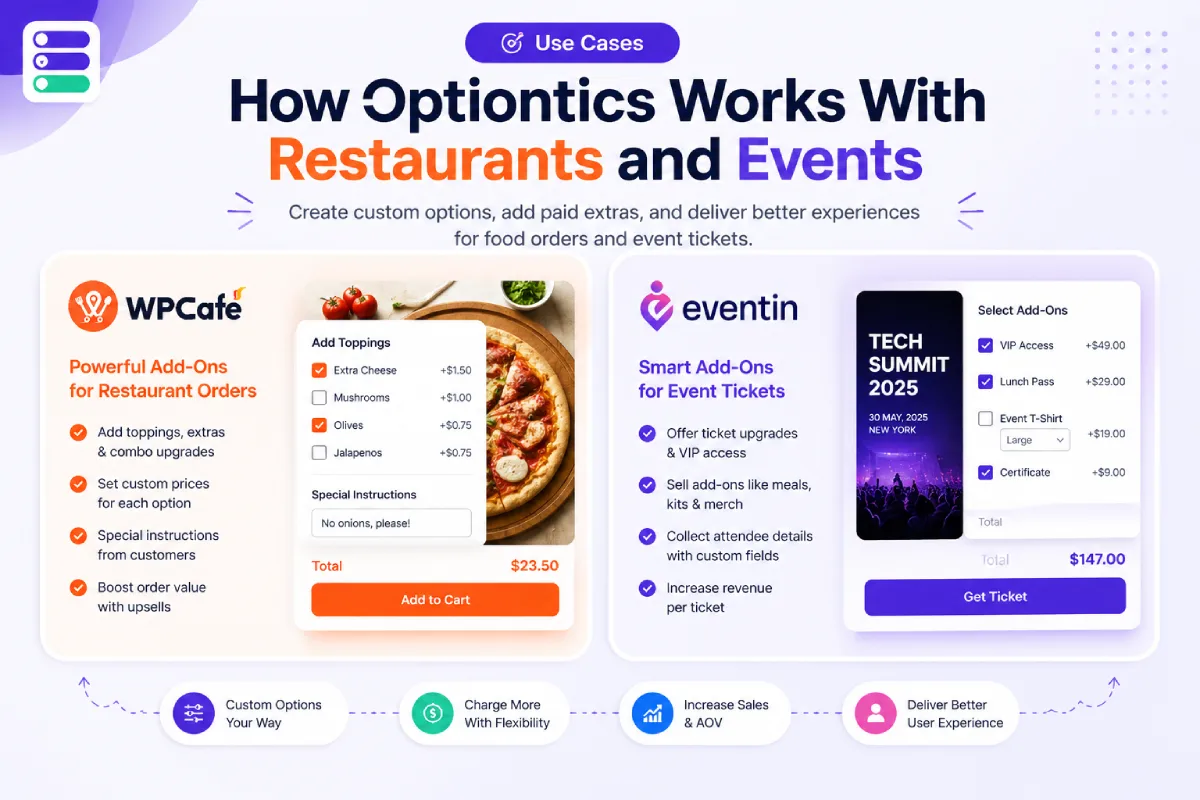
Optiontics is most useful when your WooCommerce products need more than a simple “add to cart” button. Restaurants and event businesses are two good examples because customers often want to customize what they buy before checkout.
Optiontics + WPCafe: Add Food Customization Options
If you use WPCafe to manage restaurant ordering in WordPress, Optiontics can help you add more flexible food options to your WooCommerce menu items.
For example, a customer may want to order a pizza, but they also want to choose the crust, add extra cheese, select toppings, pick a sauce, choose spice level, and leave a cooking note. Without proper product add-ons, these requests can become messy for both the customer and the restaurant team.
With Optiontics, you can add these choices directly to the food product page. Customers can select what they want before checkout, and your team can see clear order details.
This helps restaurants:
- Sell extra toppings, drinks, desserts, and combo upgrades
- Let customers personalize food orders
- Reduce phone calls or manual follow-up
- Collect special cooking instructions clearly
- Improve the online ordering experience
So, instead of selling only a basic food item, WPCafe and Optiontics together help you create a better food ordering flow with more customization and more upsell options.
Optiontics + Eventin: Sell Event Ticket Add-Ons
If you use Eventin to manage events and sell tickets with WooCommerce, Optiontics can help you sell more than a basic event ticket.
For example, an attendee may want VIP access, a lunch package, a certificate, a T-shirt, a parking pass, or access to an extra workshop. These are not always separate tickets. Many times, they work better as optional add-ons during the ticket purchase process.
With Optiontics, you can add these ticket extras to the WooCommerce product page and let attendees choose what they need before checkout.
This helps event organizers:
- Sell VIP upgrades and premium access
- Offer meals, certificates, merchandise, or parking passes
- Collect attendee preferences during purchase
- Increase ticket order value
- Create a smoother registration experience
This works well for conferences, training programs, workshops, seminars, meetups, and community events.
When Eventin handles the event setup and ticketing, and Optiontics handles extra ticket options, you can create a more complete event booking experience from your WordPress website.
How to Add Product Add-Ons in WooCommerce With Optiontics
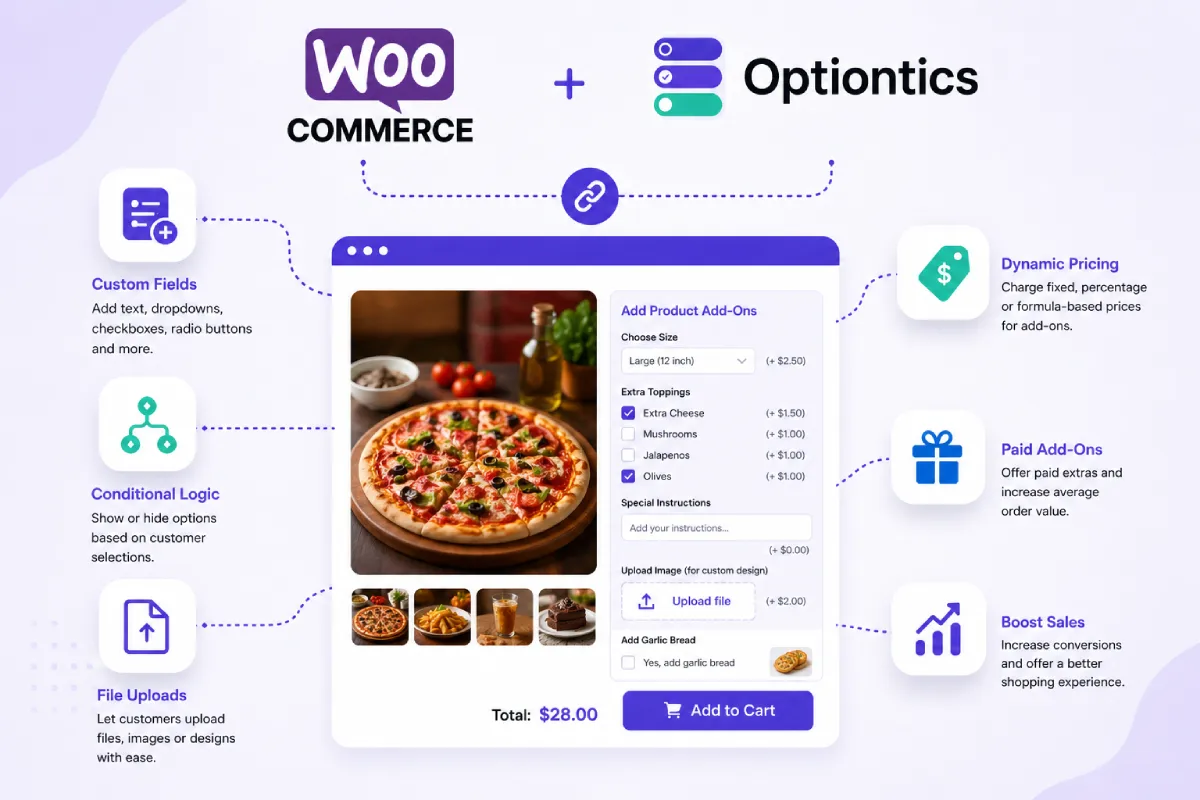
Adding WooCommerce product add-ons with Optiontics is simple. You can create an option group, choose where it should appear, add custom fields, set pricing rules, and publish everything from your WordPress dashboard.
Step 1: Install and Activate Optiontics
First, install and activate the Optiontics plugin on your WordPress website.
Go to WP Admin → Plugins → Add New → Upload Plugin, upload the Optiontics plugin file, then click Install and Activate.
Once the plugin is active, you’ll see the Optiontics menu in your WordPress dashboard.
Step 2: Create a New Product Option Group
Next, go to:
WP Admin → Optiontics → Add Option
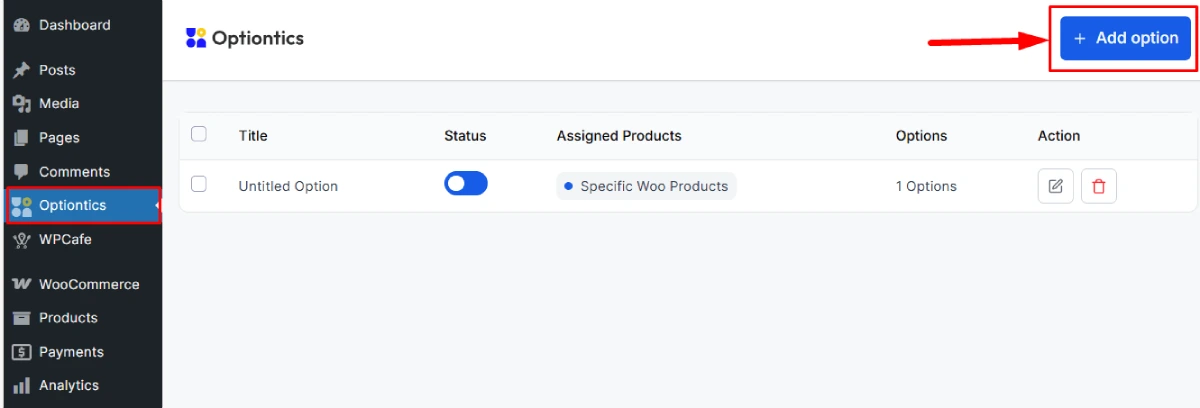
This is where you create a new option group for your WooCommerce products.
An option group is a set of product add-ons that you can apply to one product, selected products, or specific product categories.
For example, you can create:
- A food customization group for restaurant menu items
- A ticket upgrade group for event products
- A gift add-on group for personalized products
Step 3: Choose Where the Add-Ons Will Appear
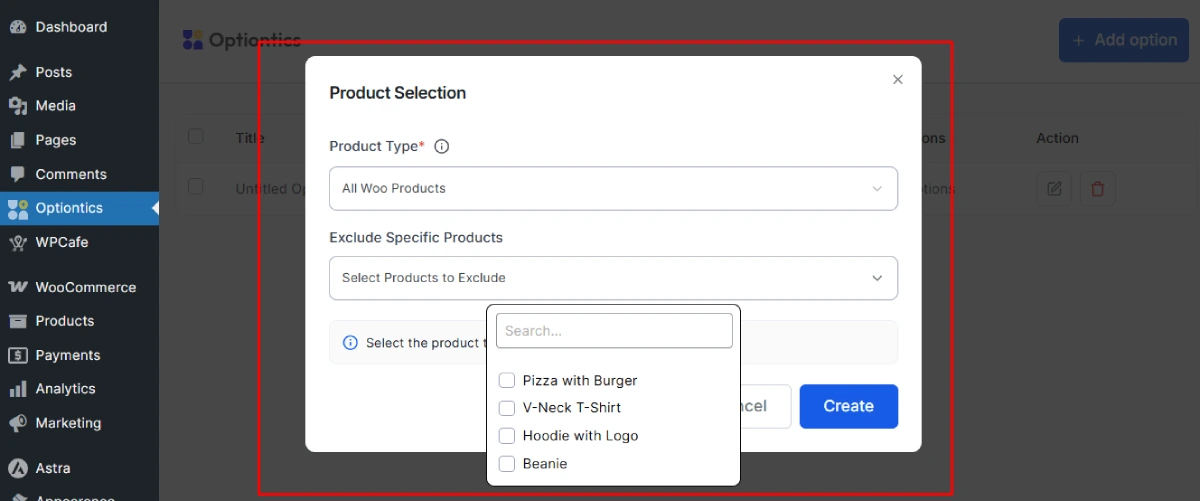
Now choose where your product add-ons should show.
You can apply the option group to:
- All products
- Specific products
- Specific product categories
This gives you better control. For example, toppings should appear only on food products. VIP upgrades should appear only on event ticket products.
Step 4: Add and Customize Product Fields
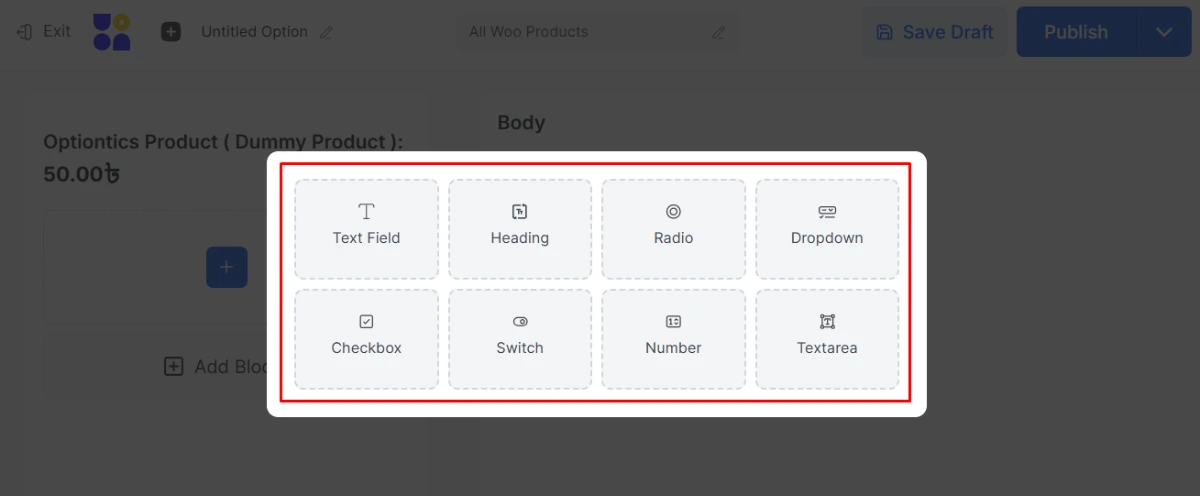
Use the drag-and-drop editor to add product fields to your selected WooCommerce products.
Optiontics supports useful field types like:
- Text field
- Heading
- Radio button
- Dropdown
- Checkbox
- Switch
- Number field
- Textarea
After adding a field, customize it from the settings panel.
You can adjust the label, placeholder, required status, default value, conditional logic, instructions, and add-on price.
This is where you decide how each option works for the customer.
Step 5: Publish and Test the Product Page
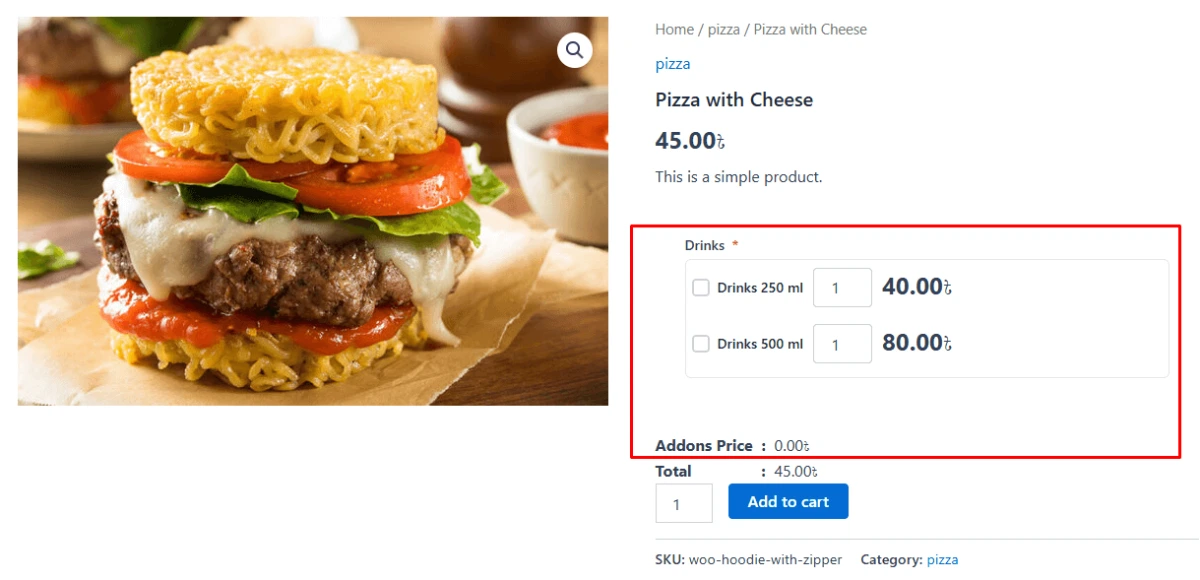
Once your fields are ready, click Publish or Save.
Then visit the product page and test it like a real customer.
Check if:
- The add-ons appear correctly
- Required fields work
- Pricing updates properly
- Selected options appear in the cart
- Order details show the customer’s choices
- The page looks clean on mobile
A quick test helps you avoid confusion during checkout.
WooCommerce Product Add-Ons Plugin Comparison: What Matters Most?
| Feature | Optiontics (ThemeWinter) | Advanced Product Fields (StudioWombat) | WooCommerce Custom Product Addons (Acowebs) | Extra Product Options (ThemeHigh) |
| Pricing (approx. as of 2026) | $39/ Lifetime (for 5 websites) | Pro: ~$69–89/year Extended: ~$89–229 lifetime options | From $49/year (single site); often one-time deals | $39/year (1 site) to $129/year (25 sites) |
| AI-Powered Setup | Yes (strongest differentiator – generate options in seconds) | ❌ | ❌ | ❌ |
| Conditional Logic | ✅ | ✅ | ✅ | ✅ |
| Pricing Options | ✅ | ✅ | ✅ | ✅ |
| File Uploads | ✅ | ✅ | ✅ | ✅ |
| Color / Image Swatches | ✅ | ✅ | ✅ | ✅ |
| Dynamic / Advanced Pricing | ✅ | ✅ | ✅ | ✅ |
| Unique Strength | AI generation speed +Beginner friendly+ Lightweight | Speed + developer-friendly interface | Powerful custom formulas & field variety | Affordable multi-site licensing |
Why Choose Optiontics for WooCommerce Product Add-Ons?
By now, you already know why Optiontics can be a strong fit for WooCommerce product add-ons.
Still, one thing is worth saying clearly: it is not easy to find this mix of features, price, and ease of use in one plugin. Optiontics gives you smart AI capabilities, a lightweight setup, beginner-friendly design, affordable pricing, and lifetime access, which makes it a strong value compared to many other options in the market.
Also, choosing a product add-ons plugin is not only about adding more fields to a product page. The real goal is to make your product page more useful, easier to manage, and better at selling extra options.
More Optiontics features are also coming, which makes it a future-ready choice for WooCommerce store owners who want better product customization and more selling opportunities.
FAQs About WooCommerce Product Add-Ons
1. What are WooCommerce product add-ons?
WooCommerce product add-ons are extra options customers can choose on a product page before checkout. These can include custom text, dropdowns, checkboxes, file uploads, gift wrapping, food toppings, ticket upgrades, and paid services. Product add-ons help customers personalize orders and help store owners sell more from each product page.
2. How do I add product add-ons in WooCommerce?
You can add product add-ons in WooCommerce by using a product add-ons plugin like Optiontics. After installing the plugin, create an option group, add fields like dropdowns or checkboxes, set pricing if needed, assign the options to products or categories, and publish them on your product pages.
3. What is the best WooCommerce product add-ons plugin?
The best WooCommerce product add-ons plugin depends on your store needs. If you want custom product options, paid extras, conditional logic, dynamic pricing, file uploads, and AI-assisted setup, Optiontics is a strong choice. It is useful for WooCommerce stores, restaurants, events, and service-based products.
4. What is the difference between WooCommerce variations and product add-ons?
WooCommerce variations are best for fixed product types, such as size, color, or material. Product add-ons are better for extra choices, custom inputs, paid upgrades, file uploads, notes, and optional services. For example, use variations for T-shirt sizes and add-ons for gift wrapping or custom text.
5. Can I charge extra for WooCommerce product add-ons?
Yes, you can charge extra for WooCommerce product add-ons. Many add-on plugins support paid fields, fixed fees, percentage pricing, per-character pricing, or formula-based pricing. This helps you sell upgrades like extra toppings, VIP access, gift wrapping, rush delivery, or premium services. WooCommerce’s own Product Add-Ons documentation also describes paid and free options using fields like radio buttons, checkboxes, dropdowns, and custom text inputs.
6. Can I add conditional logic to WooCommerce product options?
Yes, you can add conditional logic to WooCommerce product options with the right plugin. Conditional logic lets you show or hide fields based on what a customer selects. For example, you can show a file upload field only when the customer selects “custom design.” This keeps the product page clean and easier to use.
7. Can customers upload files with WooCommerce product add-ons?
Yes, customers can upload files with WooCommerce product add-ons if your plugin supports file upload fields. This is useful for print products, custom designs, logos, photos, documents, artwork, and personalized orders. The uploaded file can be attached to the customer’s order details for easier processing.
8. Do product add-ons increase average order value?
Yes, product add-ons can increase average order value by letting customers buy extra options from the product page. For example, a customer can add gift wrap, a warranty, extra toppings, a VIP upgrade, or a premium service. These small paid extras can increase total order value without adding new products.
9. Can I use WooCommerce product add-ons for restaurant orders?
Yes, WooCommerce product add-ons work well for restaurant orders. Restaurants can offer toppings, sauces, spice levels, drinks, desserts, combo upgrades, and special instructions. WooCommerce also recommends product add-ons for restaurant ordering because they allow diners to customize orders and create upsell options.
10. Can I use product add-ons for event ticket upgrades?
Yes, product add-ons can be used for event ticket upgrades. Event organizers can offer VIP access, lunch packages, certificates, T-shirts, parking passes, workshop access, or rental equipment as optional extras.
Final Thoughts: Turn Simple WooCommerce Products Into Better Buying Experiences
A good WooCommerce store should not stop at just selling the main product.
When someone is ready to buy, it’s the best time to offer useful extras. These small choices can enhance the order experience and increase the final cart value.
That’s the real value of product add-ons.
So, if you want a simple way to earn more from the same product page, Optiontics makes this easier with custom fields, conditional logic, dynamic pricing, templates, and smart AI capabilities.
Bonus: 🔥 Optiontics is now available with a massive launch offer-70% OFF! If you want to secure a low price, grab the offer before the early bird deal ends.