How to Manage Cohort-Based Learning in WordPress Without a Complex LMS


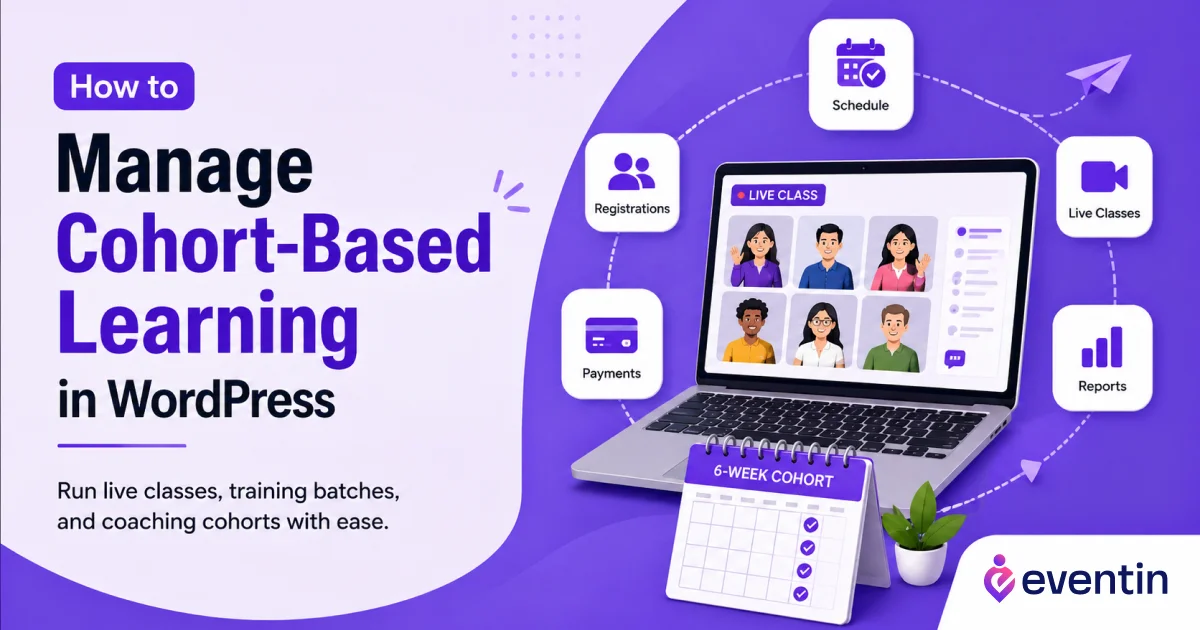
Table of Contents
You can manage cohort-based learning in WordPress without a complex LMS by treating each cohort as a scheduled learning event.
Instead of building a full course portal with lessons, quizzes, certificates, and progress tracking, you can use WordPress to manage the main parts of a live cohort program: registration, payments, schedules, seat limits, Zoom or Google Meet links, calendar invites, and attendee lists.
Using Eventin, you can create each cohort as a recurring event, set weekly or monthly class schedules, limit seats, collect paid registrations through WooCommerce or Stripe, and send learners meeting links with calendar invites.
You can also run multiple cohorts at the same time while keeping attendee lists and booking reports separate for each batch.
So, if your cohort-based course depends more on live sessions than self-paced lessons, you do not need to start with a heavy LMS. WordPress + Eventin gives you a simpler way to organize, sell, and manage cohort-based learning from your own website.
This setup works best for live classes, online bootcamps, coaching programs, paid workshops, and group training sessions where learners join together on fixed dates.
In this guide, you’ll learn how cohort-based learning works, when you actually need an LMS, and how to manage online cohorts in WordPress using Eventin.
📌 Quick Summary: What You’ll Learn
You’ll learn how to manage cohort-based learning in WordPress without using a complex LMS. This guide shows how to organize live classes, paid registrations, recurring schedules, attendee limits, and online meeting access from your WordPress site.
- What cohort-based learning means and how it works in WordPress
- When you need an LMS and when an event-based setup is enough
- How to create weekly, monthly, or custom recurring cohort sessions
- How to collect cohort fees through WooCommerce or Stripe
- How to set attendee limits for each cohort
- How to send Zoom or Google Meet links with calendar invites
- How to manage multiple cohorts with separate attendee lists and booking reports
- How Eventin helps you run live cohort programs, bootcamps, workshops, and group training sessions from WordPress
By the end, you’ll know how to use WordPress and Eventin to create, sell, schedule, and manage cohort-based learning without depending on a heavy LMS.
What Is Cohort-Based Learning?
Cohort-based learning is a learning model where a group of students joins a course, workshop, or training program together and follows the same schedule. Instead of learning alone at any time, learners attend live sessions as a group.
Key Elements of Cohort-Based Learning
A successful cohort-based program usually includes:
- Fixed schedule: Learners know when each class will happen.
- Live sessions: Classes happen through Zoom, Google Meet, or another meeting platform.
- Group progress: Everyone moves through the program together.
- Limited seats: The instructor can control the class size.
- Direct support: Learners can ask questions and get feedback.
- Community feel: Students interact with each other during the program.
- Clear start and end date: The program feels organized and easy to follow.
For example, a course creator may run a 6-week “WordPress SEO Bootcamp” where students join one live class every Saturday. Everyone starts on the same date, follows the same lessons, joins the same live sessions, and completes the program together.
That is a cohort-based course.
The main idea is simple: A fixed group of learners learns together within a fixed timeline. Moreover, it’s different from self-paced learning.
In a self-paced course, students can join anytime and complete lessons whenever they want. They usually watch recorded videos, read course materials, and move at their own speed.
In cohort-based learning, the experience is more live, structured, and community-driven.
Here is the simple difference:
| Learning Type | How It Works | Best For |
| Self-paced learning | Students learn anytime at their own speed | Recorded courses, evergreen programs, large course libraries |
| Cohort-based learning | Students join live sessions together on a fixed schedule | Bootcamps, coaching, workshops, training, live classes |
Cohort-based learning works well when students need guidance, feedback, discussion, and accountability.
That is why many course creators, coaches, trainers, and online educators use this model for high-value programs.

Best Way to Manage Cohort-Based Learning in WordPress
The best way to manage cohort-based learning in WordPress is to treat each cohort as a scheduled live program, not as a full course portal.
For most coaches, trainers, workshop hosts, and online educators, the main need is simple:
- Create a class schedule
- Register learners
- Limit seats
- Collect payments
- Send Zoom or Google Meet links
- Manage attendee lists
- Track each cohort separately
You can do all of this with Eventin.
Eventin lets you create each cohort as an event or a recurring event. So, instead of building a complex LMS, you can set up weekly classes, paid workshops, training batches, or live coaching programs directly inside WordPress. Here’s a simple view:
| What You Need | How Eventin Helps |
| Fixed cohort schedule | Create weekly, monthly, or custom recurring events |
| Learner registration | Collect signups from your WordPress site |
| Limited seats | Set attendee caps for each cohort |
| Paid access | Accept payments through WooCommerce or Stripe |
| Live classes | Send Zoom or Google Meet links to learners |
| Multiple cohorts | Manage separate attendee lists and booking reports |
So, if your cohort-based course depends more on live sessions, registration, payments, and class schedules, Eventin can be a simpler choice than a full LMS.
But does that mean you never need an LMS?
Let’s clear that up next.
Do You Really Need an LMS for Cohort-Based Learning in WordPress?
You do not always need an LMS to run cohort-based learning in WordPress.
An LMS is useful when you want to build a complete online course platform with recorded lessons, quizzes, assignments, certificates, student dashboards, and progress tracking.
But if your cohort is mainly based on live classes, workshops, group coaching, paid training sessions, or recurring online sessions, a full LMS can feel too complex.
Here’s a simple way to decide:
| Your Need | Use Eventin | Use an LMS |
| Run live online classes | ✅ | ✅ |
| Create weekly or monthly sessions | ✅ | ✅ |
| Collect learner registrations | ✅ | ✅ |
| Accept paid bookings | ✅ | ✅ |
| Limit seats per cohort | ✅ | ✅ |
| Send Zoom or Google Meet links | ✅ | Sometimes needs setup |
| Manage attendee lists | ✅ | ✅ |
| Run multiple cohorts | ✅ | ✅ |
| Add quizzes and assignments | ❌ | ✅ |
| Track lesson progress | ❌ | ✅ |
| Create student dashboards | ❌ | ✅ |
| Issue certificates | ❌ | ✅ |
Use an LMS if you want a full course system with lessons, quizzes, assignments, progress tracking, and certificates.
Use Eventin if you want to manage a live cohort-based program with schedules, registrations, payments, meeting links, attendee limits, and booking reports.
For many course creators, coaches, trainers, and workshop hosts, this is enough to start and manage a professional cohort program without extra complexity.
Why Eventin Is a Practical Choice for Cohort-Based Learning in WordPress
Eventin helps you manage cohort-based learning in WordPress by treating each cohort as a scheduled event.
This makes sense because a live cohort program works much like an event series.
You have a topic, a start date, a fixed schedule, a limited number of seats, registered attendees, payment options, and live session access.
With Eventin, you can create a cohort-based course as an event and then manage the full registration flow from your WordPress dashboard.
For example, you can create a cohort like:
WordPress SEO Bootcamp: Batch 1
Then you can set it to run every Saturday at 8 PM for 6 weeks.
You can add a seat limit, enable paid registration, connect Zoom or Google Meet, and manage all registered learners from one place.
This makes Eventin useful as a WordPress cohort course plugin, especially for creators who do not need a full LMS.
Here is how Eventin supports live cohort-based learning.
- Create Weekly, Monthly, or Custom Recurring Cohort Sessions
- Set Attendee Limits for Each Cohort
- Collect Paid Registrations Through WooCommerce or Stripe
- Send Zoom or Google Meet Links
- Provide Calendar Invites
- Manage Separate Attendee Lists for Each Cohort
- Run Multiple Cohorts at the Same Time
- Track Bookings and Reports Per Cohort
This is useful for course creators and training businesses that want to improve future cohort planning.
Eventin vs LMS: Which One Should You Choose?
| Tool | Starting Price | Good Fit for Live Cohorts? | Notes |
| Eventin | Starts from $89/year | Yes | Best when you need recurring schedules, registration, payments, attendee lists, and meeting links without building a full LMS. Eventin also has a free version for basic event management. |
| Tutor LMS | Starts from $199/year | Yes, but heavier | Better for structured course portals with student dashboards, course builder, quizzes, certificates, and advanced LMS features. |
| LearnDash | Starts from $199/year | Yes, but heavier | Good for full course platforms with lessons, groups, grading, analytics, Stripe, and PayPal support. |
| LifterLMS | Bundle starts at $149.50/year | Yes, but may need paid add-ons | The free core plugin supports courses and memberships, but payment add-ons like Stripe, PayPal, and WooCommerce are included in paid bundles. |
How to Set Up Cohort-Based Learning in WordPress with Eventin
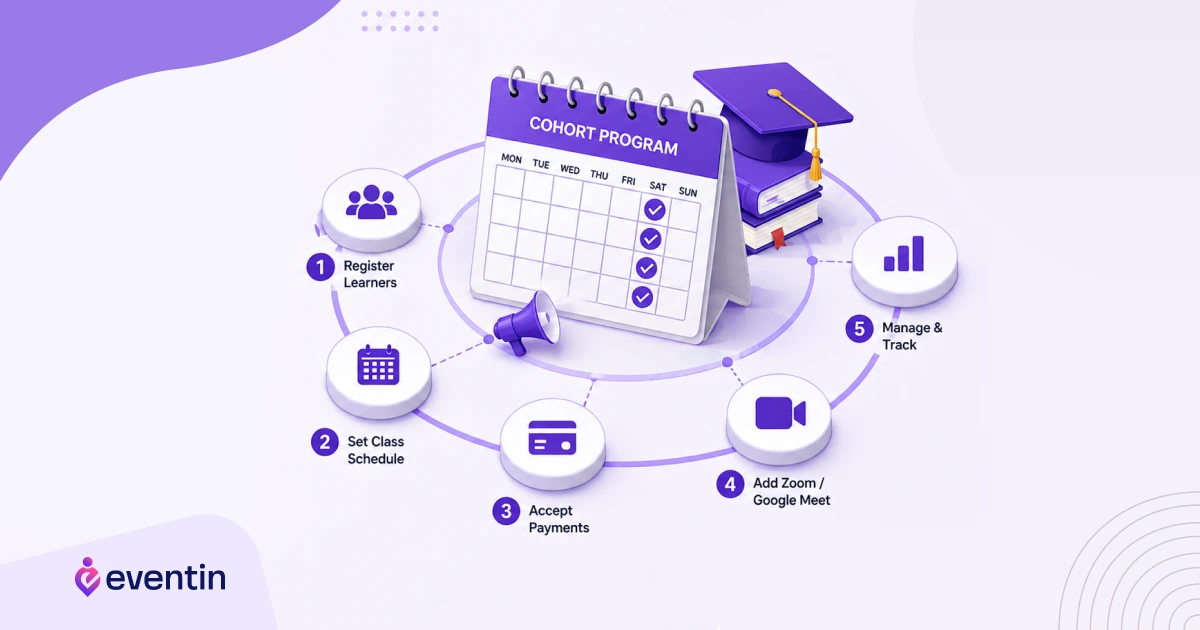
Setting up cohort-based learning in WordPress with Eventin is simple. You can create your cohort as a live event, add a repeat schedule, collect registrations, and manage learners from one dashboard.
Here’s the basic process:
Step 1: Create Your Cohort as an Event
First, install and activate Eventin on your WordPress site.
Then go to your WordPress dashboard and create a new event for your cohort.
Add the basic details:
- Cohort title
- Short description
- Instructor or trainer name
- Start date and time
- Learning outcome
- Class location or online meeting type
Example: Content Writing Bootcamp: May Cohort
This makes your cohort clear for learners before they register.
Step 2: Set the Class Schedule
Next, set the schedule for your cohort.
If your cohort runs more than once, use Eventin’s recurring event option. You can create sessions based on:
- Weekly schedule
- Monthly schedule
- Custom dates
- Multi-day workshop format
For example, a 6-week training program can run every Saturday at 8 PM. A short bootcamp can run on three selected dates in one month.
This helps learners know exactly when each live class will happen.
Step 3: Add Registration and Seat Limit
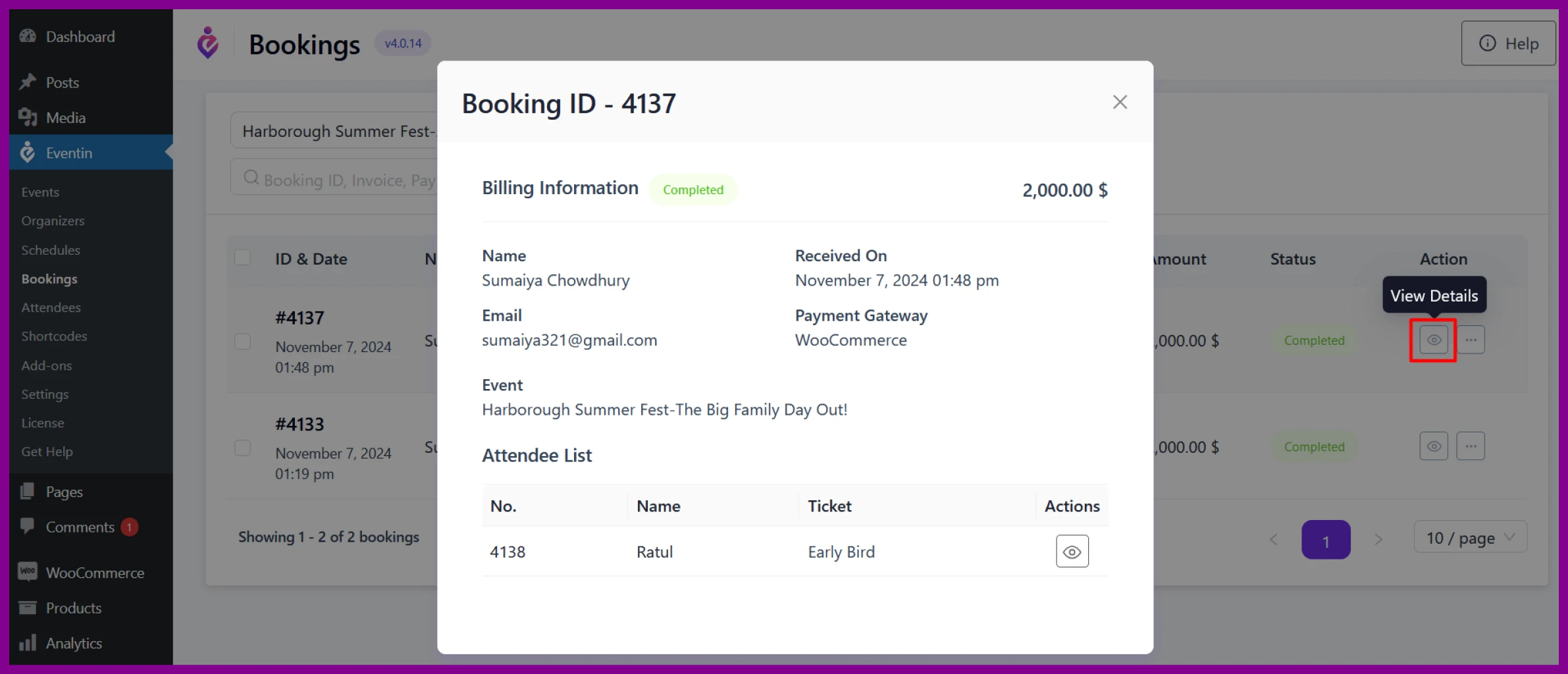
Now, enable registration for your cohort.
You can set how many learners can join each batch. This is useful because cohort-based learning works better when the group size stays manageable.
Example:
- Beginner cohort: 30 seats
- Advanced cohort: 20 seats
- VIP coaching cohort: 10 seats
A seat limit also creates urgency and helps you avoid overbooking.
Step 4: Set Free or Paid Access
After that, choose whether your cohort will be free or paid.
With Eventin, you can sell access to your cohort through WooCommerce or Stripe. This is helpful for:
- Paid workshops in WordPress
- Live online training
- Coaching programs
- Skill-based bootcamps
- Private group classes
You can also create different pricing options if needed, such as early bird access, regular access, or VIP access.
Step 5: Connect Zoom or Google Meet
For online cohorts, connect your live class platform.
Eventin lets you manage Zoom classes in WordPress and Google Meet classes WordPress from the event setup. After registration, learners can receive the correct meeting link and join details.
This saves time because you do not need to send meeting links manually to every learner.
Step 6: Send Confirmation and Calendar Details
Once learners register, they should receive clear confirmation details.
You can use Eventin to send important session information, such as:
- Registration confirmation
- Class date and time
- Meeting link
- Calendar invite
- Basic joining instructions
This helps reduce confusion and improves attendance.
Step 7: Manage Attendees and Reports
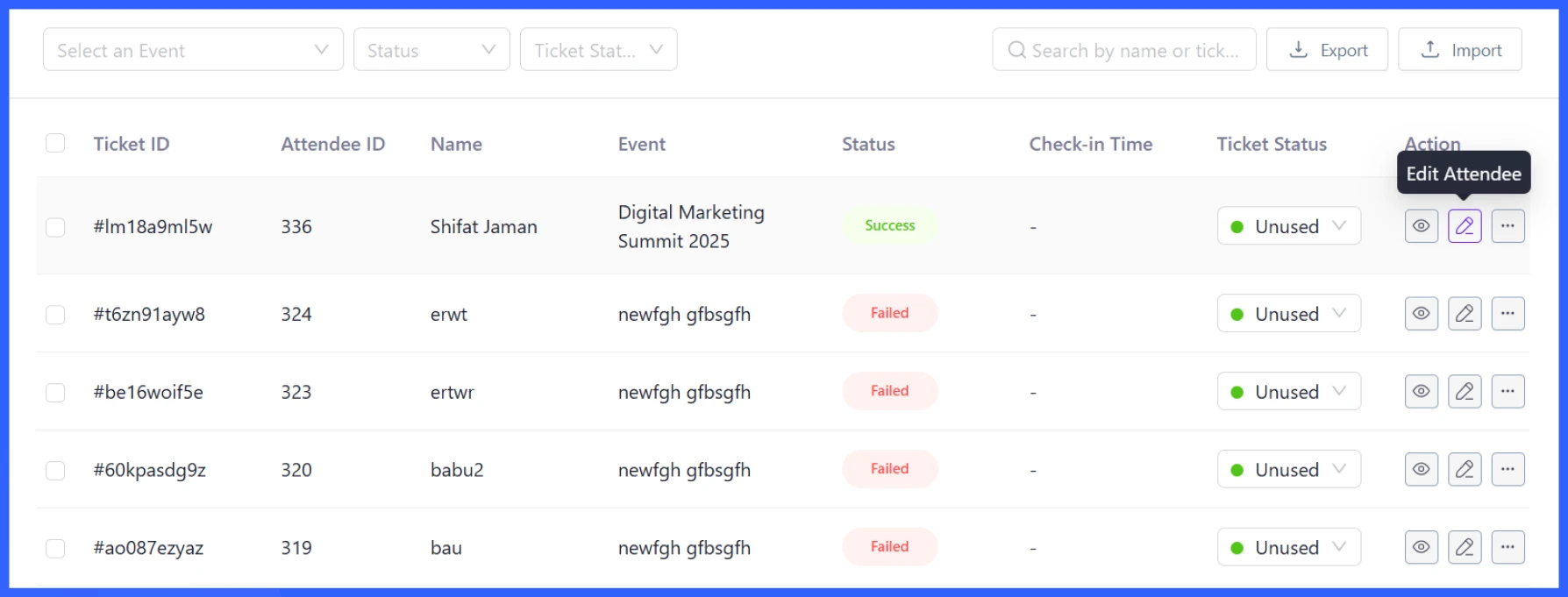
Finally, manage your cohort from the Eventin dashboard.
You can review:
- Registered learners
- Attendee list
- Booking details
- Payment status
- Cohort-wise reports
If you run multiple cohorts at the same time, keep each cohort as a separate event. This way, every batch has its own schedule, attendee list, and booking data.
That’s it. With this setup, you can manage a live cohort-based program in WordPress without building a complex LMS.
Conclusion: Start Simple, Then Scale Your Cohort Program
Cohort-based learning does not have to start with a complex LMS.
If your goal is to run live classes, paid workshops, group coaching, or training batches, you can start with a much simpler setup inside WordPress with Eventin.
As your cohort program grows, you can improve it step by step. You can add more batches, create advanced pricing options, run private cohorts, offer VIP sessions, or connect your cohort with other WordPress tools when needed.
The best part is that you stay in control of your own platform.
So, start simple.
Eventin gives you the practical solution to launch, manage, and grow your live learning programs from one dashboard.
FAQs About Cohort-Based Learning in WordPress
What is cohort-based learning?
Cohort-based learning is a learning model where a group of learners starts, follows, and completes a program together on a shared schedule. It usually includes live sessions, group discussion, deadlines, and instructor support.
What is a cohort-based course?
A cohort-based course is a time-based course where learners join as a group and move through the same lessons, sessions, or activities together. It is different from a self-paced course because learners follow a fixed timeline instead of learning alone whenever they want.
Can I manage cohort-based learning in WordPress?
Yes, you can manage cohort-based learning in WordPress. You can create cohort landing pages, collect registrations, schedule live classes, limit seats, accept payments, and manage attendees using plugins like Eventin.
Do I need an LMS for cohort-based learning?
You need an LMS if your program needs recorded lessons, quizzes, assignments, certificates, student dashboards, and progress tracking. But if your cohort is mainly built around live classes, workshops, group coaching, or training sessions, you can manage it with an event registration plugin like Eventin.
What is the best way to run a cohort-based course in WordPress?
The best way is to create each cohort as a scheduled program with a clear start date, session dates, registration form, seat limit, payment option, and live class link. With Eventin, you can create the cohort as an event or recurring event and manage learners from one dashboard.
Can I run paid cohort-based courses in WordPress?
Yes, you can run paid cohort-based courses in WordPress. You can sell access to live classes, workshops, coaching programs, or training batches using a plugin that supports registration and payments. Eventin supports paid registration through payment options like WooCommerce or Stripe, which makes it useful for paid workshops in WordPress.
Can I run Zoom classes in WordPress?
Yes, you can run Zoom classes in WordPress. For a cohort-based program, you can create a live class schedule and share Zoom access with registered learners. Eventin helps by connecting your event setup with online meeting access, so learners can receive the correct class details after registration.
Can I run Google Meet classes in WordPress?
Yes, you can run Google Meet classes in WordPress. This works well for live training, coaching cohorts, online workshops, and small academy classes. With Eventin, you can manage your cohort schedule, collect registrations, and share Google Meet details with learners.
How do I manage multiple cohorts at the same time?
To manage multiple cohorts, create each cohort as a separate event or recurring event. Give each cohort a clear name, schedule, seat limit, meeting link, and attendee list. For example, you can create “SEO Bootcamp Batch 1” and “SEO Bootcamp Batch 2” as separate cohorts inside Eventin.
Is Eventin a cohort-based learning platform?
Eventin is not a traditional LMS or full cohort-based learning platform. It is a WordPress event management and registration plugin. But it works well for live cohort-based programs because it supports recurring events, registrations, payments, attendee management, and virtual class links.
Is cohort-based learning better than self-paced learning?
Cohort-based learning is better when learners need structure, live support, group discussion, and accountability. Self-paced learning is better when learners want full flexibility and recorded lessons. For live coaching, workshops, and training programs, cohort-based learning often creates stronger participation and completion.