Timetics AI 2.0: A Smarter Way to Schedule Appointments, Sell, and Manage Bookings


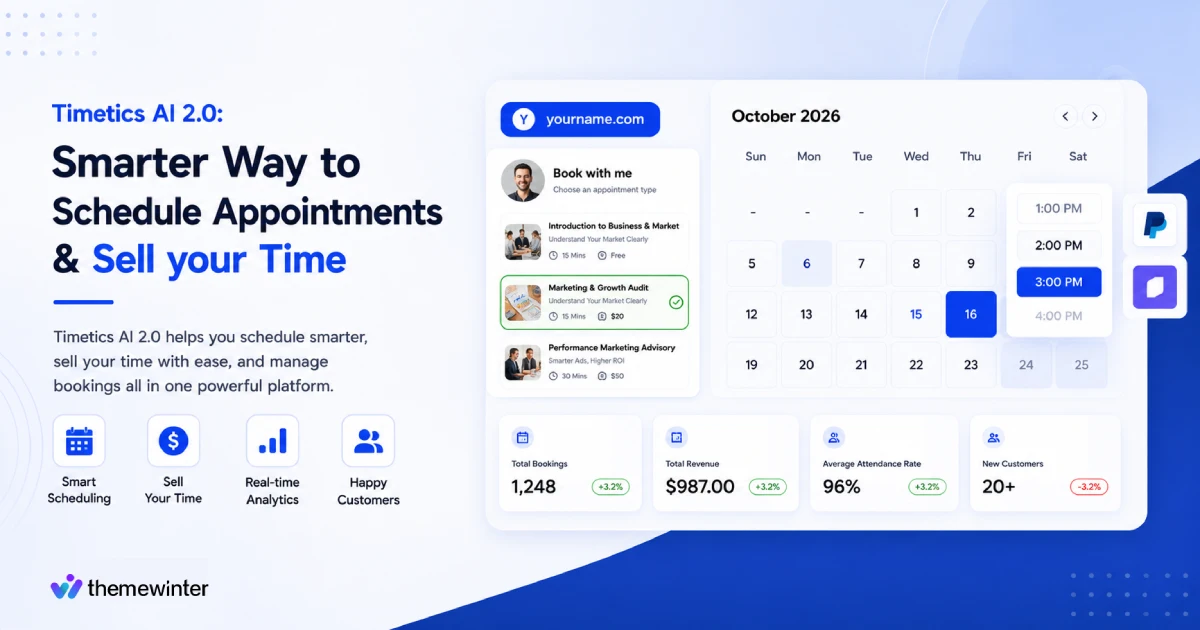
Table of Contents
Timetics AI 2.0 is an AI-powered appointment booking software built for individual professionals and businesses who want to sell their time or services and make money.
Instead of only showing available time slots, Timetics AI helps you create a booking page where clients can see your services, understand your pricing, choose the right option, and book with confidence.
Traditional scheduling tools mostly answer one question: “When are you free?” Timetics AI 2.0 goes further by helping you answer: “What service are you offering, who should book it, what should it cost, and how should the booking be managed?” That shift makes it a stronger fit for businesses that want better bookings, fewer low-intent calls, smoother payments, and less manual follow-up.
With features like AI scheduling assistance, booking pages with payments, team scheduling, workspaces, calendar sync, meeting integrations, and automation, Timetics AI 2.0 helps businesses manage appointments in a more structured way.
In this guide, we’ll break down what Timetics AI 2.0 is, how it works, who it is best for, and why it stands out as a modern appointment booking softwarefor professionals like you.
What Is Timetics AI 2.0?
Timetics AI 2.0 is a sales-driven booking software that transforms your calendar into a high-converting storefront designed to turn visitors into paying customers.
Where most scheduling tools focus on calendar availability, Timetics AI 2.0 is built around what you’re offering: structuring your services, surfacing your pricing, and converting client interest into a committed, paid booking – before the call ever begins.
It positions itself not as a scheduling tool but as what the team calls a Time Intelligence and Monetization Platform. Before a client picks a time slot, they’ve already seen your service options, understood your pricing, answered your intake questions, and completed payment.
By the time a meeting is confirmed, both sides already know why it’s happening, what it costs, and what to expect.
This is the core difference between scheduling software that manages appointments and appointment booking software that drives conversion.
What’s New in Timetics AI 2.0 Compared to Earlier Versions?
Timetics AI 2.0 shifts from a calendar-first to a service-first approach. Instead of just scheduling time, it focuses on what you offer and how to sell it effectively. This sales-driven model is the primary upgrade from previous versions.
| Area | Previous Version | Timetics AI 2.0 |
| Main focus | Basic appointment scheduling | Service-based booking, automation, and AI-powered scheduling |
| Booking experience | Clients mostly picked a time slot | Clients choose a service, review details, select time, and book with clarity |
| Booking page | More calendar-focused | More sales-driven and service-focused |
| Client decision-making | Limited context before booking | Service details, pricing, and booking questions help clients choose better |
| Payments | Less central to the booking flow | Payments and deposits can be part of the booking process |
| AI support | Limited or not central | AI assistant helps with navigation, setup, availability, and booking actions |
| User experience | More manual setup and management | Cleaner, faster, and more guided booking workflow |
| Team management | Basic team scheduling needs | Better fit for teams, agencies, workspaces, and multi-service businesses |
| Productivity | More manual follow-up and coordination | More automation across bookings, calendars, reminders, and workflows |
| Best fit | Simple scheduling use cases | Consultants, agencies, clinics, salons, coaches, tutors, and service businesses |
Core Features of Timetics AI 2.0 – And What Each One Actually Does
Timetics AI 2.0 is built around six core capabilities. Each one targets a specific gap that standard appointment booking software leaves open – from how clients understand your services, to how they pay, to how the system runs without you manually managing it.
1. Paid Consultation Booking
Most booking pages show a calendar. A Timetics booking page shows a business.
When a client lands on your link, they see your service offerings, pricing, and options – not an empty grid of available slots. They understand what they’re choosing before they choose it. The decision is made on the booking page, not on the call.
This single shift changes the quality of every meeting that gets booked. Clients arrive with context. They’ve already seen what you offer, what it costs, and why it’s right for them.
2. Service Packages and Add-Ons
Traditional scheduling tools ask clients to pick a time. Timetics asks them to pick a service first, then a time.
This is a structural change, not a cosmetic one. Instead of presenting a wall of open slots, Timetics organizes your offerings into clear, selectable services – each with its own duration, price, and description.
A consultant can offer a free 15-minute intro alongside a paid 60-minute strategy session. A salon can list a haircut, a color treatment, and a full styling session as separate, bookable services. A lawyer can separate a free eligibility check from a billable consultation.
Clients self-select the right option before they ever touch the calendar.
That means fewer wrong bookings, fewer mismatched expectations, and fewer conversations that should never have happened.
3. The Timetics AI Agent
Most scheduling tools have a learning curve. You spend time figuring out where settings live, how to configure availability, how to set up a new service type. It is not hard, but it is friction. And for someone who bills by the hour, that friction has a real cost.
The Timetics AI Agent removes it. Instead of navigating menus, you type what you need in plain language and it either does it or takes you directly there.
- “Set my availability for next week” → done
- “Create a 30-minute consultation at $150” → service created
- “Where is the timezone setting?” → navigates instantly
- “Reschedule John’s appointment to Friday” → executed
It is not a chatbot answering FAQs. It is an agent that operates the platform on your behalf , the difference being that it actually changes things, not just explains them.
Calendly, Acuity, and Cal.com do not have this. You configure those tools. With Timetics, you instruct it.
Voice commands, bulk reschedule actions, and automated workflow management are currently in development , but the core agent is live and functional today.
4. Built-In Payments and Deposits
Payment in Timetics AI 2.0 is not an add-on. It is part of the booking flow itself.
Timetics supports Stripe and PayPal with a 0% platform fee. Clients can pay the full amount or a deposit at the time of booking (before the meeting is confirmed) without being redirected to a separate page or a follow-up invoice.
Coupons are supported. Flexible deposit amounts are configurable per service. The entire payment experience happens inside the same uninterrupted flow as the rest of the booking.
The business impact is direct: clients who pay before a meeting have financially committed.
5. Workspaces – Run Multiple Brands from One Account
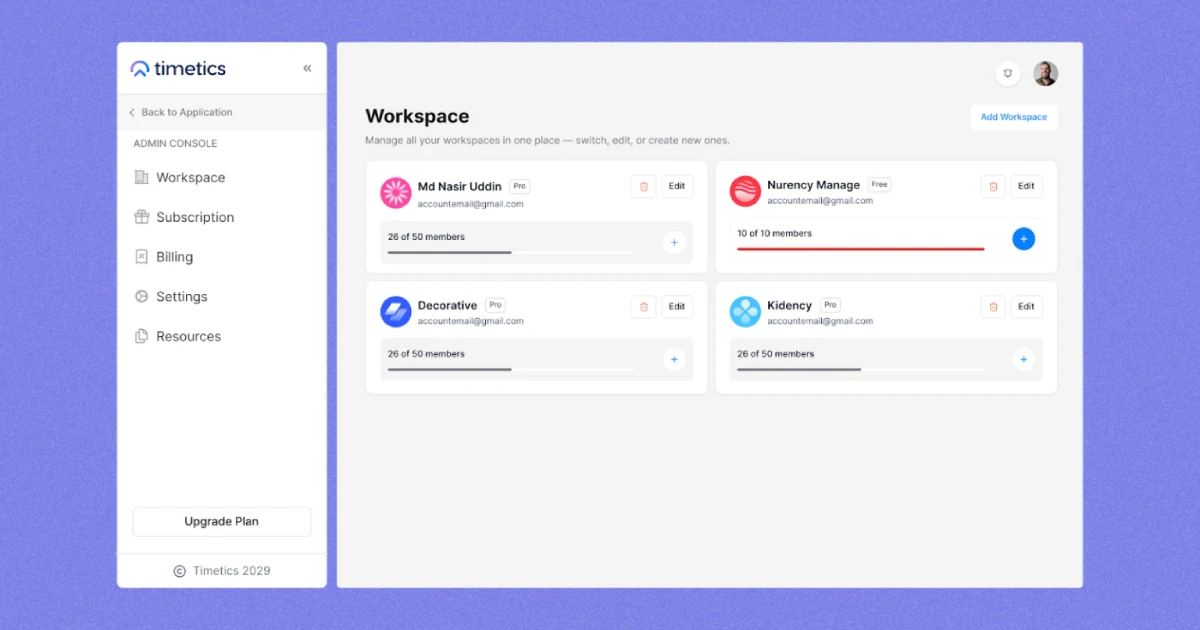
Timetics AI 2.0 includes a workspace system that lets you operate multiple fully isolated brands, businesses, or client accounts from a single Timetics login.
Each workspace has its own team, services, availability settings, booking page, and calendar. Workspace A sees nothing of Workspace B. An agency managing ten clients can run ten independent booking environments without ten separate subscriptions.
A consultant with two distinct service lines can keep them cleanly separated.
Depending on the plan tier, users get between 2 and 30 workspaces. This feature directly addresses one of the most common pain points in multi-brand scheduling: the forced choice between operational chaos and per-account subscription costs.
6. Analytics and Time Insights
Timetics AI 2.0 includes booking analytics that go beyond a standard calendar view.
The analytics layer shows which services generate the most revenue, which booking types drive the most no-shows, and which time slots produce the highest-value meetings. The intent is to help users make decisions about their calendar based on data.
Most appointment booking software tells you when your meetings are. Timetics tells you which meetings are worth taking.
Advanced analytics – including revenue per service, team performance metrics, and time-ROI reporting- are on the active development roadmap.
Additional Features Worth Knowing
Beyond the six core capabilities, Timetics AI 2.0 includes:
- Round-robin team scheduling — bookings distributed automatically across available team members
- Recurring bookings — daily, weekly, or monthly sessions set on autopilot
- Automated reminders — confirmation emails, pre-meeting nudges, and no-show follow-ups sent without manual input
- Pre-booking intake questions — clients answer custom questions before confirming, so hosts arrive with context already captured
- 30+ integrations — Google Calendar, Microsoft Outlook, Apple Calendar, Zoom, Google Meet, Microsoft Teams, ActiveCampaign, GoHighLevel, ConvertKit, Zapier, Slack, Discord
💡 Want to see how these features look in practice? Explore a live Timetics AI 2.0 booking page →
Who Is Timetics AI 2.0 Built For?
Timetics AI 2.0 is built for people and teams that use appointments as part of their business growth, sales, or service delivery. It is a strong fit for users who do not just want to share availability.
It works best for service-based businesses where time has direct business value. That includes consultants, coaches, agencies, clinics, freelancers, creators, SaaS founders, and startup teams.
Consultants and Coaches
Consultants and coaches can use Timetics AI 2.0 to manage discovery sessions, paid strategy calls, and consultation workflows from one booking page.
Instead of sending a simple calendar link, they can show different session types, pricing, duration, and booking questions upfront. This helps clients choose the right call and arrive prepared.
Use case: Free discovery call → paid strategy session → ongoing coaching call.
Agencies
Agencies can use Timetics AI 2.0 to manage client meetings across multiple services, team members, and workspaces.
It helps agencies create client-facing booking pages, route meetings internally, and keep different services or brands organized. This is useful for sales calls, onboarding, strategy sessions, and project reviews.
Use case: SEO consultation → client onboarding → monthly review call.
Clinics and Service Providers
Clinics, salons, spas, fitness centers, and service providers can use Timetics AI 2.0 for appointment management, staff scheduling, and service add-ons.
Clients can choose the service they need, select a time, add extra options, and complete the booking flow with less back-and-forth.
Use case: Service selection → staff availability → add-ons → confirmed appointment.
Freelancers and Creators
Freelancers and creators can use Timetics AI 2.0 to turn their time into clear service offers.
They can sell audits, consultations, creative reviews, coaching sessions, or portfolio-based services directly through a booking page. This helps filter low-intent requests and makes the offer easier to understand.
Use case: Portfolio visit → paid audit booking → project discovery call.
SaaS Founders and Startup Teams
SaaS founders and startup teams can use Timetics AI 2.0 for demo booking, lead qualification, onboarding, and sales scheduling.
Qualification forms help teams collect useful details before the call, while routing helps send the right meeting to the right person.
Use case: Lead qualification → product demo → onboarding call.
Who Timetics AI 2.0 May Not Be Ideal For
Timetics AI 2.0 is built for a specific type of business, and being honest about the fit saves everyone time.
It is probably not the right tool if:
- You only need internal meeting scheduling — for team standups, interviews, or internal syncs, a basic calendar tool does the job faster
- You don’t charge for your time — the platform is built around monetized bookings; without that layer, most of its core features go unused
- You need deep CRM integration right now — HubSpot native sync is on the roadmap but not yet live; if your workflow depends on it today, check back soon
- You want a fully self-hosted or open-source solution — Timetics is a hosted SaaS product; teams needing on-premise control would be better served by something like Cal.com
If your bookings are tied to revenue and client experience, Timetics is built for you. If scheduling is purely internal coordination with no monetization layer, it is more than you need.
The Pivot: Why Timetics AI Left Traditional Scheduling Behind
| Traditional Scheduling Software | Timetics AI 2.0 |
| Helps people pick an available time slot | Timetics manages your income and revenue |
| Mostly calendar-first | Service-first and client-friendly |
| Shows available times with limited context | Shows services, pricing, details, and booking options |
| Clients may book without knowing the right service | Clients can choose the right service before booking |
| Not built for selling services clearly | Turns booking pages into service-selling pages |
| Often needs extra tools or manual follow-up | Supports payments inside the booking flow |
| Can attract random or low-intent bookings | Helps filter clients with pricing, service details, and questions |
| Usually limited or missing | AI helps with setup, navigation, availability, and booking tasks |
| Basic reminders and confirmations | Automates booking steps, reminders, calendar sync, and workflow actions |
| Often simple or limited | Supports teams, staff scheduling, routing, and workspaces |
| May require separate accounts or complex setup | Workspaces help manage different brands, teams, or services in one place |
| Still needs manual explanation, payment handling, and follow-up | Reduces repeated work by keeping service details, booking, payment, and automation together |
| Can become expensive as teams grow | More affordable for teams that need service booking, payments, AI, and automation together |
| Simple meetings and availability sharing | Consultants, agencies, clinics, service providers, freelancers, SaaS teams, and paid appointment workflows |
| Helps you get booked | Helps you get better, more qualified, and more valuable bookings |
Timetics AI 2.0 vs. Calendly (A Practical Comparison)
Calendly is the most recognized name in scheduling. Timetics AI 2.0 is a fundamentally different product. Understanding the difference is not about which tool has more features – it is about which question each tool is designed to answer.
Calendly asks: “When are you free?”
Timetics asks: “What are you offering – and how should it be sold?”
That single difference drives everything else in this comparison.
Side-by-Side Comparison
| Feature | Timetics AI 2.0 | Calendly |
| Booking page experience | Services, pricing, and options displayed upfront | Available time slots only |
| Payment collection | ✅ Built-in (Stripe + PayPal, 0% fee) | ⚠️ Add-on ( requires paid plan) |
| Service-based booking | ✅ Yes | ✅ Yes |
| AI agent inside the product | ✅ Yes ( natural language commands) | ❌ No |
| Multi-brand workspaces | ✅ Up to 30 isolated workspaces | ❌ Single identity per account |
| Collective scheduling | ❌ Not available | ✅ Multiple hosts, one meeting |
| Browser extension | ❌ Not available | ✅ Chrome extension for quick sharing |
| LinkedIn integration | ❌ Not available | ✅ Book directly from LinkedIn profile |
| Round-robin team scheduling | ✅ Built-in | ✅ Available (paid plans) |
| Recurring bookings | ✅ Built-in | ✅ Available |
| Automated reminders | ✅ Built-in | ✅ Available (paid plans) |
| Pre-booking intake questions | ✅ Built-in | ✅ Available (paid plans) |
| Calendar integrations | Google, Outlook, Apple, Yahoo | Google, Outlook, iCloud |
| Video integrations | Zoom, Google Meet, Teams, FaceTime | Zoom, Google Meet, Teams |
| Native CRM integration | ❌ Not yet (HubSpot on roadmap) | ✅ HubSpot, Salesforce (native) |
| Mobile app | ❌ Not yet ( in discussion) | ✅ Available (iOS + Android) |
| Integration ecosystem | ~30 integrations | ✅ 100+ native integrations |
| Brand recognition | ❌ Early-stage, newer product | ✅ Widely recognized, established |
| White label | ✅ Available (all LTD tiers) | ❌ Enterprise only |
| Pricing model | One-time from $29 | $12–$20/user/month |
| 5-year cost (5 users) | $29–$229 total | ~$3,600–$5,971 total |
What About Cal.com and Acuity?
Cal.com is open-source and built for developers. If your team wants to self-host, write custom code, and control every detail of the setup, Cal.com is a reasonable choice. But it has no AI agent, no service-based booking flows, and no built-in payments out of the box. You build all of that yourself.
Acuity Scheduling (now part of Squarespace) works well for basic service businesses that need package booking and simple payment handling. It is straightforward to set up. The limits show up when you need multiple brands, team workspaces, or anything AI-assisted..
Both tools manage scheduling. Neither one treats the booking page as a place to present, qualify, and convert a client.
That is the gap Timetics AI 2.0 fills.
Real Use Cases: How Different Businesses Use Timetics AI 2.0
Timetics AI 2.0 is not a theoretical product. Here are two professionals actively using it, with real booking pages, real services, and real pricing , to show what the platform looks like in practice.
User 1: Arifur Rahman Naim- CEO, JoulesLabs
Arifur Rahman Naim is the CEO of JoulesLabs, with 10+ enterprise apps built, 8+ SaaS platforms shipped, 25+ projects across 5+ countries, and a 4.95 Clutch & Google rating. His calendar was just as busy as his portfolio.
Before Timetics, he was managing meeting requests through Google Sheets, manually tracking availability, chasing confirmations over WhatsApp, and losing time to logistics before any real conversation had started.
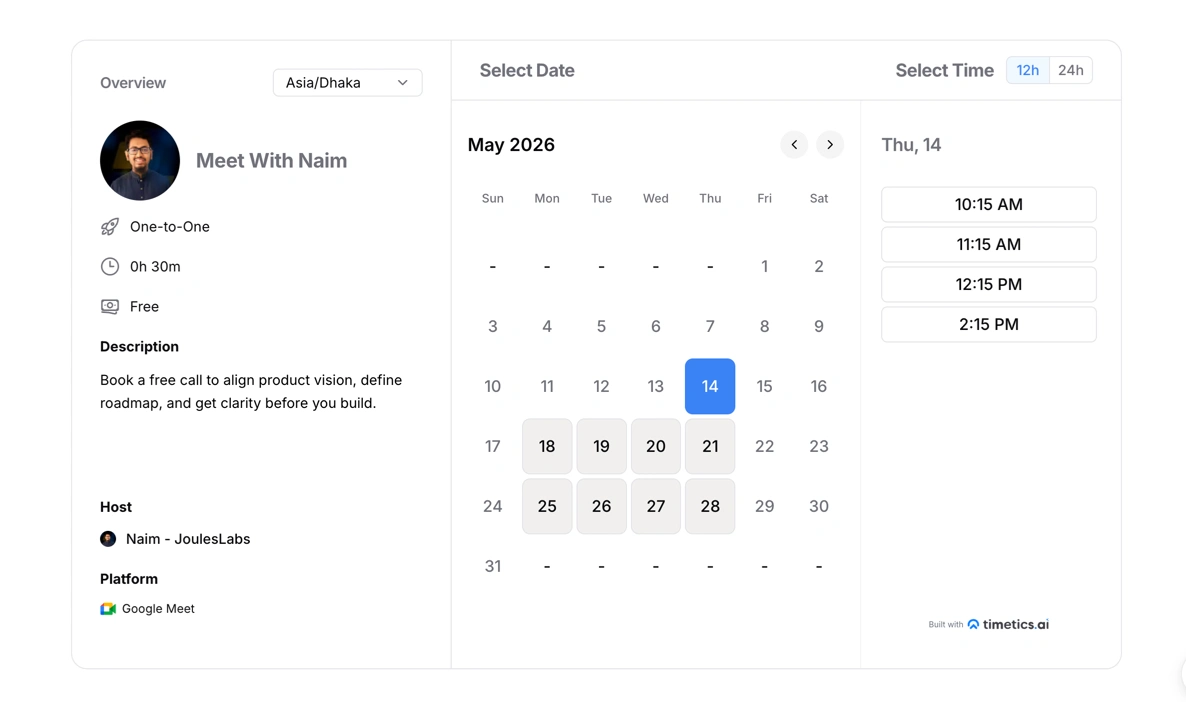
Now his booking page is embedded directly inside the JoulesLabs website. Clients land on a clean “Meet With Naim” page, pick an available slot, and get an instant Google Meet confirmation – without a single back-and-forth message.
👉 Visit the live page: Click here.
“Timetics AI fits perfectly into our service workflow clean scheduling, fewer back-and-forths, and reliable for client-facing meetings”“ — Arifur Rahman Naim, CEO, JoulesLabs
User 2: Abdur Rahim Rasel – Product Strategist
Abdur is a product and growth strategist with 10+ years of experience and 1,247+ sessions booked. His challenge was one every consultant knows: too many low-context calls, and not enough time for the ones that actually matter.
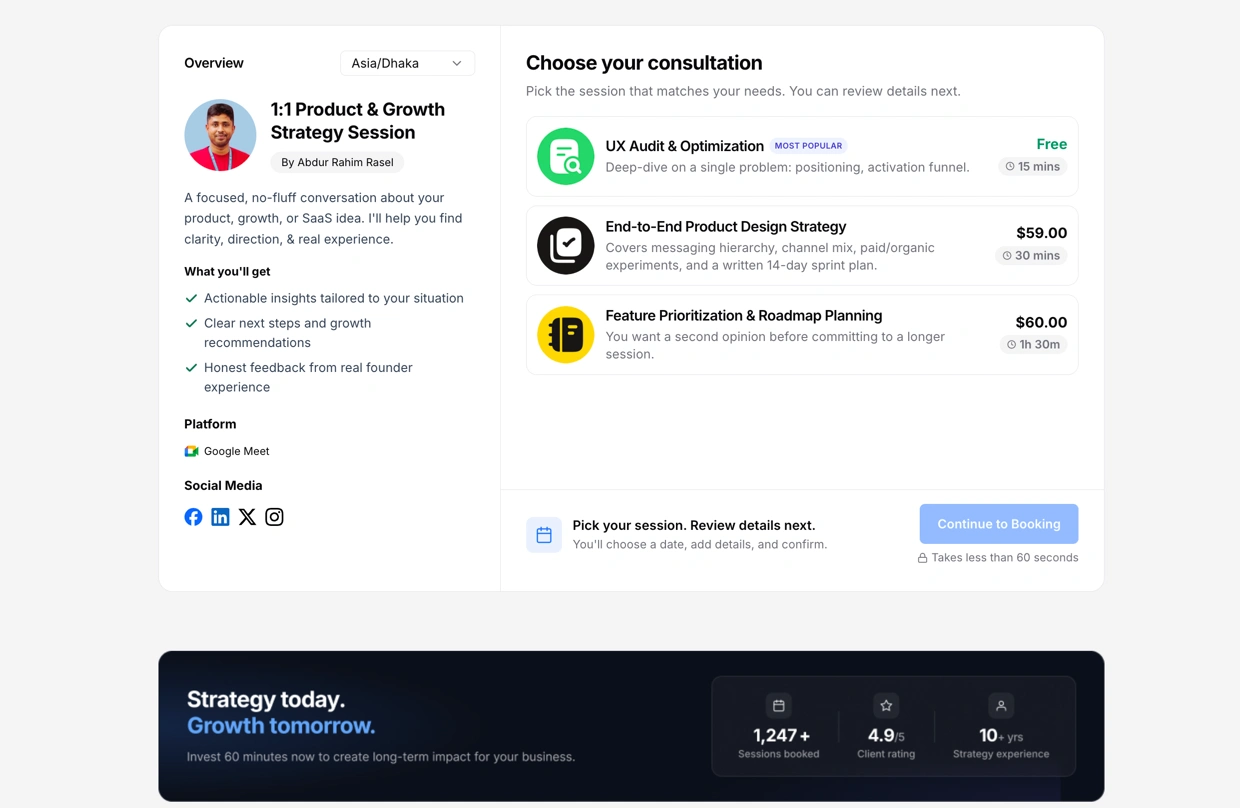
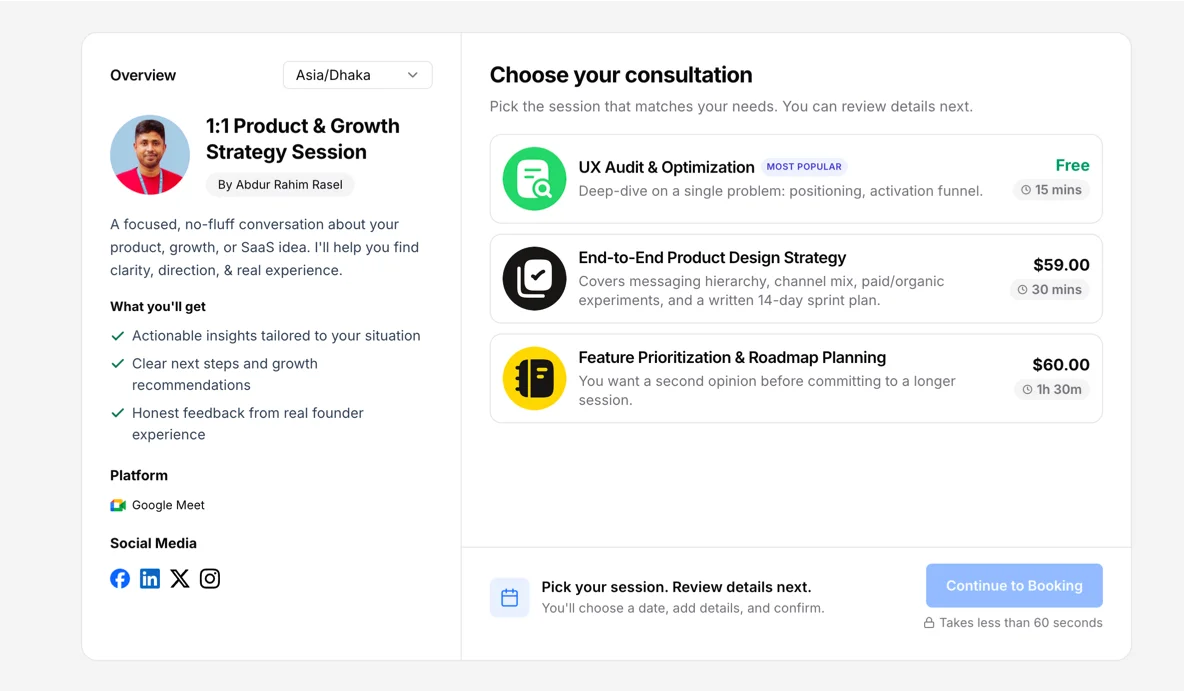
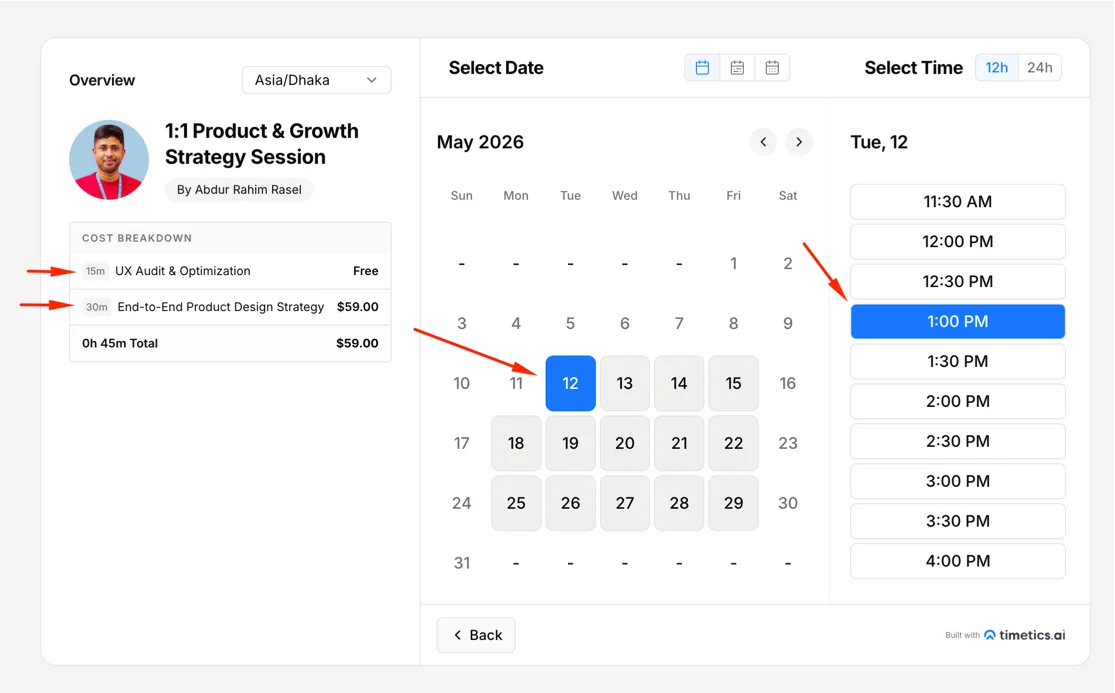
His Timetics booking page – 1:1 Product & Growth Strategy Session, structures his offering into three clear tiers:
- UX Audit & Optimization — Free (15 mins): Entry point for new leads
- End-to-End Product Design Strategy — $59 (30 mins): For clients ready to act
- Feature Prioritization & Roadmap Planning — $60 (90 mins): For deeper, committed work
Clients see exactly what each session covers and what it costs before they pick a time. The free intro filters intent. The paid tiers convert it.
By the time a client lands on his calendar, they have already chosen the right session for their situation ,no back-and-forth, no awkward pricing conversation, no explaining from zero.
👉 Visit the live page:Click here.
What Both Use Cases Have in Common
Neither of these professionals is using Timetics as a calendar. They are using it as the first step in their sales process – a page that represents their work, sets client expectations, and filters the right people in before the meeting starts.
That is the core function Timetics AI 2.0 is built for.
How Timetics AI 2.0 Works: Appointments to Sales Click
Timetics AI 2.0 turns a simple appointment flow into a complete booking journey. Instead of asking clients to only pick a time, it helps them choose the right service, understand the price, complete the booking, and arrive prepared.
Here’s how the process works.
Step 1: The Client Lands on Your Booking Page
Your booking page does not open with a calendar. It opens with your services.
Depending on how you have set up your account, a client sees either a one-to-one personal booking ( a direct link to schedule time with you) or a service-based booking page that lists your full service menu with descriptions, durations, and pricing. They know what they are choosing before they choose it.
Step 2: The Client Selects a Service
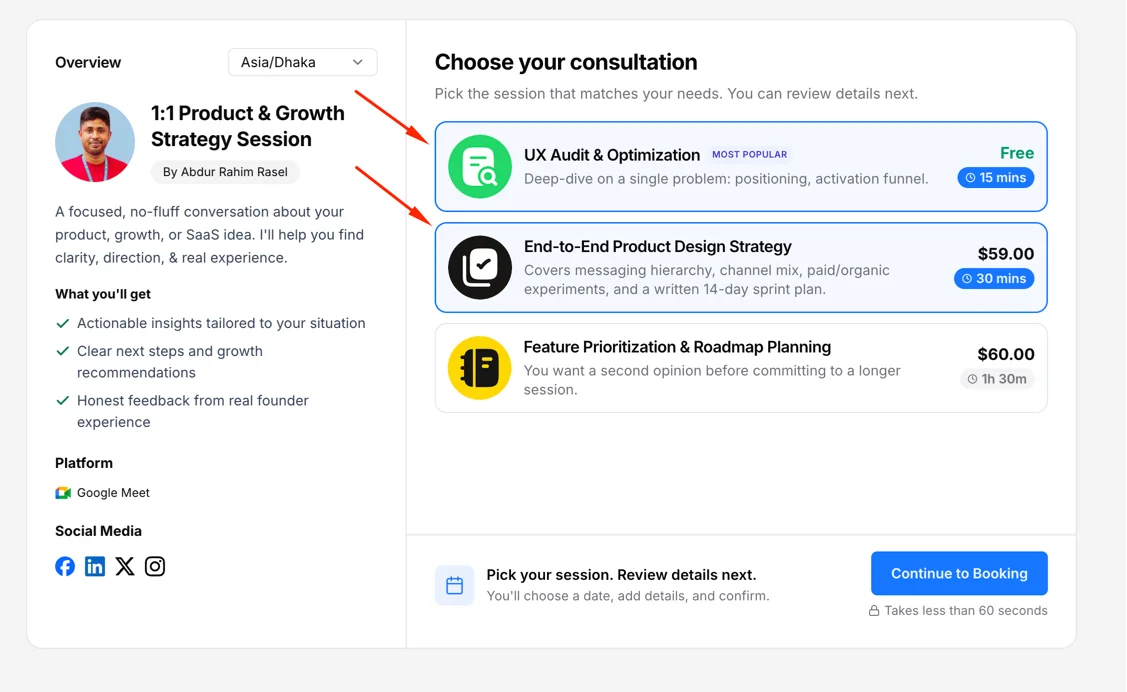
For service-based bookings, the client picks the service that fits their need first – before they ever see a time slot.
Each service on your booking page has its own duration, price, description, and assigned team member.
This single step eliminates the most common source of mismatched bookings: clients picking any available slot without understanding what they are booking.
Step 3: The Client Picks a Date and Time
Once a service is selected, the client sees real-time availability – only the slots that are actually open, filtered by the assigned team member’s calendar, your buffer time settings, and any booking limits you have configured.
You can control how far in advance bookings are allowed, set daily or weekly booking caps, and add buffer time between appointments to prevent back-to-back sessions from compressing your day.
Step 4: The Client Answers Your Intake Questions
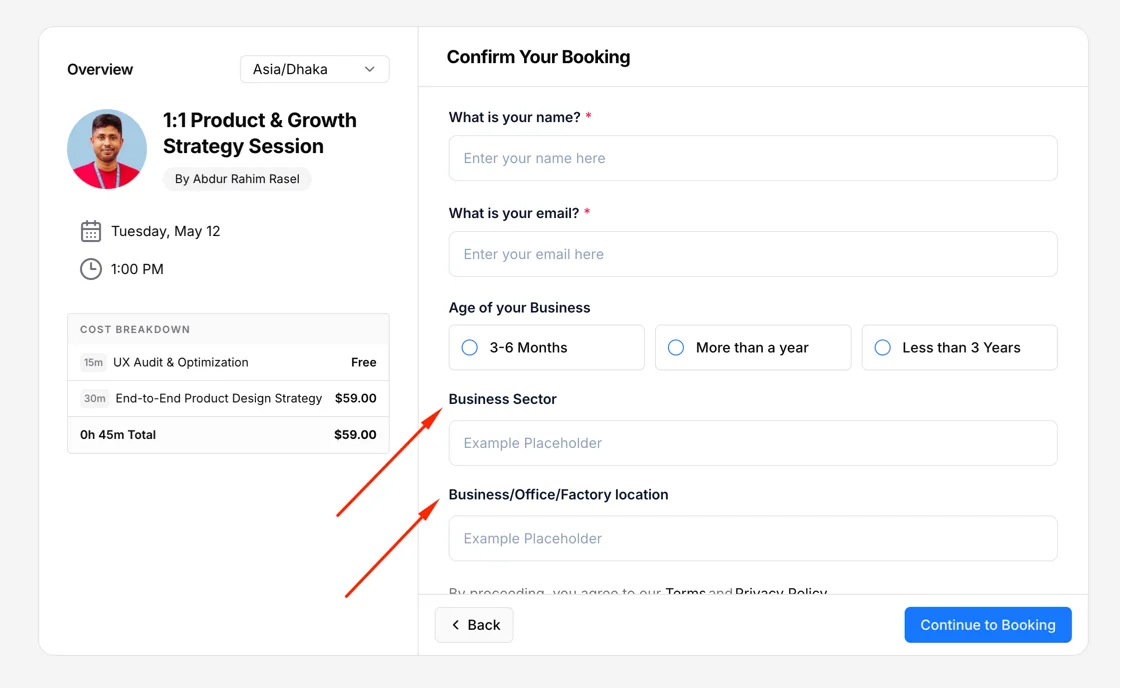
Before confirming the booking, the client completes any pre-booking questions you have set up.
These questions are fully customizable. You can ask for context about their business, the problem they want to solve, their team size, their budget range, or anything else relevant to your service.
By the time the booking is confirmed, you already know who this person is and why they booked. The call starts at a higher level.
Step 5: The Client Pays
If your service requires payment – a deposit or the full amount, the client completes it here, inside the same flow.
Timetics AI 2.0 supports Stripe and PayPal with no platform fee added on top.
- Clients can apply a coupon code if you have set one up.
- You can configure your own refund policy per service.
On-site payment is also available for businesses that collect payment in person.
Payment happens before the booking is confirmed. Not after. Not via a follow-up invoice.
Step 6: The Booking Is Confirmed
Once payment clears or if the service is free, the booking is confirmed for both sides simultaneously.
What happens automatically at this point:
- A calendar event is created and added to both the client’s and the host’s calendars
- A video meeting link is generated and attached — Zoom, Google Meet, or Microsoft Teams, depending on your setup
- A confirmation notification is sent to both parties
- The booking appears in your Timetics dashboard under Manage Bookings
No manual steps. No copy-pasting a meeting link. No chasing a confirmation email.
Step 7: Reminders Run Automatically
Timetics sends automated notifications before the meeting, confirmation emails, pre-meeting reminders, and follow-up messages, based on the notification settings you configure.
You can manage exactly what gets sent, when it gets sent, and to whom from the Notifications section of your dashboard. For businesses dealing with recurring no-shows, this automated reminder layer alone makes a measurable difference.
The Full Flow at a Glance
| Step | What Happens | Who Acts |
| 1 | Client lands on booking page — sees services and pricing | Client |
| 2 | Client selects a service | Client |
| 3 | Client picks an available date and time | Client |
| 4 | Client answers intake questions | Client |
| 5 | Client completes payment (deposit or full) | Client |
| 6 | Booking confirmed — calendar event, meeting link, confirmation sent | Timetics (automated) |
| 7 | Reminders sent before the meeting | Timetics (automated) |
By the time the meeting starts, the client has chosen the right service, shared their context, and paid. You have the information you need and a financially committed client on the other end.
That is what a booking flow built for revenue looks like.
💡 Want to set up your first booking flow? Read the full documentation→
What Does Timetics AI 2.0 Cost?
Timetics AI 2.0 is available as a free plan and as a lifetime deal , a one-time payment that gives you permanent access to the platform, all current features, and all future updates within your tier. No monthly fees. No per-seat billing. No subscription that compounds every year you stay.
Here is what each option looks like.
Free Plan
Timetics AI 2.0 includes a free plan to get started. It gives you access to the core booking setup so you can explore the platform, build your first booking page, and test the flow before committing to a paid tier.
Lifetime Deal Tiers
The lifetime deal is structured across four tiers. Each tier is a one-time payment – stacked codes unlock higher tiers, which means you can start at Tier 1 and scale up by purchasing additional codes.
| Tier | One-Time Price | Regular Price | Team Members | Workspaces | Best For |
| Tier 1 | $29 | $300 | 5 | 2 | Solo professionals and independent consultants |
| Tier 2 | $49 | $300 | 10 | 3 | Small teams and early-stage service businesses |
| Tier 3 | $119 | $300 | 25 | 10 | Growing agencies, coaching practices, clinics |
| Tier 4 | $229 | $300 | 100 | 30 | Large teams, multi-brand operators, enterprise |
What Every Tier Includes
Every lifetime deal tier (from $29 to $229) includes the full core feature set. There are no stripped-down entry tiers that gate essential features behind an upgrade.
Every plan includes:
- Timetics AI Agent
- Unlimited bookings
- Remove Timetics branding (white label)
- Unlimited event types and consultation types
- Unlimited services (salons, coaching, personal care, and more)
- Service-based and one-to-one booking types
- Multiple appointment types per booking
- Recurring bookings
- Group bookings
- 2-way calendar sync (Google, Outlook, Yahoo, iCal)
- Video conferencing — Zoom, Google Meet, Microsoft Teams (auto-generated links)
- Stripe and PayPal payment integration (0% platform fee)
- Deposit payments, coupons, and refund settings
- Automated email reminders and confirmation notifications
- Pre-booking intake questions
- Customer journey email sequences
- CRM integrations — ActiveCampaign, GoHighLevel, Zapier
- Buffer time between appointments
- Booking limits per day, week, or year
- Future updates — free within your tier, for life
The only things that scale with tier are team member count and workspace count. Everything else is fully available from Tier 1 onwards.
The Savings Reality vs. Monthly Scheduling Tools
The financial argument for the lifetime deal is straightforward , and significant.
Calendly’s Business plan costs $20 per user per month on monthly billing. For a team of five over five years, that is approximately $11,200 in subscription fees , after which you still own nothing and must keep paying to keep access.
Timetics Tier 1 costs $29. Once.
| Timetics AI 2.0 (Tier 1) | Calendly (5 users) | |
| Cost | $29 (one-time) | $20/user/month |
| Year 1 total | $29 | $1,200 |
| 5-year total | $29 | $6,000+ |
| Year 1 savings | $1,171 | — |
| 5-year savings | $5,971 | — |
| Ownership | Lifetime | Rented access |
That $5,971 in savings over five years is not a rounding error. It is enough to fund a developer hire, a marketing campaign, or simply keep running instead of compounding SaaS overhead month after month.
Money-Back Guarantee
Every lifetime deal purchase includes a 15-day money-back guarantee. If Timetics AI 2.0 is not the right fit after you have had time to test it properly, you can request a full refund within that window – no conditions attached.
Is the Lifetime Deal Still Available?
The lifetime deal is an early-access, limited-time offer. The pricing page clearly states that pricing will return to standard monthly billing once the early bird window closes.
If you are evaluating Timetics AI 2.0, this is the pricing window to act inside – the one-time tiers will not be available indefinitely.
💡 Lock in lifetime access before pricing returns to monthly billing. View current Timetics AI 2.0 pricing and claim your tier →
Timetics AI 2.0 Roadmap: What’s Coming Next?
Timetics AI 2.0 is already live and serving users. The team is actively building the next layer of features on top of what is already shipped. Below is the current roadmap, organized by development stage.
🔨 In Progress
Features currently in active development.
| Feature | What It Does |
| Agency Account | Manage multiple client accounts from one panel – built for agencies running scheduling on behalf of others |
| WhatsApp Integration | Send booking confirmations, reminders, and follow-ups directly through WhatsApp |
| Booking Page Templates | A ready-made library of booking page templates – pick, customize, and publish without building from scratch |
| Voice-Controlled AI Actions | Control availability, bookings, and settings using voice commands through the AI Agent |
| HubSpot CRM Integration | Native two-way sync between Timetics bookings and HubSpot contacts and deals |
🗓 Up Next
Features scoped, designed, and queued for the next build cycle.
| Feature | What It Does |
| Webhook Builder | Push booking events – new, cancelled, rescheduled – into any external tool, CRM, or database in real time |
| Custom Domain | Host your booking page on your own domain instead of a Timetics subdomain |
| AI-Powered Rescheduling | Smart AI suggestions when meetings shift – automatically finds the next best available slot for both parties |
| Advanced Analytics | Revenue per service, team booking performance, and time-ROI reporting – know which meetings are worth taking |
| SMS Notifications | Booking confirmations and reminders sent via SMS in addition to email |
💬 In Discussion
Features requested by the community and under evaluation by the product team.
| Feature | What It Does |
| Mobile App | Native iOS and Android app for managing bookings and availability on the go |
| Waiting List | Let clients join a waitlist when a slot is full – auto-notified when a cancellation opens up |
| Invoice Generation | Create and send invoices directly from a completed booking without a third-party tool |
| Ratings & Reviews | Allow clients to leave a review after a completed session — displayed on the public booking page |
| Conditional Booking Logic | Show or hide services, questions, and pricing based on how a client answers intake questions |
📌 Note: All features listed as In Progress and Up Next will be shipped to lifetime deal users at no additional cost within their tier. The roadmap is public and updated regularly – vote on features or submit your own ideas at timetics.ai/roadmaps.
Real Users · Verified Reviews
What Users Are Saying About Timetics AI 2.0
Rated across three independent platforms by consultants, agencies, and service businesses actively using the product.
“I needed a scheduling tool for my webpage, similar to Calendly, and Timetics AI made it simple.”
“What I like most about Timetics AI is how it brings everything into one place — scheduling, client management, and follow-ups.”
“An awesome alternative to Calendly. I love how easy it is to create customized booking pages with the look I want.”
“Timetics fits a unique space in appointment booking. It’s packed full of intentional features and great usability that towers over others. The ROI on the investment is super awesome.”
Final Thoughts
Most scheduling tools solve one problem: getting a meeting on the calendar. Timetics AI 2.0 solves a different one, making that meeting worth taking.
It presents your services, shows your pricing, collects payment upfront, and handles the logistics automatically. By the time a client walks into the call, the selling is already done.
Is it perfect? No. The mobile app is still coming. The integration ecosystem is still growing. But for consultants, agencies, coaches, clinics, and service businesses that treat their time as a product, the core of what Timetics AI 2.0 does today is already more purposeful than what most tools offer at any price.
And at a one-time cost starting at $29, the barrier to finding out is low.
No credit card required · Free plan available · 15-day money-back guarantee
Frequently Asked Questions About Timetics AI 2.0
What is Timetics AI 2.0?
Timetics AI 2.0 is a sales-driven appointment booking software that turns your booking page into a decision-making system. Instead of showing clients an empty calendar, it presents your services, pricing, and options – so clients arrive informed, qualified, and ready to pay before the call begins.
What does the Timetics AI Agent actually do?
The Timetics AI Agent helps you control the entire platform using plain language, no menus, no setup wizards. You can tell it “create a 30-minute consultation at $150,” “set my availability for next week,” or “where is the timezone setting?” – and it either completes the action or navigates you there instantly.
How is Timetics AI 2.0 different from Calendly?
Calendly answers one question: “When are you free?” Timetics answers a different one: “What are you offering – and how should it be sold?” That shift means clients see your services and pricing before picking a slot, payment is collected inside the booking flow with zero platform fee, and the booking page does the selling before the call ever starts – none of which Calendly handles natively.
What is service-based booking and why does it matter?
Service-based booking means clients choose a service first – with its own price, duration, and description and then select a time. This replaces the traditional “pick any open slot” model with a structured flow where clients self-select the right option before booking. The result is fewer wrong bookings, fewer mismatched expectations, and better-qualified meetings.
Does Timetics AI 2.0 have built-in payment processing?
Yes. Timetics AI 2.0 supports Stripe and PayPal natively, with a 0% platform fee. Clients can pay the full amount or a deposit at the time of booking – inside the same flow, without being redirected to a separate page or invoiced afterward. Coupon codes and configurable refund settings are also supported per service.
Can Timetics AI manage multiple brands or businesses?
Yes – through its Workspace system. Each workspace is a fully isolated environment with its own team, services, availability, and booking page. Depending on the plan tier, users can run between 2 and 30 workspaces from a single Timetics account, making it the practical choice for agencies, multi-brand operators, and consultants with multiple service lines.
Who is Timetics AI 2.0 built for?
Timetics AI 2.0 is built for anyone whose time is the product – consultants, coaches, lawyers, agencies, salons, spas, clinics, fitness studios, and service businesses that need bookings to be structured, priced, and paid. It is not a good fit for businesses that only need internal meeting scheduling or do not charge for their time.
How much does Timetics AI 2.0 cost?
Timetics AI 2.0 is available as a free plan and as a one-time lifetime deal starting at $29 for solo professionals (5 team members, 2 workspaces), up to $229 for teams of 100 with 30 workspaces. Every tier includes the AI Agent, unlimited bookings, built-in Stripe and PayPal at 0% fee, white label, and lifetime updates. A 15-day money-back guarantee applies to all paid tiers.
Does Timetics AI help reduce no-shows?
Yes – in two ways. First, requiring upfront payment at booking creates a financial commitment, which measurably reduces no-show rates compared to free bookings. Second, Timetics sends automated confirmation emails, pre-meeting reminders, and follow-up nudges without any manual input, keeping clients engaged from booking through to the call.
What integrations does Timetics AI 2.0 support?
Timetics AI 2.0 integrates with Google Calendar, Microsoft Outlook, Apple Calendar, Zoom, Google Meet, Microsoft Teams, FaceTime, Stripe, PayPal, ActiveCampaign, GoHighLevel, ConvertKit, Zapier, Slack, and Discord. Calendar sync is two-way, and meeting links are generated automatically at the time of booking. HubSpot CRM and deeper webhook support are on the active development roadmap.