7 Reasons Why Your Event not Showing on Google Search 2026


Table of Contents
Is your event not appearing in Google search even after you have created the event page, added the details, set up the tickets, and hit publish? This is more common than you think and in most cases, the fix is straightforward once you know what to look for.
Common reasons why your event is not showing up in search results are indexing delays, missing schema, visibility settings, or content issues.
Go through this guide to check out all the reasons why your event not showing on Google and what you can do to fix each one.
How Google Displays Events?
Google offers two ways to display your event. These are:
- As a standard indexed page: A regular link that appears in organic search results when someone searches a relevant term
- As a rich result in the event carousel: A detailed listing at the top of results showing your event date, location, and ticket link
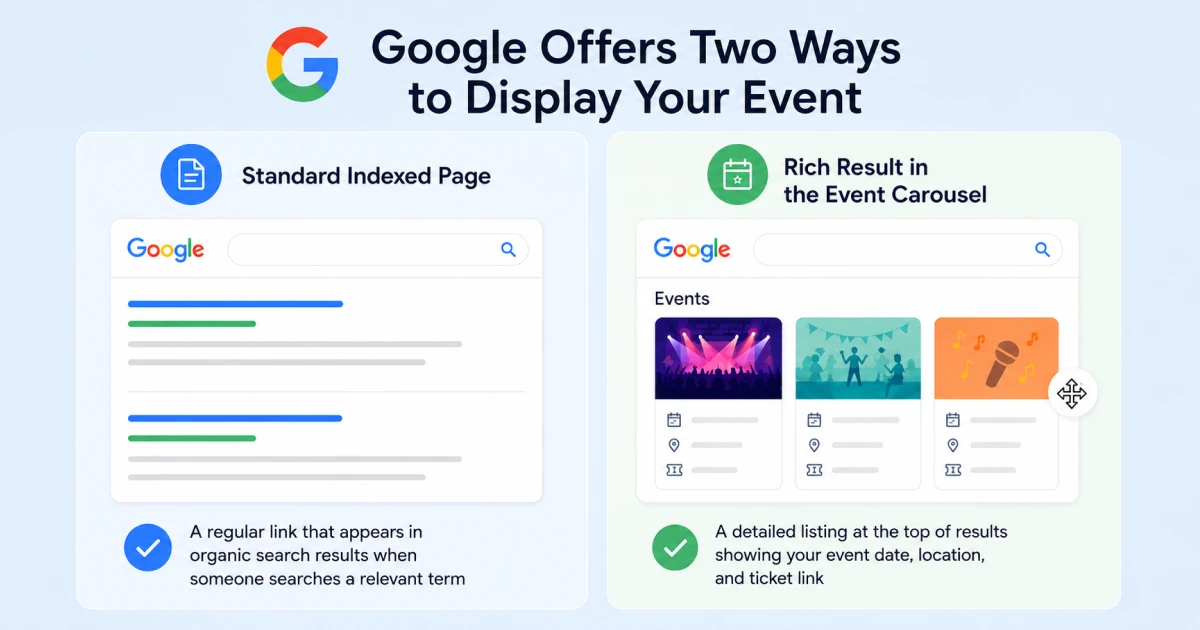
So, before jumping into the fixes, let’s understand how Google actually displays your events.
What is a Standard Indexed Page?
A standard indexed page is a regular link that appears in Google search results. When someone searches for an event related to your topic, Google shows your page as a clickable link with a title and short description. This is the most basic way your event can appear on Google.
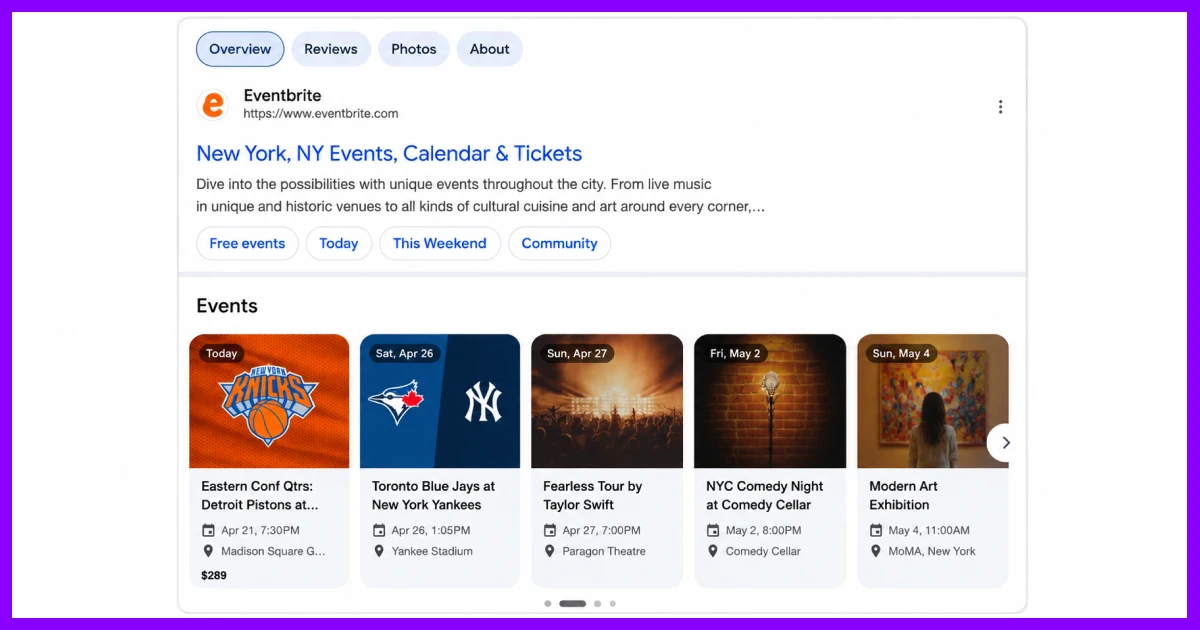
What Is a Google Event Rich Result?
A Google event rich result is a special search listing that displays your event’s name, date, location, and ticket link directly in the search results. It appears in a scrollable carousel above organic results and is only triggered by valid event schema markup on your page.
This is different from a standard search result. A rich result surfaces structured event details that stand out visually and tend to get significantly more clicks.
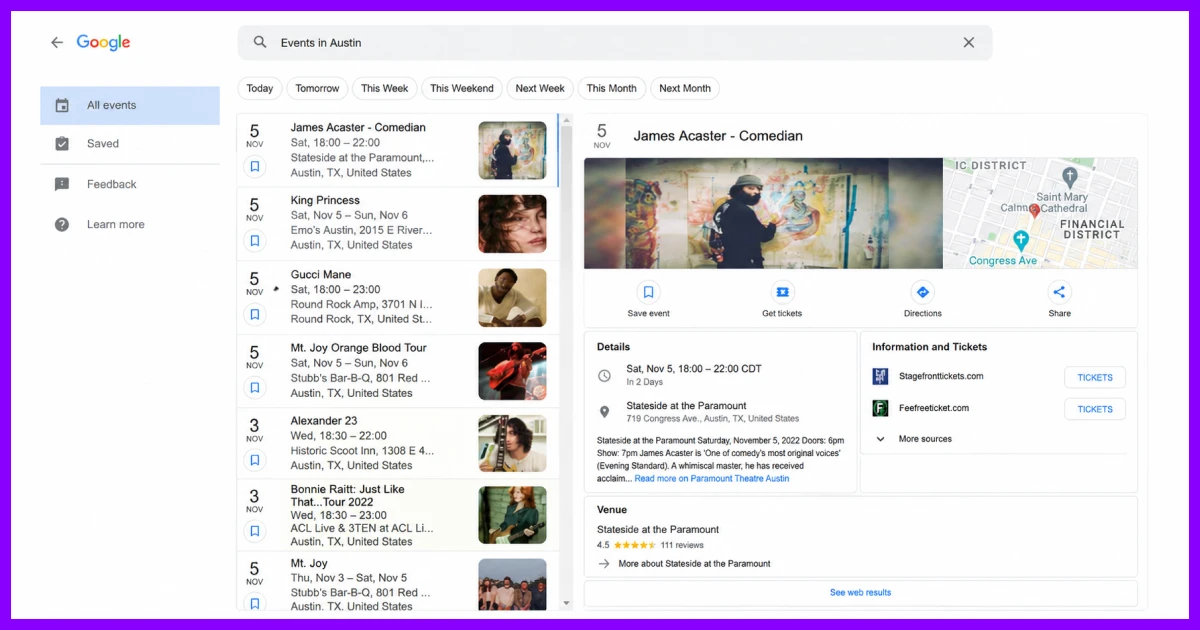
Many people assume their event is not on Google at all, when the real issue is that the page is indexed but not qualifying for the rich result.
Others have the opposite problem, the page was never indexed in the first place. Knowing which situation you are in is the first step toward fixing it.
7 Reasons Why Your Event not Showing on Google
There are seven common reasons for an event missing from Google search. Each one has a direct fix. Work through them in order and you will find the cause quickly.
Here’s a quick snapshot of the reasons why your event not appearing in Google search and how to fix them:
| No. | Reason | Fix |
|---|---|---|
| 1 | Event page not indexed yet | Request indexing via Google Search Console |
| 2 | Missing or Event Schema | Run the Rich Results Test and fix all schema errors |
| 3 | Search Engine Visibility Is Turned Off | Uncheck discourage indexing in WP and set event post type to index in your SEO plugin |
| 4 | URL or Content issues | Publish publicly and add unique content to every event page |
| 5 | Inconsistent Event Information | Cross-check page and schema using Rich Results Test |
| 6 | Virtual Events Are Not Eligible for the Carousel | Use hybrid schema or rank as a standard organic result |
| 7 | Google Business Profile Issues | Use GBP as a supplementary channel only and maintain a dedicated event page. |
For a clear and step-by-step guide, get into the details of these 7 reasons and how to fix these issues.
Reason #1: Your Event Page Is Not Indexed Yet
Indexing is the first thing to check when your event not appearing in Google search. If Google hasn’t indexed the page yet, nothing else matters until that is resolved.
Cause:
When you publish an event page, Google does not see it immediately. It needs to crawl and add the page to its index first, which typically takes one to five days.
If you recently changed your event URL, Google treats it as a brand new page and restarts the process. On larger sites with many event pages, Google may also deprioritize newer pages due to crawl budget constraints.
How to fix Google indexing problems for events:
- Open Google Search Console and go to the URL Inspection Tool
- Paste your event URL and check whether it has been indexed
- If it has not, click Request Indexing to move it into Google’s priority queue
- Update your XML sitemap to include the event URL and resubmit it
So, check whether there are any Google indexing problems for events and fix accordingly.
Quick check: Type site:yourdomain.com/your-event-url into Google. If no result appears, your page is not in Google’s index yet.
Reason #2: Event Schema not working [missing or broken]
Missing or broken schema markup is the most common reason events never appear in the Google rich result carousel even when the page is fully indexed and ranking well.
Cause:
Event schema markup is the structured data that tells Google your page is specifically about an event. So, without it, Google may index your page as a regular article or landing page, but it will never qualify for the event carousel.
Schema can also be present but broken in ways that are not obvious. Common issues that your schema can be broken include missing required fields, incorrect date formatting, and conflicts between two plugins where both are trying to generate schema on the same page.
If you are not sure how to add event schema correctly, here is a step-by-step guide on how to add event schema in WordPress.
Moreover, if your event is missing the price currency field, it becomes ineligible for Google rich results even though your schema is great. This is because since June 25, 2025, Google also requires this field for any paid event.
How to fix schema markup:
- Run your event URL through Google’s Rich Results Test
- Review all errors and warnings in the results
- Confirm that every required field is present and correctly formatted in your JSON-LD markup
Check these for event structured data fix:
| Field | Status |
|---|---|
| name | ✅ Required |
| startDate (ISO 8601 with timezone) | ✅ Required |
| location (physical address) | ✅ Required |
| endDate | ⭐ Recommended |
| image | ⭐ Recommended |
| offers / priceCurrency | ✅ Required for paid events |
| eventStatus | ⭐ Recommended |
| organizer | ⭐ Recommended |
For a deeper walkthrough on setting up and fixing event-related plugins in WordPress, you can also read this article WordPress events plugin guide
Reason #3: Google Event Search Engine Visibility Is Turned Off
If your event page is blocked from Google at the settings level, no amount of schema work or indexing requests will make it appear. This is one of the most overlooked causes and one of the easiest to fix.
Cause:
WordPress includes a built-in setting that discourages search engines from indexing your site. If this is accidentally enabled, every page on your site becomes invisible to Google including all your events.
Also, SEO plugins like Yoast and Rank Math also have their own indexing controls. Some of these plugins set custom post types like events to noindex by default, which means Google crawls the page but deliberately excludes it from search results.
Moreover, a meta name=”robots” content=”noindex” tag or a robots.txt rule blocking your /events/ folder can cause the exact same problem.
How to fix the this default setting:
- Go to WordPress → Settings → Reading and confirm “Discourage search engines from indexing this site” is unchecked
- Open your SEO plugin settings, find the event post type, and set it to index
- Check your robots.txt file for any rules blocking event-related URLs
- Use the URL Inspection Tool in Google Search Console to verify that Googlebot can actually access the page
You should always check this before investigating more technical causes because it is surprisingly common and takes less than two minutes to verify.
Reason #4: URL or Content Guideline Violations
Google will not index pages it considers private, inaccessible, or too thin to be useful. If your event page falls into any of these categories, it will not appear in search results regardless of how well everything else is set up.
Cause:
Event pages that are set to draft, private, or password-protected cannot be accessed by Google at all. Pages with thin or duplicate content are often skipped during indexing.
This happens when multiple event pages share the same description, or when a page contains nothing beyond a title and a date which Google does not consider worth indexing.
How to fix:
- Confirm your event page is published and publicly accessible with no login required.
- Add meaningful, unique content to every event page with a full description, speaker details, session agenda, or venue information.
- Avoid using the same description across multiple event pages, even for similar or recurring events.
A well-written event page also improves your chances of ranking for related search terms beyond just the event name itself.
If you are managing multiple events, learn how to add an event list in WordPress so each event has its own indexed page.
Reason #5: Inconsistent or Incomplete Event Information
Google cross-checks the information visible on your page against what your schema markup says. When these do not match, Google treats it as a structured data violation and suppresses the rich result.
Cause:
This is more common than most people expect, especially when event details are updated manually after publishing.
- The event name on the page might differ slightly from the name in the schema.
- The date shown to visitors might not match the date in the structured data.
- The venue might appear in the page content but be missing from the markup entirely.
When Google detects a mismatch between what users see and what the markup says, it removes the event from the rich results carousel.
Fix:
- Use Google’s Rich Results Test to compare your schema output against what is visible on the page
- Make sure the event name, date, and location are identical in both the page content and the JSON-LD markup
- Whenever you update event details, update the schema at the same time
An event plugin that automatically syncs page content with schema output removes this risk entirely.
Reason #6: Virtual Events Are Not Eligible for the Rich Results Carousel
As of June 2025, no. Google updated its event structured data requirements and now requires a physical location for carousel eligibility. This change has affected a large number of virtual event pages without a clear explanation appearing in Search Console.
Cause:
Online-only events that use VirtualLocation in their schema are no longer eligible to appear in Google’s event carousel.
Many WordPress site owners set up their virtual events correctly under the previous rules and are now missing from the carousel without understanding why.
How to fix eligibility of virtual events:
- For hybrid events, include both a physical Place and a VirtualLocation in your schema markup so that hybrid events remain eligible.
- For fully virtual events, add event schema anyway because AI-powered search platforms still read and surface event structured data.
- Shift focus to ranking your virtual event page as a strong standard organic result through clear on-page SEO and unique content.
Your virtual event can still get meaningful traffic from Google. It just requires a different visibility strategy than the carousel.
Reason #7: Google Business Profile Issues
Many event organizers use Google Business Profile posts to promote their events. But GBP has strict limitations that most users are not aware of and relying on it as a primary visibility channel can leave your events not visible on Google to most searchers.
Cause:
GBP event posts are only surfaced for independent, single-location businesses. Chains and multi-location businesses are excluded entirely.
On top of that, GBP event posts only appear on mobile search, not desktop. They only show up when someone searches your exact business name, not a general event query. Events with a duration of more than one month are also ignored by Google.
How to fix GBP issues:
- Keep all GBP event post durations under 30 days
- Make sure your GBP business category is correctly configured
- Treat GBP event posts as a supplementary visibility channel, not your primary strategy
- Always maintain a dedicated event page on your website with proper schema markup.
The Fastest Long-Term Fix: Use an Event Plugin Built for Google Visibility
Going through each of the seven reasons above and fixing them manually works quite well. But doing all these by hand creates ongoing risk. Any plugin update, URL change, or content edit can quietly break something. A quick and easy way to fix your event not showing on Google is using an event management plugin like Eventin.
Eventin is built to do exactly that. It generates valid event schema with all required fields, keeps your event name, date, and location in sync across page content and structured data, and works without conflicts alongside Yoast and Rank Math.
Beyond search visibility, Eventin also handles everything from ticketing to WooCommerce payments – here is how to create and sell event tickets directly from WordPress.
Moreover, you get Zoom and Google Meet integration, recurring events, and attendee management all from a single WordPress dashboard.
So, if you are managing multiple events and want them to appear on Google without manually maintaining schema and indexing settings every time you publish, Eventin takes care of it from the moment the event goes live.
Quick Checklist: Is Your Event Set Up Correctly for Google?
Run through this before publishing any event page:
- Event page is published and publicly accessible
- “Discourage search engines” is turned off in WordPress Settings
- Event post type is set to “index” in your SEO plugin
- robots.txt does not block your event URLs
- Event schema is present and includes name, startDate, and location
- All dates are in ISO 8601 format with correct timezone offset
- Schema has been validated using Google’s Rich Results Test
- Event URL has been submitted via Google Search Console
- Event page content is unique so not a copy of other event pages
- If using GBP, event duration is set to under 30 days
If every item is checked, your event is set up correctly for Google. If anything is missing, go back to the relevant section above and apply the fix. This way you can fix event not showing on Google.
Wrapping Up
Most of the time, an event not showing on Google comes down to simple issues like: the page isn’t indexed yet, the schema is missing or broken, or, search visibility is turned off. However, once you know which one it is, the fix usually takes just a few minutes.
The catch is keeping everything correct over time. One small change can break your schema or indexing without you noticing. A good event plugin takes care of this automatically, so your events stay visible without the constant checking.
Start managing events the right way with Eventin — built for visibility, ticketing, and full Google compatibility.
FAQs
How long does it take Google to index an event?
Google typically indexes events within a few hours to 2 weeks, depending on your site’s authority. You can speed this up instantly by submitting the URL directly to Google Search Console and adding Event Schema markup.
How to get event listed on Google?
To get an event listed on Google, publish it on integrated platforms like Eventbrite or Facebook, or add Event Schema markup to your own website. For brick-and-mortar locations, post it directly as an event under your Google Business Profile.
Does updating an event page help it appear on Google faster?
Yes, updating an event page helps it appear on Google faster. If you update your contents, it signals Google to recrawl the page.
Do social media shares help my event appear on Google?
No, social media shares don’t help your event page to appear on Google directly. These shares are not a Google indexing signal. However, if through social media sharing, traffic to your event page increases, it can sometimes prompt faster recrawl.
Can I use Yoast SEO or Rank Math to add event schema?
Yes, you can use both Yoast SEO and Rank Math to add event schema but both have limited schema support. A dedicated event management plugin like Eventin generates a more complete and reliable event schema automatically.
Why did my event disappear from Google after it was showing before?
The most common reasons are an expired event, a broken schema after a plugin update, or a changed URL. Check Google Search Console for new coverage errors.
Does my event need a dedicated page to show up on Google?
Yes, your event needs a dedicated page to show up on Google because Google requires a unique, publicly accessible URL for each event. Shared calendar pages do not qualify for individual event rich results.

Start Using Eventin Today
Ready to take your events to new heights? Get Eventin now and enjoy a seamless event management experience.