Why Restaurants Lose Online Reservations (And How to Fix It)


Table of Contents
Most restaurants don’t lose online reservations because of a lack of demand. They lose them because small but critical friction points stop guests from completing the booking process.
A missing button, a slow-loading page, a complicated form, or unclear availability can silently reduce reservations every day, without restaurant owners even realizing it.
Even when a restaurant has great food and steady website traffic, a poor reservation experience can significantly reduce confirmed bookings, increase no-shows, and lower table occupancy.
The good news is that most of these issues are fixable with a better booking experience and a properly designed restaurant reservation system.
In this guide, you’ll learn why restaurants lose online reservations, where drop-offs happen in the booking journey, and how to fix them using practical improvements that increase confirmed bookings and improve reservation management.
Quick Diagnosis: Is Your Restaurant Losing Online Reservations?
Before improving your system, it’s important to identify whether your current booking process has hidden weaknesses.
| Healthy Reservation System | System That Loses Bookings |
| The reservation button is easy to find | Guests struggle to locate the booking option |
| Booking takes only a few steps | The booking process feels long or complex |
| Only essential details are requested | Too many unnecessary form fields |
| Fully optimized for mobile users | Mobile experience is difficult or broken |
| Availability is clearly visible | Guests cannot easily see open slots |
| Instant confirmation is provided | No clear booking confirmation |
| Reservations are managed centrally | Bookings are scattered across tools |
| Automated reminders are enabled | No reminder system in place |
| Performance is regularly tracked | No optimization or analysis |
If several items on the right side feel familiar, your restaurant is likely losing reservations before guests complete the booking process.
The next step is understanding where those losses occur within the reservation journey and how small points of friction can affect booking conversions.
Where Restaurants Lose Reservations
For restaurant owners, reservation performance isn’t just about traffic. It’s about how effectively the booking journey turns interested visitors into confirmed guests.
When restaurants lose online reservations, potential bookings drop out somewhere between a guest’s first visit to the website and a completed reservation. Understanding where these drop-offs occur starts with understanding the reservation funnel.
Understanding the Restaurant Reservation Funnel
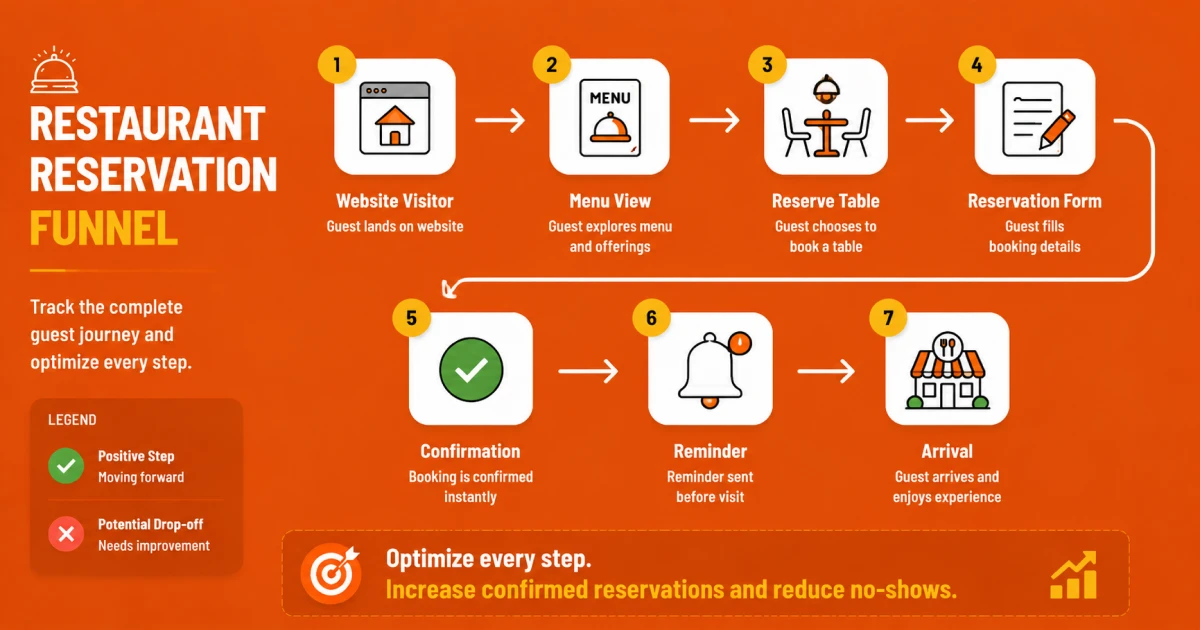
Every online reservation follows a journey:
Website Visitor
↓
Menu View
↓
Reserve Table
↓
Reservation Form
↓
Confirmation
↓
Reminder
↓
Arrival
Each step is a conversion point. If guests face friction, confusion, or delays, they may leave before completing their reservation. Even small issues can cause guests to abandon the booking process.
By understanding the reservation funnel, restaurants can identify where bookings are being lost. This helps them focus on the changes that can improve reservation rates.
Reservations affect both the guest experience and restaurant operations. As a result, even small drop-offs can lead to lost revenue and fewer occupied tables.
Why Online Reservations Matter More Than Ever
Online reservations do more than fill tables. They help restaurants operate more efficiently, create better guest experiences, increase restaurant sales, and make smarter business decisions.
A good restaurant reservation conversion rate varies by channel. It is typically around 2%–3% from overall website traffic. From direct traffic, it can reach 5%–7%. For online booking attempts, it can go as high as 60%–80%.
These numbers clearly show how important online reservations are and how much revenue depends on reducing friction in the booking process.
A strong reservation process can help restaurants:
- Plan staffing and inventory more accurately based on expected demand.
- Manage seating capacity more effectively during peak dining hours.
- Reduce uncertainty and create a smoother experience for guests.
- Understand booking trends, busy periods, and customer preferences.
- Improve table turnover and make better use of available space.
- Build stronger relationships with guests through a more convenient booking experience.
- Support long-term growth by turning more visitors into repeat customers.
When reservations are lost, restaurants don’t just miss bookings. They also lose valuable operational insights and opportunities to improve the overall guest experience.
Why Restaurant Visitors Leave Without Booking
Restaurant visitors typically leave without booking when the reservation experience creates friction or uncertainty.
Common issues include hard-to-find reservation options, lengthy booking forms, poor mobile usability, slow-loading pages, limited availability visibility, and a lack of immediate confirmation.
Many of these issues are easy to overlook, but they can directly impact reservation conversions. Identifying and fixing them can help restaurants capture more bookings from existing website traffic.
- Guests Can’t Find the Reservation Option
If guests cannot quickly find where to make a reservation, many will leave without booking. Reservation buttons should be clearly visible on important pages, including the homepage, menu page, and contact page. The easier it is to start a reservation, the more likely guests are to complete one.
- The Reservation Process Takes Too Long
Long reservation forms can discourage guests from completing a booking. Asking for too much information or requiring multiple steps creates unnecessary friction. Long forms and unnecessary steps often lead to reservation abandonment, causing guests to leave before completing their booking.
- The Website Isn’t Mobile-Friendly
Many guests search for restaurants and make reservations from their phones. If the booking experience is difficult to use on smaller screens, visitors may abandon the process and choose another restaurant instead. A well-designed restaurant website helps create a smoother booking experience across devices.
- The Website Loads Too Slowly
Speed plays an important role in the booking experience. Slow-loading pages can frustrate visitors before they even reach the reservation form. A fast website helps keep guests engaged and reduces the risk of abandonment. Learning how to speed up your WordPress website can help improve page load times and create a smoother reservation experience for guests.
- Guests Can’t Easily See Availability
Guests want to know whether a table is available before spending time completing a reservation request. If available dates and time slots are difficult to find, visitors may assume there is no availability and leave the website.
- Guests Don’t Receive Immediate Confirmation
After submitting a reservation request, guests expect reassurance that their booking has been received. Without an instant confirmation message or email, uncertainty can lead to confusion, duplicate requests, or lost trust in the reservation process. Well-designed reservation confirmation emails help reassure guests and strengthen the overall booking experience.
Common Reservation Management Problems That Cost Restaurants Bookings
Restaurants can lose reservations even when guests successfully submit booking requests. In many cases, the problem isn’t the booking experience itself but how reservations are managed behind the scenes.
Without a reliable reservation management process, small operational issues can lead to missed bookings, scheduling conflicts, and poor guest experiences.
- Missed Reservation Requests
Reservation requests can easily be overlooked when they arrive through email, contact forms, social media, or multiple booking channels. Every missed request is a missed opportunity to secure a customer and fill a table.
- Double Bookings and Scheduling Conflicts
When reservation schedules are not updated in real time, the same table or time slot can be booked more than once. Double bookings create frustration for both guests and staff and can damage the dining experience.
- Manual Reservation Tracking Errors
Managing reservations with spreadsheets, notebooks, or disconnected systems increases the risk of human error. Incorrect booking details, missed updates, and lost reservation records can all affect service quality.
- No Automated Reminder System
Guests sometimes forget about reservations, especially when they book days or weeks in advance. Without automated reminders, restaurants may experience more no-shows and last-minute cancellations.
- Communication Gaps Between Staff and Guests
Reservation changes, special requests, and cancellations need to be communicated clearly. When information is not shared effectively, misunderstandings can occur and negatively impact the guest experience.
How to Fix Online Reservation Losses
Restaurants can reduce online reservation losses by improving both the guest booking experience and reservation management.
The following strategies can help restaurants capture more bookings, reduce no-shows, and improve overall reservation performance.
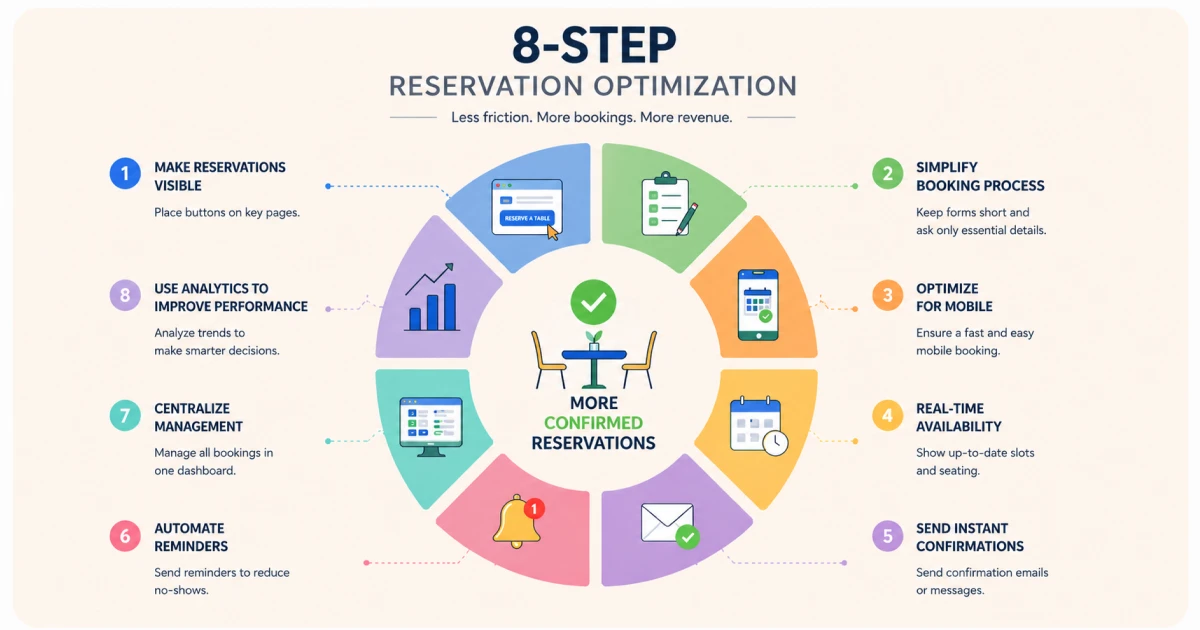
Step 1: Make Reservations Visible Across Your Website
Guests should never have to search for a reservation button. Make booking options visible on key pages such as the homepage, menu page, contact page, and website header.
Many restaurants invest heavily in attracting visitors, but create unnecessary booking barriers during the reservation process. Reducing the number of clicks between landing on the website and starting a reservation can help improve conversion rates.
Step 2: Simplify the Booking Process
Every additional step creates an opportunity for abandonment. A reservation form should only request essential information such as name, contact details, party size, date, and time.
A shorter booking process helps guests complete reservations faster and reduces unnecessary booking obstacles throughout the reservation journey.
Step 3: Optimize the Mobile Booking Experience
Mobile devices play a major role in restaurant discovery and booking. If guests have to zoom, scroll excessively, or struggle to complete forms, they may leave before confirming a reservation.
A mobile-friendly reservation system should offer fast loading times, responsive layouts, and an easy booking experience on any device.
Step 4: Display Real-Time Availability
Clear availability helps visitors make faster booking decisions. Showing available dates, time slots, and seating options helps visitors make decisions faster and reduces uncertainty.
Real-time availability can also help restaurants manage table capacity more effectively, prevent scheduling conflicts, and improve operational planning.
Step 5: Send Instant Booking Confirmations
Reservation confirmations provide reassurance that a booking has been successfully received. Without confirmation, customers may question whether the reservation was processed correctly.
Instant confirmation emails or messages help build trust, reduce duplicate booking requests, and create a more professional guest experience.
Step 6: Automate Reservation Reminders
No-shows remain one of the biggest challenges in restaurant operations. Guests often make reservations days in advance and simply forget about them.
Automated email or SMS reminders can help keep reservations top of mind. Industry reports suggest automated reservation reminders can reduce restaurant no-shows by20% to 50%, helping restaurants recover bookings that might otherwise be lost.
Step 7: Centralize Reservation Management
Managing reservations across emails, spreadsheets, phone calls, and multiple booking channels increases the risk of missed requests and operational errors.
A centralized restaurant reservation software or table booking system allows staff to manage bookings, reservation updates, cancellations, guest information, and table availability from a single dashboard. This improves visibility, reduces manual work, and helps create a more consistent guest experience.
Step 8: Use Reservation Data Analytics to Improve Performance
Reservation data analytics can reveal valuable insights about booking trends, busy periods, customer preferences, and no-show patterns.
Regularly reviewing reservation performance helps restaurants identify bottlenecks in the booking process and make informed decisions that improve conversion rates over time.
What Features Should a Restaurant Reservation System Include?
An online reservation system for restaurants should do more than accept bookings. It should help restaurants manage availability, reduce manual work, improve guest communication, and create a smoother booking experience from start to finish.
When evaluating a restaurant reservation system, look for features such as:
- Online table reservations directly from your website
- Mobile-friendly booking forms
- Real-time reservation availability
- Automated reservation confirmations
- Reservation reminder emails or SMS notifications
- Table and seat capacity management
- Reservation scheduling and time slot control
- Cancellation and modification management
- Centralized reservation tracking
- Multi-location reservation support
- Guest information management
- Reservation reports and insights
- Visual table reservation capabilities
- Customizable reservation forms
The best restaurant reservation software helps restaurants increase bookings while reducing operational complexity. Features that improve both guest experience and reservation management often deliver the greatest long-term value.
How WPCafe Helps Restaurants Capture More Reservations
Many of the challenges discussed in this guide can be solved by combining better reservation workflows with the right restaurant management technology.
For restaurants using WordPress, the WPCafe plugin works as a complete WordPress booking system for reservations and guest management.
It helps restaurants manage reservations, seating, guest communication, and operations from one WordPress dashboard.
| Common Challenge | How WPCafe Helps |
| Guests can’t find an easy way to book | Adds online table reservations directly to your website |
| Guests struggle to book on mobile devices | Provides a responsive booking experience across devices |
| Availability is unclear | Supports reservation schedules, time slots, and seat capacity management |
| Guests are unsure if a booking was received | Sends automated reservation confirmation emails |
| No-shows affect table occupancy | Sends automated reminder emails before reservations |
| Staff manage bookings manually | Centralizes reservation management from one dashboard |
| Double bookings create conflicts | Supports reservation scheduling and capacity controls |
| Tables are difficult to manage during busy hours | Offers visual table reservation and seating management |
| Multiple branches create operational complexity | Supports branch-wise reservation and seat management |
WPCafe does more than manage reservations. It also supports online food ordering, QR code ordering, menu management, pickup and delivery services, and restaurant workflow automation. This helps restaurants manage more of their operations from a single WordPress platform.
Instead of using multiple tools, restaurants can handle reservations, table management, guest communication, and food ordering in one place. It creates a smoother and more convenient experience for customers.
Frequently Asked Questions
What is the average restaurant no-show rate?
Most restaurants experience a no-show rate of 10% to 20%, depending on their reservation process and reminder strategy.
How long should a restaurant reservation form be?
Keep it short. Only ask for essential booking details to reduce abandonment.
Can online reservations increase restaurant revenue?
Yes. A smoother booking experience can help fill more tables and increase repeat visits.
What is the biggest reason restaurants lose online reservations?
Restaurants usually lose online reservations because of booking friction, including complicated forms, poor mobile usability, and unclear availability.
How can small restaurants manage reservations more efficiently?
By using a centralized reservation system that automates confirmations, reminders, and booking management.
How can WordPress restaurants manage reservations more efficiently?
Use a WordPress reservation plugin like WPCafe to manage bookings in one place. It automatically sends confirmations and reminders, updates availability in real time, reduces manual work, and helps prevent double bookings.
What causes reservation abandonment in restaurants?
Reservation abandonment usually happens when guests encounter long forms, poor mobile experiences, unclear availability, or a complicated booking process.
Conclusion
Most guests decide to book before they reach the reservation form. The booking experience simply determines whether that intent becomes a confirmed reservation.
When booking is fast, clear, and convenient, more visitors become guests. When it creates friction, potential customers may leave before completing their reservation.
For restaurants that want a simpler booking process, WPCafe brings online reservations, table management, guest communication, and restaurant operations together in WordPress. This helps turn booking interest into confirmed reservations.