How Nonprofits Can Manage Volunteer Registration in WordPress


Table of Contents
Nonprofits can manage volunteer registration in WordPress by creating online signup workflows that collect volunteer details, organize roles, manage event participation, and keep volunteers updated. Instead of depending on scattered spreadsheets and emails, organizations can create a smoother nonprofit event registration workflow directly on their WordPress website.
For event-based volunteer programs, a WordPress registration system can collect applications, separate volunteers by role or shift, limit available places, send event reminders, and record attendance. This helps charities, NGOs, and community organizations manage each activity without relying on separate forms and spreadsheets.
In this guide, we’ll show you how to create a volunteer registration system in WordPress, manage volunteer-driven events, and build a better experience for both organizers and volunteers.
TL;DR
Nonprofits can manage volunteer registration in WordPress by creating event pages, collecting volunteer details, managing roles and capacity, sending updates, and tracking attendance. Eventin helps WordPress users create this complete volunteer event registration workflow from one dashboard.
Why Nonprofits Need an Online Volunteer Registration System
Nonprofits need an online volunteer registration system to simplify how they collect applications, organize volunteer details, and coordinate participation. As volunteer programs grow, handling registrations, assigning roles, and keeping volunteers updated becomes more time-consuming. A structured registration process helps organizations stay organized, reduce manual work, and create a better experience for volunteers.
Take a charity food drive as an example. You may need volunteers for registration, food distribution, setup, and cleanup. An online registration system allows people to sign up through your website, choose suitable roles, and receive important updates, while organizers can manage everything through a single workflow.
Keep Volunteer Information Organized
Volunteer applications often come from multiple sources, including your website, email, social media, and referrals. When information is scattered across different platforms, it becomes harder to find accurate records and connect volunteers with the right opportunities.
A centralized registration system keeps important details together, including:
- Contact information
- Skills and interests
- Availability
- Previous volunteer history
With organized event records, nonprofits can review volunteer details for the current activity without searching through separate emails or spreadsheets. If you need long-term volunteer profiles or automatic role matching, you will need a dedicated volunteer management system.
Match Volunteers to the Right Roles
Most nonprofit events require people with different responsibilities. A general signup form only shows who wants to participate, but it does not help organizers understand where each person fits best.
Allowing volunteers to select their preferred roles during registration makes planning easier. Organizers can see which positions are filled, where additional support is needed, and create balanced teams before the event starts.
For example, a community cleanup event may need separate groups for registration, equipment handling, cleanup work, and photography. A role-based signup process helps assign volunteers more effectively.
Keep Volunteers Informed Without Extra Work
Volunteer coordination does not stop after someone registers. Participants still need confirmation emails, event instructions, reminders, and schedule updates.
Sending these messages manually takes time and increases the chance of missed information. An online registration workflow can automate routine communication, helping volunteers stay prepared while reducing repetitive tasks for nonprofit teams.
When combined with WordPress, nonprofits can build this complete registration workflow directly into their website and manage volunteer-driven activities more efficiently.
What Should a Nonprofit Volunteer Registration System Include?
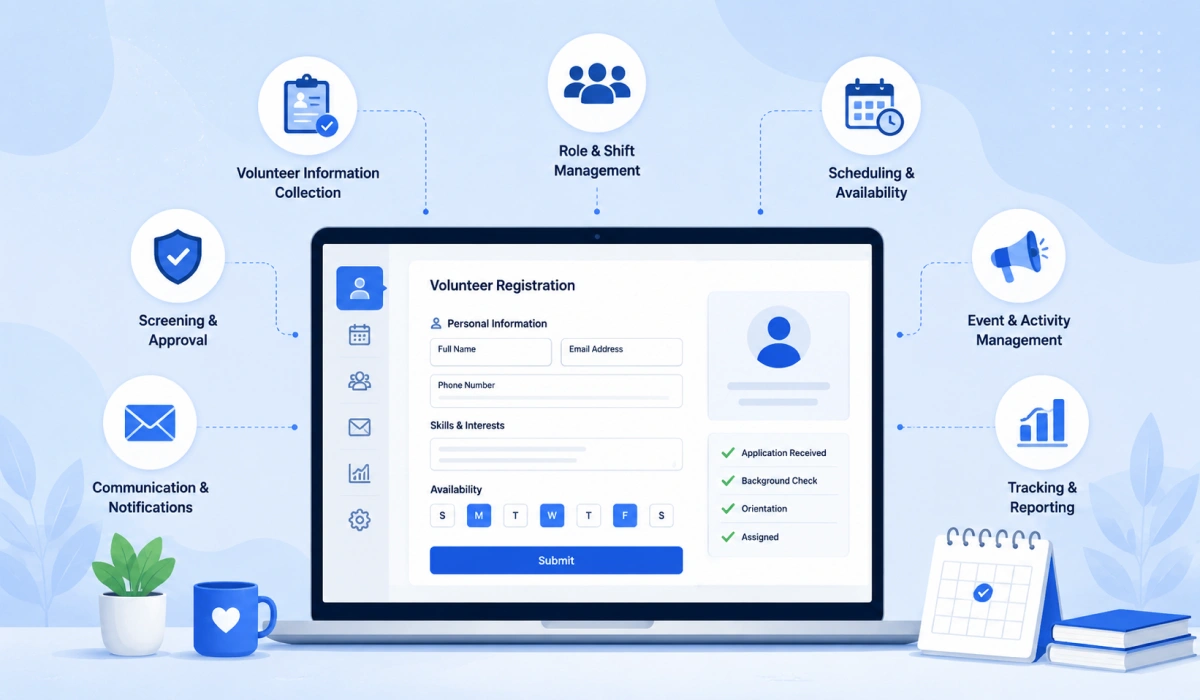
A nonprofit volunteer registration system should do more than collect names and email addresses. It should help organizations gather the right information, organize volunteer responsibilities, control participation, communicate updates, and track involvement throughout an activity.
A complete system should include:
- Volunteer Information Collection
The registration process should collect the details nonprofits need to make better decisions, such as contact information, skills, interests, availability, and preferred roles. This helps organizations understand their volunteer base and connect people with suitable opportunities.
- Role and Shift Management
Nonprofit activities often involve multiple responsibilities, schedules, and teams. A good system should allow organizers to separate volunteers into different roles and manage availability before the event begins.
This prevents manual assignment work and helps teams ensure every important task has enough support.
Learn how to manage multiple events in WordPress effectively.
- Registration Capacity Control
Volunteer numbers need to match the actual requirements of an activity. A registration system should allow organizations to set limits for specific roles, shifts, or events.
This helps avoid situations where one area has too many volunteers while another area does not have enough support.
- Automated Communication
A volunteer’s journey does not end after signup. Organizations need to share confirmations, instructions, reminders, notifications, and updates before the activity.
Automated communication reduces repetitive work and ensures volunteers receive important information at the right time.
Learn how to send event notifications and reminders in WordPress .
- Attendance and Participation Tracking
Knowing who registered is useful, but knowing who participated provides better insights. A registration system should help organizations track attendance and maintain volunteer records for future activities.
A complete volunteer registration workflow should connect every stage of the process: volunteers discover an opportunity, register online, choose their preferred role or shift, receive event updates, and participate on the event day.
How Eventin Helps Nonprofits Manage Volunteer Registration in WordPress
Eventin is an event management plugin rather than a dedicated volunteer management system. However, nonprofits can use its event pages, free tickets, custom attendee fields, email settings, attendee records, and QR scanner to manage event-based volunteer registration from WordPress.
With the Eventin plugin, you can create volunteer event pages, collect registration details, manage attendees, send event updates, and track participation directly from your WordPress dashboard.
In the next section, we’ll show you how to create this volunteer registration workflow using Eventin step by step.
How to Create a Volunteer Registration Workflow in WordPress Using Eventin
Eventin can manage event-based volunteer registration from your WordPress dashboard. You can create the volunteer activity, offer separate roles or shifts, collect participant details, send registration emails, and record arrivals.
The following steps match the workflow tested in Eventin v4.1.16.
Step 1: Create a Volunteer Event
Go to Eventin → Events and click New Event. The event setup starts under the Basic Info tab.
Add an event name and a clear description. Explain:
- What the volunteer activity involves
- What responsibilities volunteers will have
- Who can participate
- What volunteers should bring
- When and where they need to arrive
Next, select the time zone and add the event’s start and end dates. Choose the start and end times, then select Venue, Virtual, or Hybrid as the location type. You can also upload a banner and assign a category, organizer, or speaker if needed.
This information helps potential volunteers understand the activity and decide whether it matches their interests and availability. If you have not used Eventin before, follow this complete guide to set up an event in WordPress.
After completing the basic information, save the event and continue to the ticket settings.
Step 2: Create Volunteer Roles or Shifts
Open the Tickets tab and click Add Ticket. Instead of using one general registration option, create a separate free ticket for each volunteer role or shift.
For example, you could create:
- Morning setup
- Registration desk
- Food distribution
- Afternoon support
- Cleanup team
Give each ticket a clear name, select the free ticket type, and set its available quantity. The quantity represents the maximum number of volunteers you need for that role or shift.
For example, if you need five volunteers at the registration desk, set that ticket’s quantity to five. Once all five places are registered, volunteers can no longer select that ticket option.
You can also enable Global Capacity if all ticket types should share one overall registration limit. However, separate ticket quantities work better when each volunteer role requires a different number of people.
Using free tickets for roles or shifts lets volunteers select a suitable option while registering. It also helps your team see how many positions remain available before the activity begins.
Step 3: Customize the Volunteer Registration Form
Open the Advanced tab and find the custom field section. Click Add Field to collect information that the standard attendee form does not include.
You may add fields for:
- Phone number
- Relevant skills
- Previous volunteer experience
- General availability
- Emergency contact
- Accessibility requirements
- Additional notes
Choose a suitable field type for each question and write a clear label. Make a field required only when your team needs that information to approve or assign the volunteer.
For example, a phone number may be necessary for event-day communication. Previous experience may remain optional if new volunteers can also participate.
A focused volunteer signup form makes the event registration process in WordPress easier. It gives your team the information needed for planning without asking volunteers to complete an unnecessarily long form.
Custom fields collect extra attendee information. They do not control the number of available places. Use the ticket quantity from Step 2 to manage capacity for each role or shift.
Step 4: Configure Volunteer Emails
Go to Eventin → Settings → Email. This section includes two relevant options:
- Purchase Confirmation Email
- Event Reminder Email
Despite its name, the purchase confirmation setting sends attendees their ticket confirmation after registration. Enable it and use Configure to manage the email content.
The confirmation email should include the registration details volunteers need to keep. The selected role or shift appears as their ticket type. You should also provide clear instructions on the event page or in the email content, including:
- Event date and arrival time
- Venue or meeting details
- Preparation instructions
- Items volunteers should bring
- Organizer contact information
You can also enable and configure the Event Reminder Email. Use it to remind registered volunteers about the activity before it begins.
These emails confirm that the registration was successful and reduce the need to contact every volunteer separately. If plans change, send any additional update through your organization’s usual email system because Eventin’s tested settings here focus on confirmation and event reminders.
Step 5: Manage Volunteers on the Event Day
Go to Eventin → Attendees to open the Attendees List. You can search for a volunteer by name or ticket and filter the list by event, payment status, or ticket status.
The attendee table shows information such as:
- Ticket ID
- Attendee name
- Ticket type
- Payment status
- Ticket status
- Check-in time
Because each role or shift uses a separate ticket, the Ticket Type column helps your team identify what each volunteer selected.
Click Ticket Scanner to open Eventin’s QR ticket scanner. Your event-day team can scan each volunteer’s ticket to validate it and record their arrival. The ticket status and check-in information then help you see who attended.
After the activity, review the attendee records and follow these practices to manage event attendees in WordPress and keep the registration information organized for future activities.
However, QR check-in confirms arrival only. Eventin does not automatically confirm whether someone completed a shift, record volunteer hours, or track individual tasks. If your nonprofit needs that information, maintain a separate shift-completion or time record.
With this workflow, volunteers can view the activity, choose an available role or shift, submit the required details, receive registration emails, and check in on the event day. Your team can manage the full event-based registration process from WordPress while keeping capacity and attendee information organized.
Best Practices for Managing Volunteer Registration Online
A successful volunteer program depends on creating a simple signup experience, keeping information organized, and maintaining clear communication with participants.
- Keep registration forms simple: Ask only for the information you need to avoid making signup difficult for volunteers.
- Keep volunteer information updated: Regularly review details like availability, skills, and interests to match people with suitable activities.
- Share clear event information: Provide volunteers with schedules, locations, responsibilities, and instructions before the activity begins.
- Track participation after events: Review attendance and engagement data to improve future volunteer programs.
- Protect volunteer information: Collect only the details required for the activity, explain how you will use them, limit dashboard access, and remove information you no longer need.
WordPress Volunteer Registration vs Dedicated Volunteer Management Software
WordPress can be a practical option for nonprofits that already have a website and want to add volunteer registration capabilities without managing another platform. However, dedicated volunteer management software and WordPress solutions are designed for different needs.
The right choice depends on whether you need a simple event-based volunteer registration workflow or a complete system for managing large volunteer operations.
| Feature | WordPress event-based registration | Dedicated volunteer software |
|---|---|---|
| Website connection | Runs through your WordPress website | May use a separate platform or integration |
| Event registration | Available through an event plugin | Usually included |
| Roles and shifts | Can use ticket or registration options | Often includes dedicated role and shift tools |
| Attendance | Can record event check-in | May include attendance and hour tracking |
| Volunteer history | Limited without additional tools | Often includes long-term volunteer profiles |
| Task and hour tracking | Usually requires another system | May be included |
| Cost | Depends on hosting, plugins, and required features | Depends on the provider and selected plan |
| Best for | Event-based volunteer activities | Ongoing or complex volunteer programs |
For nonprofits that mainly organize volunteer-driven events, campaigns, or community activities through a WordPress website, adding nonprofit event registration capabilities can be a simple and flexible approach.
Organizations with complex volunteer operations, such as large-scale recruitment, long-term volunteer scheduling, or advanced reporting, may need dedicated volunteer management platforms.
FAQ
Can I limit registrations for each volunteer role or shift?
Yes. Create a separate free ticket in Eventin for each role or shift and set its available quantity. Once the limit is reached, volunteers can no longer select that ticket option.
Can Eventin track volunteer attendance?
Yes. Eventin’s QR ticket scanner can validate each volunteer’s ticket and record their arrival. However, check-in only confirms that the person arrived. It does not confirm whether they completed their assigned shift.
Can Eventin track volunteer hours or completed tasks?
No. Eventin does not automatically track working hours, completed shifts, or assigned tasks. You will need a separate time sheet or task management system for this information.
Can volunteers choose their preferred role or shift?
Yes. You can create each role or shift as a separate free ticket. Volunteers can then select an available option during registration. The ticket quantity controls how many people can register for each option.
What information should a volunteer registration form collect?
A volunteer form can collect contact details, relevant skills, availability, previous experience, emergency contact information, and accessibility requirements. Only ask for information your team needs for the activity.
How should nonprofits protect volunteer registration data?
Collect only the information required for the event and explain why you need it. Restrict WordPress dashboard access to authorized team members and remove personal data when you no longer need it.
Can Eventin manage volunteer registration in WordPress?
Yes. Eventin can manage event-based volunteer registration through event pages, free role or shift tickets, custom attendee fields, confirmation emails, reminders, attendee records, and QR check-in. It does not replace dedicated software for tracking hours, tasks, or long-term volunteer profiles.
What is the best volunteer management plugin for WordPress?
The best option depends on how you manage volunteers. Eventin is suitable for event-based volunteer registration because it supports role or shift tickets, custom attendee fields, registration limits, reminder emails, and QR check-in. For volunteer hours, recurring assignments, tasks, and long-term profiles, you may need dedicated volunteer management software.
How do nonprofits organize volunteer schedules?
Nonprofits can organize volunteer schedules by separating each role or time slot into a registration option. In Eventin, you can create free tickets such as Morning Setup, Afternoon Support, or Cleanup Team and set a separate capacity for each option.
Conclusion
Managing volunteer registration becomes easier when nonprofits have a structured workflow instead of relying on spreadsheets, emails, and manual follow-ups. WordPress gives organizations the flexibility to create online signup experiences, organize event participation, and keep volunteers informed.
With Eventin, nonprofits can manage volunteer-driven events, registrations, attendee details, and communication directly from their WordPress website.
Create your next volunteer event registration workflow with Eventin.

