How to Enable RTL Support on WordPress Website


Table of Contents
RTL support helps your WordPress website display right-to-left languages like Arabic, Hebrew, Persian, and Urdu correctly. Without it, your content may translate properly but still look broken because menus, buttons, forms, icons, and page sections may stay in left-to-right order.
The good news is that WordPress already supports RTL languages. You can enable it from the site language settings without installing a separate plugin.
To enable RTL support in WordPress, go to Settings > General, choose a right-to-left language such as Arabic, Hebrew, Persian, or Urdu from the Site Language dropdown, and click Save Changes. WordPress will automatically switch the dashboard and supported frontend areas to right-to-left direction.
This guide shows you how to enable RTL support in WordPress, test your layout, fix common RTL issues, and create a better experience for users who read from right to left.
Quick Overview
We’re going to show you how to enable RTL support on a WordPress site so languages like Arabic, Hebrew, Persian, Urdu, Kurdish, and Pashto appear correctly. You’ll also learn how RTL affects your website layout, menus, forms, buttons, checkout pages, plugins, themes, and mobile user experience..
- What RTL support means in WordPress and why it matters
- How to enable RTL support from WordPress site language settings
- How to enable RTL language for a specific WordPress user
- How to check if your theme and plugins support RTL layouts
- Common WordPress RTL issues and how to fix them
- How to test menus, forms, checkout pages, and mobile layouts before publishing

What is RTL support in WordPress?
RTL support in WordPress means your website can properly display right-to-left languages like Arabic, Hebrew, Persian, Urdu, Kurdish, and Pashto. Instead of showing text and page elements from left to right, RTL support adjusts the content direction so users can read and interact with the website naturally.
In a normal English website, the text starts from the left side of the screen and moves to the right. But in RTL languages, the reading direction starts from the right side and moves to the left. That means your website layout also needs to follow that direction.
RTL support affects more than just text. It can also change how these elements appear:
- Navigation menus
- Buttons and icons
- Forms and input fields
- Blog layouts
- Product pages
- Checkout pages
- Event booking forms
- Dashboard screens
For example, if your site uses Arabic but your menu, form labels, and buttons still align from left to right, the user experience can feel confusing. Visitors may understand the words, but the layout will not feel natural.
WordPress has built-in RTL language support. When you choose an RTL language from Settings > General > Site Language, WordPress automatically changes the text direction for supported areas. But your theme and plugins must also support RTL properly. Otherwise, some parts of your website may still look broken or misaligned.
So, RTL support in WordPress means your full website experience should work correctly for right-to-left users, not just the written content.
📚 Related reading: How to Fix WordPress Pages Not Indexed by Google
Why RTL Support Matters for WordPress Websites
RTL support matters because it helps right-to-left language users read, browse, and take action on your WordPress website without confusion. If your audience uses languages like Arabic, Hebrew, Persian, Urdu, Kurdish, or Pashto, your website layout should follow their natural reading direction.
A translated website is not always an RTL-friendly website. You may translate the words, but if the menu, buttons, forms, icons, and page sections still follow a left-to-right layout, the experience can feel broken.
For example, an Arabic visitor may see the correct text but struggle with a contact form if the labels, input fields, and submit button are placed in the wrong direction. The same issue can happen on checkout pages, booking forms, event registration pages, and mobile menus.
Here’s why RTL support is important for WordPress websites:
1. It Improves Readability
RTL support makes your content easier to read for users who naturally read from right to left. Text starts from the correct side, paragraphs align properly, and the full page feels more familiar.
Without RTL support, users may need extra effort to understand your content, especially on long blog posts, service pages, and product pages.
2. It Creates a Better User Experience
Good RTL support adjusts the full layout, not only the text direction. This includes menus, buttons, icons, forms, sidebars, breadcrumbs, and page sections.
When the layout follows the user’s reading habit, visitors can move through your website more easily.
3. It Makes Forms and Checkout Pages Easier to Use
Forms are one of the most important parts of a website. Contact forms, booking forms, registration forms, login forms, and checkout forms must feel natural for RTL users.
If form labels, input fields, dropdowns, and buttons are misaligned, users may leave before submitting. For ecommerce, restaurant ordering, booking, and event websites, this can directly affect conversions.
4. It Builds Trust With Local Audiences
A clean RTL layout shows that your website is built for the user’s language and region. It feels more professional and reliable.
When users see broken alignment, mixed direction, or confusing buttons, they may question whether your business is active, trustworthy, or ready to serve them.
5. It Supports Multilingual Growth
If you want to reach users in Arabic-speaking, Hebrew-speaking, Persian-speaking, or Urdu-speaking markets, RTL support helps your WordPress website serve those audiences properly.
It also makes your multilingual setup stronger because each language can display in the correct direction.
6. It Improves Mobile Usability
Many users visit WordPress websites from mobile devices. RTL issues often become more visible on small screens because menus, buttons, icons, and form fields have less space.
Testing RTL support on mobile helps you avoid broken navigation, overlapping text, and confusing page flows.
7. It Helps Important User Flows Work Better
RTL support is especially important for websites where users need to complete actions, such as:
- Buying a product
- Booking an appointment
- Registering for an event
- Ordering food
- Filling out a contact form
- Subscribing to a newsletter
- Completing checkout
If the layout is confusing, users may stop before finishing the action. A proper RTL setup helps them complete the process with less friction.
In short, RTL support makes your WordPress website readable, usable, and trustworthy for right-to-left language users. It helps your content look natural, keeps important forms and checkout pages clear, and creates a better experience across desktop and mobile.

How to Enable RTL Support on WordPress Website
You can enable RTL support in WordPress by changing your site language to a right-to-left language. WordPress has built-in RTL support, so you do not need a separate plugin for the basic setup.
Follow these steps:
1. Log in to Your WordPress Dashboard
First, log in to your WordPress admin dashboard.
From here, you can control your website language, user language, theme settings, plugins, and other site options.
2. Go to General Settings
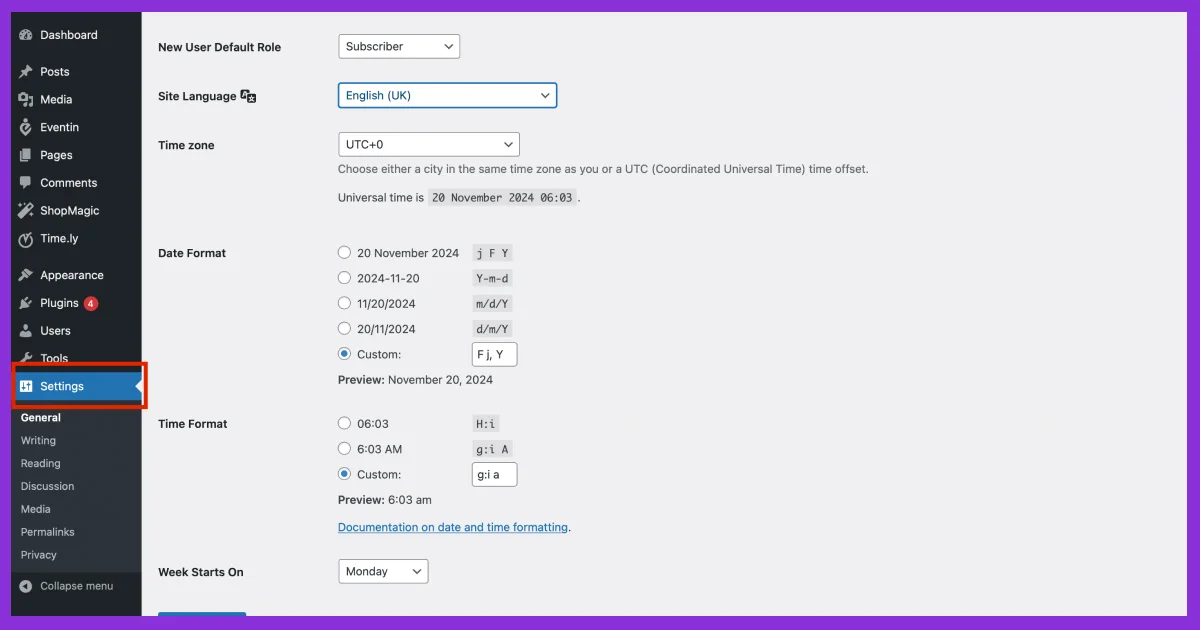
From your dashboard, go to: Settings → General
This page includes your site title, tagline, site URL, admin email, time zone, and site language settings.
3. Change the Site Language
Find the Site Language option. Click the dropdown and choose a right-to-left language, such as:
- Arabic
- Hebrew
- Persian
- Urdu
Once you select an RTL language, WordPress will prepare the dashboard and supported frontend areas for right-to-left direction.
4. Save Your Changes
Scroll down and click Save Changes.
After saving, WordPress will apply the new language direction across supported parts of your website.
5. Check Your Website Layout
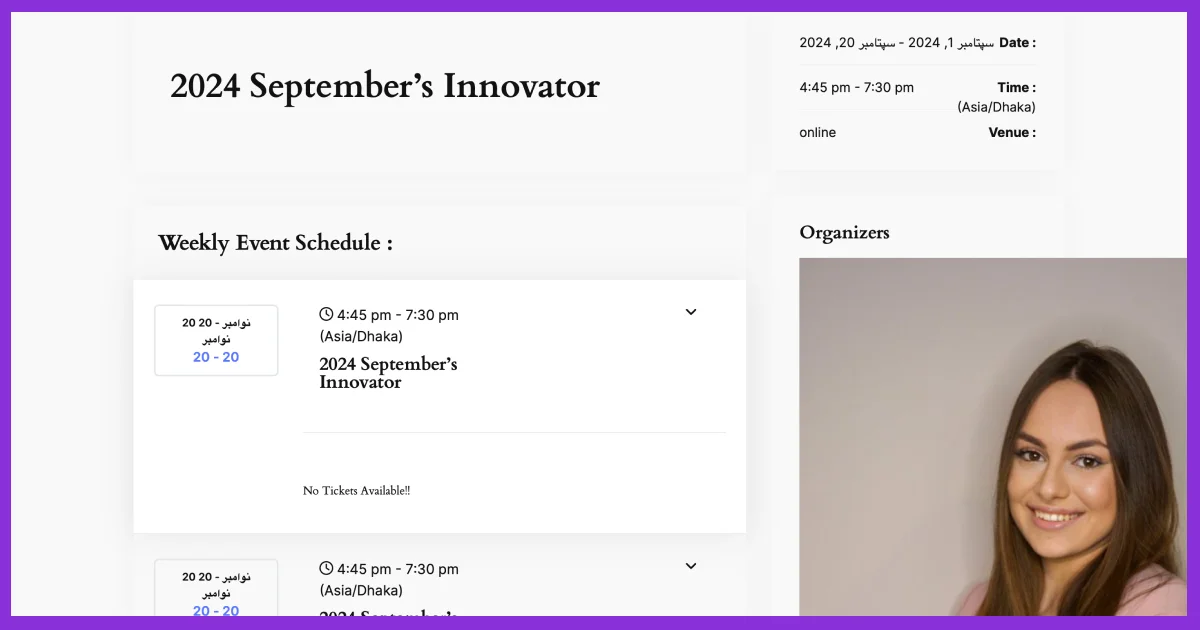
Now visit your website from the frontend and check if the layout appears correctly.
Review important areas like:
- Homepage
- Header menu
- Blog pages
- Contact forms
- Buttons
- Footer
- Product pages
- Checkout pages
- Event pages or booking forms
This step is important because WordPress can enable RTL direction, but your theme and plugins must also support RTL properly.
6. Test the Mobile View
Many RTL layout issues appear on mobile screens.
So, open your website on a phone or use your browser’s mobile preview mode. Check if the menu, buttons, forms, and content sections still look clean and easy to use.
7. Fix Any RTL Layout Issues
If some parts of your website look broken, the issue usually comes from your theme, plugin, page builder, or custom CSS.
Common fixes include:
- Updating your theme and plugins
- Using an RTL-ready WordPress theme
- Checking plugin RTL compatibility
- Adjusting page builder spacing
- Adding custom RTL CSS if needed
Changing the site language enables RTL support in WordPress, but testing makes sure your visitors get a clean right-to-left experience.
📚 Related reading: How to Fix a Hacked WordPress Website: Complete Recovery Guide
How to Enable RTL Support for a Specific WordPress User
You can enable RTL language direction for a specific WordPress user by changing that user’s profile language. This is useful when one admin, editor, or author wants to use the dashboard in an RTL language without changing the full website language.
Follow these steps:
- Go to Users → Profile from your WordPress dashboard.
- Find the Language option.
- Choose an RTL language, such as Arabic, Hebrew, Persian, or Urdu.
- Scroll down and click Update Profile.
This only changes the dashboard language for that specific user. It does not change the public website language for visitors.
Quick note:
If you want the whole website to use RTL direction, change the language from Settings → General → Site Language instead.
How to Check If Your WordPress Plugins Support RTL
A WordPress plugin supports RTL when its frontend and backend elements display correctly in right-to-left languages. This matters for forms, popups, booking pages, event pages, product pages, and checkout flows.
Here’s how to check plugin RTL support:
- Enable an RTL language from Settings → General.
- Visit the pages where the plugin appears.
- Check form fields, buttons, labels, icons, dropdowns, calendars, and checkout steps.
- Test both desktop and mobile layouts.
- Check the plugin documentation for RTL support details.
Pay extra attention to plugins that handle user actions, such as contact forms, appointment booking, event registration, food ordering, and ecommerce checkout. These areas directly affect user experience and conversions.
If a plugin looks broken after enabling RTL, update the plugin first. If the issue remains, contact the plugin support team or add custom RTL CSS.
How to Check If Your WordPress Theme Supports RTL
Your WordPress theme controls the main layout of your website, so RTL support depends heavily on the theme. A theme with proper RTL support should adjust text direction, menus, sidebars, buttons, spacing, and mobile layouts.
To check if your theme supports RTL:
- Switch your site language to an RTL language.
- Visit your homepage, blog pages, service pages, and landing pages.
- Check the header menu, footer, sidebar, buttons, breadcrumbs, and content alignment.
- Open the site on mobile and test the menu.
- Review the theme documentation for “RTL ready” or “RTL support.”
A good RTL-ready theme should not only flip the text direction. It should also keep the design clean, balanced, and easy to use.
If the layout breaks, the theme may not fully support RTL. In that case, use an RTL-ready theme, update the theme, or fix the layout with custom CSS.
Common RTL Issues in WordPress and How to Fix Them
Even after enabling RTL in WordPress, some parts of your website may not display correctly. This usually happens because of theme CSS, plugin layouts, page builder settings, or custom design styles.
Here are the most common RTL issues and their fixes:
| RTL Issue | Common Cause | How to Fix |
|---|---|---|
| Text direction changes, but layout looks broken | Theme does not fully support RTL | Use an RTL-ready theme or update your theme |
| Menu alignment looks wrong | Header layout is built for LTR only | Adjust menu alignment or add RTL CSS |
| Forms look messy | Plugin fields do not support RTL styling | Update the plugin or fix form CSS |
| Buttons and icons appear in the wrong place | Custom spacing or LTR icon direction | Adjust margins, padding, and icon placement |
| Mobile menu breaks | Theme mobile layout issue | Test mobile view and fix responsive RTL styles |
| Checkout page feels confusing | WooCommerce or checkout plugin issue | Test all checkout fields and fix alignment |
| Page builder sections look uneven | Manual left/right spacing | Replace fixed spacing with RTL-friendly spacing |
Before publishing an RTL WordPress website, test the full user journey. Check menus, forms, booking pages, checkout pages, and mobile screens. This helps you catch layout problems before real users face them.
Best Practices for WordPress RTL Websites ( +Checklist )
A good RTL WordPress website should do more than change text direction. It should make the full experience easy for users who read from right to left, including menus, forms, buttons, checkout pages, and mobile layouts.
Follow these best practices:
1. Use an RTL-Ready Theme
Choose a WordPress theme that supports RTL layouts. A good RTL-ready theme should handle menus, sidebars, buttons, spacing, and mobile navigation correctly.
Before publishing, test your theme by switching the site language to Arabic, Hebrew, Persian, or Urdu.
2. Check Plugin RTL Support
Plugins can affect forms, popups, checkout pages, booking flows, event pages, and product pages. After enabling RTL, test the pages where your plugins appear.
Focus on plugins used for:
- Contact forms
- Ecommerce checkout
- Booking or registration forms
- Popups
- Page builders
- Translation or multilingual setup
3. Test the Full User Journey
Do not only check the homepage. Test how users browse, read, fill out forms, book services, register for events, or complete checkout.
If any step feels confusing or misaligned, fix it before going live.
4. Avoid Fixed Left and Right CSS
Custom CSS can break RTL layouts when it uses fixed styles like margin-left, padding-left, or text-align:left.
Use flexible spacing and alignment where possible so your design can adjust better for RTL and LTR layouts.
5. Review Icons and Arrows
Directional icons can look wrong in RTL layouts. Check arrows, sliders, breadcrumbs, next buttons, and step indicators.
If needed, replace or flip icons so they match the right-to-left flow.
6. Test Mobile Layout
Many RTL issues appear on mobile screens. Check menus, buttons, forms, sliders, and checkout fields on phones and tablets before publishing.
A clean RTL setup helps users read, navigate, and complete actions on your WordPress website without confusion.
FAQs About Enabling RTL Support in WordPress
How do I enable RTL support in WordPress?
Go to Settings → General, choose an RTL language from Site Language, and click Save Changes.
Does WordPress support RTL by default?
Yes. WordPress supports RTL languages by default when you select an RTL site language.
Do I need an RTL plugin for WordPress?
No, not for basic RTL support. You only need a plugin if you want multilingual switching, translation, or extra layout control.
Why does my WordPress layout break after enabling RTL?
Your theme, plugin, page builder, or custom CSS may not fully support RTL layouts.
Can I use RTL and LTR languages on the same WordPress site?
Yes. You need a multilingual plugin and a theme that supports both RTL and LTR layouts.
What is the best way to test RTL support?
Change the site language to an RTL language and test your homepage, menus, forms, buttons, checkout, booking pages, and mobile layout.
Which WordPress themes support RTL?
Many modern WordPress themes support RTL. Check the theme documentation, WordPress theme directory filters, or test the theme after switching to an RTL language.
Final Thoughts
Enabling RTL support on your WordPress website is simple, but creating a smooth RTL experience needs proper testing. Changing the site language helps WordPress switch to right-to-left direction, but your theme, plugins, menus, forms, checkout pages, and mobile layout must also work correctly.
So, after enabling RTL, check your full website from a visitor’s point of view. Review your homepage, blog pages, navigation menu, contact forms, booking forms, product pages, and checkout flow. This helps you find layout issues before your users do.
A clean RTL setup makes your website easier to read, easier to use, and more trusted by audiences who use languages like Arabic, Hebrew, Persian, Urdu, Kurdish, and Pashto.
Want to keep learning more about WordPress? Subscribe to our newsletter and join our community for practical guides on WordPress security, hacked website recovery, Google indexing issues, performance fixes, plugin updates, and other important WordPress news.