Eventin User Journey: A Local Cinema Theater’s Real Struggle-to-Success Story


Table of Contents
If you are running a local movie theater or a local movie event organizer, this success story helps you solve your event-related struggles when you run your events.
Running a local movie theater is tough. Daily shows, long lines, slow check-ins, and repeated event setups can be stressful.
In the same way, one of our users, Menos1 Cine, faced these same issues.
But after switching to Eventin, everything changed. Online ticket sales, QR check-ins, and simple schedules made their work smooth and stress-free.
In this blog, you’ll see how they transformed their event workflow. If you run a theater or small cinema, this story can help you manage shows, sell tickets faster, and create a better visitor experience.
Quick overview: How ‘Menos1 Cine’ benefited
| Before Using Eventin (Real Struggles) | After Using Eventin (Real Improvements) |
| Tickets sold manually at the door — people waiting, getting upset in long lines | Online ticket sales — most seats booked before showtime, no crowd at the entrance |
| Staff got stressed managing cash, confirming seats, and answering. | Eventin gives a visual seating arrangement option and reduces last-minute questions |
| Show times and venue details sometimes got mixed up, leading to confusion | Eventin keeps a clear schedule for each event — no mismatched times or mistakes |
| Recurring shows had to be created and promoted again, wasting hours | One recurring event → reused every week with a single click |
| Check-in took too long — people waited, staff checked names one by one | QR code check-in made entry fast, smooth, and stress-free |
| Hard to see which events were full, which were slow, or what happened last week | All events in one dashboard — past, today, and coming up |
| Team spent too much time on admin work instead of planning good screenings | Team Works in One Flow: Every schedule change shows up instantly in iCal, Outlook, and Google Calendar. |

How Eventin solved their pain points
1. Easier online ticket booking
‘Menos1 Cine’ sells their event ticket manually right at the entrance. Visitors had to stand in a long line that moved slowly, especially during busy shows.
This created a poor experience for both sides:
- Visitors felt annoyed and tired before the movie even started
- Staff felt overwhelmed as the queue grew longer
- The entrance area always looked crowded and noisy
- People waiting outside sometimes thought the show was full when it wasn’t
- Late arrivals blocked the flow even more
The whole process became a daily stress point. They wanted to welcome guests with ease, not with a bottleneck at the door.
Once they started using Eventin, everything changed
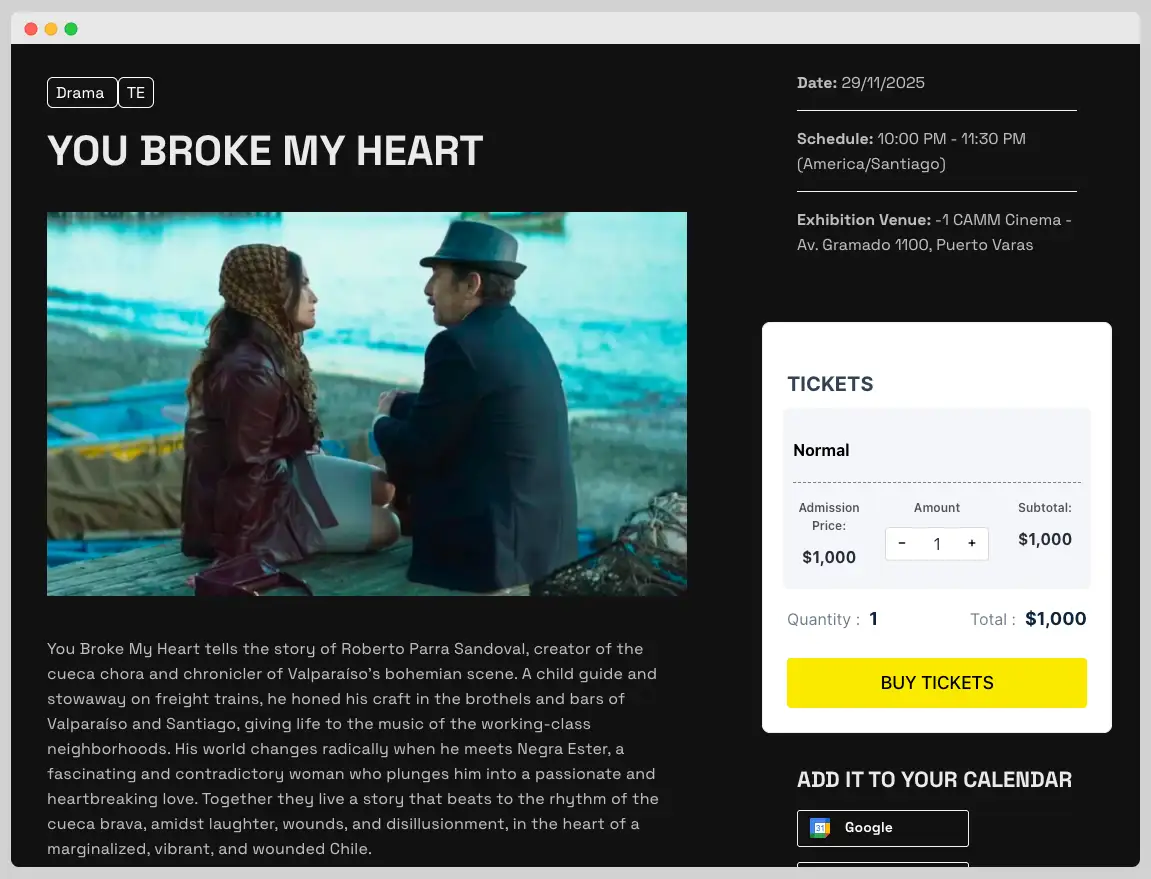
Visitors no longer needed to wait outside or guess if seats were still available. They could simply go to the ‘Menos1 Cine’ website, pick a movie, select a showtime, and buy their ticket online.
2. Fix the seating arrangement
Their staff had a hard time handling event management at once. They had to take cash, confirm seats, and answer questions from people waiting in line. When many visitors arrived at the same time, the team felt rushed and stressed.
This created daily problems such as:
- Confusion about how many seats were still available
- Delays caused by manual seat checking
- Stressful show openings when multiple groups arrived at once
Eventin, solve the workflow became much easier
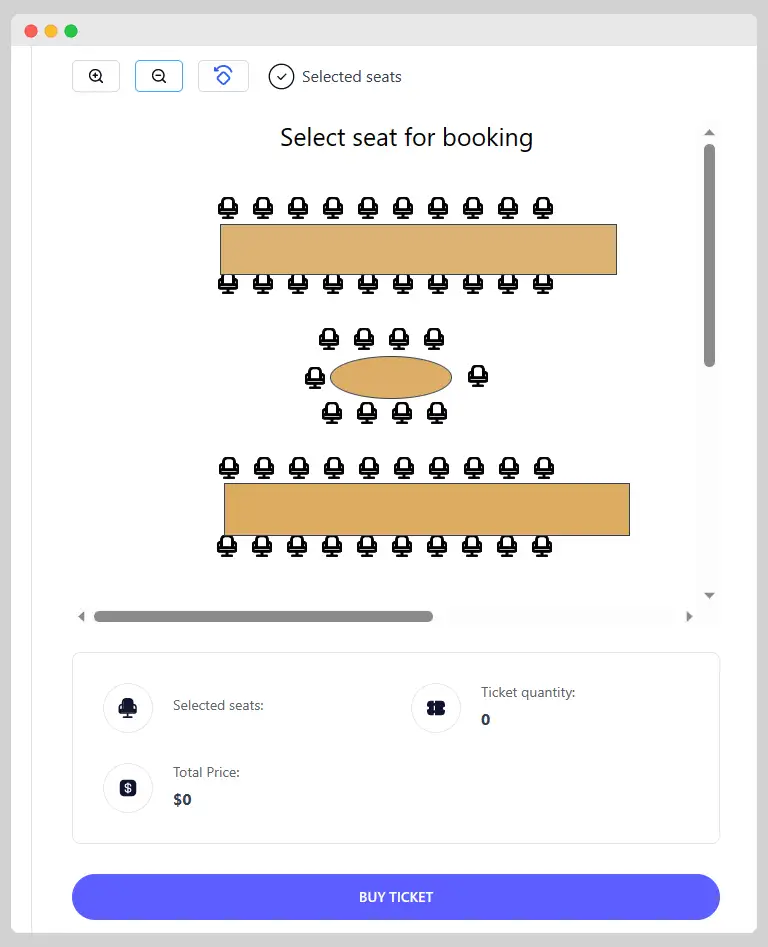
Eventin’s visual seating arrangement helps attendees select their seats when booking for an event. The staff no longer have to guess how many seats are left or answer the same questions repeatedly.
Visitors can see available seats on the event page before booking, so most doubts are eliminated automatically.
3. Repeating events with the same information
They screened movies almost every day, and some shows repeated every week. But before using Eventin, they had to create each event from scratch.
New title. New date. New time. New details. New promotion.
Doing this again and again took a lot of time. Even though the movie was the same, the staff spent hours copying information and updating posters.
If they forgot a detail or missed a time slot, visitors got confused and asked more questions.
Eventin’s recurring option solves this problem with one click
Eventin lets them create a recurring event once, then reuse it every week. No more copying events.
- They set the movie and the schedule only once.
- Eventin automatically repeats the event on the selected days.
Visitors also benefited because every weekly show appeared clearly on the website without confusion. Otherhand the staff spend less time setting up events.
📚 Related reading: How to Create Recurring Events in WordPress (Step-by-Step Guide) 👉 Read more
4. Slower check-in and identification
Before using Eventin, check-in was one of their slowest tasks.
When visitors arrived, the staff had to look through a printed list or a manual spreadsheet to find each person’s name.
They checked people in one by one, which took a long time.
Using QR code check-in has made the process fast and smooth
Eventin sends every visitor a digital ticket with a unique QR code.
At the entrance, the staff only need to:
- Scan the QR code using any phone or scanner.
- The ticket is verified in seconds.
Eventin updates the attendee list instantly after each scan, so the dashboard always shows who has arrived and who hasn’t.
5. Calendar sync issue
Menos1 Cine does update showtimes in multiple places, send reminders by hand, and check different calendars to make sure nothing overlaps.
When a schedule changed, they had to:
- Edit the showtime on the website
- Fix or repost their social media updates
- Inform visitors one by one
- Update their internal team calendar
- Recheck all platforms to make sure the time matched everywhere
These steps took long, and small mistakes happened easily when things got busy.
Eventin made their schedule management much easier.
Any time they updated a show inside Eventin, the change instantly appeared in iCal, Outlook, Yahoo!, and Google Calendar. They no longer had to edit multiple calendars or send reminders to each staff member manually.
One update changes all connected calendars. No more repeating the same edits everywhere.
📚 Related reading: How Eventin integrates all calendars (iCal, Outlook and Google Calendar) 👉 Read more
Final results ‘Menos1 Cine’ saw after using Eventin
Their growth and results were not just small changes — the ticket sales, visitor experience, and the team’s overall workload were better.
- 35% increase in pre-sales, visitors booked online before showtime
- Sold over 10,000 tickets, which is 3x than manual ticketing.
- Saved 40+ hours each week, and schedule updates automatically.
- Filled-up rate increased by 85% in their 82-seat theater.
- Saw happier and more satisfied visitors and gained 21,000 Instagram followers.
- 30% fewer last-minute changes, since visitors received e-tickets, seat details, and timing updates instantly.
So, what’s your take from this case study?
If you run events of any kind, cinema shows, workshops, concerts, or meetups, there’s a lot you can take away from this story.
Menos1 Cine didn’t fix their problems with a big budget or a big team. They fixed them by improving the way they worked each day. And you can do the same.
Here’s what you, as an event organizer, can learn from their journey:
- Let people book online, and your entrance becomes stress-free
- Your visitor experience improves when everything feels easy
- Show clear event schedules across all platforms
- Reusing recurring event templates saves hours of work
- A good event management system makes your event days run better
Now it’s your turn: Let’s create a successful event with Eventin
A small, smart change can reshape your entire event workflow. One good tool can save time, reduce stress, and help your business grow in a steady way.
If you are still managing tickets, schedules, and check-ins by hand, this is the right moment to upgrade your system.
However, if you feel that some features or ideas were not fully covered in this blog, take a moment to explore Eventin. You may find the exact options you need to organize your events with confidence and ease.
Your success story can start with one simple decision.
Frequently asked questions (FAQs)
Why is Eventin better than other event management plugins?
-Eventin keeps everything inside WordPress, supports online ticket sales, QR check-in, recurring events, and integrations like WooCommerce and Zoom. Many plugins offer only a few of these features, while Eventin covers the full event workflow in one place.
Does Eventin have AI features for event creation?
-Yes. Eventin AI helps you generate event descriptions, agendas, and promotional text quickly. You type a short idea, and the AI creates clean, ready-to-publish content for your event page.
Can I customize event templates like tickets and certificates with Eventin?
-Yes, you can customize both ticket and certificate templates with Eventin. The Template Builder lets you adjust layouts, colors, logos, and event details using simple drag-and-drop tools.
Can Eventin automate event emails?
-Yes. Eventin has an email automation system that sends confirmations, reminders, follow-ups, and thank-you messages automatically. You set the rules once, and the system handles the communication for each attendee.
Does Eventin support RSVP events?
-Yes. Eventin allows visitors to RSVP with a single click. You can track responses, limit seats, send reminders, and manage attendance in real time without using extra tools.
Does Eventin integrate with other tools I use?
-Yes. Eventin works with WooCommerce, Zoom, Stripe, PayPal, Google Calendar, iCal, and many other tools you already use to run events.