5 Best Event Conference Plugins for WordPress


Table of Contents
Managing a conference on WordPress takes more than listing event dates. You need a reliable event conference plugin to handle event registration, ticket sales, and schedules in one place.
A good event conference plugin helps you create event pages, manage attendees, sell tickets using WordPress, and display events through an event calendar.
In this guide, we’ve selected the best event conference plugins for WordPress, including both premium and free event conference plugins for WordPress.
If you’re looking for a complete events calendar and registration plugin or a tool for running a full WordPress event conference, this list will help you choose the right one.

WordPress event conference plugins (quick comparison)
| Plugin Name | Best For | Conference Features | Ticketing / Payments | Free Version |
| Eventin Event Management Plugin | Conferences, summits, webinars | Speakers, schedules, multiple events, attendee tools | Yes | Yes |
| Modern Events Calendar | Multi-day conferences & advanced event layouts | Timetables, booking, multiple event views | Yes | Yes |
| The Events Calendar | Conference sites that need strong calendar + add-ons | Calendar views, venue/organizer, add-on ecosystem | Yes (add-ons) | Yes |
| Event Espresso | Serious conferences with detailed registration flows | Advanced registration, attendee management, check-in | Yes | No |
| WP Event Manager | Simple conference listings + add-on-based setup | Event listings, organizer/venue, extensions | Yes (add-ons) | Yes |
How we tested and reviewed these event conference plugin for WordPress
We did not choose these event conference plugins for WordPress at random. Each event conference plugin was tested on real WordPress sites to see how it works in real conference setups, not just demos.
Here’s how we reviewed them:
- Real conference setup, not demos: We installed each event conference plugin on a fresh WordPress site. We created conference events, added schedules, speakers, and ran the full setup from event creation to ticket booking.
- Ease of use: We checked how simple it is to create a WordPress event conference, manage sessions, set event dates, and handle attendees. Plugins that felt confusing for beginners scored lower.
- Conference experience for visitors: We tested how users view event details, session schedules, and speaker information, and how smoothly they can register or buy tickets.
- Ticketing and payment options: We reviewed how well each plugin lets you sell tickets using WordPress, handle free and paid conferences, and manage different ticket types.
- Performance and compatibility: We checked speed, theme support, and compatibility with tools like WooCommerce and page builders.
- Support and updates: We reviewed documentation, support quality, and update history.
Only the best event conference plugins passed all checks. Rankings are based on usability, features, and real value.
📚 Related reading: How to Build an Event Marketing Funnel That Actually Works 👉 Read more
Top WordPress event conference plugins to manage events and bookings
Running a conference on WordPress needs more than a basic signup form. In this section, we review the top WordPress event conference plugins one by one.
For each plugin, we explain how it handles conferences, what features it offers, what works best, and how pricing is structured. This helps you quickly compare tools and choose the best event conference plugin for your WordPress site.
Let’s start with the first plugin on the list.
1. Eventin Event Management Plugin
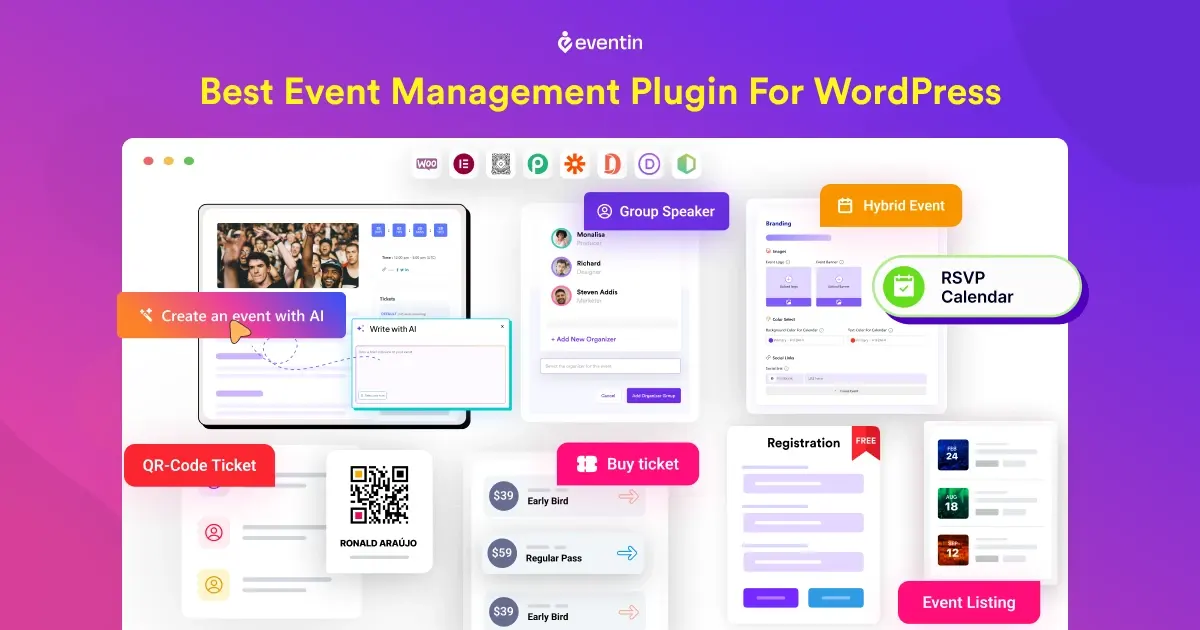
Eventin Event Management Plugin is a powerful event conference plugin for WordPress built for managing full-scale conferences from one place. It’s designed for organizers who need control over schedules, speakers, tickets, and attendees without juggling multiple tools.
With Eventin, you can create conference events, set up multi-day schedules, manage registrations, sell tickets, and track attendees directly from your WordPress dashboard. Everything stays inside WordPress, which keeps the setup clean and easy to manage.
Eventin works well for online conferences, in-person conferences, and hybrid events. You can use it for industry conferences, virtual summits, workshops, training programs, or large meetups. It supports both free and paid conferences, making it suitable for small events and scalable enough for growing conference needs.
Key Features
- 🤖 AI-powered conference setup to create events faster
- Create unlimited conference events with session schedules & speakers
- Sell conference tickets online with multiple ticket tiers and pricing options
- RSVP-based events and track attendees with built-in QR code check-in
- Set up recurring conferences or sessions (daily, weekly, or monthly)
- Sync conference bookings with Google Calendar, iCal, and Outlook
- Build custom conference landing pages, tickets, and certificates using the template builder
- Works smoothly with Elementor, Divi, Gutenberg, and Bricks
What We Like Most
Eventin offers a strong balance between advanced conference features and ease of use. You can start with a simple conference setup and grow into multi-day schedules, speaker management, and ticket sales without changing plugins.
The interface stays clean and easy to follow, even if you’re setting up your first WordPress event conference.
Pricing
- Free version: Available on WordPress.org with core event registration features
- Pro version: Start from $84/year, lifetime $149.
2. Modern Events Calendar
Modern Events Calendar is a flexible event conference plugin for WordPress built for organizers who need detailed schedules and strong visual layouts. It works well for conferences that run across multiple days with several sessions.
You can create conference events, add time-based sessions, manage speakers, and display everything using different calendar and timetable views.
Modern Events Calendar is a good fit if you want more control over how your conference schedule looks on the front end. It’s commonly used for conferences, workshops, training programs, and large events where clear session timing matters.
Key Features
- Multiple calendar and event views (monthly, weekly, list, agenda).
- Over 50 layout styles to match your site’s design.
- Recurring events support for ongoing schedules.
- Booking and ticketing tools (ticket sales, seat limits, coupons).
- Integration with WooCommerce, PayPal, Stripe, Google Calendar.
- Custom colors, countdown timers, and event images.
- SEO-ready and responsive design for all devices.
What we like most:
The wide range of layouts and timetable views makes it easy for attendees to understand conference schedules at a glance.
Pricing:
- Free version: The free version includes basic conference event creation, calendar views, and essential scheduling features.
- Pro version: Single site — $99/year.
📚 Related reading: How to Create Recurring Events in WordPress (Step-by-Step Guide) 👉 Read more
3. The Events Calendar
The Events Calendar is a widely used event conference plugin for displaying conference schedules and event timelines in a clear, organized way. It is mainly designed for event listing and calendar management rather than full conference operations.
You can create conference events, add dates, times, and locations, and display them using clean calendar views. For conferences that need attendee registration, ticket sales, or payments, you’ll need to rely on paid add-ons.
Key Features
- Simple and clean event calendar layout
- Conference event listings with clear date, time, and venue details
- Multiple calendar display options such as month, list, and day views
- Event organization using categories and tags
- Compatible with most WordPress themes
- RSVP and ticketing available through add-ons
- WooCommerce integration via extension
What we like most
With this plugin, conference schedules appear neat and well-structured without additional configuration. Events can be added and updated quickly and easily.
Pricing
- Free version: Includes core event calendar and listing features
- Pro version: Start from $149/year.
- Paid add-ons at $149/year (Required for event registration, ticket sales, and advanced tools).
4. Event Espresso
Event Espresso is another popular WordPress plugin for events and displaying conference events on your website. It is mainly designed for events like conferences, seminars, and training programs where registration workflows matter more than simple event listings.
Event Espresso works best for in-person conferences, workshops, and professional events where attendee data and registration accuracy are critical.
Key Features
- Advanced conference registration forms
- Multiple ticket types and pricing options
- Attendee management and check-in tools
- Support for group registrations
- Customizable confirmation emails and notifications
- Payment gateway support for paid conferences
- Built-in reporting for attendees and orders
What we like most
Event Espresso gives you deep control over conference registrations. If your event depends on accurate attendee data, ticket rules, and structured workflows, this plugin handles it well. It’s not the simplest tool, but it’s reliable for complex conference setups.
Pricing
- Pro version: Start from $129/year.
5. WP Event Manager
WP Event Manager is a lightweight event conference plugin for WordPress that focuses on event listings with an add-on–based approach. It’s suitable for conference websites that want a simple starting point and plan to add features only when needed.
By default, WP Event Manager helps you create conference events, display them in event listings, and manage basic event details like date, time, location, and organizers.
This plugin works best for small to medium WordPress event conferences where flexibility matters more than having everything built in from day one.
Key Features
- Event listing and event detail pages
- Frontend event submission for organizers
- Event registration and attendee management via add-ons
- Ticket selling through WooCommerce integration
- Event search and filtering by date, category, and location
- Calendar and list view options
- Email notifications for registrations
- Works with popular page builders and themes
- Developer-friendly structure with hooks and extensions
What we like most
WP Event Manager is easy to set up and doesn’t feel heavy. You can start with simple conference listings and add features only when required.
Pricing
- Free version: The core plugin is free and includes basic event listing features
- Pro version: Start from $199 /year.
Note: For conference-specific needs such as event registration, ticket sales, speaker management, or schedules, you’ll need to install paid add-ons.
📚 Related reading: How to Write Event Announcements That Actually Get Registrations (With Examples) 👉 Read more
Choose the best WordPress event conference plugin for your events
🏆 1. Best event conference plugin overall — Eventin
If you want a complete event conference plugin for WordPress without relying on multiple add-ons, Eventin Event Management Plugin is the strongest choice. It brings event calendars, conference schedules, ticketing, payments, and attendee management into one system.
You get:
- Easy conference and event creation
- Built-in ticketing and payment support
- Flexible layouts for conferences and sessions
- Strong balance between features and ease of use
Best for: Event conferences, professional event websites, and organizers who want one tool to manage everything.
🥈 2. Best conference schedules & visual layouts plugin — Modern Events Calendar
If your conference depends heavily on clear schedules and session timing, Modern Events Calendar is a strong choice. It offers advanced timetable views and flexible layouts that work well for multi-day conferences.
Best for: Conferences with detailed agendas, workshops, and session-based events.
🥉 3. Best for clean event calendars — The Events Calendar
The Events Calendar focuses on displaying events in a clean and professional calendar format. It’s great for showing conference dates and schedules, but advanced features require paid add-ons.
Best for: Conference websites that prioritize event visibility over complex registration flows.
🎯 4. Best for advanced conference registrations — Event Espresso
If registration rules, attendee data, and ticket control matter most, Event Espresso delivers powerful tools for managing conference signups. It’s more complex but reliable for serious events.
Best for: Professional conferences with detailed registration and ticket workflows.
🧩 5. Best flexible option with add-ons — WP Event Manager
WP Event Manager offers a modular setup where you add only the features you need. It starts simple and can grow into a conference tool using extensions.
Best for: Small to mid-size conferences that want flexibility and cost control.
FAQ
What is the best event conference plugin for WordPress?
Eventin is the best event conference plugin for WordPress in this list. It offers event calendars, registration, ticketing, payments, and attendee management in one plugin.
Is there a free event conference plugin for WordPress?
Yes. Eventin, Modern Events Calendar, and WP Event Manager offer free event conference plugins for WordPress with essential features to get started.
Can I handle event registration with a WordPress event conference plugin?
Yes. All plugins in this guide support event registration, either built in or through official add-ons.
Can I sell tickets using WordPress for conferences?
Yes. Eventin, Event Espresso, and Modern Events Calendar help you sell tickets using WordPress, including paid and free conference events.
Do these plugins include an event calendar?
Yes. Every plugin covered in this blog includes an event calendar, and some also work as a RSVP and registration plugin.