How to Build an Event Community That Keeps Growing


Table of Contents
What makes people stay in an event community instead of leaving after the event ends?
This is a common question for many organizers. You host a great event, people join, they enjoy it, and then the group slowly becomes quiet.
The truth is, a community does not grow on its own. It grows when you create a space where people feel welcome, heard, and connected. When you do this right, attendees come back, invite others, and stay active even between events.
In this guide, we will discuss simple ways to build an event community that feels alive and keeps growing over time.
No complex tools. No hard steps. Just clear actions you can start today.
Let’s break it down.
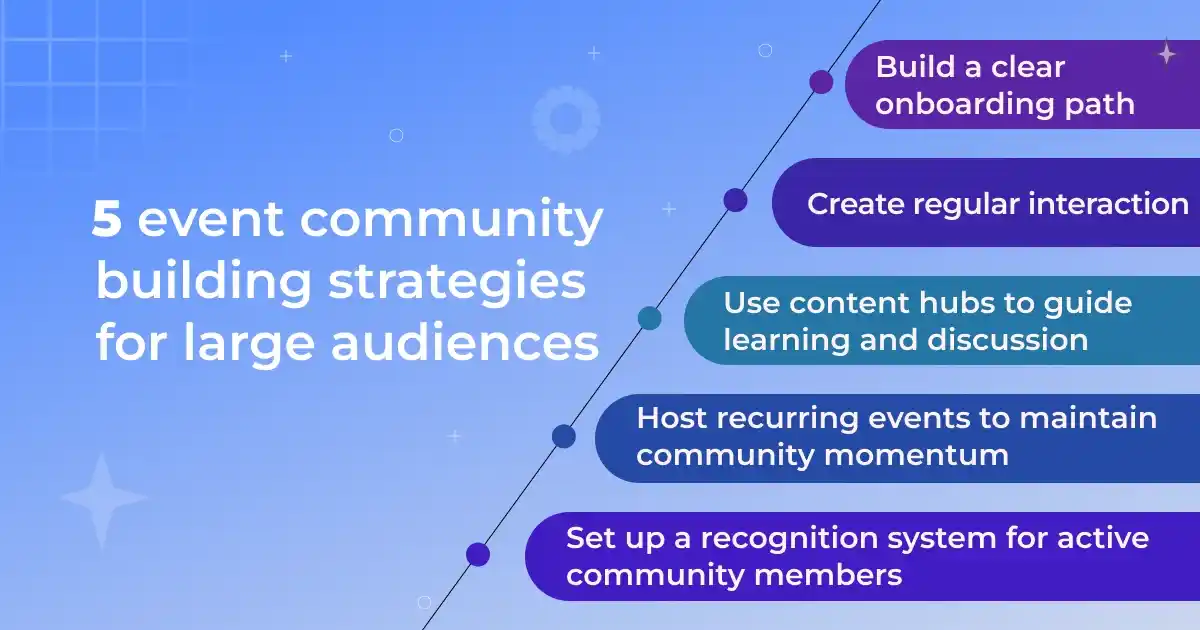
5 event community building strategies for large audiences
Growing a large event community is not about adding more people. It is about giving them a clear path, simple ways to join in, and reasons to stay engaged.
When your community grows, members need more structure, more guidance, and more chances to connect. These strategies help you build a space that stays active even as the audience gets bigger.
1. Build a clear onboarding path for new members
Large communities can feel overwhelming, so your first goal is to help new members understand where they fit. A clear onboarding path reduces confusion and gives people an easy way to start engaging from day one.
What the strategy looks like:
- Explain the purpose of the community. Tell new members what the group is about, who it is for, and what they can expect. This sets the tone and avoids mixed expectations.
- Show the first places they should visit. Highlight the key channels, threads, or sections that matter most. This helps them avoid wandering around without direction.
- Give a simple action to start with. Ask them to introduce themselves, react to a poll, or check the next event. Small tasks break the ice and help them feel part of the group.
- Share helpful resources. Offer links to guides, past sessions, FAQs, or community rules. This keeps people informed without needing to ask basic questions.
- Offer a clear next step. Tell them how to join upcoming events, how to join a topic group, or how to contribute ideas.
A strong onboarding path creates early engagement, reduces drop-offs, and sets the foundation for long-term growth. When people know what to do in the first few minutes, they are more likely to stay active and bring others in.

2. Create regular interaction loops to keep people active
Large communities stay alive when members have simple, repeatable ways to take part. These are called interaction loops—small actions that bring people back again and again. Without them, even a big group can become silent over time.
How to apply this strategy:
Start by choosing a few key touchpoints each week. And keep the activities simple so anyone can join without much time. Members should be able to respond in a few seconds.
People engage more when they know what to expect. For example:
- Monday question
- Midweek poll
- Friday recap
- Monthly spotlight
Now, make these interactions connected to your event theme. Share small insights, behind-the-scenes notes, or updates that lead into your next event.
- Encourage small, low-pressure actions: Simple replies, emoji reactions, or quick votes make it easy for busy members to join in.
- Tie content to upcoming events: Share previews, speaker highlights, or behind-the-scenes notes to spark interest and keep the event cycle moving.
Reply quickly when new people join. If members see you notice their comments, they are more likely to return. Keep things simple.
These back-and-forth interactions help your community stay active, even between events. They create regular habits that encourage people to come back on their own.
📚 Related reading: How to Build an Event Marketing Funnel That Actually Works 👉 Read more
3. Use content hubs to guide learning and discussion
When your audience grows, members need a simple way to find the right information. A content hub helps you organize everything in one place so people know where to start, what to read, and how to join conversations.
A good content hub might include :
- Key guides or tutorials related to your event topics
- Past event recordings or summaries
- Important announcements
- Topic-based discussion areas
- A list of upcoming sessions or learning paths
This structure reduces chaos. Instead of answering the same questions many times, you point people to the right section. It also encourages deeper conversations because members see what others are learning and talking about.
4. Host recurring events to maintain momentum
Large communities lose energy when events happen too far apart. Recurring events solve this by creating a steady rhythm that keeps people connected.
When members know there is always something coming up, attendance becomes a habit instead of a random choice.
Recurring events also help you bring structure to your community. Instead of planning a new format every time, you reuse a proven template and focus on improving the content.
This saves planning time, reduces stress, and increases consistency.
What recurring events do for your community:
- Keep members engaged between major sessions
- Build anticipation and predictability
- Increase long-term attendance and event retention
- Make it easier to plan content and speakers
- Strengthen trust because the community knows you show up regularly
To put this into practice, choose a format that you can repeat without heavy prep, such as a weekly check-in, monthly workshop, or themed discussion. Including:
- Set a fixed time slot so members can treat it as part of their routine.
- Keep the duration manageable—short sessions often work better for busy audiences.
- Share the upcoming schedule ahead of time so members can plan.
- Review engagement after each session to refine the next one.
📚 Related reading: How to Create Recurring Events in WordPress (Step-by-Step Guide) 👉 Read more
5. Build a recognition system that rewards active members
Communities grow faster when people feel seen. In large groups, it’s easy for members to feel like just another name. A simple recognition system changes that. When you highlight active members, they stay engaged, and others feel encouraged to join in.
This doesn’t have to be complex. You can create light, friendly ways to show appreciation:
- Welcome new members publicly
- Highlight helpful answers or shared ideas
- Give “member of the month” shoutouts
- Share wins or progress from real attendees
- Feature community-led workshops or tips
Recognition creates a loop: people participate → they get noticed → they return and contribute more. It also makes the community feel warm and human, which is hard to maintain as the audience grows.
You can also link recognition to your events. Give early access to workshops, offer a special seat in a session, or feature a member’s story in your next meetup. These small gestures make people feel invested in the community’s success.
📌 Once you start hosting events regularly, you need a simple way to manage event booking, sessions, speaker and attendee activity.
An event management system helps you track participation and involve members in ways that feel personal.
This is where your event setup becomes part of your community strategy—and it’s exactly what the next section will help you do.
How to build an event community with Eventin: Easy guide for organizers

If you run meetups or online sessions, you need a setup that feels simple both for you and your members. Many organizers jump between tools for tickets, schedules, and reminders. That adds stress and slows everything down.
Eventin event management plugin gives you one place to set things up. You do not need special skills, and you can publish a full event page in a short time. Here is how the flow works in real use.
Create your event
Go to your WordPress dashboard → Eventin → Events → Add New. Add the event name, time, and a short description. You can also upload a cover image to make the page clear for visitors.
Add speakers and sessions
Speakers are the most engaging part of an event. They address your target audiences, drive attention, and convey your key message with impact.
If your community event has a few guests or hosts, you can put their names in the speaker list. Also, if your event has more than one session, you can add a schedule tab. This helps people know what will happen and when to join.
📚 Related reading: How to Create Speakers List (2 Simple Steps) 👉 Read more
Set your event ticket type
You can offer free tickets, paid tickets, or both. The ticket form is simple, so anyone can sign up without confusion. You also get a clear view of who joined.
- Go to Eventin → Events, then click on your event.
- From the sidebar, select Tickets & Pricing.
- Click the “+” (Add Ticket) button to create a new ticket type.
📚 Related reading: How to Create and Sell Multi-tied Event Tickets 👉 Read more
Share the event link
Share the link inside your community group, email list, or social channels. Since the page is clean and easy to read, people can join without extra steps.
Manage everything from one dashboard
You can see your attendees, send updates, and check people in when the event starts. This removes a lot of manual work and helps you stay focused on the event itself.
📚 Related reading: How to Write Event Announcements That Actually Get Registrations (With Examples) 👉 Read more
Why this works well for community-driven events
Community events grow when the process feels smooth. Eventin helps you create a simple flow where:
- People understand the event at a glance
- Joining takes only one step
- You can update members without switching tools
- Attendance stays easy to manage
There is no pressure to use every feature. You can start small, set up your basic event, and add more options when you feel ready.
If you want a clean, reliable setup for repeated community events, Eventin can handle the core work while you focus on your people.
Final words
Building a growing event community takes time, but small steps make a big difference. Keep the user experience simple, stay consistent, and focus on helping people connect.
When people feel supported, they don’t just attend your events—they become part of the community behind them.
If you want your event workflow to stay smooth as your community grows, the Eventin event management plugin can help. It gives you one place to plan sessions, manage attendees, and run events without extra steps.
FAQs
-
Is Eventin good for build an event community groups?
Yes. You can start with simple free events and grow as your community grows. You don’t need advanced settings to begin.
-
Can Eventin event management plugin help me grow my event community?
Yes. Eventin gives you clean event pages, easy signups, reminders, and smooth check-ins. When the event experience feels simple, more people stay and join your community.
-
Can I use Eventin for both online and in-person community events?
Yes. You can add meeting links for online events or add a venue for in-person sessions. Members know exactly where to join.
-
Does Eventin event management plugin help with repeated community meetups?
Yes. You can create recurring events, so regular meetups, study circles, workshops, and monthly hangouts are easy to run.
-
Can I send automatic reminders to my community members?
Yes. Eventin lets you send reminder emails before the event starts. This helps reduce no-shows and keeps the community engaged.
-
Does Eventin support QR check-in for community events?
Yes. You can check people in with a QR code at the door or at the start of an online session. It makes the process fast and organized.
-
What payment options can I use for paid community events?
You can use Stripe, PayPal, WooCommerce, and local payment options to collect payments. This makes it easy to host paid workshops or trainings.
-
Does Eventin work with Zoom and Google Meet?
Yes. You can add joining links directly in the event page. Members can join with one click.
-
Can I export attendee lists to manage my community better?
Yes. You can export attendee data to CSV and use it for follow-ups, feedback, or future event planning.
-
Does Eventin help with post-event engagement?
Yes. You can send follow-up emails, share next event details, and track who attended. This helps you bring people back.